If you have ever heard a smooth YouTube narration or a crisp e-learning lesson and wondered whether a person actually recorded it, you have already met the technology behind this question. What is an AI voice generator? In plain terms, it is software that turns written text or an audio reference into spoken audio using machine-learning models, so you can produce narration without booking a studio, a microphone, or a voice actor for every script change. That single capability changes how creators, marketers, course builders, and developers plan their audio work.
This guide explains what an AI voice generator actually is, how it produces speech, how it relates to text to speech and voice cloning, and the criteria that genuinely matter when you pick one. We focus on the decision, not the hype: realism alone is a weak reason to choose a tool, because pronunciation control, language coverage, rights, and privacy usually decide whether a project ships cleanly.
Table of contents
How an AI voice generator actually produces speech
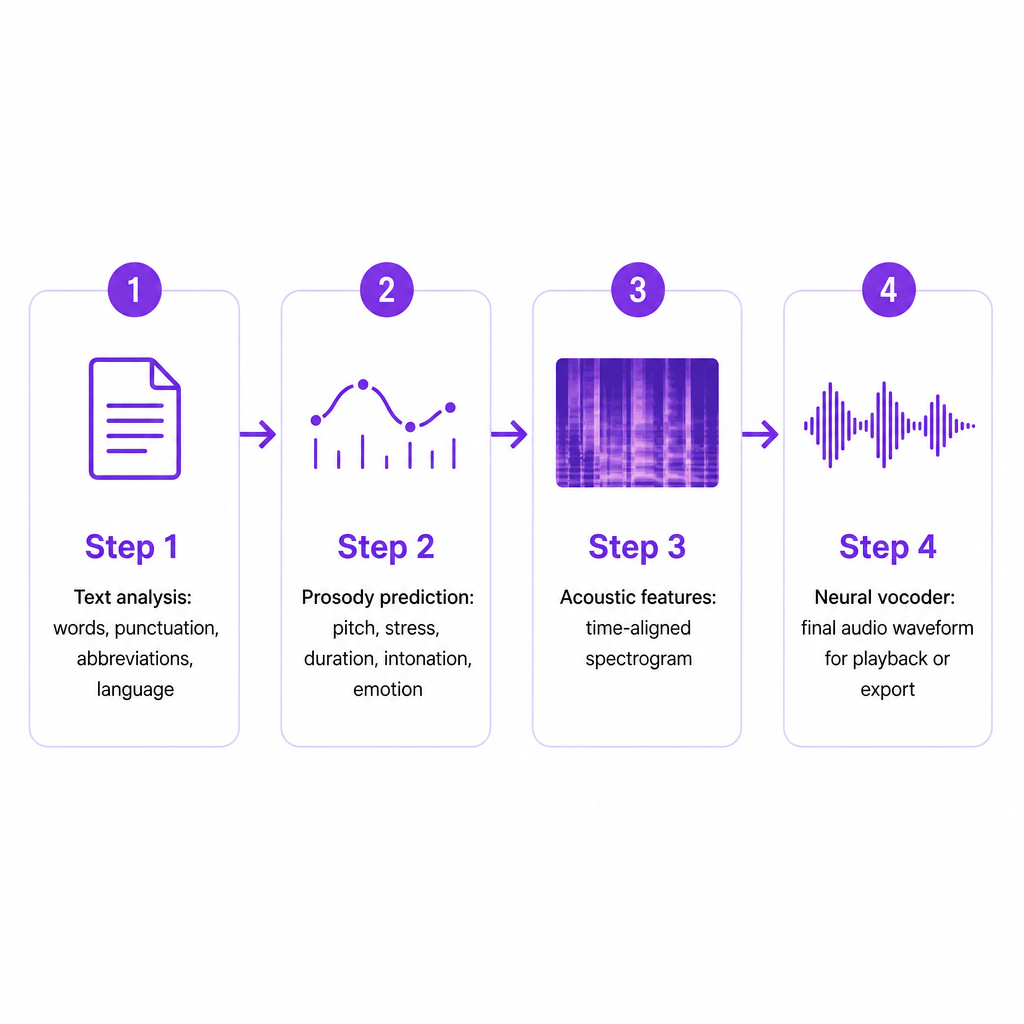
Most AI voice generators run on text-to-speech, or TTS, models, and the work happens in two broad stages: the system analyzes your text, then it synthesizes audio from that analysis. IBM describes TTS systems as analyzing words, punctuation, sentence structure, pronunciation, timing, and prosody before converting the result into an audio waveform.
In the analysis stage, the model reads more than the raw letters. It identifies sentence boundaries, punctuation and pauses, abbreviations and numbers, and the intended language or accent. This matters because written text rarely tells you how it should sound. "Dr." might need to become "Doctor," and a product name or technical acronym may need a custom pronunciation that no default rule would guess.
Next, the model predicts delivery: pitch, stress, phoneme duration, rhythm, intonation, and emotional tone. Collectively these are called prosody, and they are what separates a flat read from narration that distinguishes a question from a statement. The system then converts that analysis into time-aligned acoustic features, often represented as a spectrogram that maps frequency changes over time.
Finally, a neural vocoder turns those acoustic features into a digital audio waveform your editor can play or export. IBM notes that neural TTS systems learn the relationship between language and acoustic features from training data containing recordings and matching transcriptions. If you want the deeper mechanics of this stage, our explainer on how neural text to speech works breaks the pipeline down further.
AI voice generator vs text to speech vs voice cloning
These terms travel together, so people assume they are the same. They are not, and the differences change what you can legally and practically do with the output.
| Technology | What it does | Typical input | Best suited to |
|---|---|---|---|
| AI voice generator | Umbrella term for software that creates synthetic speech | Text, voice settings, or an audio reference | Voiceovers, narration, assistants, content |
| Text to speech | Converts a written script into spoken audio | Written script | Narration, accessibility, e-learning, podcasts |
| Voice cloning | Builds a synthetic voice modeled on a specific speaker | Authorized voice recordings | Consistent brand or creator narration, characters |
| Speech to speech | Recreates spoken audio while preserving delivery | Recorded speech | Dubbing, voice conversion, performance transfer |
| AI dubbing | Translates and revoices existing media in another language | Video or audio | Multilingual publishing and localization |
The practical distinction is the input and the permission attached to it. A standard TTS voice is chosen from a provider's library, so you can use it immediately. A cloned voice is built from a particular person's recordings, which means consent and usage rights come into play before you generate a single word. Treating the two as interchangeable is the most common beginner mistake, and it is the one with the biggest legal consequences.
What you can create with it
The output range is wide: YouTube narration, short-form social voiceovers, podcast intros, audiobook drafts, product demos, online course lessons, corporate training modules, explainer videos, game dialogue, customer-service prompts, accessibility audio, and multilingual versions of any of the above.
The value climbs sharply when content changes often, needs several languages, or requires multiple versions for different audiences. A small business can write one product script and generate localized variants. A YouTube creator can replace a revised introduction without rerecording the whole video. An e-learning team can update a lesson after editing a few sentences, instead of rebooking a narrator. If your audio is produced once and never touched again, a generator helps less; if it churns, it helps a lot. Our walkthrough on converting text to speech online quickly shows how that first draft comes together in practice.
Common types of AI-generated voices
Not every voice option carries the same setup cost or the same rights obligations, so it helps to separate three practical categories before you commit.
Prebuilt voices are ready-made synthetic voices supplied by the platform, usually sorted by style, gender presentation, age range, accent, language, energy, and narration type. They ship instantly and need no consent paperwork, which makes them the right default when speed and consistency matter more than matching one specific person.
Custom or cloned voices are generated from recordings of a specific speaker, so a creator, brand, or organization can keep one recognizable narrator across many videos. Because a voice can be tied to a real person's identity and reputation, cloning should only happen with the speaker's informed permission and within the provider's usage rules.
Character and expressive voices target storytelling, games, animation, or marketing, and they often expose finer control over pace, emphasis, emotion, and speaking style. Expressiveness can lift engagement, but it has to match the job: a dramatic read suits a fictional trailer and actively hurts a medical instruction or a compliance notice.
The criteria that decide which tool fits
The best AI voice generator depends on the output you need, not on how good a demo clip sounds. Here is what actually separates a tool you can publish from one you fight with.
Voice quality, tested honestly. Run a representative script through it, not a short promotional sentence. Include the real names, terminology, punctuation, and sentence lengths from your project, then listen for mispronounced names, awkward pauses, unnatural emphasis, repeated words, and flat or exaggerated emotion.
Language and accent coverage. Confirm the tool supports the exact languages and regional accents you need. A platform may support a language in its interface yet offer fewer voices or weaker pronunciation in it. For localization, also check whether it handles translation, dubbing, voice consistency across languages, and timing alignment.
Pronunciation and delivery controls. You need a reliable way to fix names, acronyms, and numbers through pronunciation dictionaries, phonetic spellings, or editable formatting, plus controls for speed, pauses, emphasis, pitch, tone, and emotional delivery. Our Text to Speech tool lets you pick from 300+ AI voices, adjust speech rate, add emotion through dialogue tags, emphasize words, and write numbers out when pronunciation needs correcting.
Editing, export, and API options. A browser editor may be enough for creators. Developers and agencies often care more about generating audio automatically inside an application or video pipeline, where authentication, supported formats, synchronous versus asynchronous generation, rate limits, and predictable pricing all matter. If you are weighing programmatic use, our primer on what a voice AI API is covers those evaluation points in detail.
Commercial rights and usage terms. Before publishing, confirm whether commercial use is permitted, whether the audio can run in paid ads, whether cloning requires consent documentation, and whether the license changes after a subscription ends. Do not assume a free plan grants unrestricted commercial rights.
Privacy and data handling. Voice recordings can carry biometric, personal, or commercially sensitive information. Review storage duration, deletion controls, encryption, and training-data policies, especially for employee recordings, customer calls, unreleased media, and cloned voices.
Limitations and risks worth taking seriously
AI voice generation is useful, not foolproof, and a few risks deserve real attention.
Pronunciation and context errors are routine: models misread names, homographs, numbers, and industry terms, so legal, financial, medical, educational, and technical content always needs a listen-through before release. Emotion can also miss; a voice can sound natural sentence by sentence yet land the wrong emphasis, which reads as distracting or even misleading.
The heavier risks involve identity. Voice cloning can be abused to imitate family members, executives, or public figures. The Federal Trade Commission warns that scammers use cloned voices to make requests for money or personal information sound more believable, and it recommends independently contacting the supposed speaker through a trusted number or another known channel. NIST similarly identifies synthetic content, including audio, as material that can be used to mislead people or support fraud, including attempts to defeat biometric authentication.
That leads to a practical responsibility set: generate voices only from text and recordings you are authorized to use, obtain clear consent before cloning anyone, keep permission records, and never deploy a cloned voice to deceive. Fact-check the script before final generation, disclose synthetic narration when transparency is appropriate or required, protect uploaded recordings, and assign a human reviewer to high-impact content. Automation produces the audio; it does not vouch for accuracy, cultural fit, or safety.
AI voice or a human voice actor?
These are not automatic substitutes, and the honest answer for many teams is "both, for different jobs."
| Consideration | AI voice generator | Human voice actor |
|---|---|---|
| Production speed | Fast for revisions and multiple versions | Needs scheduling and recording |
| Cost structure | Usually usage- or subscription-based | Talent and studio fees |
| Consistency | Repeatable across large volumes | Depends on conditions and direction |
| Emotional nuance | Improving, varies by tool and script | Responds dynamically to direction |
| Rights management | Needs synthetic-voice and license review | Needs talent and usage agreements |
| Best use case | High-volume, revised, multilingual content | Premium and emotionally complex work |
A common split: let an AI voice handle drafts, internal training, localized versions, and routine updates, while a human performer carries the flagship campaign or emotionally sensitive material. Decide based on quality needs, rights, privacy, review capacity, language coverage, and total production cost rather than demo polish alone. When localization is the goal, our AI Dubbing workflow revoices existing content across 33 languages so one source can reach several markets.
Frequently asked questions
What is an AI voice generator in simple terms?
It is a tool that creates spoken audio from text or another voice input. Most run on text-to-speech models trained on speech recordings and transcriptions to produce synthetic narration.
Is an AI voice generator the same as text to speech?
Not always. Text to speech is one type of AI voice generation. The broader category also covers voice cloning, speech-to-speech conversion, and AI dubbing.
Can AI voices sound human?
They can sound highly natural, but quality varies by provider, language, voice, script, and delivery. Pronunciation and emotional accuracy still need human review before you publish.
Can I use an AI-generated voice on YouTube?
Often yes, provided the tool's license permits your intended use and the content follows YouTube's policies. Check commercial-use terms, disclosure rules, and policies on misleading or impersonating content.
Are AI-generated voices free?
Some services offer free access or free credits; others charge by characters, duration, credits, subscription, or API usage. Compare the full cost of your expected production volume rather than the headline free allowance.