
A voice AI API is the programmable connection that lets your application create, understand, transform, or localize spoken audio using AI models you don't have to build yourself. You send text, audio, or video to an endpoint and get back something useful: synthesized narration, a transcript, a custom voice, or a fully dubbed video. The real question when you start isn't whether you need "AI voice"—it's which voice capability your product actually requires, because speech generation, speech recognition, voice cloning, and dubbing are distinct products that happen to share a category name.
This guide walks through what the term means, the main API types and how they differ, how a request moves through the pipeline, the decision criteria that separate a good fit from an expensive mistake, and the risks worth managing before you ship. It's the hub for our developer and API series, so you'll find links out to the deeper integration guides where they're useful.
Table of contents
What "voice AI API" actually means
The phrase bundles three ideas. Voice AI is artificial intelligence that works with human speech or generates synthetic speech. API is an application programming interface—a defined way for two software systems to exchange requests and responses. The combination means the heavy model processing happens on the provider's side, while your application handles the user experience, your business rules, and the final content.
A request can be as simple as a short JSON payload with the text you want spoken, a voice identifier, and a language code. The response typically returns a project identifier, a processing status, and a URL to the generated audio once it's ready. For video localization, the request instead references an uploaded file and a list of target languages.
That structure is what separates an API from a browser-based voice generator. A web app is built for a person to operate by hand, one job at a time. An API is built for software to call repeatedly, automatically, and at scale. If you're producing one occasional voiceover, the web tool is often faster. If you're localizing every video you publish, the API is the point.
The five main voice AI API types
"Voice AI API" is a category, not one technology. The five common types take different inputs and return different outputs, and choosing the wrong one wastes integration time. The table below maps them so you can match your starting material to the result you want.
| API type | Input | Output | Typical use |
|---|---|---|---|
| Text-to-speech | Written text | Synthetic speech audio | Narration, accessibility, app prompts, training |
| Speech-to-text | Speech or video | Written transcript | Captions, search, meeting notes, repurposing |
| Voice cloning | Authorized voice sample | Custom synthetic voice | Brand voices, recurring presenters, multilingual narration |
| AI dubbing | Video or audio | Translated and voiced media | YouTube localization, courses, films, podcasts |
| Speech-to-speech | Recorded speech | Transformed or translated speech | Voice conversion, multilingual production |
The selection rule is straightforward. If you already have a script, text to speech is usually the simplest path. If you have a recording that needs a transcript, you need speech to text. If you want the same presenter identity across several languages, voice cloning or dubbing is more appropriate. For a focused explainer on just the TTS side, our companion guide on what a text to speech API is goes deeper into the synthesis pipeline.
A worthwhile distinction: voice cloning is not a voice changer. A voice changer transforms an existing performance in place, while cloning creates a reusable voice model that generates new speech from text or another controlled input.
How a request moves through the pipeline
Implementations vary, but most voice APIs follow the same four stages. Understanding the shape of the flow saves hours of guesswork when something returns an unexpected status.
First, your application authenticates. It sends an API key or bearer token in the request header. DubSmart's TTS API, for example, uses a REST endpoint with bearer-token authentication and JSON requests against the base URL https://dubsmart.ai/api/v1. A rule that matters more than it sounds: never place a private key in browser-side JavaScript or a distributed mobile app. Store it on a secure server and have your client call that server.
Second, your application sends content and settings. A request usually carries some mix of text or a file reference, source and target language, a voice ID, speed or pitch, speaker information, output preferences, and project metadata. For simple TTS, the content is text. For dubbing, the API often requires a video upload first, then a separate request to create the project.
Third, the service processes the content. Depending on the task, that can mean normalizing and interpreting text, predicting pronunciation and prosody, translating spoken content, separating speakers or isolating speech from background audio, generating audio with a standard or custom voice, and synchronizing the result to a video timeline. Longer jobs run asynchronously: instead of returning a finished file, the API returns a project ID.
Fourth, your application retrieves the result—an audio or video URL, individual segment URLs, a transcript, translated text, timing data, and status or error fields. DubSmart's TTS API documents project states such as pending, processing, completed, and failed, and completed projects can return MP3 URLs at the project or segment level.
Synchronous versus asynchronous: the distinction that shapes your build
How an API returns results determines how you architect around it, so decide this before you write integration code.
A synchronous API holds the request open until processing finishes, then returns the result. That works well for short text, brief voice prompts, small audio snippets, and interactive, low-latency features. Its weakness is that long jobs can exceed request timeouts.
An asynchronous API returns a project or job ID immediately. Your application then polls a status endpoint or receives a webhook when the job finishes. This model suits long narration, video dubbing, multiple target languages, batch generation, and large files. DubSmart's documented TTS and dubbing workflows use project states and result retrieval, which is an asynchronous pattern built for media jobs.
When you evaluate an option, check whether it supports webhooks. Polling every few seconds is trivial to implement, but webhooks cut unnecessary requests and scale better once you're running many jobs at once.
What to evaluate before you commit
The right API depends on the job, but a handful of criteria apply to almost every project. Run through them deliberately rather than trusting a short demo.
Capability fit. Confirm the API supports the exact task—text to speech, speech to text, voice cloning, dubbing, multiple speakers, audio-only or video output, real-time or batch. Don't assume anything marketed as "voice AI" includes all of these.
Language coverage. Check source and target languages. "Supports 30 languages" might mean 30 TTS voices, 30 translation targets, or a mix of languages and dialects. For a multilingual channel, also weigh accent quality, pronunciation of names and places, regional vocabulary, per-language voice availability, and whether one cloned voice carries across languages.
Output and media support. Verify audio formats, video containers, sample rate and bitrate, segment-level downloads, full rendered video, transcript or subtitle availability, and maximum file size. These shape your editing workflow and storage costs.
Quality and controllability. Listen for natural pauses, correct pronunciation, stable volume, consistent speaker identity, appropriate emphasis, and accurate timing. A voice can sound flawless in a ten-second sample and stumble on technical terms, long paragraphs, numbers, or unusual names. Test representative content, not the vendor's cherry-picked clip.
Latency and throughput. Measure time against your real workload. One short voiceover and hundreds of localized videos are different problems. Ask whether processing is real time or async, what the rate limits are, whether jobs run in parallel, whether priority processing exists, and how failures retry. DubSmart states that a typical five-minute video takes about one minute to process, noting that timing depends on length and file size.
Pricing model. Voice APIs may bill by characters, words, audio or video duration, credits, requests, storage, or concurrent jobs. For dubbing, the number of target languages multiplies the effective cost. Calculate a complete workflow—retries, regenerated segments, translation review, storage—not just the first call. Our breakdown of voice AI API pricing walks through the credit math in detail.
Risks worth managing early
Voice AI introduces failure modes that don't exist in ordinary media tooling. Addressing them during design is far cheaper than after a public mistake.
Unauthorized voice use. Cloning a person's voice without permission creates legal, ethical, and reputational exposure. Use a written consent process that names who owns the recording, what may be generated, where the voice may be used, whether commercial use is allowed, how the voice is deleted, and what happens when the agreement ends.
Incorrect translation or pronunciation. Generated speech can mishandle names, acronyms, addresses, and industry terms. Keep human review in the loop for public-facing content: a translated-script read, a native-speaker listen, pronunciation spot-checks, a timing and lip-movement pass, and a final review of the exported media.
Impersonation and fraud. Synthetic voices can be misused for scams or false endorsements. Avoid generating anything that could make a reasonable listener believe a real person said something they didn't. For sensitive communications, add disclosure, approval controls, and audit logs.
Voice and data privacy. Samples may contain personal data. Before uploading, settle consent, retention rules, access restrictions, deletion procedures, vendor data-processing terms, and any secondary-use policy. DubSmart says uploaded cloning files are encrypted and that users can delete custom voices and associated audio data, though teams should still confirm the current terms and controls for their specific plan.
Vendor and model changes. Voice IDs, language support, output formats, and rate limits can shift. Treat the API as an external dependency: pin configuration where you can, store source scripts, save approved audio, monitor error rates, keep a fallback workflow, and retest after major vendor updates. For teams that want fewer moving parts, our rundown of all-in-one AI video tools explains the tradeoffs of consolidating these capabilities.
When an API beats a manual workflow
A voice AI API earns its integration cost when you need repeatable, programmatic production. It's a strong fit when a creator publishes localized versions of every video, a small business generates product narration across several languages, an e-learning company updates hundreds of lessons, a podcast ships translated editions, a software product adds spoken accessibility, or an agency wires voice generation into its content-management system.
A manual studio workflow can still win in specific cases: when a project hinges on a highly nuanced human performance, when legal approval requires a professional actor, when content carries sensitive claims, when a one-time recording is faster than building an integration, or when the result needs heavy artistic direction. The point isn't to replace every human voice. It's to automate the parts where consistency, speed, scale, or multilingual output matter most.
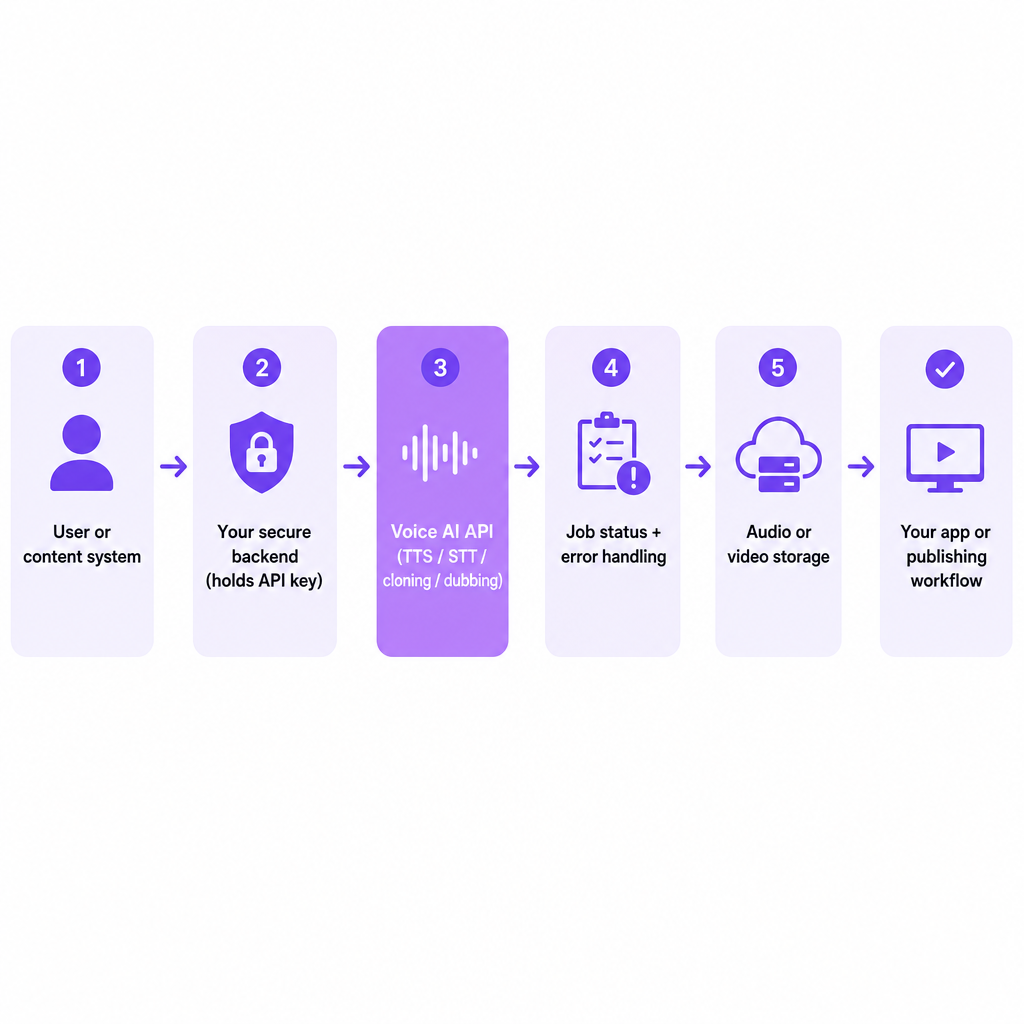
For a small build, keep the architecture simple. A secure backend sits between your user or content system and the voice API. That backend keeps credentials private, validates input, creates projects, stores job IDs, polls status or receives webhooks, retries temporary failures, saves result URLs and metadata, applies usage limits, and records consent for any cloned voice. A creator-facing version might accept a finished English video, send it to a dubbing endpoint for the chosen languages, wait for completion, route results to a review folder, and publish only after approval.
Where DubSmart fits
We build several voice-related API capabilities into one AI media platform, which matters most when you want to connect generation and localization to an existing workflow rather than run each job by hand.
Our Text to Speech API provides programmatic speech generation with neural voices, voice cloning, multilingual support, project status tracking, and MP3 results—its example request uses text segments with a voice ID, language, speed, and pitch. Our Voice Cloning API follows a three-step pattern: request a presigned upload URL, upload an audio sample, then create a custom voice from the uploaded file key; it accepts MP3, WAV, AAC, M4A, and FLAC, and we recommend at least 20 seconds of clean audio for better results. Our AI Dubbing API handles video localization with multi-language project creation, speaker settings, translated segments, and downloadable dubbed output, accepting inputs such as MP4, MOV, AVI, MKV, and WebM up to 5GB.
If you're weighing which endpoint to start with, match it to your content: scripted narration points to TTS, an authorized recurring voice points to cloning, and multilingual video points to dubbing.
Frequently asked questions
What is a voice AI API in simple terms?
It's a connection that lets software generate, recognize, clone, translate, or transform speech without building its own AI voice system. Your app sends a request and receives processed audio, text, or video.
Is a voice AI API the same as text to speech?
No. Text to speech is one type of voice AI API. The category also includes speech recognition, voice cloning, dubbing, and speech-to-speech functions.
Do I need coding experience to use one?
Usually some, because APIs involve authentication, HTTP requests, JSON, file uploads, and status handling. For occasional manual jobs, a no-code web app is often easier.
Can a voice AI API translate a YouTube video?
A dubbing API can translate and generate new audio for a video when it supports the required source and target languages, file format, and output workflow. Review the result before publishing.
Can I clone any person's voice?
Technically possible is not the same as legally or ethically allowed. Clone a voice only with appropriate permission, and follow the provider's rules, your contracts, and applicable privacy and publicity requirements.