Most video projects don't end when you stop recording. Transcription, audio cleanup, voiceover, dubbing, image generation, animation, and sometimes API integration all sit between raw footage and a finished, publishable asset. The most useful all in one ai video tools solve that fragmentation: instead of exporting files between unrelated apps, you move from source footage to localized, narrated, and repurposed content inside one connected workflow.
This list isn't a popularity ranking. We selected the tools in our own media-creation stack by the production job each one removes, and we flag the limits of each so you can test before you commit. Our screening criteria were workflow coverage, practical inputs and outputs, integration potential, audience fit for creators and teams, and transparent constraints like supported formats and language qualifications. The sections below are organized by use case, because the right starting point depends on whether you care most about multilingual publishing, audio cleanup, short-form visuals, transcription, or developer automation.
Table of contents
AI Dubbing for multilingual video publishing
If the finished asset already exists and simply needs to reach a wider audience, dubbing is where to start. Our AI Dubbing supports dubbing from more than 60 source languages into 33 target languages, clones the voices of speakers, and is built to preserve tone, emotion, and context during localization.
What separates this from a plain text translator or a standalone voice generator is that the whole job lives in one project. You upload a video or audio file or paste a YouTube link, choose the target language, add speakers, edit the text or timings, regenerate individual segments when a line needs work, and download the result. Dubbed audio can also be aligned with characters' lip movements and expressions, which matters when the output is video rather than audio alone.
Best for: YouTube creators, e-learning teams, businesses, filmmakers, and podcasters moving existing content into new languages. It also fits teams that want to test an international version before commissioning traditional dubbing.
Limitation to know: the public page doesn't name every one of the 33 target languages or all 60-plus source languages, and it doesn't specify downloadable formats, maximum resolution, or processing times. Run a representative clip first, ideally one with multiple speakers, accents, music, or specialized terminology, before committing a large batch.
Speech to Text for captions, transcripts, and repurposing
Transcription sits at both ends of a workflow: before recording becomes a script, and after it becomes content you want to reuse. Our Speech to Text tool converts audio or video into editable text and subtitles, and it accepts YouTube links as well as uploaded audio and video.
The flow is straightforward: upload a file or paste a link, generate a transcript or subtitle project, add speakers, edit, then download in the format you need. The tool is described as handling long recordings, meetings, interviews, lectures, podcasts, multiple speakers, background noise, and varied accents, which makes it practical for real-world footage rather than only clean studio audio.
Best for: turning long-form video into captions, searchable transcripts, scripts for dubbing, written articles, or short-form clips, and improving accessibility for deaf and hard-of-hearing audiences.
Limitation to know: language coverage is described two ways across the page, up to 99 languages in one place and more than 60 in the FAQ, so confirm the exact language for your project before production. Files can be up to 5 GB with no stated video-length limit, but there's no published accuracy figure or detailed explanation of automatic speaker identification. Accuracy varies with audio quality, overlapping speech, and technical vocabulary. If you later localize that transcript, our AI Dubbing picks up where the edited text leaves off.
Speech Separator for cleaning noisy recordings
Clean source audio quietly determines the quality of everything downstream. Our Speech Separator isolates spoken voice from background noise, targeting recordings hurt by street noise, microphone feedback, or ambient sound.
The reason it belongs early in the stack is specific: background noise degrades the quality of a voice clone, so we position separation as a preparation step before cloning as well as before transcription and narration. It supports common audio formats, including MP3, WAV, and AAC, and it also accepts video files, so you can clean source footage directly instead of manually extracting the audio track first.
Best for: podcasters, interview producers, and filmmakers salvaging usable speech from imperfect production audio, and anyone preparing a clean sample for voice cloning.
Limitation to know: the page describes separating speech from background noise, not full multi-speaker stem separation. It doesn't specify how it handles overlapping speakers, music-heavy recordings, severe echo, or wildly variable noise. Listen to the cleaned file before treating it as a final mix or a cloning source.
Image to Video for short visual inserts
When you need motion but don't want to film, animating a still is the fastest route. Our Image to Video tool turns a high-quality still image into a short animated clip: the uploaded image becomes the first frame, and a text prompt describes subject movement, camera motion, or scene dynamics.
The workflow stays short by design. Upload a high-quality image, describe the movement, choose duration, resolution, aspect ratio, and quality, then generate, review, and download. Available durations are 4, 6, and 8 seconds. Aspect ratios cover landscape, square, and vertical, including 16:9, 1:1, and 9:16. Standard quality produces video without audio, while High and Ultra High options are described as including sound.
Best for: social teams, marketers, and educators who need animated openings, transitions, product-artwork clips, or motion on slides, then drop those clips into a larger edit.
Limitation to know: this is a short-clip generator, not a long-form editor, and published durations stop at 8 seconds. The page doesn't specify image file formats, maximum file size, prompt length, generation quotas, or exact audio behavior. Use clean, artifact-free source images and treat each output as a component inside a bigger project. If you need the source artwork itself, our AI image generator produces stills you can then animate.
AI Dubbing API for scaled, repeatable localization
Occasional manual exports work until localization becomes a recurring job. For that, we provide an AI Dubbing API built to translate and dub video into more than 33 languages, including voice-cloning capabilities.
The value here is different from a browser-based editor. An API lets you trigger and manage localization from inside an existing application, so you can connect dubbing to a video-upload platform, a learning-management system, a media-processing pipeline, an agency dashboard, or an automated publishing workflow. It's not another creative control; it's the ability to make localization a repeatable system.
Best for: developers, agencies, and SaaS teams generating language versions automatically after uploads, building multilingual training libraries, or processing large content catalogs. Teams weighing automation costs can review our voice AI API pricing explainer before scoping a build.
Limitation to know: the public page confirms an API exists but doesn't publish endpoint behavior, authentication requirements, rate limits, webhooks, output formats, or error-handling guidance. Request or review the current technical documentation before estimating implementation effort.
One workflow for cleanup, transcription, visuals, and localization
The real argument for an all-in-one platform isn't that every single feature beats every specialist app. It's that several steps run inside one broader workflow, so source assets, transcripts, audio, and localized versions stay closer together with fewer file handoffs.
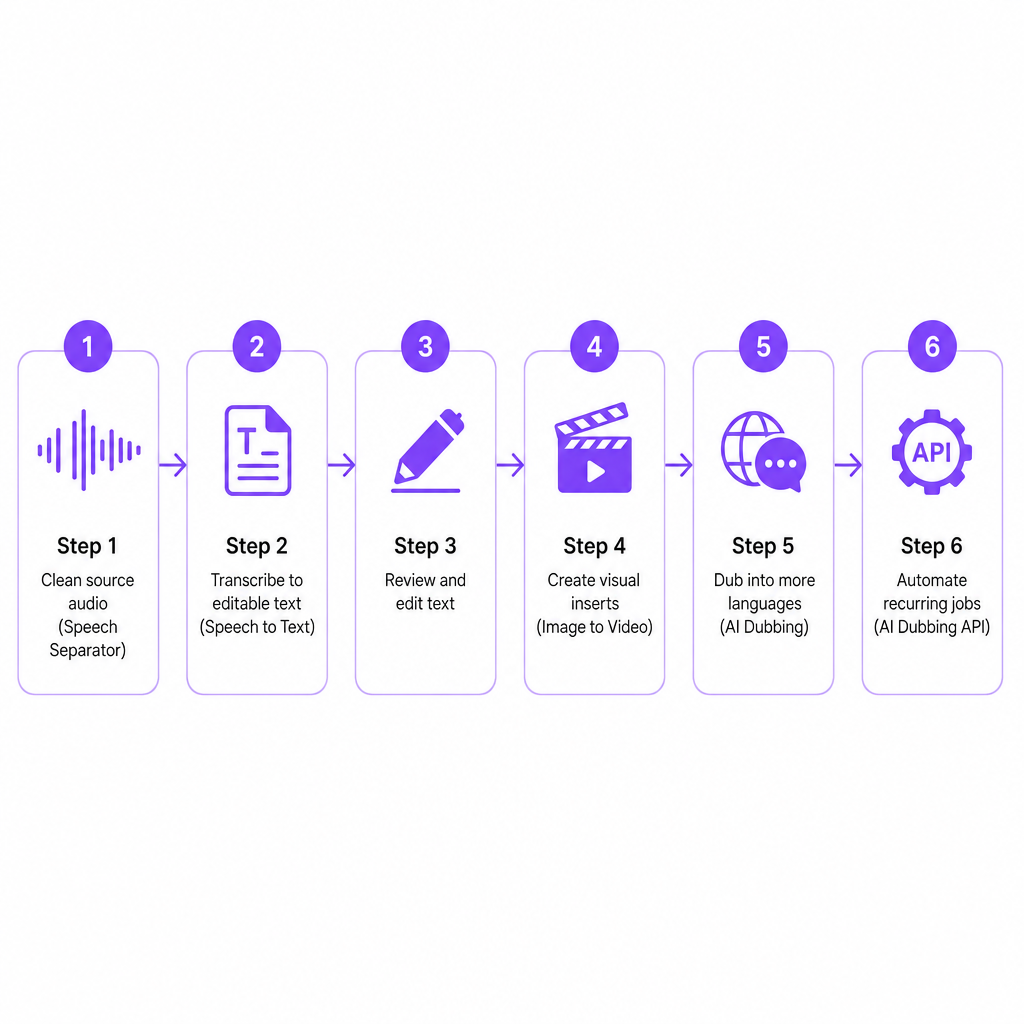
A repeatable sequence looks like this:
- Clean the source recording with Speech Separator.
- Transcribe the content with Speech to Text.
- Review and edit the text before narration or localization.
- Create new visual inserts with Image to Video.
- Dub the finished video into additional languages.
- Connect recurring production tasks through an API.
This structure pays off most when the same team creates, adapts, and localizes content on a regular cadence, including multilingual YouTube channels, small marketing teams with frequent product videos, corporate training libraries, and agencies juggling several client languages.
Limitation to know: all-in-one is not the same as fully automatic. Transcripts still need review, translations may need cultural adaptation, cloned voices require permission, and generated visuals need selection or editing. Some technical details remain unspecified on the product pages, so validate your exact file types, languages, quotas, and export requirements before migrating an entire operation. Our video localization checklist for teams is a practical way to pressure-test that handoff.
How to choose the right tool for your task
Match the job to the capability rather than starting from the feature list. The map below points you to the right entry point for the most common production tasks.
| Your main task | Start with | Why |
|---|---|---|
| Publish an existing video in other languages | AI Dubbing | Localizes video or audio and supports cloned speaker voices |
| Create captions or a searchable transcript | Speech to Text | Converts uploaded audio, video, or YouTube links into editable text |
| Improve noisy dialogue | Speech Separator | Isolates speech from background noise, supports MP3, WAV, AAC |
| Animate a still image | Image to Video | Adds motion from an image plus a text movement prompt |
| Build localization into a product | AI Dubbing API | Connects dubbing to an app or automated media pipeline |
| Prepare a voice sample for cloning | Speech Separator, then cloning | Cleaner source audio improves cloning quality |
| Produce multilingual course content | Speech to Text plus AI Dubbing | Transcript first, then localized voice versions |
Before you standardize on any platform, run a short verification pass. Confirm that your source and target languages are supported, check maximum file sizes and durations, and test whether exports move cleanly into your editing or publishing workflow. Clarify whether speakers are identified automatically or added by hand, confirm you have permission to clone or synthesize every voice, and check that generated clips are long enough for their placement. Finally, decide where a human will review translation, pronunciation, timing, and cultural context, and whether you need an API for batch processing. The honest answer to those questions usually tells you whether a single platform or a narrow specialist tool fits the work in front of you.
Frequently asked questions
What are all-in-one AI video tools?
They combine several media-production tasks, such as transcription, voice generation, audio cleanup, image animation, and dubbing, inside one platform or connected workflow so you avoid exporting files between unrelated apps.
Which tool is best for multilingual YouTube content?
Start with AI Dubbing. It supports dubbing from more than 60 source languages into 33 target languages, with speaker voice cloning and editable dubbing projects. Confirm the exact language pair and review a sample before publishing at scale.
Can I use these tools for podcasts?
Yes. Speech Separator cleans noisy podcast audio, Speech to Text creates a transcript, and AI Dubbing produces localized versions. Our pages specifically describe podcast, interview, and audio use cases.
Can speech to text handle long videos?
There is no stated video-length limit, but there is a 5 GB file-size limit. Accuracy can still vary with audio quality, accents, overlapping speakers, and specialized terminology.
Are AI-dubbed videos ready to publish without review?
Not always. Dubbing accelerates production, but review translations, names, timing, pronunciation, voice permissions, and cultural context first. A short test export matters most for content with multiple speakers or specialist language.