You can convert text to speech online in the time it takes to paste a script, pick a voice, and click generate. No microphone, no booth, no editing suite—just a browser-based tool that turns written words into natural-sounding narration you can download and drop into a video, course, podcast, or ad. The real work isn't the clicking; it's the handful of choices that decide whether the audio sounds like a person or a kiosk.
This guide walks through that decision quickly: what happens when you convert text to speech online, how to get a usable file fast, how to pick the right voice, and where the honest limits are. We built DubSmart AI to handle this whole workflow in one place, so the examples here come from how our own Text to Speech, voice cloning, and dubbing tools actually behave.
Table of contents
What “convert text to speech online” actually means
Text to speech, or TTS, is technology that converts written language into spoken audio. A modern AI system reads the text, interprets pronunciation and sentence structure, and synthesizes a voice with pacing, emphasis, and tone. Doing it “online” simply means the synthesis runs in the cloud: you don't install software or record anything yourself.
That shift matters because it changes who can produce voiceover. A YouTuber scripting a Short, a trainer updating a compliance module, a marketer rewriting an ad for the third time that week—none of them need recording equipment or a voice actor on call. The same pasted script can become narration for tutorials, product demos, courses, podcasts, presentations, accessibility audio, customer-service messages, and localized versions in other languages.
If you want the deeper mechanics of how the synthesis pipeline turns phonemes into prosody, we cover that separately in how neural text to speech works. For this guide, the useful mental model is short: good input script plus the right voice equals audio you can publish.
The fast path from script to downloadable audio
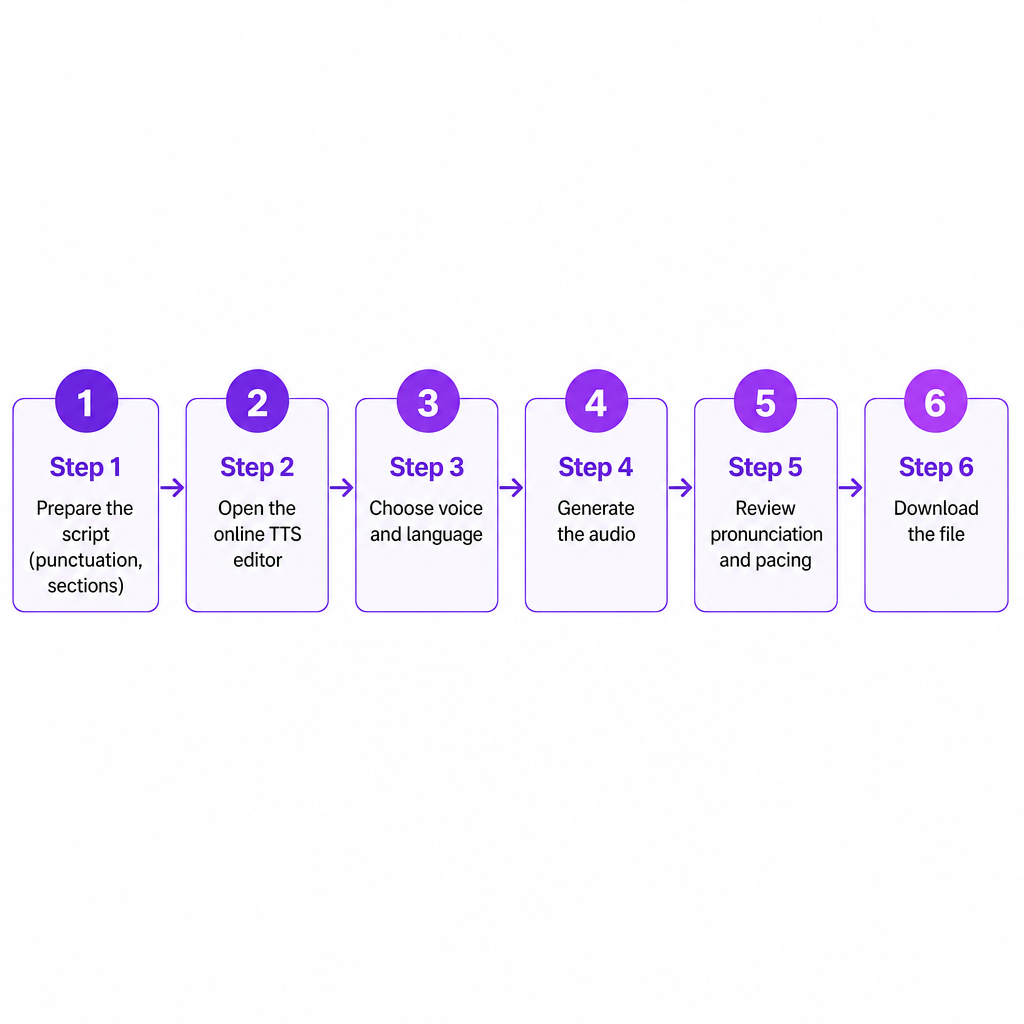
The sequence is short enough to memorize: prepare the text, open the tool, choose a voice and language, generate, review, download. The step people skip is the first one, and it's the one that saves the most time.
Start with a finished script, not rough notes. Add punctuation, break long passages into logical sections, and read it aloud once. An AI voice delivers what you give it, so cleaning the text up front prevents re-generating later. From there, paste it into DubSmart's Text to Speech tool, pick a voice that matches the content and audience, and generate the audio. Our TTS page offers 300+ AI voices—male, female, and neutral—plus controls for speech rate, emotional direction, emphasis, and number pronunciation.
Then review before you export. Listen specifically for mispronounced names, unnatural pauses, misplaced emphasis, or a tone that doesn't fit the video. Fix those in the script and regenerate the affected section rather than the whole file. When it sounds right, download it and drop it into your project.
One practical note: our editor exposes the export options directly, and we don't publish an exhaustive format list in advance, so check the available formats in the editor before you start a large batch job. That five-second check beats discovering a format mismatch after rendering an hour of narration.
Choosing a voice that holds up for the whole project
Picking the most realistic-sounding voice in a short preview is a common mistake. A voice that impresses in a ten-second clip can become tiring across a twenty-minute explainer. The better test is to run a representative paragraph from your actual script—names, numbers, and all—before producing anything.
Match the voice to the job. Warm and conversational suits tutorials, podcasts, and creator content. Clear and authoritative fits business presentations and training. Energetic works for ads and social videos; calm and measured suits meditation, accessibility, and educational material; distinctive or expressive helps fiction and animation. If you want a shortlist tuned for a specific platform, our guide to the best text to speech voices for YouTube narrows the field.
Language deserves the same care. For multilingual content, choose a voice built for the target language rather than forcing an English voice to read foreign text—pronunciation, rhythm, and emphasis differ sharply between languages and accents. Our Text to Speech API lists support for 33+ languages and dialects and names English, Portuguese, Spanish, French, German, Chinese, and Japanese among them, and our voice cloning works across 33 languages.
Consistency is the quiet differentiator. Reuse the same voice, pronunciation style, and delivery settings across related videos so a channel, course, or brand stays recognizable. For dialogue, switch voices only when the change genuinely aids comprehension; too many voices make a short explainer feel scattered.
Making AI speech sound less like a machine
Most “robotic” output traces back to the script, not the engine. Written language and spoken language are different registers, and the voice reads exactly what you typed.
Write for the ear. Shorter sentences land more naturally than dense clauses. Compare these two:
The implementation of this feature provides users with the ability to generate audio content without the requirement for recording equipment.
This feature lets you create audio without recording equipment.
The second one breathes. Use punctuation as a delivery control, too: commas create short pauses, periods and paragraph breaks create stronger transitions. If the voice starts rushing or flattening, split the sentence.
Numbers, dates, currencies, and acronyms are the usual pronunciation traps. When the output sounds wrong, spell the pronunciation into the script—that's our standing recommendation when generated numbers come out incorrectly:
| You wrote | Write it as |
|---|---|
| 2026 | twenty twenty-six |
| $49.99 | forty-nine dollars and ninety-nine cents |
| API | A-P-I |
| SQL | the pronunciation your audience expects |
Emotional direction can help, used sparingly. A cue like “she said happily” may brighten delivery, while “he shouted angrily” pushes a more forceful tone—but if every sentence carries an instruction, the narration turns theatrical. Speed is the other lever: a slightly slower pace aids comprehension in courses and accessibility audio, while faster delivery suits short social clips until it starts costing clarity. Our editor shows a speech-rate control (for example, a value like 1.00x) you can nudge in either direction. When a key word gets lost, fix the sentence structure before reaching for unusual formatting; emphasis should serve meaning, not advertise that a machine made it.
Standard TTS, voice cloning, or the API: which fits
Three routes lead to spoken audio, and they solve different problems. Standard text to speech uses a prebuilt AI voice. Voice cloning creates a reusable synthetic voice from an audio sample. The API makes either one programmable.
Reach for a standard AI voice when you need a fast one-off voiceover, several styles to audition, a general-purpose narrator, or a voice in a language you can't record yourself. Reach for voice cloning when you need a consistent creator or brand voice, recurring episodes with the same narrator, audio updates without re-recording, or multilingual versions that keep a recognizable voice identity. We offer unlimited voice cloning on the TTS plan, and cloned voices work in both Text to Speech and AI Dubbing across 33 languages.
The API is a different decision entirely. A browser editor is fastest for individual files and small batches. An API earns its place when generation has to happen automatically—a platform narrating user-submitted scripts, a learning system building audio lessons, a support product sending personalized messages, or an agency processing many localized variations. Our Text to Speech API uses a REST interface with project and segment management, voice and language selection, speed and pitch parameters, progress states, and audio URLs after processing; it returns MP3, and typical one- to two-sentence segments take roughly 10–30 seconds depending on length and complexity. Worth remembering: an API automates volume, but it won't make a single short voiceover faster than the visual editor. If you're weighing programmatic routes generally, what is a voice AI API explains the category before you integrate anything.
What to check before you commit to a tool
Most regret comes from skipping a short pilot. Run the same paragraph through several voices, include real names and numbers from your workflow, and listen on the device your audience actually uses. These are the criteria worth scoring while you do it.
| Decision criterion | What to check |
|---|---|
| Voice quality | Does it stay natural in long sentences and hard words? |
| Pronunciation | Can you correct names, acronyms, and numbers? |
| Language support | Is your exact target language and accent covered? |
| Consistency | Can you reuse the same voice across projects? |
| Editing controls | Are speed, pitch, pauses, and emphasis adjustable? |
| Output and speed | Is the format available and generation fast enough? |
| Automation | Is there an API if you need programmatic generation? |
| Rights and cost | Are usage, commercial rights, and credit terms clear? |
The table compresses a buying checklist into one screen, but the pilot is what validates it. A free tier or small test tells you more in ten minutes than any feature list, because the only output that matters is how your script sounds in the voice you'd actually ship.
Using AI speech responsibly
Synthetic speech is genuinely useful, and it carries real obligations. Only clone a voice when you have the speaker's permission and the rights to the recording. Don't pass synthetic audio off as an authentic recording, and never use a familiar-sounding voice to request money or sensitive information.
This isn't abstract caution. The Federal Trade Commission warns that voice cloning can make fraudulent requests sound as though they came from a trusted family member, colleague, or executive, and it recommends independently verifying identity rather than trusting a familiar voice alone.
For commercial or public-facing work, a few habits keep you safe: keep records showing permission to use a cloned voice, review the provider's terms for commercial use and data handling, disclose synthetic narration when transparency would matter to your audience, and add human review for legal, medical, financial, or safety-critical content. Treat a voice as a convenience, never as proof of identity.
Frequently asked questions
What is the fastest way to convert text to speech online?
Use a browser-based TTS editor: paste a prepared script, pick a voice, generate, review pronunciation, and download. Preparing the script before you open the tool is usually the biggest time saver, because clean input means fewer regenerations.
Can I convert text to speech for free?
Some platforms, including ours, offer free access or trial credits, but limits vary by plan. Check the current terms for characters, credits, downloads, commercial use, and voice cloning before you publish.
Can I use online text to speech for YouTube?
Yes. Online TTS can narrate videos, Shorts, tutorials, and multilingual versions. Confirm the provider's licensing terms so the voice and generated audio are cleared for your intended use.
Can I convert text to speech in another language?
Yes, when the platform supports that language and an appropriate voice. For natural results, translate and edit the script first, then choose a voice designed for the target language or accent rather than reusing an English one.
What file format should I use?
MP3 suits most videos, podcasts, and web projects because it's widely supported and compact. For professional post-production, check whether your editor needs a different or higher-quality source format.
Is online TTS good enough for professional content?
For explainers, training, accessibility audio, drafts, localized media, and regularly updated narration, yes. For performance-led or high-stakes projects where subtle timing carries the meaning, listen closely and consider human voice talent.