Picking the best text to speech voices for YouTube is less about chasing one "perfect" voice and more about matching the right voice setup to your channel's niche, language plans, and how you actually produce videos. On DubSmart AI, that choice comes down to four practical options inside one workspace: our library of 300+ ready-made AI voices, a voice you clone from your own audio, those same voices applied to multilingual dubbing, and API-driven voices for automated pipelines. Each one solves a different problem, and the best pick usually combines a couple of them as your channel grows.
This guide walks through what each voice setup does well, where it fits, and where it falls short, so you can decide with confidence instead of guessing from a generic ranking.
Table of contents
How we choose the best text to speech voices for YouTube
We select for voices and voice setups that hold up on a real YouTube channel, not for abstract market rankings. Five criteria shape every pick below.
Naturalness matters first, because most watch time happens on phones at variable volume. A voice has to sound human and stay clear through compressed audio and background noise on a commute. Language and accent coverage comes next: a voice is only useful for growth if you can carry it into new regions without re-recording your back catalog. Brand consistency is the third filter, since the same voice should be reusable across both our Text to Speech studio and dubbing, including a cloned voice that sounds like you. Workflow fit decides whether a voice is practical to generate, edit, and export inside a real production schedule. Finally, automation potential determines whether developers and agencies can call the same voices through APIs for templated or large-scale output.
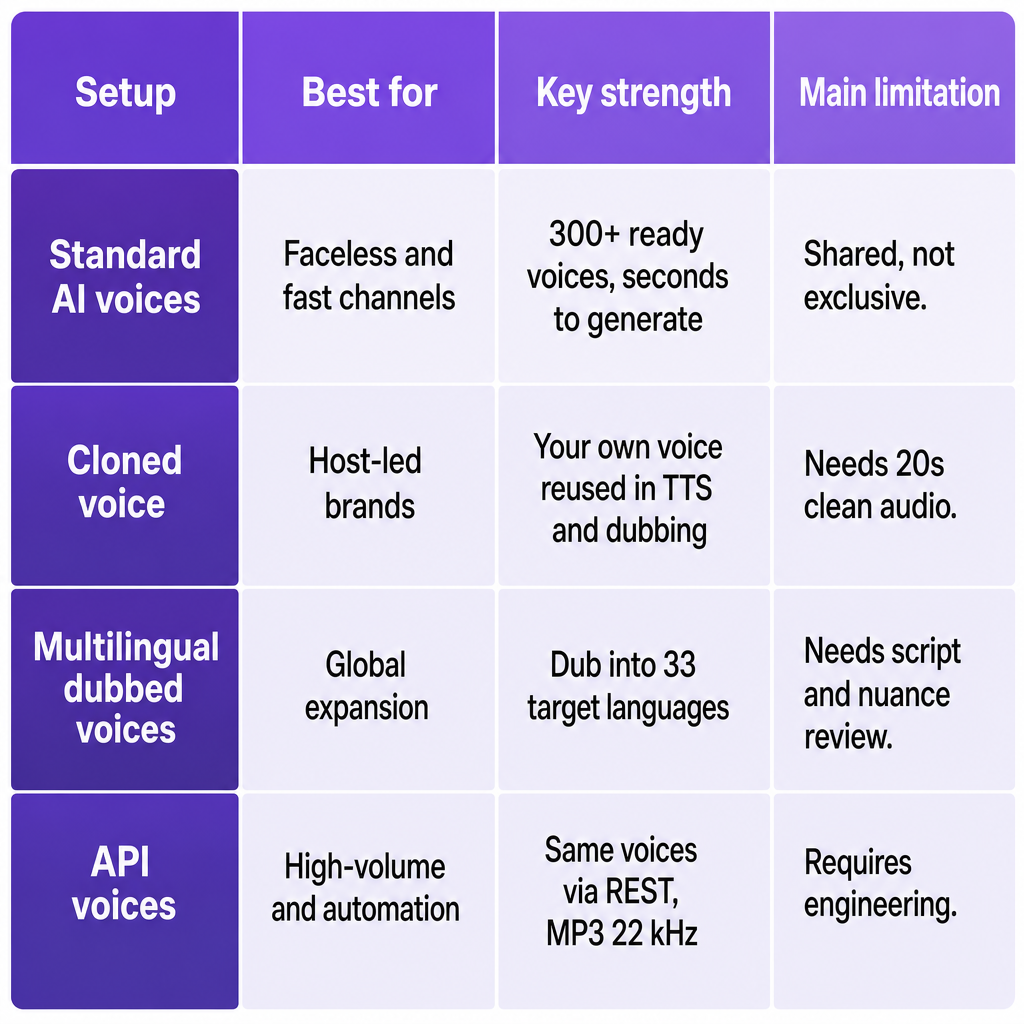
Each item below gets one section with its distinction, its best fit on YouTube, and its honest limitations, drawn from how these tools actually work inside our platform.
Standard AI voices library: fast, ready-to-publish narration
The quickest path to a finished voiceover is our Text to Speech engine: paste a script in your language, choose from more than 300 AI voices, preview, and generate realistic speech in seconds. You can select a speaker, adjust basic settings, and export standard audio you drop straight into a YouTube edit. The same catalog is exposed through our TTS API, so every ready-made voice exists in both the web studio and programmatic workflows.
This setup fits faceless and commentary channels that value speed and consistency over a single recognizable personality. It suits news breakdowns, listicles, explainers, and slideshows that need clean narration on a tight schedule, plus e-learning, corporate, and marketing channels that prefer a neutral professional tone. A creator can paste a script, pick a voice, generate, and download for an editor like Premiere or Final Cut without touching recording gear. For technical teams, our Text to Speech API returns MP3 files at 22 kHz after a simple request with text and voice preferences, which slots neatly into template- or data-driven video pipelines. If you want the deeper mechanics, our explainer on how neural text to speech works covers what's happening behind each render.
The trade-off is exclusivity. Standard voices are shared across users, so a heavily branded, personality-led channel may eventually want something more distinct. You can tune language, speaker, and some parameters, but you won't get the subtle quirks of your own voice without cloning. And because the catalog is broad, finding the voice that truly matches your audience still takes a few listening tests rather than one lucky pick.
Cloned creator voice: a recognizable host at scale
When your sound is part of your brand, cloning changes the math. Our voice cloning builds a custom AI voice from a short sample, then makes that voice selectable anywhere standard voices appear, in both Text to Speech and dubbing. You upload at least 20 seconds of clean audio with no background noise, and the system produces a reusable clone. We support cloning any number of voices, so a brand isn't locked to one host: you can clone several spokespeople or character voices as needed.
A cloned voice is the strongest choice for personality-driven channels where viewers subscribe for a specific person. It also fits creators who want to keep their own voice while automating parts of production, such as B-roll narration, alternate-language tracks, or scripted shorts. And it's the backbone of multilingual channels that want one consistent speaker identity across languages when paired with dubbing. Once cloned, your voice becomes a normal option in the studio, ready for scripted narration or for revoicing full videos into other languages while preserving your identity.
Quality depends on your source audio. A noisy or echoey sample produces a weaker clone and can introduce artifacts, so many creators record a dedicated clean sample instead of reusing livestream or vlog audio. Across languages, accent and prosody follow the synthesis model, so pronunciation may not perfectly match a native speaker in every target language. Cloning also adds a setup step before first use, which makes it best for channels committed to long-term consistency rather than a one-off test.
Multilingual dubbed voices: turning one channel into many
The most direct route to a global channel is dubbing. With our AI Dubbing, you upload a video, translate and revoice it into any of 33 target languages, and optionally apply a cloned voice to those dubbed tracks. The key detail is that dubbing draws on the same voice catalog and cloned voices used for Text to Speech, so your "best" dubbing voices are simply your chosen voices configured for translated scripts. Because the workspace also bundles Speech to Text, a Speech Separator, and image and video tools, you avoid stitching together separate suppliers for transcription, translation, voiceover, and visuals.
This fits channels already succeeding in one language and ready to expand without reshooting. Tutorials, product reviews, documentaries, and long-form content with high replay value justify the effort, as do businesses, e-learning providers, and marketing teams that need consistent branded narration across regions. You can start from existing videos, generate translated scripts, and apply either a standard voice or your cloned voice to the dubbed audio, creating local versions of your channel that keep the same personality. Keeping Text to Speech and dubbing in one workspace makes it easy to align narration style between original and translated versions. If you're weighing localization formats, our breakdown of dubbing versus subtitles helps frame the decision.
Dubbing adds work that single-language narration doesn't. Even with strong translation and synthesis, you still need to review scripts for cultural nuance, adapt examples, and confirm the voice style suits the target audience. It also consumes more credits and export management than a one-off clip. Cloned voices preserve identity, but lip sync and timing may not perfectly match the original visuals on fast-talking or heavily animated content, so expect some manual edits in your video editor.
API-driven voices: automated, high-volume production
For teams producing at volume, the same voices are available programmatically through three endpoints. Our Text to Speech API converts text into natural speech using the full 300+ voice set and returns downloadable MP3 files at 22 kHz when processing completes. Our Voice Cloning API lets you upload samples and create custom voices usable in TTS or dubbing. Our AI Dubbing API lets developers and agencies translate and dub videos programmatically, embedding these capabilities directly into content pipelines or a CMS.
This setup fits channels generating many similar videos, such as recurring news digests, data-driven summaries, or templated explainers where scripts are generated or filled from structured data. It suits agencies managing multiple client channels that need a repeatable, automated voice workflow, and software products offering auto-publish features that need quality voiceovers at scale. Because cloned voices can be referenced by ID alongside standard voices, automation doesn't cost you brand consistency: every render uses the same intended voice across videos and channels.
The cost is engineering. API workflows require familiarity with RESTful services plus infrastructure to store audio, post-process it, and attach it to video assets. Smaller creators working entirely in the web editor usually won't benefit until they reach meaningful scale. Automated pipelines also need safeguards around script quality, timing, and compliance, because weak inputs still produce weak outputs no matter how good the voice is.
How to choose the right voice setup for your channel
Four questions settle most decisions. Answer them in order and your voice stack falls into place.
Audience and format. If your channel is faceless, newsy, or listicle-driven, start with standard AI voices for fast turnarounds and easy tone testing. If viewers subscribe because of you specifically, invest in cloning your voice and using it across both Text to Speech and dubbing.
Language strategy. If you publish in one language, find one or two voices that match your tone and commit to them for consistency. If you plan to go global, design around dubbing: choose a primary cloned voice and map it to dubbed tracks across up to 33 target languages.
Production volume. For weekly uploads or occasional series, the web-based Text to Speech and AI Dubbing tools are enough. For high-volume or data-driven content, plan an API-first workflow where new scripts and assets trigger voice generation automatically.
Brand control and risk. Use standard voices for low-risk pilots and channels where voice identity isn't central. Use cloned voices with clear internal rules about who can trigger them and where they can appear, which matters most for corporate or branded channels.
Matching your voices to audience expectations, language plans, and workflow is how you avoid the common failures: inconsistent narration, surprise voice changes between videos, and over-engineered pipelines that are hard to maintain. A practical path is to test a few standard voices first, add a cloned voice once your identity matters, and introduce APIs and multilingual dubbing when your operation outgrows manual rendering.
Frequently Asked Questions
Can I use DubSmart's AI voices on my YouTube videos?
Our Text to Speech and AI Dubbing tools are built for creators and businesses to produce voiceovers for public content, including YouTube, under a credit-based usage model. You remain responsible for following YouTube's terms, advertising policies, and local regulations, but our platform is designed for commercial media use.
How much audio do I need to clone my voice?
You need at least 20 seconds of clean speech with no background noise to create a usable cloned voice. The cleaner the recording, the more accurate and natural the result, so a dedicated quiet sample beats noisy repurposed audio.
Will my cloned voice work in multiple languages?
Yes. A cloned voice is usable in both Text to Speech and AI Dubbing, which support many languages and 33 target languages for dubbing. You keep the same voice identity across scripts in different languages, though pronunciation and accent follow the synthesis model rather than native human speech in every case.
Can I switch from standard voices to a cloned voice later?
Yes. We treat cloned voices as reusable voices in the same catalog as standard AI voices, so you can start with standard voices and later switch projects to a cloned voice using the same Text to Speech and AI Dubbing interfaces or APIs, without rebuilding your workflow.
How do the APIs help with YouTube production?
Our Text to Speech, Voice Cloning, and AI Dubbing APIs let you convert scripts to speech, clone voices, and dub videos through RESTful endpoints. That makes it practical to automate recurring formats, plug voiceovers into an existing CMS or editing pipeline, and scale across many channels or languages without manually triggering each render.