Turning a script into YouTube narration used to mean a microphone, a quiet room, and a lot of retakes. Now youtube text to speech lets you paste a script, pick a voice, and export narration you can drop into a video, a Short, a tutorial, or a translated version of an upload you already published. The real decision isn't whether to use a synthetic voice at all. It's which production method fits the specific video in front of you: a stock AI voice, a custom clone, a human recording, or some mix of the three.
This guide explains how the technology actually works, which workflow suits different channel goals, and what to verify on rights and disclosure before you hit publish. It's the hub for our wider set of speech and transcription explainers, so you'll find links to deeper dives where a single topic deserves its own page.
Table of contents
What YouTube text to speech actually means
YouTube text to speech is simply using text-to-speech technology to generate narration for YouTube content. You supply a script, choose a voice and language, adjust how it should be delivered, and export an audio file to edit or upload. Under the hood, a TTS system converts text, or Speech Synthesis Markup Language (SSML), into audio data such as MP3 or WAV-compatible audio that you can add to video and other media.
Two distinctions clear up most confusion. Captions do the opposite job of TTS: captions turn spoken audio into text, while text to speech turns written text into spoken audio. Dubbing is broader still. TTS usually starts from a written script and produces a fresh voice track, whereas dubbing generally translates an existing video and matches the replacement speech to the original timing and meaning. If those boundaries matter for your workflow, our explainer on what languages AI can dub into covers the localization side in detail.
How the synthesis pipeline turns a script into a voice
A TTS system combines four ingredients: your script, a selected voice model, language information, and delivery controls. From those, it works through a short sequence that explains why the same sentence can sound great or awkward depending on how you wrote it.
First comes the text input, which might be a full YouTube script, an outline expanded into narration, a translated version of an existing script, or captions reshaped into voiceover. The input quality drives the output quality. Long sentences, unexplained abbreviations, unusual names, and messy punctuation can make a capable voice sound off. The fix is to write for listening rather than silent reading: shorter sentences, clear transitions, deliberate pauses.
Next the engine analyzes the text to decide how words should be pronounced and grouped. It reads sentence boundaries, punctuation and pauses, numbers and dates, abbreviations, names, and regional pronunciation cues. This is why punctuation changes delivery. Add a comma, rewrite a number as words, or spell out an acronym, and the voice responds.
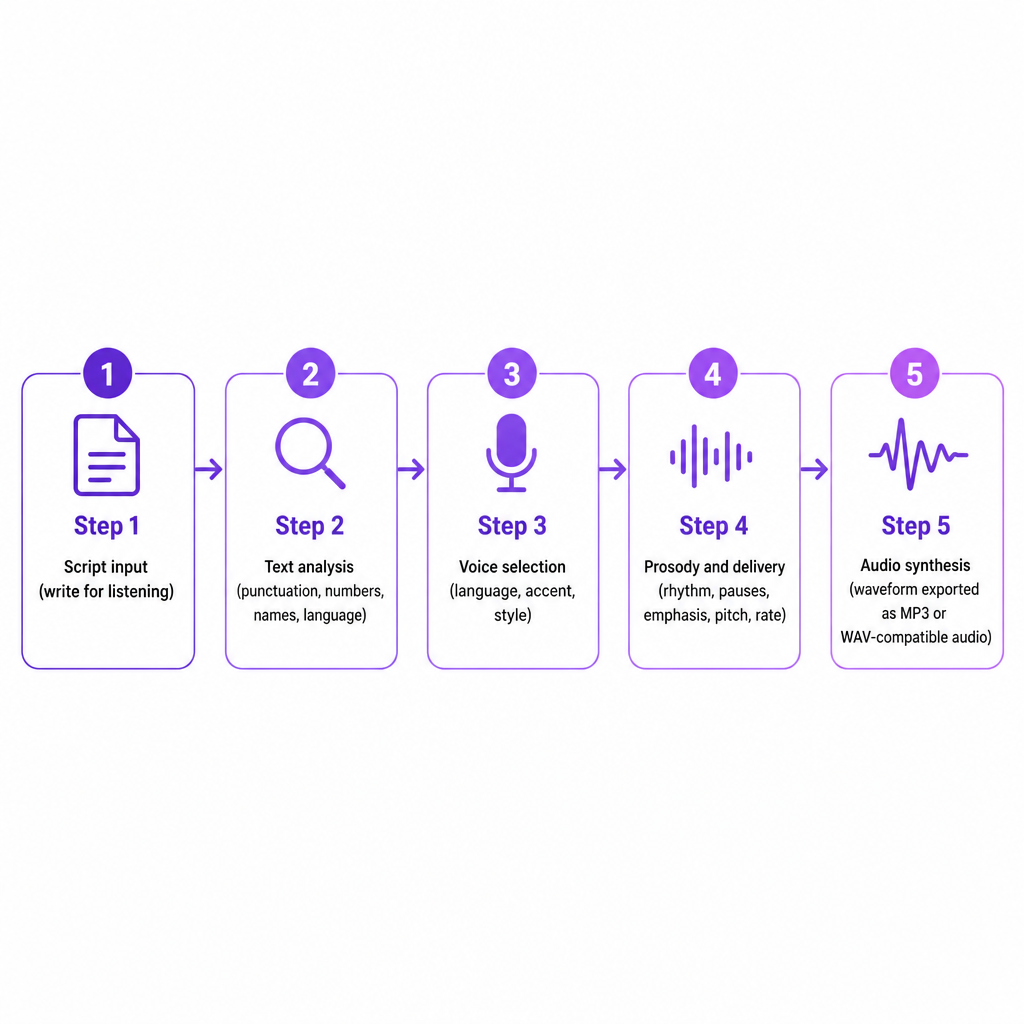
Then you choose a voice. Voices differ by language, accent, age or vocal character, gender presentation, speaking style, energy, and formality. Output settings often include speaking rate, pitch, volume, and sample rate. For a channel, consistency usually beats drama. A recognizable voice carried across videos makes the channel feel coherent, which matters more than picking the most theatrical option for a single upload.
The engine then generates prosody, the rhythm, pauses, emphasis, pitch movement, and intonation that separate expressive speech from evenly spaced words. Some tools expose these controls directly; others infer them from punctuation, sentence structure, or style instructions. This is where most quality gaps show up. A voice can pronounce every word correctly and still feel wrong if the pacing or emotional tone clashes with the video.
Finally the model synthesizes audio, transforming the analyzed text into a waveform the service returns as a downloadable file. An API workflow may hand back encoded audio data you decode into a playable file, while hosted creator tools handle that step for you. Even then, the narration isn't a finished video. You still place it on the timeline, cut dead air, add music and effects, match it to the visuals, balance levels, add captions, and review pronunciation and timing. For an explainer, the voice should follow the visual sequence; a technically clean track still feels sloppy if the images change before the matching sentence starts. If you want the full neural picture, our breakdown of how neural text to speech works goes deeper into the model internals.
Four production routes, and when each one wins
Most YouTube narration comes down to four options, and the right one depends on what the video needs rather than which sounds most advanced in a preview.
| Route | Best for | Main trade-off |
|---|---|---|
| Standard AI voice | Faceless channels, explainers, tutorials, news-style recaps, Shorts | Fast and reliable, but not tied to a specific person |
| Custom voice clone | Keeping one recognizable identity across many videos | Requires a voice you are authorized to reproduce |
| Multilingual TTS or dubbing | Translated explainers, localized product videos, new-market tests | Needs pronunciation and cultural review per language |
| Human voiceover | Nuanced acting, testimony, sensitive or brand-critical wording | Slower and harder to scale |
A standard voice pulled from a provider's library is the quickest path for high-volume content where you don't need the narration to sound like one particular person. Custom voice cloning builds a synthetic voice from an audio sample, which helps a creator hold a consistent identity without recording every script by hand. Use cloning only with permission and a voice you have the right to reproduce; a clone is not a shortcut around owning someone's identity or performance. Our Text to Speech tool gives you access to AI voices and cloning workflows, and our Voice Cloning page is the place to start when you want a reusable custom narrator rather than a stock one.
Multilingual narration lets you translate a script and synthesize a new voice track in another language, which is useful for growing an educational channel abroad, localizing product videos, or testing demand in a new market. TTS begins with text; our AI Dubbing workflow adds the broader localization layer, including translation and replacement audio for an existing video across 33 languages. A human narrator still wins when the video leans on nuanced acting, personal testimony, sensitive subjects, complex humor, legal or brand-critical wording, or a distinctive performer's interpretation. Plenty of channels run a hybrid: AI narration for drafts, versions, and high-volume uploads, human voice for flagship videos.
When text to speech earns its place on a channel
YouTube TTS pays off most when your bottleneck is recording, not writing. If scripting is easy but booking a recording session is the slow part, synthetic narration removes the slowest step.
Educational and instructional videos benefit directly. Update a script and regenerate only the affected section instead of arranging a new recording, which suits software tutorials, onboarding, and course content that changes often. Faceless channels can narrate videos built from screen recordings, stock footage, animation, slides, or generated visuals, though the voice still needs editorial direction; audio dropped over unrelated footage erodes viewer trust. Shorts gain from fast script-to-audio turnaround, letting you test multiple hooks or audience variations as long as the voice doesn't sound rushed or repetitive.
Accessibility is another honest use. A spoken version of written content helps viewers who prefer audio or struggle with on-screen text, but narration should complement accurate captions and clear visual design rather than replace them. And for multilingual expansion, you can produce translated voice tracks without running a separate production process per language. YouTube's Multi-language audio feature lets eligible creators attach additional audio tracks to a single video or Short instead of managing a separate channel for every market.
Choosing and testing a voice before you commit
Judge a voice against the video's real requirements, not a flattering ten-second preview. A voice that nails one line can fall apart across a full script, so pressure-test it first.
- Match the voice to the format. A calm delivery suits a documentary or tutorial; a higher-energy voice fits a short-form hook or announcement. Let the subject, pacing, and audience decide.
- Test difficult words. Before generating a full video, run your recurring brand names, place names, acronyms, scientific terms, foreign words, units, and people's names. A voice that handles ordinary sentences can stumble on your channel's vocabulary.
- Check long-form consistency. Generate a longer sample and listen for repetitive intonation, incorrect pauses, unnatural rhythm, shifting pronunciation, and abrupt paragraph transitions.
- Consider regional audience. English narration may need US, UK, Australian, or another pronunciation. For other languages, confirm the voice sounds natural to a native ear, not just that the tool lists the language.
- Review usage rights. Before monetizing or advertising, read the provider's terms and confirm the voice and output are cleared for commercial YouTube content, client work, paid ads, and derivative versions.
A few writing habits also lift quality fast. Write for speech by swapping dense prose for conversational sentences and using punctuation to guide pauses without leaning on it for emotion. Spell out ambiguous terms so the engine reads them correctly, testing variants like "AI" versus "A.I." or "2026" versus "twenty twenty-six." Generate in sections rather than one giant file so you can regenerate a single mistake, reorder scenes, and match audio to visuals. Then add human editing: watch the full video with the track playing, cut awkward pauses, fix timing, and duck music beneath speech. AI cuts recording time; it doesn't remove editorial review.
Rights, disclosure, and uploading a second language track
The part creators most often skip is also the part that gets videos pulled. If you build a separate language version, you can publish it as a new video or use YouTube's Multi-language audio feature where available, but the platform does not create those dubbed tracks for you. Creators must prepare and upload their own audio files in a supported audio-only format, roughly the same length as the video. YouTube may also remove a secondary audio file if its copyrighted content differs from the original, which makes rights review essential when your dubbed track includes music, clips, or other protected material.
Disclosure is a separate obligation. YouTube requires creators to disclose AI-generated or altered content that looks realistic, including content that makes a real person appear to say or do something they didn't, alters footage of a real event or place, or fabricates a realistic scene. Notably, YouTube lists cloning your own voice for voiceovers or dubs among examples that do not require disclosure under that specific policy. That is not a license to clone someone else's voice, and labeling synthetic content does not authorize using another person's face or voice without permission.
A safe editorial policy is to use your own voice or a licensed one, keep permission records for any custom voice samples, avoid imitating a real person without authorization, check commercial-use terms, disclose realistic synthetic or altered content when YouTube requires it, and review music, footage, and translated-audio rights separately. For teams generating narration repeatedly from a content system or app, our Text to Speech API is built for programmatic speech generation so you can produce tracks at volume without rebuilding the workflow each time.
So is YouTube text to speech worth it? It's a strong fit when you need repeatable narration, fast revisions, multilingual versions, or a voiceover without recording gear. It's a weaker fit when the video's success rides on nuanced acting, personal testimony, or a legally sensitive performance. The standard that matters isn't whether viewers can tell a voice is synthetic. It's whether the narration is clear, appropriate, consistent, legally usable, and well integrated with the video.
Frequently asked questions
Can I use text-to-speech audio on YouTube?
Yes. You can use generated narration in a YouTube video as long as you respect the TTS provider's licensing terms, YouTube's policies, and the rights tied to your script, music, footage, and voice.
Does YouTube automatically turn a script into narration?
No. YouTube's Multi-language audio feature does not create your dubbed tracks for you. Creators must prepare and upload their own audio files.
What is the difference between YouTube text to speech and auto-dubbing?
Text to speech converts written text into spoken audio. Auto-dubbing is a broader localization process that may translate and generate a replacement-language track for existing content. The exact features depend on the platform and workflow.
Can I clone my voice for YouTube videos?
You can use a voice clone when you hold the right to create and use it. YouTube lists cloning your own voice for voiceovers or dubs as an example that does not require disclosure under its realistic-content policy, though other AI-generated or altered content may still require disclosure.
What audio file should I upload for a second language?
For YouTube's Multi-language audio feature, the file must be in a supported audio-only format and roughly the same length as the video. Check YouTube Studio's current upload interface before you export.