
Dubbing a video into Japanese with AI means rebuilding the spoken track in a new language while keeping the picture untouched, and the hard part is rarely the translation itself. It is the editorial work around it: choosing a register that fits your audience, getting names and loanwords to read correctly, and making translated lines fit the original timing without sounding rushed. We dub from more than 60 source languages into 33 target languages, including Japanese, and the same process applies whether you are localizing one tutorial or an entire channel. This guide explains how the pieces fit together, which voice strategy suits which content, and where human review still matters most.
Table of contents
What "dubbing into Japanese" actually involves
Japanese dubbing replaces or overlays the original dialogue with Japanese speech while the visual track stays intact. That single sentence hides several decisions you make up front. You can replace the original dialogue completely, keep the source voices quietly underneath, preserve each speaker's vocal identity with cloning, or run a single stock narrator over the whole thing. Each choice fits a different kind of content: a product tutorial usually reads well with one consistent narrator, while an interview or dialogue-heavy video needs distinct voices so viewers can follow who is speaking.
The part that catches people off guard is editorial, not technical. Japanese mixes kanji, hiragana, and katakana, and the right level of politeness shifts with the relationship between speakers and the audience you are addressing. A line that sounds friendly to peers can read as rude to a customer or an executive. Colloquial phrasing should be adapted for intended meaning rather than translated word for word, because a literal rendering often lands at the wrong formality entirely. Treating this as localization, not substitution, is what separates a Japanese dub that sounds native from one that sounds machine-translated.
How AI assembles a Japanese version
An AI dubbing pipeline chains several steps together, and understanding the sequence tells you where your attention pays off. Speech recognition transcribes what each person says. Speaker detection separates dialogue so voices can be assigned. Machine translation converts the transcript into Japanese. A localization edit then adjusts names, idioms, tone, terminology, and sentence length. Text to speech or voice cloning generates the Japanese dialogue. Timing and mixing fit the new speech to the picture and balance it against background audio. A final quality review catches pronunciation, translation, and timing errors before export.
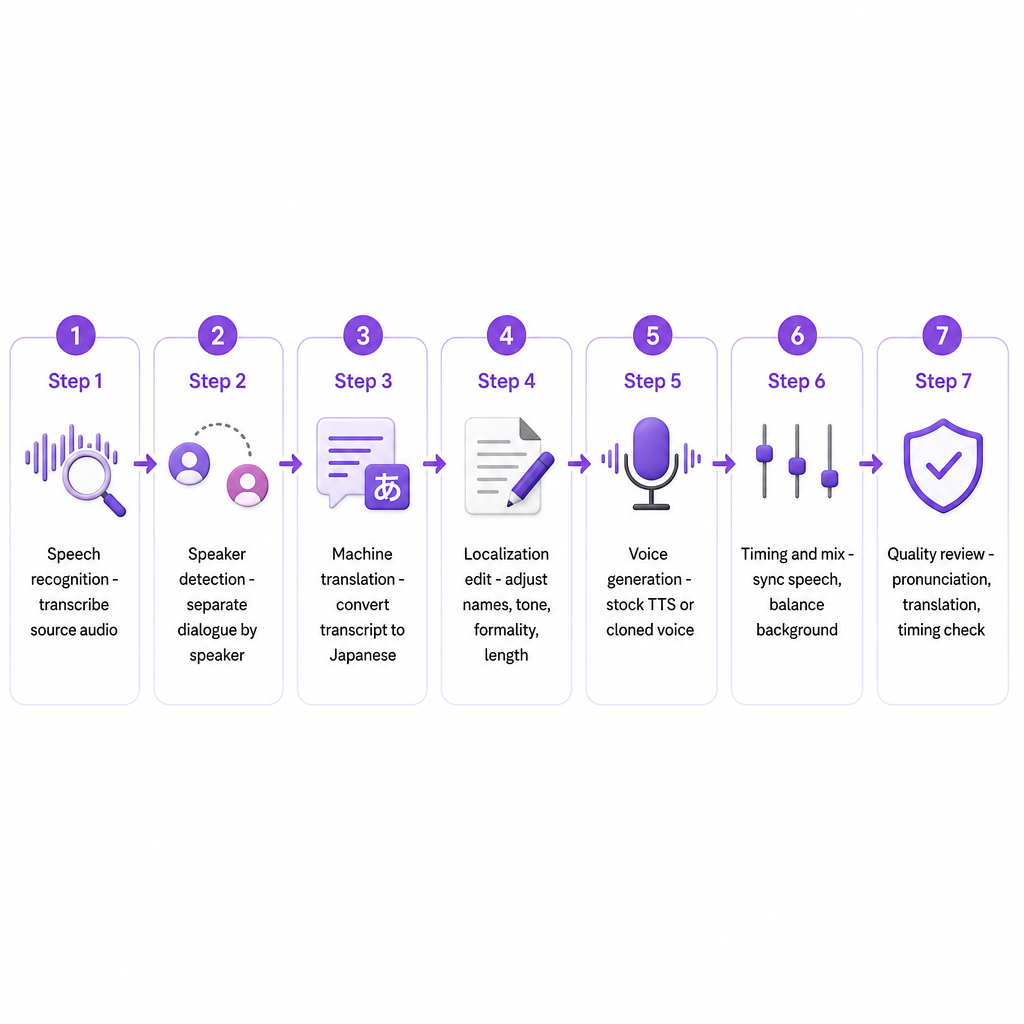
In practice, our AI Dubbing workflow lets you upload a video or paste a YouTube link, edit speakers, change text and timings, regenerate a single segment, tune background sound, and download the finished project. The value of knowing the steps is that you can target your review where it counts: a clean transcript improves everything downstream, and fixing one bad segment beats regenerating the whole file. If music or room noise is burying the dialogue, running the audio through our speech separator before dubbing gives recognition a cleaner signal to work from.
Stock voice, cloned voice, or multiple speakers
The voice strategy is the first decision that shapes the final feel, and it comes down to three paths. A stock Japanese voice is the simplest control for tutorials, e-learning, explainers, announcements, and faceless channels. Our Text to Speech library includes more than 300 AI voices across multiple languages and accents, so you can match gender impression, age, energy, and formality to the content. A measured, polite voice suits a corporate video; a more expressive, conversational delivery suits a gaming channel or short-form creator.
Cloning the original speaker's voice keeps a multilingual version consistent with the source. Instead of a stranger reading your Japanese lines, the system generates Japanese speech that resembles the presenter's vocal identity, which matters for personal brands, recurring series, online instructors, and founder-led marketing. One caveat is non-negotiable: clone a voice only when you hold documented permission to clone and distribute it. Do not clone a public figure, employee, actor, customer, or fellow creator without authorization, and confirm the license covers synthetic generation, commercial use, and distribution.
For interviews, films, podcasts, and panels, forcing one voice onto everyone makes the Japanese version hard to follow. Assign distinct voices with different ranges and pacing, label speakers during editing, and keep those assignments consistent across episodes. Deciding assignments before you generate the full audio saves you from re-doing corrections later.
| Content type | Recommended voice strategy | Why |
|---|---|---|
| Tutorial, explainer, e-learning | Single stock Japanese voice | Consistent narrator, easy to control |
| Personal brand, founder-led series | Cloned presenter voice (with consent) | Preserves recognizable identity |
| Interview, film, podcast panel | Separate voice per speaker | Keeps speakers distinguishable |
| First-time project | Stock voice | Faster to review and correct |
Translating for spoken Japanese, not word count
Literal translation is where most AI dubs sound off. Japanese register, social distance, and context decide whether a line feels natural, so the same English phrase needs different wording depending on the setting. "Let's get started" is phrased one way opening a business presentation, another way addressing students, and another again hosting a casual livestream. Build a short Japanese style guide before you generate audio: fix the formality level, preferred terminology, how names are pronounced, whether honorifics stay, and how brand names appear in katakana.
Length is the other trap. Japanese often expresses an idea in a different number of syllables than English, so a translated line can overrun the original pause and force the voice to rush. When that happens, shorten the wording, adjust the timing, or let the Japanese audio use its own pause structure where the scene allows. Our Dubbing Studio lets you edit text and timestamps, stretch or compress the speech rate, adjust background sound, and regenerate individual segments, so you can fix a rushed line without touching the rest of the project. A shared glossary pays off across a series: keep the same Japanese terms for product features, course modules, repeated calls to action, and slogans so every video reads as part of one Japanese edition. For a deeper look at building a localized presence, our guide to multilingual voiceover covers the editorial side in more detail.
Where Japanese AI dubbing commonly breaks
A handful of failure points account for most of the awkward results, and all of them are catchable before you publish.
- Wrong formality. A casual expression aimed at a customer, executive, or public audience reads as inappropriate. Define the register before generating audio.
- Pronunciation errors. Names, place names, company names, acronyms, foreign loanwords, and uncommon kanji readings are the usual offenders. Prepare a pronunciation list and test difficult terms on their own before running the full video.
- Timing mismatch. Translated dialogue may not fit the original pauses. Edit the script or speech rate rather than cramming every line into the source word timing.
- Mistranslated meaning. AI can miss jokes, sarcasm, cultural references, or ambiguous phrasing. Review lines whose meaning depends heavily on context.
- Voice-consent gaps. Cloning without documented permission creates legal and reputational risk. Confirm the license scope before you generate.
- Publishing unreviewed. AI speeds production but does not remove quality control. For commercial, legal, medical, or public-facing content, have a fluent Japanese reviewer approve the final export.
Dubbing also does not relocalize graphics. Review slides, charts, lower thirds, captions, product screenshots, and on-screen URLs, and create Japanese versions of important English text or add Japanese captions where needed.
Dubbing versus Japanese subtitles
Dubbing is usually the better call when viewers need to watch without reading, when the material is instructional, or when you want a genuinely localized channel experience. Subtitles tend to win when the original speaker's delivery is the point of the video, when budget or turnaround is tight, when dialogue overlaps heavily across many speakers, or when the source audio must stay prominent. A combined approach is often the most practical: Japanese dubbing for the main dialogue plus Japanese captions for accessibility, names, technical terms, or noisy sections. The right answer depends on your content and your reviewers, not on a fixed rule.
Studio workflow versus the dubbing API
For a single video or a handful of them, the visual Dubbing Studio is easier because you can see and review each segment as you go. Once you are producing Japanese versions at scale, the calculus changes. Our AI Dubbing API translates and dubs videos into 33 or more languages with voice cloning, which suits teams that need to process videos automatically after upload, connect dubbing to a media-management system, maintain repeatable voice and glossary settings, or build localization into an existing application. Developers who want to drive the voice side directly can pair it with the Voice Cloning API to reuse approved custom voices across projects.
The API reduces manual handoffs for recurring production, but it does not remove the two steps that protect quality: translation review and audio checks. Automated or not, a fluent reviewer on public-facing or brand-sensitive content is the difference between fast and finished.
Frequently asked questions
Can I dub an English video into Japanese with AI?
Yes. The platform transcribes the English audio, translates it into Japanese, generates Japanese speech, and syncs the result to the video. Our AI Dubbing supports more than 60 source languages and 33 target languages, Japanese included.
Can AI preserve the original speaker's voice in Japanese?
Yes. Voice cloning can generate Japanese dialogue that keeps characteristics of the original speaker's voice. Use it only with documented permission from that speaker.
Should I use a cloned voice or a Japanese stock voice?
Choose a cloned voice when presenter identity and continuity matter, such as a personal brand or recurring series. Choose a stock Japanese voice when you want a neutral narrator or a faster first draft.
How do I make an AI-dubbed Japanese video sound more natural?
Localize the script instead of translating literally, set the right formality level, correct names and terminology, adjust timing, pick a voice that fits the content, and have a fluent Japanese speaker review the final video.
Can developers automate Japanese dubbing?
Yes. Our AI Dubbing API handles automated multilingual video dubbing and voice-cloning workflows, which is useful for generating Japanese versions at scale from a single source asset.