
If you regularly create, dub, transcribe, or localize video, the all in one platform vs separate ai tools question really comes down to one decision: do you want a connected media workflow, or do you want the single best specialist tool for every individual task? Both can produce excellent output. The difference shows up in the operational work around that output — the logins, exports, file transfers, billing systems, and quality checks that pile up as volume grows.
An all-in-one platform brings related functions such as text to speech, voice cloning, dubbing, transcription, image generation, and video creation into one account and workflow. A separate-tool stack lets you pick different vendors for each stage, with more freedom but more handoffs. For most creators, small marketing teams, e-learning producers, and agencies producing multilingual media regularly, the connected workflow is the more efficient default. A separate stack earns its place when a project demands a highly specialized feature, an unusual integration, independent benchmarking, or vendor redundancy.
Table of contents
What “all-in-one AI platform” actually means
An all-in-one AI platform combines multiple media functions in one workspace instead of treating every task as its own product. A full localization job often chains together speech to text for transcription and subtitles, translation for each market, text to speech for narration, voice cloning for a consistent speaker, AI dubbing for localized tracks, speech separation for cleaning dialogue, and sometimes text to image or image to video for thumbnails and short motion clips.
The number of tools is not the real distinction. What matters is whether those tools can share project context, voices, files, credits, and output settings. When they do, a video can move from transcript to localized export without being re-uploaded at every stage. When they don't, each stage is an island.
Our platform is built around that shared workspace. From one account you can run AI Dubbing across 33 target languages, generate narration with Text to Speech, clone a speaker, pull transcripts with Speech to Text, and isolate dialogue with our Speech Separator — with a voice you create in one tool reusable in the others. If you want a deeper definition of this category, our explainer on what an AI media creation platform is covers the mechanics in more detail.
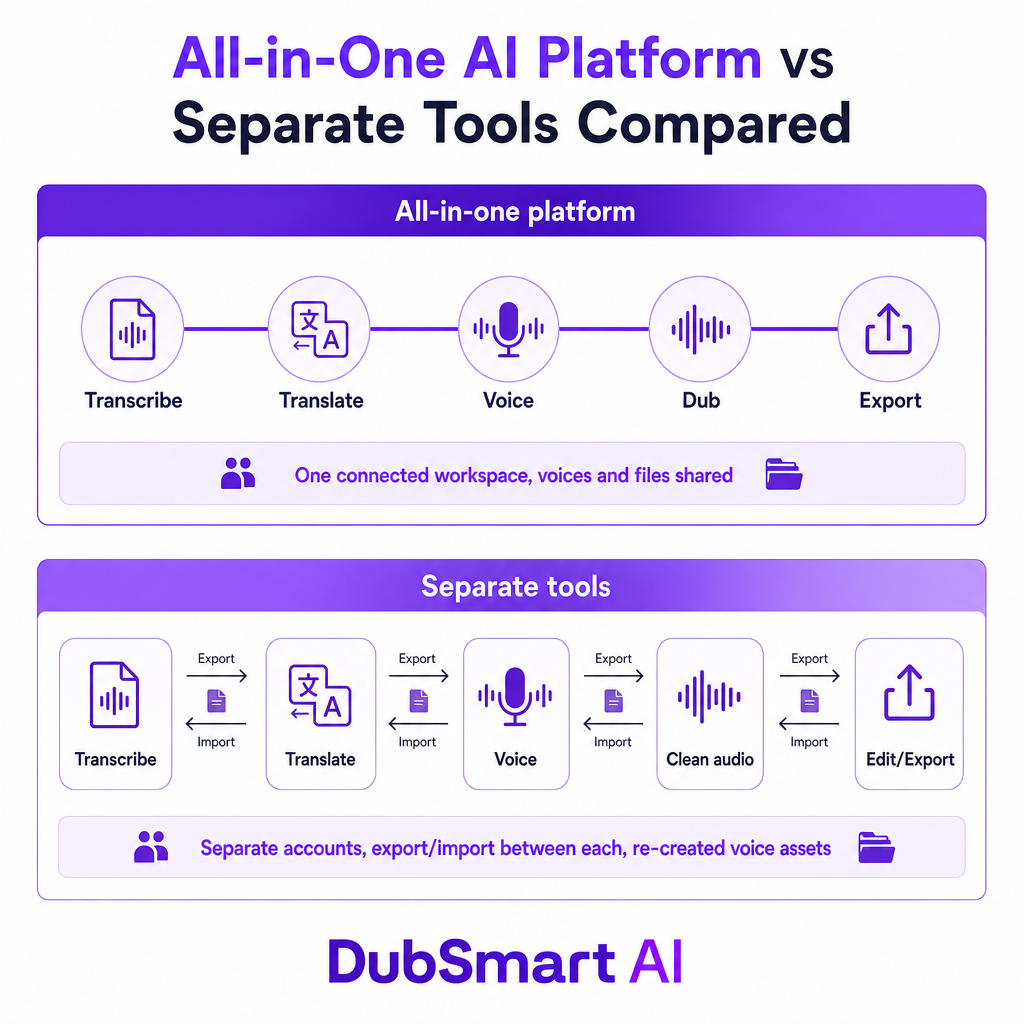
Where the two approaches genuinely differ
Separate tools shine when each application has a clear technical edge or when a team already has approved vendors for translation, editing, voice, or storage. The trade-off is handoffs: export and import time, file-format mismatches, differing usage limits, inconsistent voice quality, and lost timing or speaker metadata between steps. The question is not whether separate tools can produce a good result — they can — but whether the quality gain justifies the operational overhead at your volume.
| Decision factor | All-in-one AI platform | Separate AI tools |
|---|---|---|
| Workflow | Connected workspace, fewer handoffs | Multiple interfaces and export steps |
| Vendor management | One account, billing, and support channel | Several accounts, terms, and support processes |
| Voice consistency | One stock or cloned voice reused across projects | Voice assets often recreated or transferred |
| Feature depth | Broad coverage, individual features may be less specialized | Freedom to pick a best-in-class specialist |
| Cost visibility | A shared credit model simplifies forecasting | Costs spread across subscriptions and usage fees |
| Resilience | More dependence on one provider | More redundancy if one service changes or fails |
| Best fit | Recurring production, localization, small teams | Specialized workflows or existing enterprise stacks |
The headline benefit of the connected approach is fewer handoffs. A creator expanding from English into Spanish, French, and Portuguese has to extract dialogue, identify speakers, translate the script, generate or clone a voice, align speech to video, review timing and pronunciation, and export each version. In separate tools, that means repeatedly moving files and confirming the next tool received the correct version. In one workspace, the project moves through those functions with far fewer intermediate exports. That doesn't remove quality review — it removes the administrative work surrounding it.
Voice consistency is the quiet dealbreaker
Separate tools make it surprisingly hard to keep a recognizable speaker identity across formats and languages. A creator might use one voice for a short, another for a course, and a third for a dubbed version simply because the tools don't share voice assets. For brand-driven content, that inconsistency is a real cost.
A connected workflow lets you treat the voice as a project asset: pick a stock voice for general narration, clone an authorized speaker for branded content, and reuse that same voice in both narration and dubbing rather than rebuilding it in every app. On our platform you can create a voice from at least 20 seconds of audio, with the cleanest results coming from a recording free of background noise. The speaking style in that sample carries through — a monotone clip tends to produce flatter output, so a clean, expressive sample matters.
That detail is commercially important: fast cloning does not mean any recording yields a broadcast-ready result. Use clean, authorized audio and test pronunciation, emotion, accents, and names before publishing. If you're weighing whether to clone at all, our comparison of a cloned voice versus a stock TTS voice walks through the trade-offs for narration work.
Language coverage matters more than voice count
A large voice library looks impressive, but it is not how you evaluate a localization platform. The practical checks are source-language coverage, target-language coverage, regional accents, voice availability per language, cloning support per language, pronunciation controls, subtitle and transcript support, and timing or regeneration controls.
Our AI Dubbing supports more than 60 source languages into 33 target languages, with 300+ natural-sounding voices, and cloned voices usable across 33 languages. For a US-based creator or marketing team, though, the real test is narrower than “how many languages?” It is whether the specific markets in your content plan are supported with acceptable pronunciation, timing, and voice quality. Three well-supported target markets beat a long list where your actual languages render poorly.
The cost calculation most buyers get wrong
Separate tools look cheap one subscription at a time. The real total tends to include several monthly subscriptions, per-minute dubbing charges, per-character TTS charges, translation or transcription usage, export or watermark fees, extra seats, storage, and the human time spent coordinating all of it. A shared credit model can make spending easier to forecast because several functions draw from one pool — but a bundle is not automatically cheaper. If your team uses only one feature heavily, a specialist tool may be the better value.
Our public pricing uses a credit system with a free tier, rollover credits on paid plans, and enterprise options. The current monthly plans:
| Plan | Monthly price | Monthly credits | Approx. dubbing/TTS minutes | Notable details |
|---|---|---|---|---|
| Free | Free | 2,000 | 2 | Core tools; watermark on image/video output |
| Starter | $16.66 | 50,000 | 50 | Rollover credits, unlimited voice cloning, no watermark |
| Standard | $41.66 | 150,000 | 150 | Rollover credits, unlimited voice cloning, no watermark |
| Pro | $83.33 | 350,000 | 350 | AI Dubbing API, faster render, account manager |
| Enterprise | $208.33 | 1,000,000 | 1,000 | AI Dubbing API, 4K YouTube upload, account manager |
| Custom | Custom | From 2,500,000 | From 2,500 | Custom extra-credit pricing and enterprise support |
Product-specific usage helps you model real spend: AI Dubbing runs 1,000 credits per minute, Text to Speech is 1 credit per character, and Speech to Text and Speech Separator are 100 credits per minute each. Before comparing prices anywhere, calculate your actual workload. A team producing ten five-minute videos across three languages has a completely different requirement from a creator making one short voiceover a week.
When separate AI tools are the smarter call
A connected platform is not always right. Reach for separate tools when:
- You need a highly specialized feature. A dedicated product may offer deeper controls for one narrow task — cinematic image generation, detailed audio restoration, professional subtitle styling, or complex video editing.
- You already have approved vendors. Large organizations often hold procurement, security, legal, and data-processing agreements for specific providers, and replacing all of them with one platform may not be practical.
- You need redundancy. Depending on one provider concentrates risk. A pricing change, removed feature, outage, or quality shift can affect the whole workflow at once.
- You require independent benchmarking. Running transcription, translation, or synthesis across separate services makes it easier to compare results — valuable for regulated content or high-stakes campaigns.
- You need deep technical customization. A specialist API may expose more control over model selection, infrastructure, latency, or deployment than a convenience-first bundled API.
The mirror image is just as clear. A connected platform is usually the stronger fit when the same team creates, transcribes, voices, and localizes content; when you publish multilingual video regularly; when you reuse one voice across languages; when you want a single billing model; when production capacity is limited; or when you want a repeatable workflow for YouTube, training, podcasts, or marketing. A small US team launching a product video in English, Spanish, and French can transcribe the source, prepare the localized script, generate or clone narration, review the tracks, and export every version without juggling unrelated platforms.
What APIs change for developers and agencies
For developers, the comparison extends past browser tools. A separate-tool stack usually means several API keys, different request and response formats, independent rate limits, separate billing, more error handling, and more maintenance whenever any vendor changes an API.
We publish Text to Speech, Voice Cloning, and AI Dubbing APIs that share the same platform. The Voice Cloning API lets developers upload audio, clone voices, and use the result in text to speech or dubbing; the TTS API exposes 300+ voices and cloning; the AI Dubbing API handles video translation and dubbing into 33+ languages. Even so, treat convenience as a starting point: verify documentation, authentication, asynchronous job handling, webhooks, file-size limits, retention, usage reporting, and service-level expectations before routing production traffic through any provider.
Risks you should price in before standardizing
Voice rights and consent. Clone only voices you are authorized to use. Document consent, intended use, territory, duration, revocation terms, and commercial rights. The Federal Trade Commission warns that voice cloning can be used to impersonate relatives, executives, and other trusted people — and the same risk applies to legitimate production if you clone an actor, employee, customer, or public figure without clear authorization.
Accuracy and cultural context. AI can misread names, technical terms, numbers, dates, idioms, humor, regional expressions, speaker identity, gendered language, and legal or medical terminology. Human review stays necessary for important content. The NIST AI Risk Management Framework emphasizes validity, reliability, privacy, accountability, and human intervention when a system cannot detect or correct its own errors.
Audio quality. A cloned voice can sound convincing in one sentence and less natural in the next. Background noise, overlapping speakers, weak microphone technique, emotional delivery, and uneven volume all degrade output. Use a clean sample, listen to representative output, and review your most important scenes rather than trusting a single successful generation.
Accessibility. Dubbing is not a substitute for captions. For prerecorded synchronized media, WCAG 2.2 treats captions as a requirement outside specific media-alternative cases and also addresses audio description for prerecorded video. A localization workflow should plan for target-language captions, accurate speaker identification, important non-speech sounds, readability and timing, and correct handling of on-screen text.
Vendor concentration and data governance. Consolidating reduces vendor complexity but increases dependence on one provider. Before uploading proprietary footage, unreleased campaigns, employee recordings, or customer data, review retention, training-use policies, deletion controls, access permissions, encryption, subprocessors, regional data handling, commercial usage rights, and account-closure procedures.
A decision framework you can apply today
Choose an all-in-one platform when the main problem is workflow friction and you run several connected media functions repeatedly. Choose separate tools when the main problem is specialist quality, technical customization, procurement constraints, or vendor redundancy. Run a candidate through this scorecard against a real project rather than a demo sentence:
| Criterion | Question to ask |
|---|---|
| Workflow fit | Can it handle the majority of your current production workflow? |
| Output quality | Does the result meet your standards for voice, timing, translation, and visuals? |
| Language coverage | Are your actual source and target languages supported? |
| Voice identity | Can you consistently reuse approved stock or cloned voices? |
| Editing control | Can you fix text, speakers, timestamps, speed, volume, and regenerated segments? |
| Cost | What is the effective cost per finished minute or project? |
| Scalability | Does it support your expected volume without excessive manual work? |
| Governance | Are consent, privacy, retention, and commercial-use terms clear? |
| Resilience | What is your fallback if the platform is unavailable for a project? |
For most individual creators, small businesses, e-learning producers, and agencies making multilingual media, a connected platform is the better default: less tool switching, simpler billing, steadier voice identity, and easier recurring localization. Separate tools stay appropriate when you need a specialized capability, already run an established enterprise stack, or require multiple independent vendors. Whichever way you lean, judge the tool against your real language pair, speaker types, terminology, audio conditions, review process, and monthly volume before you standardize.
Frequently asked questions
Is an all-in-one AI platform cheaper than separate tools?
It can be, especially when you use several media functions regularly. The honest comparison is the total cost of subscriptions, usage, exports, integrations, and human coordination — not the sticker price of one specialist tool.
Are separate AI tools higher quality?
Sometimes. A specialist tool may offer deeper controls for one function, while a connected platform tends to win on workflow efficiency and consistency. Test the specific outputs that matter most to your content.
Can I use one cloned voice across multiple languages?
On our platform a cloned voice can be used in both Text to Speech and AI Dubbing, with cloning available across 33 languages. Use only voices for which you hold appropriate consent and commercial rights.
Does DubSmart offer a free plan?
Yes. The free plan includes 2,000 credits — about two minutes of AI Dubbing and Text to Speech — with a watermark on image or video output and access to the core media tools.
Should a business replace every AI tool with one platform?
Not necessarily. Use a connected platform for repeatable, linked workflows, and keep specialist or backup tools where they deliver essential quality, integration, compliance, or resilience advantages.