
An AI media creation platform is a single environment where you generate, voice, localize, and export media—audio, video, images, and text—using artificial intelligence, instead of stitching together separate tools and manual handoffs. So when you ask what is an ai media creation platform, the short answer is that it replaces a patchwork of transcription apps, voice tools, translation services, and editors with one connected workflow. At DubSmart AI, we built our platform around exactly that idea: move from a raw script or a source video to fully voiced, multilingual content without ever leaving the workspace.
That consolidation matters because the hard part of modern content work is rarely a single task. It is keeping voices consistent, timing aligned, and files moving cleanly between steps. A platform that owns the whole pipeline removes the friction that eats hours between recording, dubbing, and publishing.
Table of contents
What actually counts as an AI media creation platform
The defining trait is workflow, not the number of features. A collection of AI capabilities only becomes a platform when those capabilities share one environment: you import media once, transform it through several AI steps, and export a finished asset without exporting and re-importing between tools.
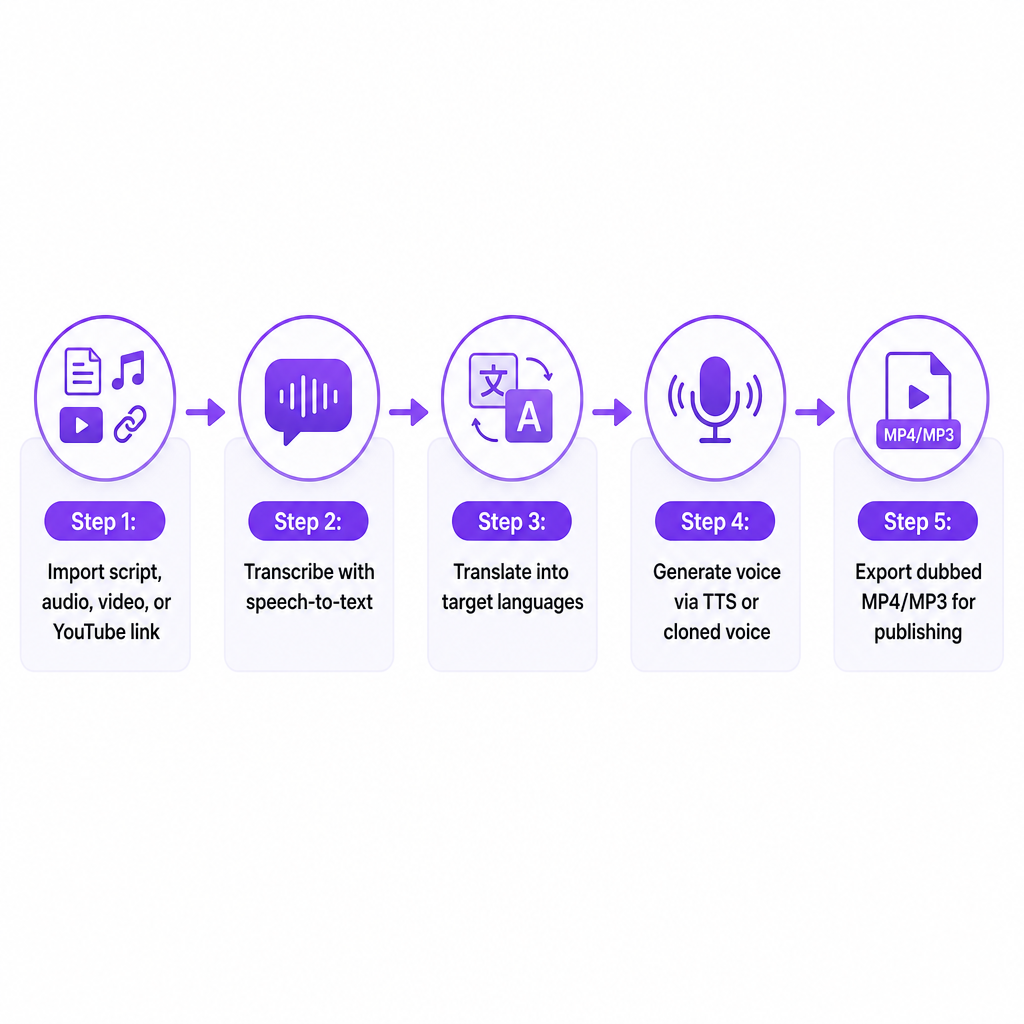
On our side, that means text-to-speech, voice cloning, AI dubbing, speech-to-text, a speech separator, text-to-image, and image-to-video all live in the same place. A YouTube creator, a marketing team, or an e-learning producer can start from a script or a source video and reach multilingual, fully voiced output inside one system. The platform's job is to handle the connective work—transcription feeding translation, translation feeding voice generation, voice generation feeding a timed dub—so no step becomes a manual file-shuffling exercise.
That is the practical line between a single-purpose tool and a platform. A standalone text to speech generator produces audio and stops. A platform treats that audio as one stage in a longer pipeline that ends with a publishable, localized file.
Do you need one, or are separate tools fine
The real decision is whether to keep managing content and localization with scattered vendors and SaaS subscriptions, or to centralize that work where voice, video, and image generation connect directly. For most teams, the answer depends on how often the question comes up.
A few scenarios make the choice concrete:
- A YouTube channel that succeeded in English wants Spanish, Portuguese, or Hindi versions without re-recording every video.
- A small marketing team needs cost-effective localization for campaigns, product demos, and explainers on a recurring schedule.
- An e-learning or corporate training group must deliver long-form courses consistently across several languages for global staff.
- An independent filmmaker or podcaster wants multilingual dubbing but cannot justify repeated studio sessions and voice-talent fees.
- A development team or agency needs voice AI exposed through APIs to power its own product or localization pipeline.
If your current process leans on manual recording, external studios, several disconnected apps, or custom scripts just to move files between systems, the question stops being about adding one more tool. It becomes a question of efficiency, scale, and control. If you localize one video a year, separate tools are fine. If you localize weekly, the handoffs are where your time and consistency leak away.
How these platforms work under the hood
Implementations differ, but most AI media creation platforms share a handful of mechanisms. Here is how they fit together in our workflow.
A centralized media workspace
Everything starts with import: scripts, audio, video files, or a YouTube link. From there you organize projects by language, speaker, and channel, apply AI transformations on a shared timeline, and export in the format your destination needs—MP4 or MP3 for YouTube, ready-to-edit files for post-production, audio for an LMS. Our interface is built so you upload local video or link to online content, configure speakers and timings, and download finished localized projects from the same workspace.
Voice creation and cloning as connective tissue
Voice is usually the backbone of the pipeline. We treat voice cloning as connective tissue rather than a novelty: you upload a clean speech sample, we process it into a named custom voice in seconds, and you reuse that voice across text-to-speech and dubbing. The mechanics are short—record or provide at least 20 seconds of clean speech, upload it to the voice clone section, then apply the resulting profile wherever you need it. That same cloned voice can generate intros and training voiceovers in TTS, and preserve a speaker's identity across languages in dubbing. A library of 300+ natural-sounding base voices covers cases where you want different voices for different markets.
Text to speech and speech-to-speech dubbing
Text to speech converts scripts and captions into natural-sounding audio, and because it plugs directly into dubbing and subtitle generation, a single project can move from text to localized video without leaving the workflow. Speech-to-speech dubbing works differently: it takes an existing recorded voice, analyzes tone, pitch, speaking style, and timing, then re-creates that voice speaking a new target language. Our AI dubbing pipeline uses this to preserve the original speaker's characteristics instead of dropping in generic narration—useful when authenticity is the point. If you want the deeper mechanics, our explainer on speech-to-speech dubbing walks through the analysis-to-regeneration flow.
The multilingual localization pipeline
A platform's value depends heavily on language coverage and how translation connects to voice. Our dubbing stack supports dubbing from over 60 source languages into 33 target languages, letting you pick target languages, speakers, and styles per project. In practice: import a video or link, choose one or more targets such as English to Spanish and Portuguese, select cloned or stock voices per language, and let the system handle transcription, translation, voice generation, and re-timing into a ready-to-upload dub. Because cloning is integrated, the same host voice can carry across every language, keeping audiences on familiar ground.
APIs for developers and agencies
When teams build their own products, they need capabilities exposed programmatically. We publish a Voice Cloning API that mirrors the in-app flow: request a presigned upload URL, upload an audio sample (MP3, WAV, AAC, M4A, or FLAC), create a custom voice by sending the returned file key with a voice name, then reference that voice in later calls. The AI Dubbing API lets developers create dubbing projects, set target languages and voice settings, and trigger analysis of the original speaker's voice before generating speech that keeps those qualities in the new language. That means agencies can embed voice and dubbing inside their own products without rebuilding the underlying models.
Three broad approaches to AI media creation
Even within integrated platforms, the market splits into a few option types, and each fits a different buyer.
Creator-first, workflow-driven platforms emphasize an accessible interface, project organization, and end-to-end localization for video, audio, and images. This is where our web app sits, spanning TTS, cloning, dubbing, speech-to-text, speech separation, text-to-image, and image-to-video in one UI.
API-centric platforms target developers first, focusing on endpoints and payloads rather than a non-technical interface. Our Voice Cloning, TTS, and AI Dubbing APIs extend the creator-first product for teams that need programmatic control.
Narrow, single-capability tools do one thing—basic TTS or simple transcription—without the surrounding pipeline. They can suit a very focused task, but you will need additional tools to reach a finished, localized asset.
For most US-based creators and businesses, the choice comes down to a workflow platform a marketing or content team can use directly, versus an API approach developers wire into existing systems. We address both ends deliberately: a credit-based product with UI workflows plus APIs for integration.
How to choose: the criteria that matter
When you weigh whether to adopt a platform, and which one, a handful of criteria do most of the work.
| Criterion | What to check | How we approach it |
|---|---|---|
| Workflow coverage | Does it span script or source video to finished localized media? | TTS, cloning, dubbing, speech-to-text, speech separator, text-to-image, image-to-video in one pipeline |
| Language and voice quality | Source and target coverage plus voice realism | 60+ source languages into 33 targets, 300+ natural voices, cloning for authentic identity |
| Speed and scale | How fast input becomes output; batch capacity | Cloning from short samples processed in seconds; dubbing built for recurring projects |
| Pricing model | Predictable, flexible cost tied to volume | Credit-based with a free tier, rollover credits, and enterprise plans |
| Integration | APIs to connect existing LMS, CMS, or internal tools | Voice Cloning, TTS, and AI Dubbing APIs exposing core capabilities |
Two of these deserve a closer look. On speed, our cloning works from roughly 20 seconds of audio and returns a usable voice in seconds, so turnaround does not depend on recording long datasets. On pricing, a credit-based model with rollover means unused balance carries forward and cost aligns with content volume rather than fixed seats alone—which suits creators and training teams whose output rises and falls.
Risks, constraints, and responsible use
Scale comes with obligations, and the honest version of this answer names them.
- Voice rights and consent. Cloning a voice without proper authorization raises legal and ethical concerns. We encourage clean, consented samples and treat cloned voices as professional assets, not impersonation tools. Our guide to voice cloning uses for creators leans on legitimate cases like multilingual channels and training.
- Authenticity and disclosure. Audiences may care whether a voice is synthetic. For marketing, training, and film, being transparent about AI use protects trust—especially when a dubbed voice sounds nearly identical to the original speaker across languages.
- Language and cultural nuance. Even strong translation and dubbing benefit from human review. Local idioms, regulatory phrasing, and cultural sensitivities mean AI output should be treated as a first pass for high-stakes content such as compliance, medical, or financial messaging.
- Data security. Audio, scripts, and video are often proprietary. Controlled upload workflows and project-based organization—like our presigned URL model—matter for teams handling sensitive material.
Handled with policy and review, these risks do not cancel the value of an AI media creation platform. They define how professional teams should structure their use of one.
For US-based creators, businesses, and training teams, our platform is a concrete answer to the original question: an all-in-one media creation and localization environment that consolidates voice and visual tools, keeps your own voice consistent across languages, scales to major markets through 60+ to 33 language dubbing, and stays accessible through both a creator-friendly web app and APIs. We report serving more than 500,000 users across creators and businesses. Your next move is to match the criteria above to how often you actually localize—and if you do it regularly, tell us your languages and content type so we can point you to the right workflow.
Frequently asked questions
What is an AI media creation platform in simple terms?
It is software that lets you create, voice, and localize media—especially video and audio—using AI from one central workflow, instead of relying on separate tools for each step.
How is this different from a basic text-to-speech tool?
We embed TTS inside a wider pipeline that includes voice cloning, AI dubbing, speech to text, a speech separator, and visual generation, so you move from script or source video to finished multilingual content in one place.
Can I keep my own voice when dubbing into other languages?
Yes. With voice cloning and speech-to-speech dubbing, we analyze your voice from a short sample and generate audio in new languages that preserves your tone, pitch, and speaking style.
How many languages does DubSmart support for dubbing?
We support dubbing from more than 60 languages into 33 target languages, covering the major markets US-based creators and businesses typically expand into.
Is there a way to try DubSmart before committing?
Yes. We offer a free tier on a credit-based model so creators and teams can test workflows, credits roll over, and enterprise plans handle higher-volume usage.