
If you are weighing voiceforge text to speech for a project, the real question is rarely whether the voices sound interesting. It is whether the tool fits your script length, your publishing rights, and the kind of content you actually make. VoiceForge is a browser-based text-to-speech service built around distinctive character voices. It converts a script into downloadable audio using a unit-selection synthesis engine that stitches together recorded speech segments from human speakers rather than generating every sound from a single mathematical waveform. The practical decision comes down to four needs: a fun, recognizable voice for personal projects; licensed audio for monetized media; precise control over pronunciation and pacing; or a scalable multilingual workflow. Only the first three map cleanly onto a character-voice generator, and that gap is where most creators get tripped up.
We publish this guide because the same confusion shows up again and again: people generate audio on a free trial, assume they can monetize it, then discover the license is tied to a specific plan. Below, we break down how the engine works, what it can and cannot do, and when a single-voice novelty tool is the right call versus a full localization workflow.
Table of contents
What VoiceForge text to speech actually is
VoiceForge turns written words into spoken audio: you enter a script, pick a voice, generate the clip, preview it, and download the result when your plan permits. What sets it apart from a general narration library is its orientation. VoiceForge leans toward voices with personality rather than neutral corporate delivery, which makes it a natural fit for YouTube sketches, gaming clips, animated characters, memes, novelty announcements, and music projects.
That character-first focus is a feature for some content and a liability for others. A comic or deliberately synthetic voice can carry a parody or a game NPC, but the same voice becomes distracting in an e-learning course, a product demo, or a premium brand spot. So the first filter is not "does this sound human?" It is "does this voice belong in front of my specific audience?"
If you are still deciding whether a stock voice generator suits your needs at all, our explainer on what an AI voice generator does covers the broader category and how these tools differ from cloning and dubbing.
How the unit-selection engine builds a voice
VoiceForge uses unit-selection synthesis, also called concatenative synthesis. Instead of generating an entire recording from one model-produced waveform, the system searches a database of recorded speech segments and joins the best-fitting pieces into your sentence. Understanding this pipeline explains both why the voices sound recognizable and why they behave the way they do under pressure.
The process runs in a few stages. First, text analysis: the engine parses words, sentence structure, phonemes, rhythm, pitch, stress, and duration to decide how a line should be spoken. Next, a voice-database search: each voice is built from a human speaker's recordings, chopped into smaller units and labeled by sound and context. Then unit selection, where the engine balances two competing goals at once — target matching, which picks a unit with the right sound, pitch, duration, and context, and smooth joining, which favors neighboring units that connect without an obvious seam. Finally, audio assembly stitches the chosen sequence together and applies light smoothing at the boundaries.
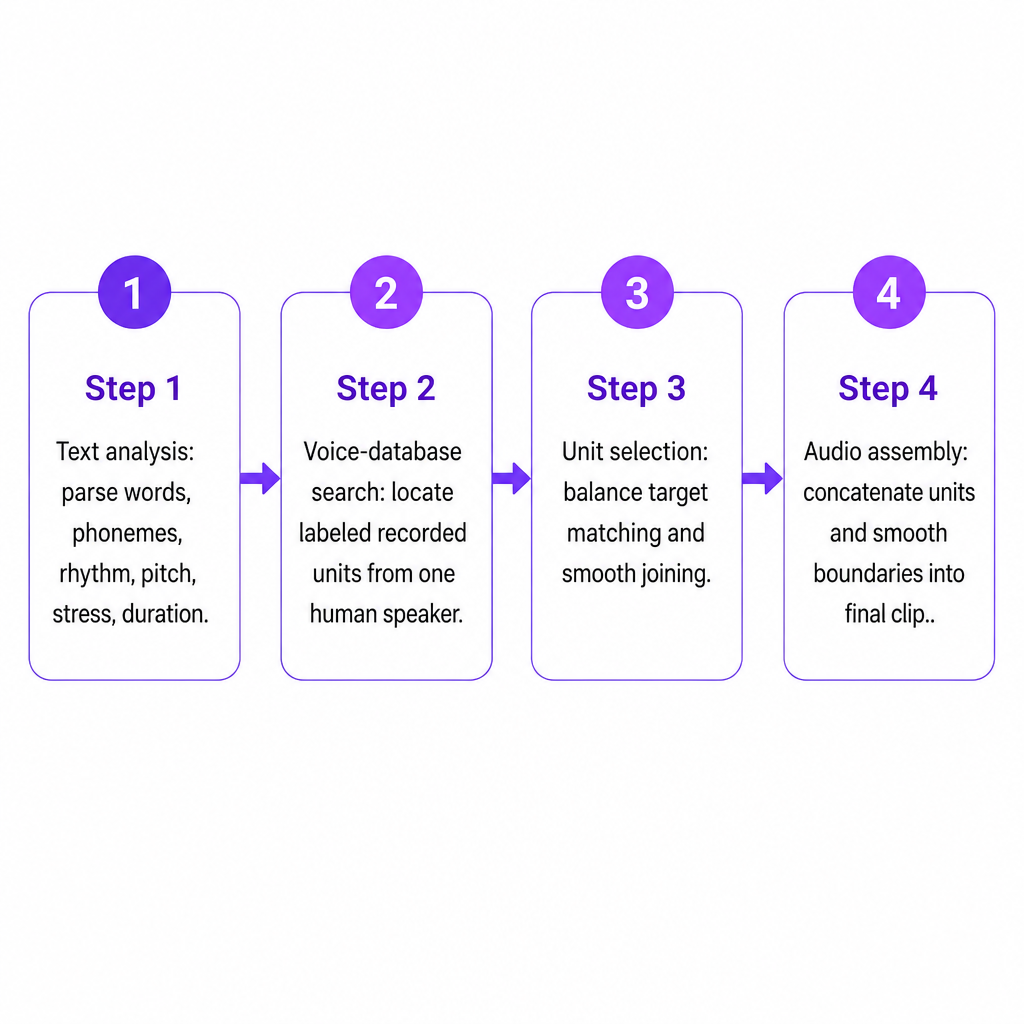
Because the output is assembled from real recordings, each voice keeps a distinctive identity. The trade-off is that this method was not designed to offer unlimited emotional direction or the fully adjustable delivery associated with newer generative systems. Unusual phrasing, rapid shifts, or awkward pronunciation combinations can expose the joins between units, producing results that sound less consistent than a continuous human take. If you want to see how a fully generative pipeline differs, our breakdown of how neural text to speech works walks through the deep-learning approach that replaces concatenation.
Voices, SSML, and the 500-character ceiling
VoiceForge lists 42 unique voices, each recorded by a different speaker with its own timbre and speaking style. That is plenty when the voice itself is part of the creative concept — a comic narrator for a short, an odd personality for a gaming video, a synthetic tone for a meme. It is a smaller catalog, though, for teams that need many regional variants or a carefully matched narrator across several markets.
For delivery control, VoiceForge supports a subset of Speech Synthesis Markup Language (SSML). Instead of relying on punctuation alone, you embed instructions directly in the script.
| SSML control | What it does |
|---|---|
<break> |
Inserts a pause |
<emphasis> |
Stresses a word or phrase |
<prosody> |
Adjusts pitch, speaking rate, or volume |
<phoneme> |
Forces an exact pronunciation |
<sub> |
Speaks a substitute for the visible text |
<p> / <s> |
Marks a paragraph or sentence |
These tags earn their keep when the engine misreads a product name, acronym, or technical term. Wrapping an abbreviation in <sub alias="application programming interface">API</sub> makes it speak the full phrase, and <phoneme> locks in a tricky name. A <break time="500ms"/> between lines adds a deliberate beat where punctuation would not.
Here is the catch that reshapes how you write for it: the text input is capped at 500 characters, and SSML markup counts toward that limit. Every tag you add eats into the space available for actual words. Long narration has to be split into multiple generations, and heavy markup shrinks each chunk further. In practice, that means planning your script in short, self-contained passages rather than pasting in a full page.
Free trial vs. commercial license: the decision that matters
VoiceForge offers a limited free trial, but a trial is not a publishing license. Its plans draw a clear line between personal and commercial use, and that line is where most mistakes happen.
The Fan Voice tier is intended for jokes, videos, games, animations, and memes that are not monetized. The Publisher plan is the subscription that grants a commercial license for TTS audio in monetized or commercial content — monetized videos, indie games, and music — and advertises unlimited downloads. The free trial exists so you can test the service before committing.
The operating rule is simple: if a project earns money, promotes a business, appears in monetized media, or ships commercially, confirm the applicable plan before you publish. Audio you generate during a free trial does not automatically carry commercial rights just because it downloaded. Licensing language can also change, so the plan page is a starting point, not a substitute for a project-specific review when the stakes are high — a client deliverable, a paid ad, a branded campaign, or an app release.
Strengths and limitations for real projects
VoiceForge's strengths cluster around personality and simplicity. The character voices stand out when timbre is part of the joke or the brand of a channel. Because the foundation is recorded human speech, the voices retain natural vocal characteristics and a recognizable identity. The SSML pronunciation controls give you real say over acronyms, names, and odd terms. And the Publisher plan makes the commercial-use question more explicit than tools that separate generation access from licensing details.
The limitations are just as concrete. The 500-character ceiling forces long scripts into many small generations, and markup makes each one shorter. The 42-voice catalog is modest next to large libraries, which matters if you need hundreds of options or many regional accents. The character-first style that shines in entertainment can undercut legal, medical, instructional, or premium brand content. Plan restrictions are easy to trip over, since the ability to generate audio is not the same as the right to monetize it. And because the engine joins recorded units, certain phrasings can surface stitching artifacts that a continuous recording would not.
None of these are disqualifying on their own. They simply define the sweet spot: short, personality-driven, single-language clips where the voice is the point.
When a character voice fits and when a localization workflow wins
VoiceForge is the right pick when the voice's personality is central, your scripts split neatly into short sections, you need basic pronunciation and pacing control, and you are producing videos, memes, animations, music, or indie-game content — whether personal (Fan Voice) or monetized with the appropriate subscription.
A broader workflow serves you better when you need a polished neutral narrator, many languages and accents, your own cloned voice, long-form narration, frequent commercial updates, API integration, or consistent voices across a large catalog where novelty matters less than reliability. A channel expanding internationally illustrates the split well: VoiceForge might supply the character voice for an English-language sketch, while a multilingual TTS and dubbing setup produces the localized versions for other audiences.
That second scenario is where we focus. Our Text to Speech tool offers 300+ AI voices, multilingual voiceovers, speech-rate controls, and downloadable projects built for production rather than one-off novelty. Creators who want to keep their own identity across every video can use Voice Cloning instead of settling for a stock character, and developers who need speech generation inside an app can build on our Text to Speech API. When the goal is turning a single clip into a full localized release, AI Dubbing carries the same script across additional languages in one place.
A pre-publish quality checklist
Before you ship VoiceForge audio, run a quick pass on the things that break most often. Generating short test passages first is worth the few extra minutes, because a voice that lands in one sentence can grow tiring or distracting across a full video.
- Pronunciation: Are names, abbreviations, numbers, and technical terms spoken correctly?
- Pacing: Do pauses fall naturally, not mid-phrase?
- Character consistency: Does the same voice suit every scene, not just the opener?
- Audio transitions: Are there audible jumps between separately generated clips?
- Licensing: Does your current plan actually cover monetized or commercial use?
- Audience fit: Is the character style appropriate for the platform and subject?
- Alignment: Does the audio sit cleanly against your video, music, or game dialogue?
- Rights: Do you have permission for any supplied script, name, or third-party reference in the audio?
Frequently Asked Questions
What is VoiceForge text to speech?
It is a browser-based service that converts written text into spoken audio using a library of distinctive character voices. It relies on unit-selection synthesis, which assembles recorded speech segments from human voice databases rather than generating audio from a single model waveform.
Is VoiceForge AI-generated?
It is a speech-synthesis service, but its documented method is unit selection, not a fully generative neural voice system. The engine selects and joins recorded human speech units to produce each utterance.
How many VoiceForge voices are available?
VoiceForge lists 42 unique voices, each associated with a different speaker and vocal personality.
What is the VoiceForge character limit?
The service documents a 500-character limit per text input, and any SSML markup you add counts toward that limit. Longer scripts need to be split into multiple generations.
Can I use VoiceForge audio on YouTube?
You can, but monetized content requires the appropriate commercial subscription. The Publisher plan is described as the license for TTS audio used in monetized or commercial content, so confirm your plan before publishing a monetized video.
Is VoiceForge the same as voice cloning?
No. VoiceForge uses its existing voice library, while voice cloning creates a custom synthetic voice from authorized recordings of a specific speaker. We explain that separate workflow on our Voice Cloning page.