You can dub a video into Spanish with AI in one sitting: upload your source video, set Spanish as the target language, review the translated script and speaker timing, pick a Spanish voice or clone the original speaker, then export the finished video or a standalone audio track. The real work is not pressing a button. It is deciding which Spanish your audience actually speaks, how closely the new voice should match the original, and how much human review the video deserves before it goes live. With DubSmart AI, dubbing into Spanish runs inside the same workflow as transcription, translation, voice cloning, and editable segments, so each of those decisions happens in one place instead of across four tools.
Table of contents
What AI dubbing actually changes in your video
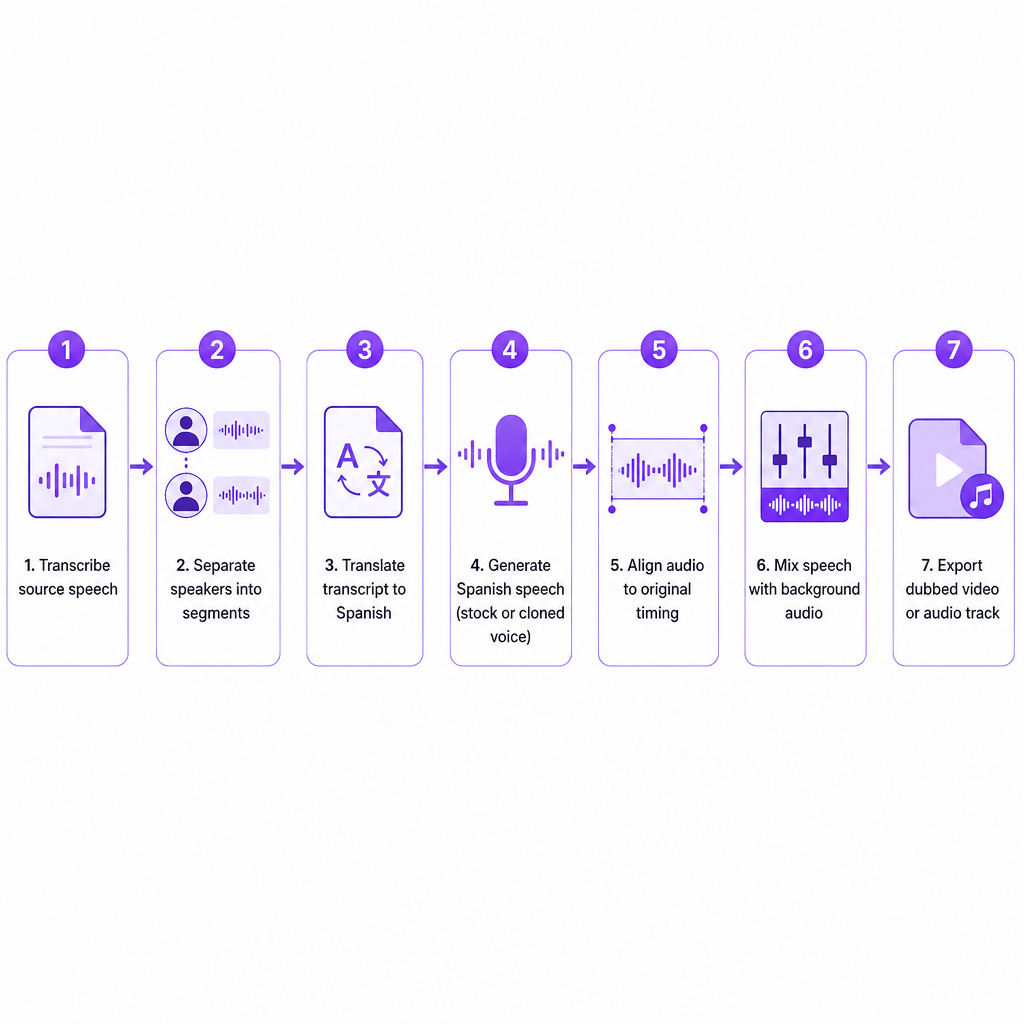
AI dubbing replaces the original spoken dialogue with Spanish speech while leaving the visual structure of the video intact. Under the hood, the system transcribes the source audio, separates speakers into dialogue segments, translates the transcript into Spanish, generates Spanish speech with a selected or cloned voice, aligns that audio with the original timing, mixes it back with the background sound, and exports a new video or audio file.
That sequence matters because every stage can introduce an error you will want to catch: a misheard name in transcription, a long-winded translation that overruns the shot, or a voice that sounds right in isolation but wrong against the footage. Our AI Dubbing workflow accepts a video upload or a YouTube link and supports source material in more than 60 languages into 33 target languages, Spanish among them.
Dubbing is a different experience from subtitles. Subtitles add translated text on top of the original speech, so viewers still hear the source language and read along. A Spanish dub gives viewers an audio-first experience in their own language, which helps people who watch without reading captions or who simply prefer to listen. Neither choice is automatically better, and many creators ship both.
Choosing the right Spanish voice
The voice is the single decision viewers notice most, and you have three realistic paths.
A standard Spanish AI voice is the fastest option. Choose it by Spanish variety or accent, age and perceived identity, formality, energy and pacing, and fit for the content type, whether that is education, marketing, entertainment, or narration. One practical rule saves a lot of rework: never pick a voice because it sounds pleasant in a short demo. Test it against the real names, technical terms, jokes, calls to action, and sentence lengths from your actual video, because those are where a voice reveals its weaknesses.
Cloning the original speaker keeps the host's vocal identity while the speech comes out in Spanish. This is the right call when the presenter is central to the brand, appears across many videos, is already recognized by the audience, or when you want localized versions to feel like the same show rather than a spin-off. Our AI Dubbing can clone each speaker's voice and reuse it for the Spanish track. Permission is not optional here: a recognizable voice can carry commercial, personal, and publicity rights, and the technical ability to clone a voice does not grant you the right to do it. If you are weighing how practical cloning is for your material, our explainer on how much audio you need to clone a voice covers the sample length and quality that make the difference.
A new Spanish narration through text to speech suits videos where matching the original speaker does not matter: screen recordings, product tutorials, e-learning modules, explainers, social clips, and anything where the visuals carry more identity than the narrator. A fresh voice is also the safer choice when the original recording is noisy, the speaker has not granted cloning permission, or the Spanish version needs a different tone than the source.
For a broad audience across the Americas, a widely understandable Latin American Spanish voice often works. A video aimed at Spain should use European Spanish vocabulary, pronunciation, and a voice that sounds native to that market. Content built for Mexico, Argentina, Colombia, or elsewhere may need further regional adaptation beyond the voice itself.
Why translation and localization are not the same job
A translation can be grammatically perfect and still land wrong on screen. Spanish dubbing has to account for regional vocabulary, formal versus informal address, sentence length and speaking time, idioms and humor, product names and technical terms, currency, measurements and dates, cultural references, and any on-screen text or calls to action. A line that takes three seconds to say in English may need more or fewer syllables in Spanish; if the translation runs long, the generated speech rushes or spills past the original timing.
A useful Spanish localization brief names the target country or audience, the preferred Spanish variant, the formality level, how names and brands should be pronounced, which words must stay untranslated, which terms need a glossary, and whether the translation should read literal, conversational, or marketing-oriented. For customer-facing, legal, medical, financial, or instructional material, have a qualified Spanish reviewer check the final text. AI can write fluent sentences and still soften a critical instruction or mistranslate a technical meaning.
The DubSmart dubbing workflow, step by step
Our interface is built for a complete dubbing project, not only speech generation, so the practical path moves from preparation to export.
Start with the cleanest available master. Clear dialogue produces better transcription and translation. If music or effects overpower the voice, clean the audio first or isolate it with our Speech Separator. Before uploading, confirm the source language is correctly identified, speakers are audible and distinguishable, specialist terms are written down somewhere you can reference, and that you hold the rights to the footage and to every voice you plan to dub or clone.
Next, upload the video or paste a YouTube link and select Spanish as the target language. A project can hold more than one target language, so you can produce Spanish alongside other versions when a release calls for it; in our API, Spanish appears as the code es in a multi-language request.
Then comes the stage most people underuse: reviewing speakers and translated segments. Treat AI speaker detection and translation as a strong first draft, not a final answer. Inspect speaker assignments, translated wording, names and numbers, segment boundaries, pronunciation, speech rate, timing against the visuals, and background audio volume. You can edit text and timings, adjust speakers and background levels, and regenerate a single segment instead of reprocessing the whole project. That segment-level control is exactly what you want when one name is mispronounced or a single Spanish sentence runs too long.
With the script right, select a voice or enable cloning. Pick a Spanish stock voice for speed and consistency, or clone the original speaker when continuity matters. For multi-speaker content, verify each speaker keeps the correct voice and that voices stay distinguishable throughout. Avoid swapping voices between videos in the same series; audiences tie voice consistency to channel and brand identity.
Finally, export the result as a full Spanish-dubbed video or as a Spanish audio track. A complete video suits a separate Spanish upload, a social platform, a course portal, or your website. An audio-only track suits keeping one video and offering viewers a language switch. If you want the longer version of this end-to-end process, our guide on how to dub a YouTube video with AI walks through it with a YouTube focus.
Publishing a Spanish dub on YouTube
YouTube supports additional audio tracks for eligible creators with access to Advanced features, which lets one video carry several language tracks instead of a separate upload per language. According to YouTube's multi-language audio help, viewers can be served a preferred language automatically and can switch tracks in the player.
For a Spanish track, export an audio-only file in a supported format that runs roughly the same length as the video. In YouTube Studio on desktop, open Languages, select the video, choose Add Language, select Spanish, add the dubbed audio file, and publish it. The feature does not create the dub for you; you produce the Spanish track first and upload it. If YouTube has already generated an automatic Spanish dub, you may need to delete that version before adding your own, and a secondary audio file can be removed if its copyrighted content differs from the original.
Discoverability depends on more than the audio. Localize the title, description, chapters, thumbnail text, captions, on-screen calls to action, and links or product names where it makes sense. Translated titles and descriptions help viewers find videos through searches in their own language. If a growing Spanish audience is the goal, our walkthrough on building a multilingual YouTube channel covers how multi-language audio, subtitles, and localized metadata fit together.
The choice between a multi-language track and a separate upload comes down to how much the visuals change. Keep one video with multiple audio tracks when the original should stay the primary asset, you want viewers switching languages in one player, you prefer consolidated views and analytics, and the visuals work for both audiences. Publish a separate Spanish video when the opening, examples, or on-screen text need heavy adaptation, Spanish viewers need a different call to action, the footage carries region-specific pricing or references, or you want a dedicated Spanish channel and calendar. Either way, a dub is not finished if the picture still shows untranslated instructions, English captions, or references that confuse the target audience.
Common problems and practical fixes
Most dubbing complaints trace back to a short list of causes, and nearly all of them are fixable at the segment level rather than by starting over.
| Problem | Likely cause | Practical fix |
|---|---|---|
| Spanish sounds too literal | Direct translation without localization | Rewrite idioms and marketing phrases for the region |
| Speech finishes too late | Spanish text is longer or pacing is slow | Edit the translation, adjust timing, or regenerate the segment |
| Names are mispronounced | No pronunciation context | Add phonetic guidance or replace the segment manually |
| Two speakers sound alike | Incorrect voice assignment | Assign distinct voices and review speaker labels |
| Music overwhelms dialogue | Background audio not balanced | Lower background volume or separate speech from the mix |
| Voice sounds inconsistent | Different voices or settings used | Keep one voice profile and regenerate the odd segments |
| The dub feels emotionally flat | Voice style mismatches the original | Choose a better-fitting voice or revise delivery and pauses |
| On-screen text stays in English | Only the spoken track was translated | Localize graphics, captions, titles, and calls to action separately |
One honest limit worth naming: AI dubbing can produce natural Spanish speech without perfect lip synchronization. If visible mouth movement is central to the experience, inspect close-ups carefully and decide whether a conventional voiceover, edited footage, or a dedicated lip-sync approach serves the video better.
How much review does an AI Spanish dub need
The honest answer scales with the stakes. A casual social clip, an internal draft, low-risk entertainment, or an early audience test can usually ship on light review. Paid advertisements, e-learning assessments, safety instructions, healthcare content, legal or financial explanations, corporate training, and anything representing a public figure or brand deserve a full linguistic and subject-matter review before publishing.
The most reliable production model is the same one teams use for high-stakes localization: let AI handle transcription, translation, voice generation, and first-pass timing, then bring in a fluent reviewer for meaning and a final playback for audio quality. Watch the complete video rather than auditioning clips, confirming that speech starts and ends on the right beats, narration does not overlap the next speaker, important visual actions match the words, dialogue is not compressed into unintelligibility, and background music stays present without masking the Spanish voice. AI removes most of the production effort, but it does not remove your responsibility for translation accuracy, rights clearance, and audience fit.
When dubbing stops being occasional and becomes a steady pipeline, the web interface gives way to the AI Dubbing API, which supports upload URLs, project creation with target languages, segment regeneration, and result downloads, and can request several languages such as Spanish, French, and German in one project. That path suits agencies processing client videos, course platforms generating localized lessons, SaaS teams localizing product demos, and media teams publishing many language versions from a single source.
Frequently asked questions
Can I dub an English video into Spanish with AI?
Yes. Upload the video, set Spanish as the target language, choose a stock Spanish voice or clone an authorized speaker, review the translated segments, and export. Spanish is among our supported target languages.
Can AI preserve the original speaker's voice in Spanish?
Voice cloning can approximate the original speaker's vocal characteristics while generating Spanish speech. Use it only with proper permission, and review pronunciation, emotion, and timing before publishing. Cloning is part of our AI Dubbing workflow.
Should I use Latin American Spanish or European Spanish?
Choose the variety by audience, not by source video. Latin American Spanish often fits a broad audience in the Americas, while European Spanish suits viewers in Spain. For a specific market, adapt vocabulary and pronunciation to that region.
Can I add the Spanish dub to the original YouTube video?
If your channel has access to YouTube's multi-language audio feature, you can upload a Spanish audio-only track to a new or existing video. The track must be in a supported format and roughly the same length as the video.
What is the fastest way to improve a Spanish AI dub?
Review the translation before generating final audio. Fix names, terminology, idioms, and regional wording first, then adjust timing and regenerate only the problem segments. That is usually faster than accepting the first output or redoing the whole project.