If you want to know how to make a multilingual YouTube channel in 2026, the short answer is this: run one core channel, use YouTube's multi-language audio and localized subtitles so every video carries dubbed tracks and translated metadata, then standardize a dubbing workflow so multilingual publishing happens by default instead of as a special project. YouTube now lets a single video hold several audio-only language tracks, and viewers automatically hear the version that matches their language and location. That structural shift is what makes global reach possible without cloning your channel five times, and it's where we at DubSmart AI fit as the production engine behind those tracks.
Table of contents
What a multilingual YouTube channel really means now
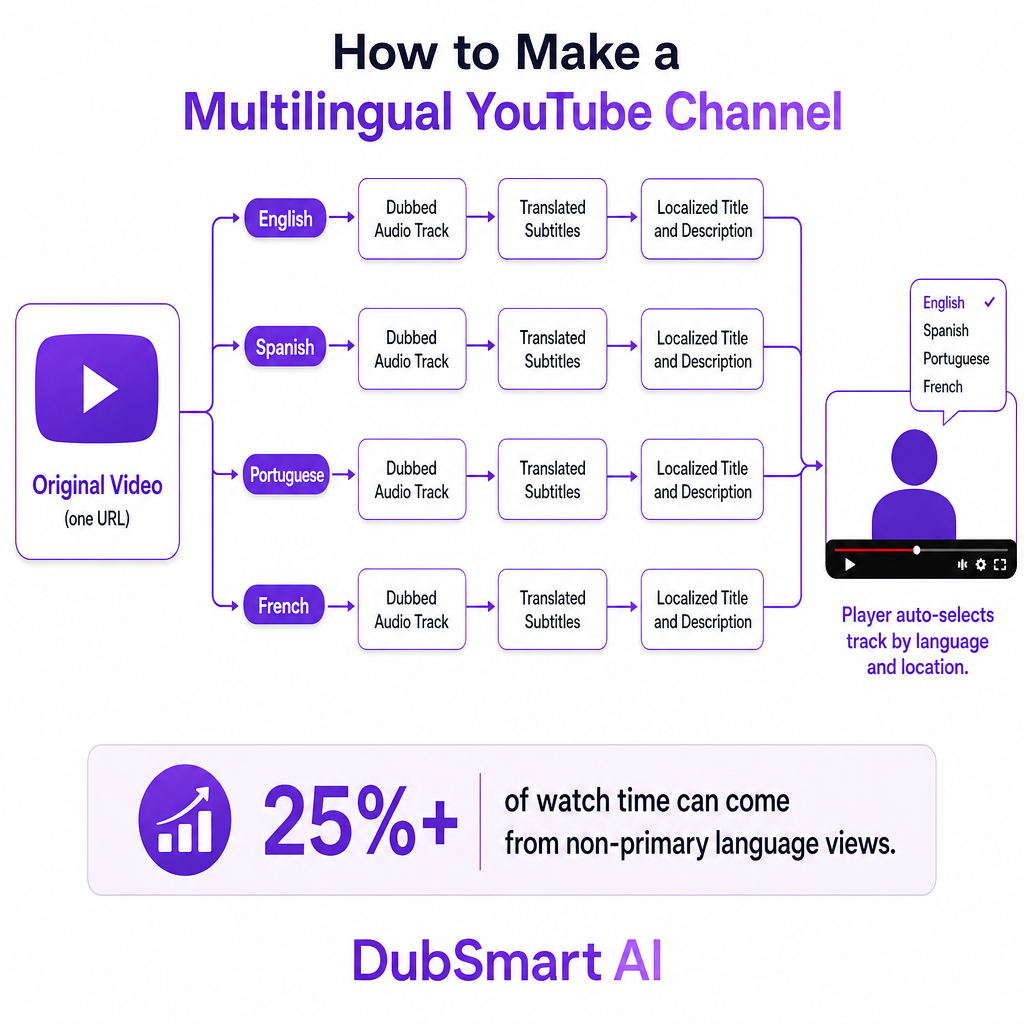
A multilingual channel is no longer a main channel plus a Spanish mirror channel. It is a single core channel where each video can offer different audio languages, subtitles, and metadata, so viewers get the right experience for their region on the same URL. YouTube's multi-language audio feature lets you upload additional audio-only tracks to one video, and viewers pick their preferred language in the player while YouTube surfaces the most relevant track by language and location.
The reach argument is concrete. YouTube reports that more than 25% of watch time can come from non-primary language views once creators add multi-language audio. Each track is uploaded as a separate audio file linked to the same video, and you can pair it with translated titles, descriptions, and subtitles so both human viewers and recommendation systems understand the localized version.
So when we talk about how to make a multilingual YouTube channel, the real decision is architectural: centralize every language on one global channel using multi-language audio and subtitles, or maintain separate regional channels with language-specific uploads. YouTube's own product direction favors the first path, and multi-language metadata is designed to keep catalog management simpler while opening more geographies.
One global channel or separate language channels
Before touching any tool, decide what multilingual should look like for your brand. There are two workable structures, and they suit different operations.
The first is one global channel with multi-language audio and subtitles. Each flagship video gets dubbed tracks for your priority languages plus translated titles, descriptions, and subtitles. Viewers stay on the same URL, which simplifies analytics and keeps subscriber growth and algorithmic momentum consolidated because all performance signals roll up to a single video. This suits you when you care most about pooling watch time and subscribers, when your content is evergreen and globally relevant, and when you can standardize a dubbing workflow so every major upload ships in multiple languages.
The second is multiple channels, one per language. You create separate channels and upload language-specific edits, often with localized thumbnails and metadata. This buys more editorial freedom per region but splits audience signals and multiplies channel operations. It makes sense when you plan meaningfully different content per market, when regional teams manage community and publishing, or when certain markets carry unique compliance or branding requirements.
For most creators, small businesses, and e-learning publishers, the single global channel is the more future-proof structure now that multi-language audio is widely supported. Reserve separate channels for cases where a genuine operational or editorial reason forces the split, not as a default reflex.
How YouTube handles audio, subtitles, and metadata
Whatever structure you choose, three native YouTube mechanisms define how a multilingual channel actually works.
The first is multi-language audio tracks. Eligible creators upload extra audio-only files per language for long-form videos or Shorts. In YouTube Studio on desktop, the Languages or Subtitles area lets you add languages and attach dubbed tracks. The technical rules matter: the file must be audio-only in a supported format, its length must closely match the source video so playback stays in sync, and each language links to the same video so views consolidate on one URL. To check access, open the Subtitles or Languages panel in YouTube Studio; if you see an option to upload a dubbed track, the feature is live on your account, and you can replace or delete tracks when a dub needs updating.
The second is subtitles and translated captions. Subtitles remain the default accessibility and localization layer. You can upload subtitle files or let YouTube autogenerate captions, then add translated versions per language. Paired with dubbed audio, strong subtitles help viewers follow complex content and give search and recommendation systems text signals for every language you support, which is exactly what you want for accurate transcripts feeding subtitle files.
The third is multi-language titles and descriptions. In the same Languages area you can add translated titles and descriptions tied to each audio track. Localizing this metadata alongside the audio matters because it improves click-through and discoverability for non-primary language audiences. Together, these three mechanisms are what make a channel genuinely multilingual: viewers hear content in their language, read matching subtitles, and see language-specific titles and descriptions, all on one video.
How we power the production side with DubSmart AI
Once you understand how YouTube expects multilingual content to be structured, the hard part is production: consistently generating high-quality dubbed audio and subtitles for every upload. That is the gap we built DubSmart AI to fill, consolidating AI Dubbing, Voice Cloning, Text to Speech, Speech to Text, Speech Separator, Text to Image, and Image to Video into one workflow so you are not stitching together several disconnected tools.
Our AI Dubbing localizes videos into 33 target languages from more than 60 input languages, and you can start from a YouTube link or a direct file upload, choose your output language, and generate a dubbed version with natural-sounding AI voices. Under the hood it combines automatic speech recognition and translation to extract and translate your script, then neural text-to-speech and voice cloning to render localized speech. When the dub is ready, you export an audio-only file per language and upload it to YouTube as a multi-language audio track, which closes the loop between AI production and YouTube's official feature.
Brand voice survives that trip. We offer 300+ natural-sounding voices and fast voice cloning from as little as 20 seconds of audio, so you can clone your own voice or a chosen brand voice and reuse it across every dubbed language. Localized intros, outros, and sponsorship reads can be produced in multiple languages without hiring separate voice talent per market, which keeps a recognizable sound as you expand.
Subtitles come from the same pipeline. Turning audio into accurate transcripts lets you translate and format subtitle files that stay consistent with what viewers hear, which is especially valuable for training, compliance, and educational channels where terminology has to be precise across languages.
For teams managing large catalogs, we expose developer APIs. The AI Dubbing API can automatically translate and dub videos into 33+ languages with voice cloning, while the Text to Speech API and Voice Cloning API allow programmatic generation and reuse of custom voices. That makes an automated pipeline realistic: pull new videos, send them through dubbing for selected languages, and route the resulting audio files back to YouTube as multi-language tracks through your own tooling. Agencies can package multilingual YouTube services for clients on top of this stack instead of rebuilding an AI layer from scratch.
On cost and scale, we use a credit-based model with rollover credits, a free tier for trials, and enterprise plans, which suits creators and small businesses that ramp up gradually rather than all at once.
Decision criteria for your channel strategy
Work from criteria, not from tools. These six questions shape a strategy that holds up as you grow.
| Decision area | The question to answer | Practical default |
|---|---|---|
| Language priority | Which 3-5 languages do your analytics and growth markets support? | Start with widely spoken languages, expand over time |
| Content quality | Which content can be fully AI-dubbed vs. needs human review? | Add review for training, compliance, and legal scripts |
| Channel architecture | Does any market truly need its own channel? | One global channel unless a real branding or ops reason exists |
| Workflow volume | Will manual dubbing become a bottleneck at your cadence? | Build a repeatable AI workflow, add API automation at scale |
| Brand voice | One global voice or region-specific voices? | Clone a consistent brand voice across languages |
| Risk and rights | Are your translations, timing, and voice consent covered? | Add QA and confirm rights before publishing |
Language priority sets the ceiling on everything else, so anchor it to real viewers rather than ambition. Content quality determines where automation stops and human review begins; casual entertainment tolerates full AI dubbing more comfortably than a compliance module. Channel architecture and workflow volume interact directly: high-volume series on a single channel are exactly where a standardized, partly automated pipeline earns its place. Brand voice and risk management are the trust layer, deciding how recognizable and how defensible your localized catalog is.
Risks and common pitfalls to plan around
A multilingual channel fails quietly when it is treated as a checkbox instead of a strategy. A handful of issues cause most of the damage.
Inconsistent or low-quality translations top the list. Automated translation without review can introduce errors that confuse or offend local audiences, so pairing transcripts with controlled dubbing and reviewing your most important videos reduces the exposure. Unsynced audio is next: if a dubbed track's length does not closely match the original, sync drifts and the viewing experience suffers, which is why YouTube requires audio files to be roughly the same length as the video.
Neglecting subtitles and metadata is a subtler trap. Uploading audio tracks without translated titles, descriptions, and subtitles leaves content harder to discover and harder to follow, undercutting the whole point of localization. Fragmented analytics is the strategic version of the same mistake: splitting languages across multiple channels without a clear reason dilutes watch time and growth signals that a single channel would consolidate.
Finally, voice rights and authenticity carry real reputational weight. Cloning voices without proper consent, or failing to disclose synthetic voices in sensitive contexts, invites ethical and legal problems. Keep cloning inside a clear rights-and-disclosure framework, and confirm you have permission for any voice you reproduce. Design around these risks and manage dubbing, cloning, and subtitles from one unified workflow, and most operational and reputational pitfalls become avoidable rather than surprising.
Frequently asked questions
Do I need separate YouTube channels for each language?
No. YouTube's multi-language audio and metadata features let you host multiple dubbed audio tracks and translated titles and descriptions on a single channel and video. Separate channels are only worth it when you want genuinely distinct editorial strategies per region.
How many languages can I add to one YouTube video?
YouTube allows multiple dubbed audio tracks per video, each tied to a language in the Languages or Subtitles area of YouTube Studio. In practice this supports robust multilingual setups with many language tracks on the same upload.
Is AI dubbing allowed on YouTube?
Yes. YouTube's multi-language audio feature lets creators upload their own audio tracks, whether recorded by humans or produced with AI tools, as long as the content complies with copyright and community guidelines. We generate those AI dubs before you upload them.
Can I keep my own voice in every language?
Yes. Our 300+ voices and voice cloning let you clone your voice from a short audio sample and reuse it across languages through Text to Speech and AI Dubbing, which keeps a consistent sonic identity worldwide.
What if my channel doesn't show the multi-language audio option yet?
Multi-language audio has rolled out to millions of creators but is still expanding, so some accounts won't see it in the Subtitles or Languages panel immediately. Until it appears, you can publish separate language versions as different uploads or on separate channels.