A dubbing AI voice changer does far more than swap one voice for another: it transcribes the original dialogue, translates it, generates a fresh performance in the target language, and can even keep the original speaker's identity, timing, and emotional style intact. That span of jobs is exactly why "which option should I use?" has no single answer. The right choice depends on what you need to preserve.
If you need the speaker to stay recognizable, voice-cloned dubbing fits. If you want fast, flexible narration, a stock AI voice is simpler to manage. If you want one repeatable brand voice across many projects, a custom voice clone is the asset to build. And if the use case is live conversation, a real-time voice changer belongs in a different category than any post-production dubbing tool. For most YouTube creators, e-learning teams, marketers, and independent producers, recorded AI dubbing is the practical starting point because it gives far more control than a live changer and can output multiple localized versions from a single master.
Table of contents
What a dubbing AI voice changer actually does
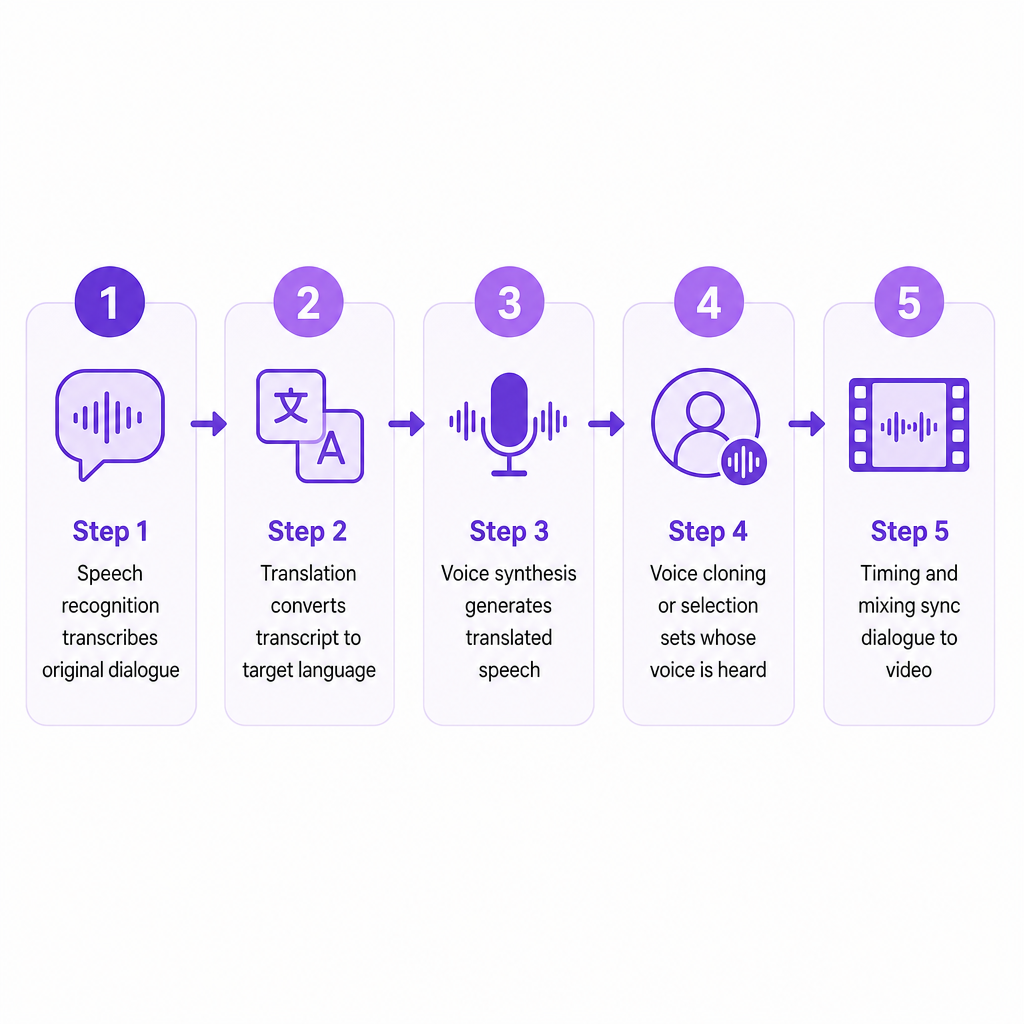
A dubbing AI voice changer changes both the spoken language and the voice of recorded audio or video. That is a chain of distinct technologies working in sequence, not a single effect. Speech recognition transcribes the original dialogue. Translation converts that transcript into the target language. Voice synthesis generates the translated speech. A cloning or selection step decides whose voice the audience hears. Finally, timing and mixing fit the new dialogue to the video, the speakers, and the background audio.
That sequence is what separates it from a conventional voice changer. A basic changer alters pitch, timbre, or character during a live call and never leaves the audio domain. A dubbing system has to understand speech, translate it, assign the right speaker to each line, and build a synchronized replacement track that lands inside the original scene.
Our AI Dubbing workflow accepts an uploaded audio or video file, or a YouTube link, then lets you edit speakers, text, and timings before downloading the result. It handles content from more than 60 source languages into 33 target languages, so the translation direction you need is usually covered before any voice decision is made. If you are new to the underlying concept, our complete beginner's guide to AI dubbing walks through the pipeline in more depth.
The four options, and who each one serves
There are four realistic approaches, and they diverge on one axis above all: whether you preserve the original speaker and whether translation is even part of the job.
Voice-cloned AI dubbing analyzes characteristics such as pitch, tone, accent, and speaking style, then generates translated speech using a synthetic version of the original voice. It is the closest fit when a recognizable person carries the content: YouTube channels built around a presenter, course instructors, brand spokespeople, consistent podcast hosts, films with recurring characters, and product demos where speaker continuity matters. Its strength is identity preservation across languages and a consistent voice for a multilingual library, which reduces the need to hire and coordinate voice actors. Its limits are real too. A poor source recording yields a poor clone, and accents, emotion, overlapping dialogue, music, and background noise all degrade quality. The speaker's permission and commercial rights must be settled first, and a cloned voice can sound less natural when the translated line carries very different timing or emotional intent.
Stock-voice AI dubbing assigns a selected synthetic voice to each speaker or narration track instead of cloning the source. It suits cases where the original speaker does not need to stay recognizable: a brand wanting one consistent narrator across many videos, source audio too noisy to clone cleanly, explainer and onboarding content, or early testing of several voice styles before committing. It is also the safer path when you simply do not have permission to replicate a person's voice. The trade-off is that the localized version may feel less tied to the original content.
Custom voice cloning is created once and reused across text-to-speech narration, dubbing, training material, and other approved content. Unlike cloning a voice separately for every video, this builds a reusable voice asset. It fits a marketing team that wants the same brand voice in product videos, help-center content, e-learning modules, social adaptations, multilingual announcements, and audio versions of written content. A custom clone needs clear ownership rules: who may use it, which languages and channels are permitted, whether external agencies get access, and what happens if the speaker withdraws consent.
Real-time AI voice changing modifies speech as it is produced or transmitted, prioritizing low latency so the audience hears the changed voice live. It is the right tool for live calls, streams, gaming, virtual events, and interactive demos, but rarely the right tool for polished multilingual localization. Real-time systems have little room to revise translations, correct timing, remove errors, or fine-tune individual segments, and they can introduce latency or artifacts. Our explainer on the real-time AI voice changer covers where that latency trade-off becomes a hard limit.
| Option | Best for | Preserves original identity? | Translation included? | Main risk |
|---|---|---|---|---|
| Voice-cloned dubbing | Presenter-led multilingual content | Yes | Yes | Unauthorized or unnatural replication |
| Stock-voice dubbing | Explainers, training, brand narration | No | Yes | Voice can feel disconnected from source |
| Custom voice clone | Reusable brand or creator voice | Yes | Usually, per workflow | Consent, licensing, access control |
| Real-time voice changer | Live streams, calls, gaming | Sometimes | Not necessarily | Latency, artifacts, limited correction |
| Human dubbing with AI assist | High-stakes film and advertising | Can be arranged | Yes | Higher cost, longer timelines |
How to choose without over-indexing on voice realism
The most common mistake is picking a tool because a short voice preview sounds impressive. A realistic sample means little if the finished dialogue does not fit the scene. Work through the decision in order.
Start with the identity requirement. Ask whether viewers need to hear the original speaker's recognizable voice. If yes, use voice-cloned dubbing or a pre-approved custom voice. If no, a stock voice is faster, simpler, and easier to govern. A language teacher expanding a YouTube channel benefits from a clone of the instructor's voice; a software company translating a generic product tutorial usually prefers a professional stock narrator.
Match the tool to the content format. Short-form content, podcasts, tutorials, and product videos often work well with automated dubbing. Closer review is warranted when a project involves multiple speakers, frequent interruptions, jokes or idioms, strong regional accents, music over dialogue, emotional acting, rapid dialogue, or legal, medical, and financial terminology.
Evaluate language coverage by direction rather than by headline count. A tool may list English, Spanish, and French as targets while offering different voice quality or dialect coverage in each direction. Confirm whether the platform detects your source language automatically, supports the regional accent you need, preserves names and terminology, handles mixed-language speech, produces subtitles or audio only, and allows several target languages in one project. Our consumer-facing AI Dubbing supports more than 60 source languages and 33 target languages, while our API documentation separately describes 33-plus target languages and processing from 99-plus source languages, so verify the applicable product or plan before committing to a large job.
Check timing and synchronization. A translated sentence is rarely the same length as the original, so a quality system should let you adjust segment start and end times, speech rate, pauses, speaker assignment, background volume, and individual regenerated lines. For lip-focused content, inspect mouth movements and scene timing by hand; a natural voice can still look mismatched if the translation runs too long or the generated pauses drift from the picture.
Consider production volume. A single occasional video is fine in an online studio. A channel, agency, or software product localizing continuously should look for batch or multi-language support, reusable custom voices, project editing, API access, downloadable segments, usage monitoring, commercial-use terms, and dependable support. If you are deciding between a stock voice and cloning for narration specifically, our comparison of TTS versus voice cloning for narration maps that choice in detail.
Quality and rights risks to check before you publish
Automated dubbing is a production accelerator, not a replacement for editorial judgment. A handful of risks deserve a direct check on every project.
Translation can be accurate word by word and still miss context, humor, cultural references, or the intended formality. Review names, measurements, calls to action, product terms, and safety instructions with a fluent speaker. Voice and emotion can also diverge: a cloned voice may keep vocal characteristics without reproducing the exact acting performance, so verify that emphasis, urgency, warmth, and pauses still fit the scene.
Background conditions matter for accuracy. Cloning and transcription are most reliable with one clear speaker, while music, room echo, sound effects, and overlapping dialogue reduce transcription and speaker-assignment quality. On the rights side, never clone a voice just because you can access a recording. Obtain permission from the speaker and document the intended use, languages, channels, duration, and commercial rights, which is especially important for actors, employees, public figures, customers, and deceased individuals.
A realistic voice sample is the easiest thing to evaluate and the least reliable predictor of a usable result.
Audience trust is the last layer. Some platforms and audiences expect disclosure when realistic synthetic media is used, and even where it is not strictly required, transparency reduces confusion and protects credibility. Before release, have a reviewer listen to the finished track, compare it against the source, confirm the translation, and inspect synchronization.
Where DubSmart fits in this workflow
We combine AI Dubbing, voice cloning, and Text to Speech in one platform rather than forcing a separate tool at each stage. Our AI Dubbing product supports automated localization, cloned speakers, editable segments, timing changes, and line-level regeneration, so you can correct a single off sentence instead of rebuilding a whole project.
Our voice cloning workflow accepts a minimum 20-second audio sample, and the resulting voice becomes available for both Text to Speech and AI Dubbing, which is what makes one approved brand voice reusable across many languages and formats. A clean recording without background noise produces the best clone, and we treat consent and responsible use as a requirement rather than an afterthought.
For teams building localization into software or an internal production system, we also offer an AI Dubbing API with multilingual projects, custom voices, speaker controls, and segment-level editing, alongside file upload, project creation, target-language selection, regeneration, and result downloads. The strongest fit is never decided by the most dramatic voice effect. It comes down to whether a workflow can deliver the language direction, identity, synchronization, editorial control, rights management, and production scale your content actually needs. If you know your source language, target languages, and whether you need the original voice preserved, that answer usually becomes obvious quickly.
Frequently asked questions
Is a dubbing AI voice changer the same as a regular AI voice changer?
No. A regular AI voice changer usually modifies a voice in real time or alters vocal characteristics. A dubbing AI voice changer translates recorded speech and builds a replacement performance that must fit the original content, speakers, and timing.
What is the best option for YouTube creators?
Voice-cloned AI dubbing is usually strongest when the creator's identity is central to the channel. A stock voice is often better for anonymous narration, explainers, or content where speed and consistency matter more than speaker identity.
Can DubSmart clone a voice from a short recording?
Yes. Voice cloning requires at least 20 seconds of audio, and a clean recording without background noise produces the best result. The cloned voice can then be used in Text to Speech and AI Dubbing.
Should I use real-time voice changing for video localization?
Usually not. Real-time changing fits live calls, streams, and interactive experiences. For multilingual videos, recorded AI dubbing gives far more room to translate, edit, synchronize, and review the final result.
Do I need permission to clone someone's voice?
Yes. Obtain appropriate permission and confirm commercial rights before cloning or distributing a recognizable person's voice, and make sure consent covers the intended languages, content, channels, and duration of use.