
A course recorded in one language can reach far more learners the moment its instruction is available in theirs. AI dubbing for e-learning courses uses speech recognition, translation, voice synthesis, and audio-video timing to build localized versions of lessons you already own, without re-recording every language by hand. The real decision is rarely whether to "use AI." It is which dubbing approach fits the course, how much human review each lesson needs, and whether a no-code workflow or an API integration suits your production model.
Our AI Dubbing platform was built for exactly this work. It accepts uploaded audio or video files and YouTube links, supports content from more than 60 source languages into 33 target languages, and lets you edit speakers, text, timestamps, speech rate, and individual regenerated segments before you download the finished project. The guide below walks through how the process works, how to choose between stock voices and voice cloning, where the real risks sit, and how to judge whether a dubbed course is ready to publish.
Table of contents
What AI dubbing actually does to a lesson
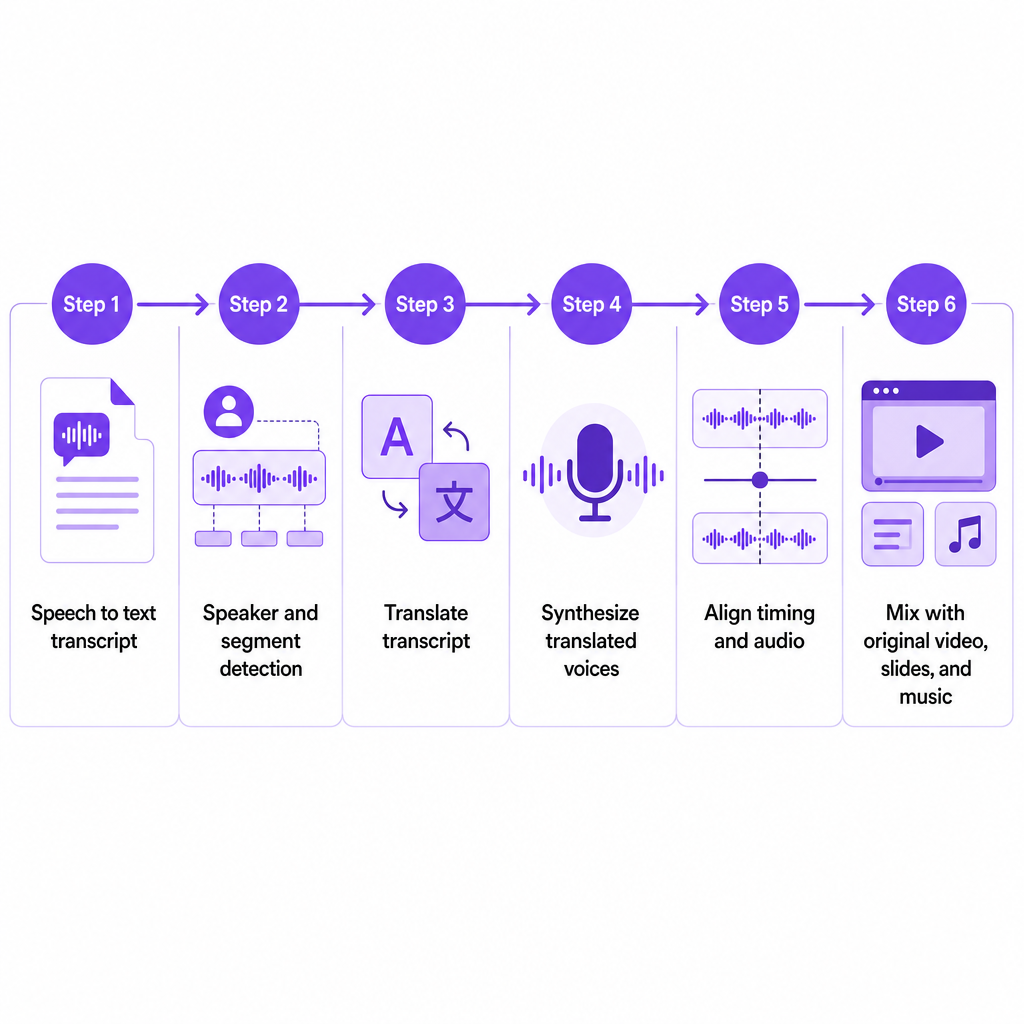
AI dubbing creates a spoken version of educational content in another language using artificial intelligence. For a course, the system typically converts the original speech into text, identifies speakers and segments, translates the transcript, generates translated speech with synthetic voices, aligns the new audio to the lesson's timing, and combines it with the original video, slides, music, or background audio.
The difference from subtitles matters for learning. Dubbing lets a learner listen to instruction in their preferred language while watching the same demonstration, screen recording, diagram, or instructor footage. Attention stays on the screen rather than splitting between the visual and a line of text at the bottom.
Our AI Dubbing workflow is designed to preserve the original tone, emotion, and context, and to align audio with a speaker's lip movements and expressions. Those are production goals, not a substitute for review: technical terminology, pronunciation, and on-screen demonstrations still deserve a quality pass before a course goes live.
Why course teams reach for dubbing
Dubbing pays off most when you already own valuable video content and need to widen its language coverage. A single English course can be adapted for Spanish-speaking learners in the United States, Portuguese-speaking learners in Brazil, French-speaking learners in Canada, or employees spread across international offices. Our AI Dubbing covers 33 target languages from more than 60 source languages, and for integrated pipelines the AI Dubbing API can detect more than 99 source languages and generate output in 33 or more target languages.
Consistency is the second reason. A carefully selected synthetic voice, or a cloned instructor voice, keeps one narration style across a library, which matters when learners move between modules, instructors, or product-training lessons. A cloned voice can also preserve a recognizable instructor identity across languages, provided you have permission to clone and use that speaker's voice.
Speed is the third. Product training, compliance lessons, and software tutorials change often. Because our workflow supports segment editing and regeneration, a team can modify the translated text, adjust timestamps, and regenerate only the changed segment rather than commissioning a fresh recording for an entire course. That turns a quarterly re-record into a targeted edit.
Dubbing also supports accessibility goals by reducing language barriers for learners who understand a second language better than the course's original. It complements captions, transcripts, and accessible navigation, but it does not replace them. Learners who are deaf or hard of hearing, or who simply prefer text, still need captions and transcripts as part of a complete plan. For a broader view of the moving parts, our video localization checklist for teams maps the elements beyond audio.
Inside the dubbing pipeline
The quality of a localized course depends on far more than translation. Each stage carries meaning, speaker identity, timing, and instructional clarity forward, and errors early in the chain compound.
Speech recognition creates the source transcript first, and that transcript becomes the basis for every later step. Names, acronyms, formulas, product terms, and specialist vocabulary deserve particular scrutiny here, because a misheard term propagates into the translation and the final narration.
Translation then adapts the lesson. A literal translation can be grammatically correct yet unsuitable for teaching. Course teams should review technical terms, examples and cultural references, units of measurement, formality and learner age, regional vocabulary, instructions that refer to visible interface labels, and any text shown on slides or screen recordings. A software course often needs the translated narration to match the exact label displayed in the localized interface; a generic term for the same button will confuse learners mid-task.
Voice synthesis converts the translated script into speech. You might use a stock AI voice, assign different voices to different speakers, apply a cloned instructor voice, or generate newly written sections with Text to Speech. Our voice-cloning tool needs at least 20 seconds of relatively clean audio and performs best with samples free of background noise; the speaking style in the sample also shapes the result, so a monotone sample tends to produce flatter, less expressive narration.
Timing and audio alignment come next, because translated sentences are often shorter or longer than the original. A usable review checks whether the narration finishes before the next visual change, whether demonstrations stay synchronized with the spoken instruction, whether pauses give learners time to absorb a point, whether new audio overlaps music or sound effects, and whether the lesson still fits its expected seat time. Our editor exposes controls for segment timestamps, speech rate, track timing, background volume, and regeneration of individual segments to tune exactly these issues.
Finally, the localized lesson is reviewed and exported. The reviewer should understand both the target language and the subject matter, because a native speaker without domain knowledge can miss a technical error, while a subject expert without language fluency can miss a translation problem. The completed project is then downloaded in your chosen format.
Stock voice or cloned instructor voice
This is the choice that most shapes how a dubbed course feels, and it turns on identity and consent rather than audio alone.
A stock voice fits when the original instructor does not need to stay recognizable, when you would rather not collect and store voice samples, when the narrator is a voice actor whose identity is not central to the brand, when you want to test demand before a larger localization investment, or when the content is mostly instructional and does not depend on personal delivery.
Voice cloning fits when the instructor's voice is part of the course identity, when you need consistent narration across a large catalog, when you hold explicit permission to create and use the clone, when the source recording is clean and expressive, and when you can review pronunciation and emotional tone in every target language. A created clone works across both voice cloning and AI Dubbing, and our cloning service supports multilingual synthetic speech while emphasizing consent and protecting the identity of the original voice owner.
Consent should be documented before you upload an instructor's recordings. Confirm permitted uses, territories, duration, languages, commercial rights, and the procedure for withdrawing or deleting the voice. Treat that record as a prerequisite, not paperwork to chase afterward.
Matching the approach to the course
The right configuration depends on your production model, audience, and risk level rather than a single default.
| Course situation | Recommended approach | Why |
|---|---|---|
| Short, low-risk intro lesson | Stock AI voice plus human review | Fast localization without collecting samples |
| Course led by a recognizable instructor | Authorized voice cloning | Keeps a consistent instructor identity across languages |
| Multiple instructors or characters | Speaker-based voice assignment | Helps learners tell speakers apart |
| Compliance, medical, legal, or safety course | AI draft plus expert and language review | Accuracy and liability outweigh speed |
| Frequently updated software course | Segment-level editing and regeneration | Makes targeted updates practical |
| Large course catalog | API or batch-oriented workflow | Supports repeatable, integrated production |
| Course with heavy on-screen text | Dubbing plus translated captions and visuals | Audio alone will not translate slides or interface |
Our API documentation covers multilingual project creation, speaker management, translated-segment editing, timing changes, regeneration, status checks, and result retrieval, with examples for JavaScript/Node.js, Python, cURL, and PHP. That matters most for the larger-catalog and frequently-updated rows, where repeatability beats manual uploads.
A quality standard before you publish
Before a dubbed course ships, judge the localized version against five concrete areas rather than a general impression.
Meaning. Does the translation preserve the instructional objective? Check warnings, definitions, examples, calls to action, and assessment instructions specifically, since these carry the most consequence if they drift.
Terminology. Are product names, acronyms, job titles, interface labels, and industry terms used consistently? A short glossary of recurring terms prevents the same concept appearing three different ways across modules.
Voice quality. Does the narration sound natural at normal playback speed? Listen for unnatural pauses, misplaced emphasis, mispronunciation, or emotion that clashes with the lesson's intent.
Synchronization. Does speech match the visuals? A learner should never hear "click the Settings button" after the demonstration has already moved to another screen.
Learning experience. Is the localized lesson understandable and sensibly paced? Test it with a target-language learner rather than relying on an internal production review alone.
The most revealing pilot is one complete module, not an isolated sentence. A full module surfaces problems with terminology consistency, speaker changes, quizzes, screen demonstrations, and navigation references that a single line will never expose.
Risks you still have to manage
AI dubbing reduces production effort; it does not remove editorial responsibility.
Translation errors appear with ambiguous terms, abbreviations, idioms, and specialized concepts, which is why human review is especially important for medical, financial, legal, safety, and compliance training. Pronunciation is a related trap: names, acronyms, code, equations, and brand terms may need phonetic guidance or regenerated audio.
Voice-consent problems are the sharpest risk. Cloning an instructor, employee, customer, or actor without documented authorization can create privacy, contractual, reputational, and legal exposure. Our voice-cloning page addresses consent and responsible use, but it is not a substitute for your own course-specific consent and licensing procedure.
Cultural mismatch is subtler. A technically correct translation can still carry an unsuitable example, joke, image, or level of formality, so localization should account for the target audience, not only the target language. Timing changes add another constraint: translated speech is often longer than the source, and stretching audio too far sounds unnatural while compressing it too hard hurts comprehension.
Two scope issues are easy to forget. On-screen content stays untranslated unless you handle it separately: slides, diagrams, buttons, captions, downloadable documents, quizzes, and screen-recorded interfaces all need their own localization. And synthetic-voice disclosure is a policy decision worth making deliberately, especially when a cloned voice is involved, since telling learners that narration was AI-generated can support transparency and trust.
When API integration earns its place
A no-code interface suits a small team localizing individual lessons from time to time. API integration becomes the better fit when a business needs to localize many lessons repeatedly, trigger dubbing from an internal content-management system, store project IDs and output files automatically, process several target languages in one request, regenerate only updated segments, connect localized media to an LMS or content pipeline, and apply internal approval and quality-control stages.
Picture a software company with a 12-module English course for new customers, where each lesson pairs a screen recording with an instructor voiceover, product terminology, on-screen interface labels, and knowledge-check questions. A sensible plan starts with one target language chosen by learner demand, a glossary for product and interface terms, and either an authorized instructor clone or a professional stock voice. The team dubs one complete module, reviews the transcript and translated segments with a target-language product expert, confirms the narration matches each screen action, adds captions, translates the quiz text, tests with representative learners, and measures completion, quiz performance, and support questions before localizing the rest.
For the full catalog, the company can connect that workflow to the API. The documented pattern uploads a file through a presigned URL, creates a project with multiple target languages, checks project status, edits segments, and retrieves the result. Before integrating, confirm authentication, file limits, output handling, error states, data retention, and how generated media is stored; the public API page documents a 5 GB maximum file size, common video and audio formats, and the available endpoints, but validate current terms with us before production deployment.
Is AI dubbing worth it for e-learning
AI dubbing is a strong choice when a course owner has reusable video content, a multilingual audience, and a need to expand or update localized content efficiently. It is weakest as a fully unattended process for high-stakes instruction, where a single mistranslation carries real consequence.
The dependable pattern is hybrid: AI handles transcription, translation, voice generation, and production speed, while human reviewers validate terminology, cultural fit, pronunciation, synchronization, and instructional accuracy. Start with one representative module, run it through the quality standard above, and let the results decide your rollout pace. Our AI Dubbing platform supports uploaded media and YouTube links, multilingual output, voice cloning, editing, timing controls, and downloadable projects, so you can test the full workflow on a single lesson before committing a catalog.
Frequently asked questions
Can AI dubbing translate an entire online course?
It creates localized audio for your course videos, but a complete localization usually also requires translating captions, slides, quizzes, downloadable resources, interface text, and learner instructions as separate elements.
How many languages does DubSmart support for AI dubbing?
Our AI Dubbing covers content from more than 60 source languages into 33 target languages, and the API can process more than 99 source languages and dub into 33 or more target languages. Confirm the current language list for your specific course before production.
Can I use my instructor's voice?
Yes, when you have the instructor's permission and suitable audio. Voice cloning needs at least 20 seconds of relatively clean audio, and the created voice can be used for both Text to Speech and AI Dubbing.
Is AI dubbing suitable for compliance or safety training?
It can speed production, but high-stakes lessons should be reviewed by both a qualified subject-matter expert and a fluent target-language reviewer before release.
Does dubbing translate text shown on the screen?
Not automatically in every case. Spoken narration, captions, slides, interface labels, quizzes, and downloadable documents should each be treated as a separate localization task.
What is the best first project?
Choose one complete module with representative speakers, terminology, visuals, and assessments, then use it to evaluate translation quality, voice naturalness, timing, learner comprehension, and the human review effort required.