Choosing between dubbing vs subtitles for video rarely comes down to picking a universal winner. It comes down to matching the format to your audience, your goals, your platform, and your budget, while staying accessible and easy to scale. For most creators and teams, the strongest strategy is a deliberate mix of both, backed by tools that make switching between formats effortless as each market proves itself.
Video localization means adapting dialogue, on-screen text, graphics, and cultural references so a new audience can fully understand and enjoy your content. Two translation formats do most of the heavy lifting: subtitles keep the original audio and add translated text on screen, while dubbing replaces the spoken dialogue with a new audio track in the target language, often timed or lip-synced to the picture. There is also a related but distinct layer worth naming early: captions provide a text version of both speech and key non-speech audio, and they are required for accessibility in many situations. Subtitles that only translate dialogue are not the same thing. Keeping those three ideas straight is what stops teams from making an expensive format mistake.
Table of contents
What subtitles actually do
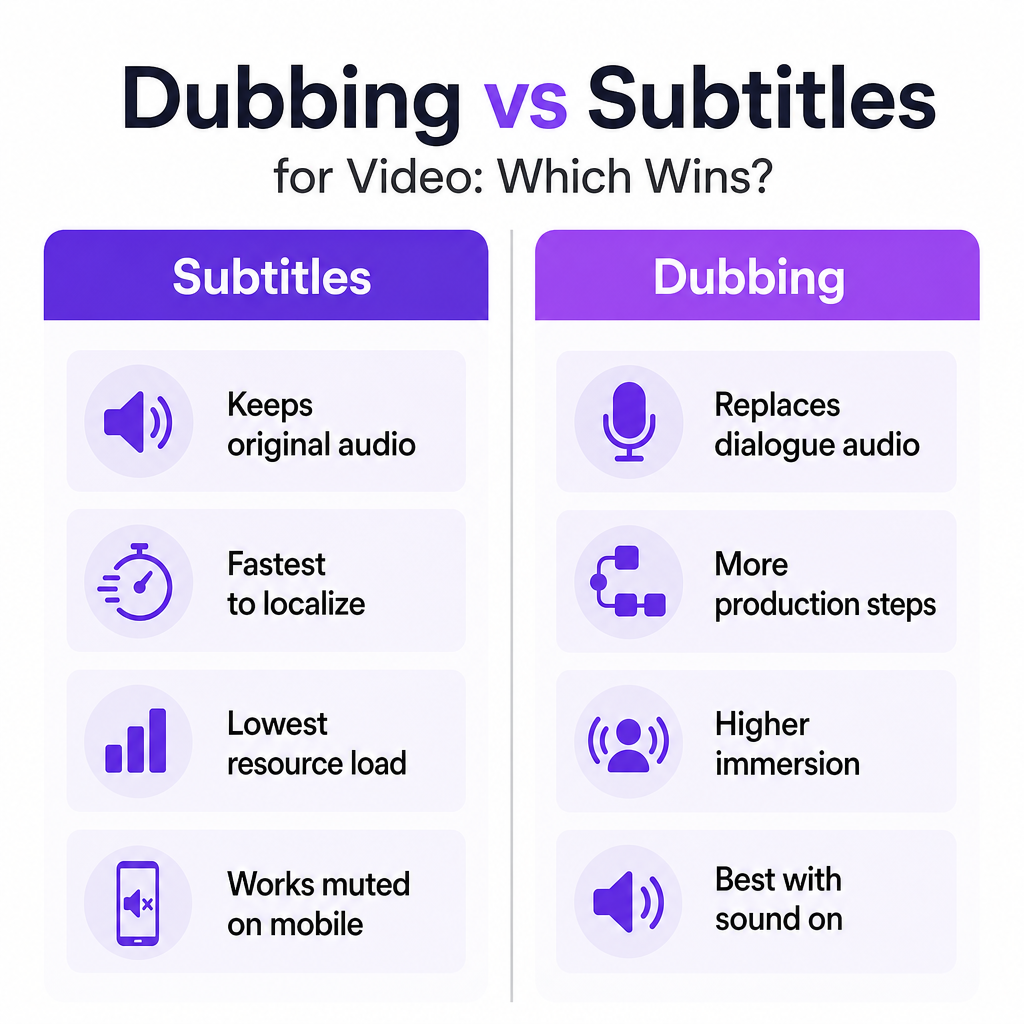
Subtitling places a written translation of the spoken dialogue on screen at the same time as the audio. The original soundtrack stays intact: the voice, the music, and the sound design remain exactly as produced. That preservation is the whole point for many projects.
Subtitles are widely considered the quickest way to expand reach into new language markets, because only the text needs translating and timing rather than a full audio production. They fit corporate videos, marketing explainers, and educational material well when keeping the original voice is preferred. They are commonly the right call when viewers can hear the audio but simply need a translation, rather than a full accessibility accommodation.
There is a craft to doing them well. Effective subtitles follow usability standards such as a maximum reading speed (often around 160-180 words per minute), limits on characters per line, a minimum on-screen duration, and adequate color contrast so they stay readable across devices. Skip those constraints and subtitles turn into a liability: poorly timed or visually cluttered text raises cognitive load and can pull down completion rates and watch time. The format is cheap to produce and easy to get wrong, which is why quality control matters more than most teams expect.
What dubbing actually does
Dubbing replaces the original spoken dialogue with a recorded voice track in another language. The new audio is timed, and often lip-synced, to align with the video, while music, ambient noise, and effects usually carry over from the original mix. The result is a viewing experience that can feel native to the audience.
Dubbing gives you a fully localized audio experience and is the standard for movies, TV, anime, and high-engagement online video. It is generally perceived as more immersive than subtitles because viewers focus on the visuals instead of reading text, which matters most for storytelling and entertainment where emotional resonance drives the outcome.
The trade-off is effort. Dubbing is more resource-intensive than simple subtitling because it involves script adaptation, voice selection, recording or AI voice generation, timing, and a final mix. That is real work per language. What has changed is the timeline: modern AI dubbing and voice cloning compress production compared with traditional studio workflows, so the cost and speed gap that once made dubbing a luxury has narrowed considerably.
Criteria-by-criteria comparison
The formats diverge along a handful of criteria that actually decide most projects. This table maps each one against both options so you can see the trade-off rather than a verdict.
| Criteria | Subtitles | Dubbing |
|---|---|---|
| Audience & accessibility | Translate dialogue as text while keeping original audio; good for hearing viewers who don't speak the source language. On their own, they do not meet full accessibility needs for Deaf or hard-of-hearing viewers. | Replace dialogue with translated audio; helps viewers who prefer listening in their language, but still not a substitute for captions for Deaf or hard-of-hearing users. |
| Viewing experience | Preserve authentic voices and performance but require constant reading, which can reduce immersion for fast-paced or visually dense content. | Let viewers experience content in their language without reading, often producing stronger immersion for storytelling and entertainment. |
| Speed & time-to-market | Typically the fastest way to localize, since only text needs translating and timing. | Requires script adaptation and voice production; historically slower, though AI dubbing shortens timelines significantly. |
| Cost & resources | Generally the most cost-effective option, especially for testing markets or supporting many languages on a limited budget. | Higher resource requirements from recording and audio work; AI dubbing lowers overhead but still adds steps over basic subtitling. |
| Platform & context | Ideal for muted autoplay environments and mobile social feeds where viewers often watch without sound. | Best for sound-on contexts such as long-form video, streaming apps, and premium experiences. |
| Brand & creative control | Maintain the original brand voice and performance; useful when the spokesperson or narrator is central to identity. | Allow full linguistic and tonal adaptation with locally appropriate voices while preserving music and structure. |
Decision thresholds: choosing without guessing
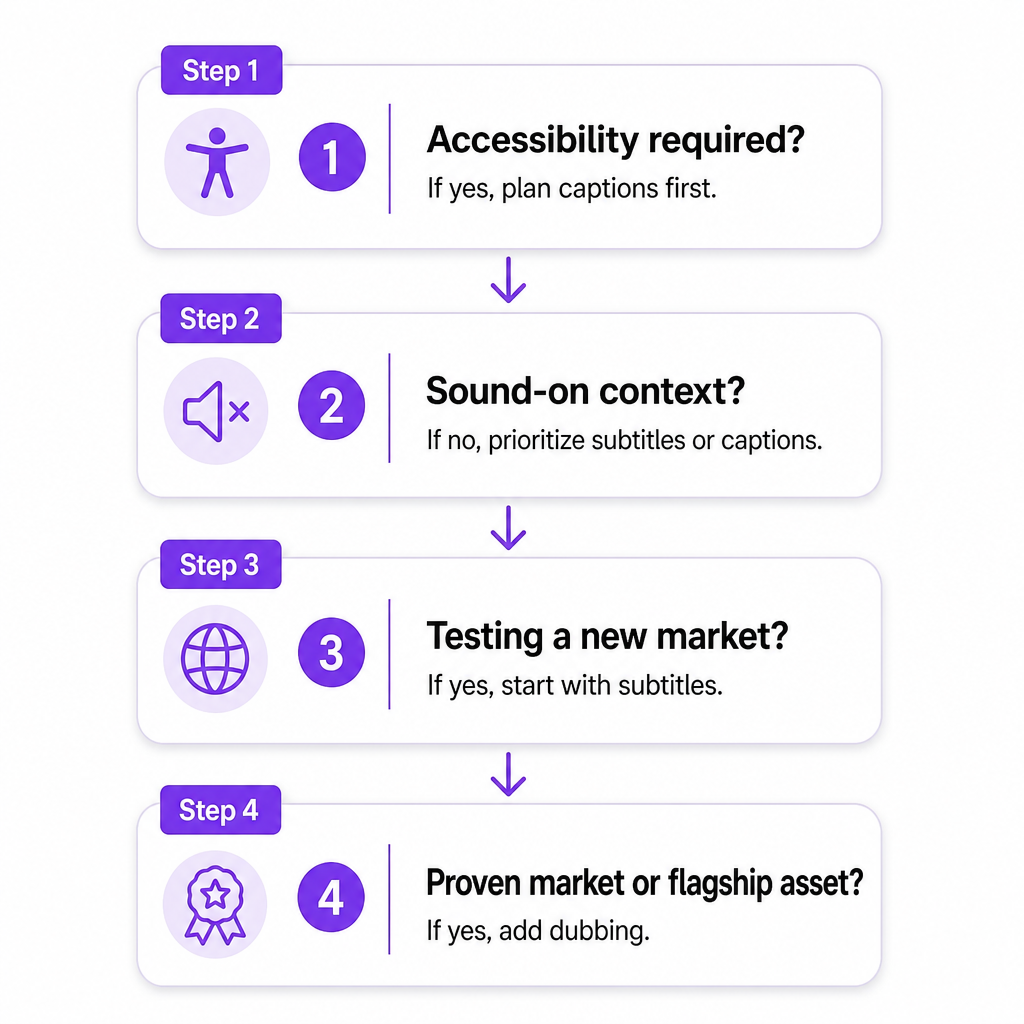
Instead of debating preferences, run your project through four thresholds. Each one can be answered with a fact about your content, not an opinion.
Compliance and accessibility. Widely referenced accessibility guidance holds that synchronized captions are necessary so Deaf and hard-of-hearing audiences receive a text version of speech and key non-speech audio. Subtitles that only translate dialogue are not equivalent to full captions and may fall short of accessibility expectations or internal policy. The threshold is blunt: if your content must meet accessibility policies or serve audiences with hearing impairments, captions are mandatory, and neither subtitles alone nor dubbing alone is sufficient.
Engagement versus authenticity. Dubbing often creates a smoother, more immersive experience because viewers engage as if the content were originally produced in their language. Yet some audiences strongly prefer original audio with subtitles to preserve authenticity, particularly in film and creator-driven formats. If emotional resonance and ease of consumption matter more than preserving the original performance, dubbing is favored. If the original voice is central to the work, subtitles are the safer choice.
Speed, budget, and scalability. Subtitles are consistently the fastest and most cost-effective way to localize across multiple markets, while dubbing demands more per language but delivers higher perceived production value. So if you are testing new languages or running lean experiments, subtitles usually come first. Once a market shows traction or a series becomes a flagship asset, dubbing becomes far easier to justify.
Platform behavior. On social feeds and mobile, users frequently watch with the sound off, which makes subtitles or captions essential. On premium and long-form streaming, audiences expect fully localized audio. If the primary consumption context is muted or mobile, on-screen text is non-negotiable; if it is lean-back viewing with sound on, dubbing carries more weight.
Scenarios by audience type
Thresholds get concrete once you apply them to a real workflow. Here is how the choice tends to land across the audiences we work with most.
YouTube creators. Launching a new language on a limited budget favors subtitles: they let you test demand quickly without touching the original voice track. Once an established series shows a strong foreign-language following, adding dubbed tracks can lift watch time and retention for viewers who prefer listening over reading. Our AI Dubbing tool, together with Speech to Text transcription and Voice cloning, lets you move from subtitle-first experiments to fully dubbed multilingual channels using one core workflow rather than a stack of disconnected apps.
Small businesses and marketing teams. For campaign videos, product demos, and testimonials, subtitles keep the original spokesperson and brand voice intact while offering translations to prospects and partners. For evergreen brand films and high-stakes launches, dubbing delivers native-language performance in each market without a reshoot, which is especially valuable when the creative is expensive or hard to reproduce. Because we consolidate dubbing, voice cloning, text-to-speech, and transcription in one place, a small team can run subtitle-first pilots and dubbed premium versions without piecing tools together.
E-learning and corporate training. Training video has to stay clear and easy to follow over long runtimes. Subtitles help multilingual staff who already understand the source language, while dubbing can reduce cognitive load when learners need to listen rather than read. Accessibility guidance also stresses captions and transcripts in training material. Using Speech to Text alongside dubbing and text-to-speech, producers can generate transcripts, localized subtitle files, and dubbed tracks from the same base content to serve different regions and standards.
Filmmakers and podcasters. For narrative work, subtitles preserve the original performances but can distract during visually rich or fast-cut scenes. Dubbing offers deeper immersion but demands careful voice direction to avoid tonal mismatch. Voice cloning and AI dubbing let creators produce dubbed versions that match character intent without a separate recording session for every language.
Developers and agencies. APIs for dubbing, text-to-speech, and voice cloning let product teams build localization directly into their pipelines, powering features like play-in-my-language or auto-localized training hubs. Our AI Dubbing API supports that integration so agencies can standardize their dubbing versus subtitle logic across every project instead of rebuilding it each time.
When subtitles, when dubbing, and when neither is enough
Lean toward subtitles when you need fast, repeatable localization across many languages on a constrained budget, when your content depends on the original voice for brand identity or artistic intent, when distribution is mostly mobile or social where viewers watch muted, or when you are running market tests and want a low-commitment way to measure demand before investing further. This is the path where you generate transcripts and translated text first and add audio replacement only where a market earns it.
Lean toward dubbing when your content is narrative, entertainment, or high-value marketing where immersion drives return, when you already see strong demand in a market and want to remove reading friction, or when you want localized voices that better match local expectations while preserving your visuals and structure. Fast voice cloning from short samples, a large voice library, and broad language coverage make it realistic to roll dubbed tracks out at scale rather than one artisanal project at a time.
Neither alone is enough in three cases. Accessibility-critical content needs captions synchronized with audio plus transcripts, not just translated subtitles or dubbed audio. Deep localization requires changing graphics, on-screen text, and examples to fit local culture, which may mean re-recording or substantially adapting the video. And highly specialized or regulated material may demand both dubbed audio and localized captions for clarity and compliance. For these layered jobs, our broader toolkit, including Speech Separator and Image to Video, supports multi-layer localization rather than a single subs-versus-dubs decision.
Choose a path, then plug into one workflow
A workable sequence keeps the decision from stalling. First, decide whether your next project prioritizes speed and coverage, which points to subtitles, or immersive local experience, which points to dubbing. Second, map your accessibility obligations: if captions are required, plan them first and layer subtitles or dubbing on top. Third, keep the strategy flexible by running transcription, translation, voice cloning, dubbing, and visual adaptation through a single platform, so you can shift formats as each market teaches you what it wants.
If you want the wider context behind these format choices before you commit, our explainer on what media localization involves sets the foundation, and how AI localization works shows what happens under the hood once you start producing at scale.
Frequently asked questions
Do accessibility expectations allow subtitles alone instead of captions?
No. Subtitles that only translate dialogue are not equivalent to captions, which provide synchronized text for speech and key non-speech audio. Guidance for accessible multimedia emphasizes captions for Deaf and hard-of-hearing users, plus a transcript where possible.
Is dubbing enough to make my videos accessible?
Dubbing helps with language comprehension but does not address viewers who cannot hear the audio. For accessibility you still need captions that represent speech and important sounds, and in many cases an accompanying transcript.
Which format is better for social media and mobile feeds?
On platforms where videos autoplay muted, subtitles or captions are critical because users rely on on-screen text to follow along. Dubbing improves the experience when sound is on, but it cannot replace text in muted environments.
Does dubbing always increase watch time compared with subtitles?
Not always. Dubbing tends to be more immersive and can improve engagement for entertainment and storytelling, but some viewers prefer original audio with subtitles for authenticity, and results vary by genre and audience.
Are there technical standards my subtitles should follow?
Common standards include a reading speed limit around 160-180 words per minute, a character count per line, a minimum display time, and sufficient color contrast against the background. Following them improves usability and reduces viewer fatigue.
Can one platform handle both subtitles and dubbing?
Yes. We built DubSmart as an all-in-one media creation and localization platform combining AI Dubbing, Voice Cloning, Text to Speech, Speech to Text, Speech Separator, Text to Image, and Image to Video in one workflow, so you can start with subtitles, add dubbed tracks as markets prove themselves, and maintain accessibility layers without stitching separate tools together.