
An AI dubbing API is the difference between dubbing one video by hand and building dubbing directly into whatever you already publish. In plain terms, it is a developer interface that lets an application send a video or audio file, choose one or more target languages and voice settings, and get back a localized version through API requests instead of a human clicking through a dashboard. So the real question behind what is an ai dubbing api is rarely just about definitions. It is whether you need an occasional dubbing tool, or whether localization has to happen repeatedly, at scale, and inside your own product or content pipeline.
This guide is the hub for the developer side of that decision: what a dubbing API actually does, how its workflow is structured, how it differs from a plain text-to-speech call, and how to judge whether one is worth wiring into your stack. Where it helps, we point to our deeper walkthroughs instead of repeating them here.
Table of contents
What a dubbing API actually does
A dubbing API bundles several media-processing steps that would otherwise require separate tools. From a single pipeline it handles speech recognition to catch the spoken words, transcription into text, translation into a chosen language, speaker detection and separation, voice selection or cloning, speech synthesis in the new language, timing and synchronization, and finally rendering a localized video or audio file for download.
That bundling is what separates it from a basic text-to-speech API. A Text to Speech API begins with text you already have and returns audio. A dubbing API begins with recorded media and owns the entire localization chain around it, so your application never has to stitch transcription, translation, and voice generation together itself. If you only ever feed in a finished script, a text-to-speech call is the lighter choice; if you start from existing footage, the dubbing API is doing far more under the hood.
The four layers of a dubbing workflow
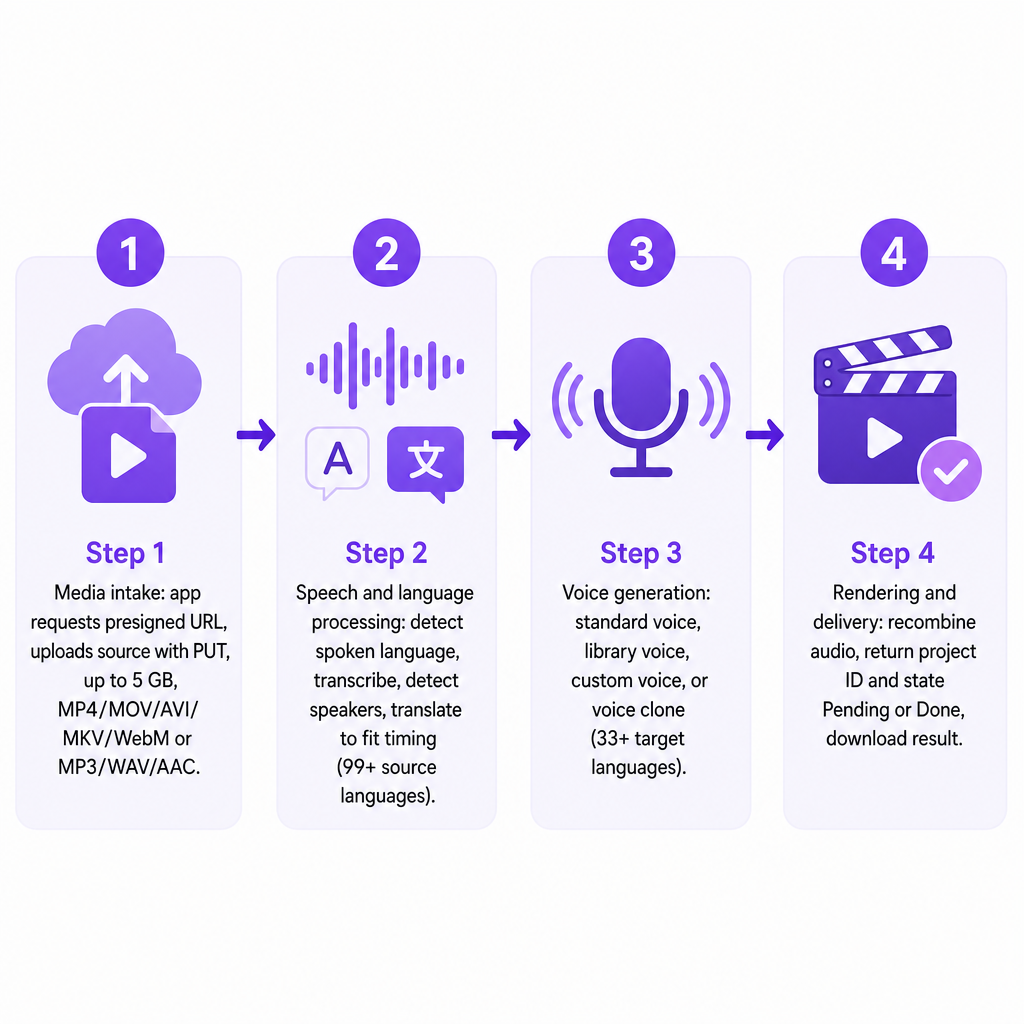
Implementations differ, but almost every API-based dubbing flow breaks into four logical layers, and understanding them tells you where things can go right or wrong.
Media intake. Your application sends the source file to the service. Some APIs accept a direct upload; others use a public media URL or a temporary upload link. Our published workflow uses a presigned upload URL: the application requests the URL, then uploads the file with a PUT request. Our documented API accepts common video formats such as MP4, MOV, AVI, MKV, and WebM, plus audio formats including MP3, WAV, and AAC, up to a 5 GB maximum file size.
Speech and language processing. The service works out what was said, which language was spoken, when each phrase lands, and who is speaking, then translates the transcript to fit the available timing. This is the layer where human review still pays off for names, technical terms, jokes, cultural references, and brand language.
Voice generation. The translated text becomes speech using a standard synthetic voice, a library voice, a custom voice, or a clone of the original speaker. Our AI Dubbing API supports voice cloning intended to preserve tone, pitch, accent, and speaking style across 33+ target languages, with source-language detection for 99+ source languages. Cloning is not automatically the right choice: a native target-language voice can sound more natural to some audiences, while a cloned voice gives a recurring presenter or educator stronger continuity.
Rendering and delivery. The API recombines generated speech with the original media and returns a dubbed video, separate audio, or individual segments. Our workflow creates a project, returns a project ID and a processing state such as Pending or Done with progress information, and exposes downloadable result URLs once rendering finishes.
API versus the dashboard dubbing tool
An online dubbing tool is built for a person at a screen: upload, pick settings, review, download. A dubbing API is built for software, so a developer can connect dubbing to a video-upload platform, a content or learning management system, a localization pipeline, a YouTube production workflow, a mobile or web app, or an agency's batch system. The underlying AI can be identical; the control and the experience are not.
The choice usually comes down to frequency and where the work lives.
| Use case | Better starting point |
|---|---|
| Dub one video occasionally | Web-based dubbing tool |
| Localize every new upload | Dubbing API or automated integration |
| Add language selection inside an app | Dubbing API |
| Produce a few training videos | Web-based tool unless automation matters |
| Process many files or languages repeatedly | Dubbing API |
| Test voice quality before building | Web-based tool or small API pilot |
If your answer is "I dub videos by hand now and again," start in the browser with AI Dubbing and only move to the API once the volume justifies engineering time.
Why dubbing is a job, not an instant call
Transcription, translation, synthesis, synchronization, and rendering all take real time, often longer than a normal web request will wait. A production integration should treat dubbing as an asynchronous job rather than a function that instantly returns a finished video.
The reliable pattern is: submit media and settings, receive a project or job ID, check status later or accept a completion notification if webhooks exist, retrieve the finished media and related files, then handle failed jobs, retries, and expired download links. Our public API documents project creation, project states, progress tracking, and status retrieval by project ID, and a single request can carry multiple target languages, creating grouped projects for languages such as Spanish, French, and German at once.
When you compare providers, the headline language count matters less than these operational details. Check for polling, webhooks, retry guidance, idempotency, and clear failure states, because those are what keep a pipeline stable in production.
Dubbing API or separate speech APIs
A dubbing API is an end-to-end localization product: you hand it media and get back another language with minimal orchestration. Separate APIs make sense when you need to own more of the chain yourself. Use a Speech to Text step to transcribe without translating, a translation step on an existing transcript, a text-to-speech step to narrate a finished script, a Voice Cloning API to create and reuse a custom voice, or a Speech Separator to isolate speech from music before processing.
The decision rule is simple. Reach for the integrated dubbing API when speed and simplicity win. Reach for separate services when you need to control the transcript, translation memory, voice pipeline, timing model, or final rendering layer. Many teams start integrated and only break the pipeline apart once a specific stage, usually translation review or audio mixing, becomes a bottleneck.
What you can control through the API
The settings a dubbing API exposes decide how much polish you can achieve without leaving the pipeline. Useful API-level controls include source language or automatic detection, one or more target languages, voice selection and cloning, speaker count and speaker-to-voice assignment, background volume, editable translation text, segment timing, subtitle generation, regeneration of selected segments, and output format and download options.
Our published examples include voice retrieval filtered by language, gender, and accent; custom-voice retrieval; speaker management; segment editing; background-volume adjustment; and regeneration of an entire project or only selected segments. That last capability earns its keep: when a single name, sentence, pronunciation, or translation is wrong, segment-level regeneration lets you fix that slice instead of re-rendering the whole video. Without it, a one-word correction can cost you a full render.
How to evaluate a dubbing API before you build
A proof of concept that dubs one clean clip tells you almost nothing about production reliability. Pressure-test seven areas before you commit engineering time.
Language coverage. Ignore the raw total and check the exact languages and regional variants your audience needs. Can it detect the source language? Are dialects and the required writing system supported? Are voices available in every target language, and are capabilities identical for cloning and standard voices? We publicly advertise 33+ target languages and 99+ source languages, including English, Spanish, Portuguese, French, German, Chinese, Japanese, Korean, Russian, Arabic, and Hindi; confirm the current list and voice availability before you depend on it.
Voice quality and identity. A perfect translation still fails if the voice sounds flat. Test short and long sentences, questions, fast speech, pauses, multiple speakers, emotional delivery, proper names, and the same speaker across several videos. If you clone a voice, confirm you have documented permission to clone and distribute it, especially for commercial work and recognizable people.
Translation and editing controls. Look for a way to review and correct the translated script before final rendering, with segment-level editing so one sentence or timing range can change without a full regeneration.
Input and output limits. Check maximum file size and duration, supported formats, URL versus file upload, output formats, download-link expiration, retention policies, and batch limits. Our published page lists a 5 GB maximum file size and supports common video and audio formats.
Integration design. A usable API is more than one endpoint. Review authentication, upload handling, project creation, status retrieval, error states, retries, pagination, voice discovery, segment editing, result downloads, usage reporting, and webhooks or another completion mechanism. Keep credentials on your server, never in browser or mobile-app code.
Cost model. Real cost depends on source duration, number of target languages, speaker count, cloning, re-rendering, storage, transcription usage, API calls, and priority processing. Do not assume one dubbed minute equals a full localization project; estimate the number of rendered language versions, revisions included. Our public API page describes the feature set but does not publish API pricing there, so request current commercial terms before you budget.
Privacy, rights, and security. Before sending media to any third party, clarify retention periods, whether files train models, where data is processed, how deletion works, who owns generated audio, what rights apply to cloned voices, whether commercial use is permitted, and whether enterprise controls exist. An API cannot make an unauthorized recording, script, performance, or voice legally usable; you need the rights going in.
Risks and when an API is the wrong call
Automation scales mistakes as efficiently as it scales output, so know the failure modes. AI translation can miss context, humor, idioms, or cultural references and still sound fluent. Translated speech is often longer or shorter than the original, which creates unnatural pauses, rushed delivery, or overlaps. Cloned voices can lose emotional detail or pronunciation, and degrade with noisy audio, overlapping speakers, music, or very short samples. Music and effects reduce transcription and speaker-separation accuracy, so cleaner source audio produces better results. Cloning without consent creates real impersonation risk, which is why documented authorization and restricted access to custom voices matter.
An API is the wrong call when you only need one short video, when the content demands nuanced acting, when the source recording is noisy or poorly separated, when you need a dialect the API does not support, when your organization cannot send media to an external processor, or when every line requires professional linguistic and performance review. The most dependable setup is usually hybrid: automate transcription, translation, voice generation, and rendering, then put a person on the script and final audio before anything publishes, and keep that review checkpoint mandatory for education, advertising, healthcare, finance, and legal content.
Where the DubSmart AI Dubbing API fits
Our AI Dubbing API is built for teams that localize media often enough to justify an integration rather than manual dubbing. The published API covers 33+ target languages, detection and processing for 99+ source languages, voice cloning to preserve speaker characteristics, multiple target languages in one project request, presigned file uploads, bearer-token authentication, project creation and status retrieval, speaker and segment editing, selective regeneration, video and audio downloads, common format support, a 5 GB maximum file size, and commercial use across its plans.
If you are mapping this against the wider API landscape, our What Is a Voice AI API? A Beginner's Guide frames the five API types, and What Is a Text to Speech API and How Does It Work? covers the narration-only case. When you are ready to wire it up, the AI Dubbing API page carries the current examples and capabilities. For a quick-start pattern on a neighboring service, our walkthrough on how to integrate a Voice Cloning API shows the upload-create-generate rhythm you will recognize in dubbing too.
Frequently asked questions
What is an AI dubbing API?
It is a software interface that translates spoken media and generates dubbed audio or video automatically, usually combining transcription, translation, voice synthesis, synchronization, and media rendering in one workflow.
Is an AI dubbing API the same as text to speech?
No. Text to speech converts supplied text into audio. A dubbing API starts with recorded video or audio and manages transcription, translation, voice generation, and synchronization around it.
Can an AI dubbing API clone the original speaker's voice?
Some can. Our published AI Dubbing API includes voice cloning intended to preserve the original speaker's characteristics in the target language, subject to documented consent.
Can I dub a video into several languages at once?
Some APIs support multiple target languages in a single project request. Our published workflow shows one request creating grouped projects for Spanish, French, and German.
What does an application receive after submitting a dubbing job?
Typically a project or job identifier first. The application then monitors processing and retrieves the completed video, audio, transcript, subtitles, or segments once they are ready.