
A voice cloning API is a developer interface that turns a permitted audio sample into a reusable synthetic voice, so an application can send text—or run an automated dubbing job—and get back new speech that resembles the original speaker. Instead of picking a fixed voice from a catalog, your code creates a voice identity tied to a unique ID, then reuses it across scripts, products, and languages. That one shift—from selecting a voice to programmatically owning one—is what makes this technology interesting for creators, brands, and developers building at scale.
The short answer to what is a voice cloning api is this: it exposes three connected capabilities—audio upload, voice creation, and voice generation—as endpoints your software can call. Understanding how those pieces fit together is what separates a smooth production pipeline from a frustrating one, so the rest of this explainer walks through the mechanism, the trade-offs, and the rights questions you need to settle before a single file goes live.
Table of contents
What a voice cloning API actually does
A voice cloning API exposes cloning as a programmable service rather than a manual feature buried inside an audio editor or a web dashboard. Your application uploads a sample, the provider converts it into a custom voice with its own ID, and from then on that ID becomes the handle you pass into text-to-speech or dubbing requests.
The pattern is consistent across providers: audio sample becomes a custom voice ID, which becomes new speech from text or a translated script, which becomes a finished audio file. The machine-learning work—analyzing tone, pronunciation patterns, pitch range, rhythm, and timbre—happens behind the endpoint, and the resulting voice model can speak a brand-new script while keeping recognizable qualities of the reference speaker.
One distinction matters more than any other. The API does not replay the original recording; it synthesizes fresh speech. A cloned voice can say words that were never in the source sample, which is exactly why it is powerful and why it carries responsibility.
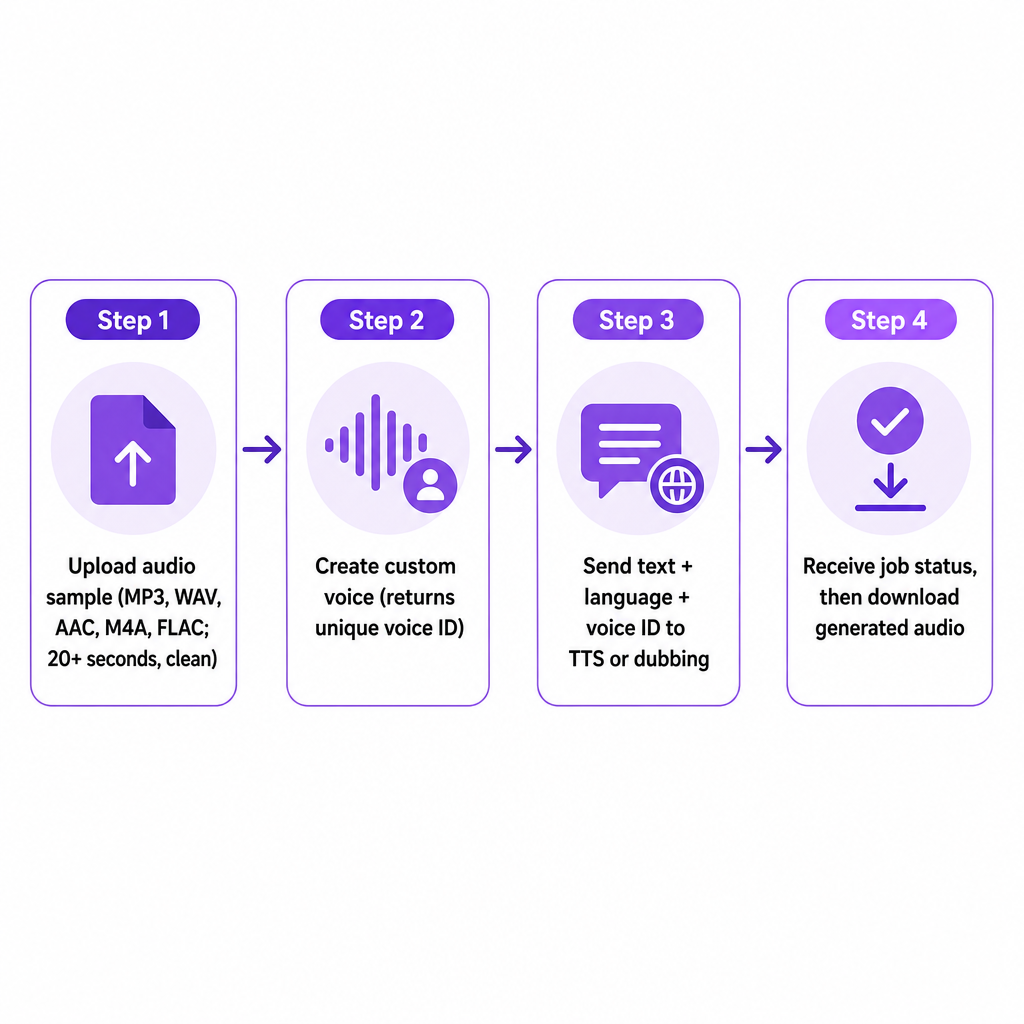
How voice cloning works behind the API
Providers implement the model differently, but most systems share the same broad stages, and knowing them helps you design a reliable integration.
First, the system receives a voice sample. Developers commonly upload through a presigned upload URL, which lets the application send the file directly to storage instead of stuffing a large audio payload inside the voice-creation request. Clean source audio is important here because the model can learn unwanted sounds along with the speaker: music, room echo, multiple overlapping speakers, distortion, and aggressive noise reduction all reduce the consistency of the clone. Our Voice Cloning API documents support for MP3, WAV, AAC, M4A, and FLAC, and recommends at least 20 seconds of audio without background noise for the best result.
Second, the provider creates a custom voice. After upload, the application submits the stored file location and a name, and the service returns a voice object with an identifier. That identifier is the key to everything that follows—your application stores it alongside a user, project, character, or brand record in its own database. Our documentation follows this pattern with a create endpoint, plus endpoints to list custom voices with pagination and to delete a custom voice by ID.
Third, the application generates new speech. Once the custom voice exists, your code sends text, a language, and the custom voice ID to a text-to-speech endpoint. The service returns a project or job identifier; the application then polls the job status until processing completes and retrieves the resulting audio URL. Our TTS API documents project-based generation with pending, processing, completed, and failed statuses, and exposes voice, language, speed, and pitch values at the individual segment level.
If you want the deeper mechanics of the generation side, our explainer on what a text to speech API is and how it works breaks down the synthesis pipeline that a cloned voice ultimately drives.
Voice cloning API versus text-to-speech and dubbing APIs
These three APIs are related but solve different problems, and mixing them up leads to the wrong architecture.
| API type | Main input | Main output | Best suited to |
|---|---|---|---|
| Text-to-speech API | Text plus a selected voice | Synthetic speech | Narration, alerts, assistants, scripted audio |
| Voice cloning API | Audio sample | Custom voice ID | Creating a reusable voice identity |
| AI dubbing API | Video or audio plus language settings | Translated, dubbed media | Multilingual video and audio localization |
In practice, a voice cloning API rarely works alone. The cloning endpoint creates the voice; a text-to-speech endpoint uses that voice ID to speak new text. The same voice ID can also flow into a dubbing workflow, where the system translates the original dialogue and generates the translated performance in the chosen custom voice. We describe our custom voices as usable in both TTS and AI Dubbing projects, which is what lets one 20-second sample serve narration and localization from the same identity. For the dubbing-specific architecture, see our companion explainer on what an AI dubbing API is, and for the broader family of voice endpoints, our guide to what a voice AI API is.
What you can build with it
A voice cloning API earns its place when the same voice must be generated repeatedly, across many scripts, products, or languages. A few concrete patterns show where it fits.
A YouTube creator can record one voice sample and reuse the resulting voice for localized versions of videos, generating narration for different language markets without re-recording every script. The clone does not remove the need for translation review—names, idioms, jokes, and cultural references still need a human check—but it removes the recording bottleneck.
A company can create a consistent narrator for product explainers, onboarding videos, ads, and help content, rather than assigning a different voice to every campaign. The practical move before production is a voice-use policy: which departments may use the voice, which content needs approval, and whether synthetic narration must be disclosed.
Training teams gain the ability to update lessons quickly when a policy, product detail, or procedure changes, keeping continuity across a large course library. For sensitive subjects, human review stays essential, because a generated voice sounds confident even when the script is wrong. Podcast producers can hold a consistent host or character voice for intros, corrections, summaries, or alternate-language editions, which is useful when a small edit would otherwise require a whole new session. And developers building games, educational apps, accessibility tools, or guided experiences can make the voice part of an existing workflow instead of exporting audio by hand for every response.
How to evaluate a voice cloning API
The right provider depends on your production requirement, not on how polished a single demo sounds. Work through the dimensions below before you commit.
Audio-input requirements. Confirm supported file formats, minimum or recommended sample length, whether multiple speakers are rejected, how background noise is handled, whether uploads are accepted directly, and whether reference files can be deleted after cloning. We list MP3, WAV, AAC, M4A, and FLAC as supported formats and recommend a clean sample of at least 20 seconds.
Voice quality and consistency. Test the voice with more than one sentence. Include short and long sentences, numbers and dates, proper names, questions and exclamations, technical vocabulary, and words that are hard to pronounce. A clone that charms in a short demo can wander in long narration or an unfamiliar language.
Language and localization support. If multilingual output is the goal, verify supported source and target languages, whether the custom voice can speak each one, accent and pronunciation behavior, and whether the voice stays recognizable across languages. Our TTS API publicly states more than 300 AI voices across 33+ languages and dialects, including English, Portuguese, Spanish, French, German, Chinese, and Japanese. We do not publish a complete language catalog on that page, so confirm the exact voice-and-language combination before you lock a production workflow.
API architecture. A production-ready API should give predictable handling for authentication, uploads, voice creation, listing, deletion, project status, retries, validation errors, pagination, audio retrieval, and usage monitoring. We show Bearer-token authentication in our examples and document both voice-management endpoints and project-based TTS processing.
Synchronous versus asynchronous generation. Short requests may return quickly, but longer content is better handled as a job: submit request, receive a job ID, poll or receive status, then download audio. An asynchronous design stops a web request from timing out while a long narration or a large batch of segments renders. Our TTS documentation uses project statuses and progress values, and the completed project returns an audio URL along with per-segment audio URLs.
Output and editing controls. Check the output format and quality, whether sample rate is configurable, whether speed and pitch adjust, whether individual segments can be downloaded, whether a failed segment can be regenerated without rerunning the whole project, and whether audio URLs are temporary or permanent. We document MP3 output at 22 kHz for the TTS API and expose speed and pitch controls at the segment level.
Deletion and data controls. A provider should let you remove the uploaded reference audio, the generated custom voice, generated audio files, and associated project data. Our Voice Cloning API includes a delete endpoint for custom voices and states that users can delete custom voices and associated audio. Review current privacy terms and retention commitments before uploading confidential or commercially sensitive recordings.
Rights, impersonation, and responsible use
Cloning a voice is a rights, privacy, and impersonation decision as much as a technical one, and treating it only as code is how teams get into trouble.
Start with permission. Use a recording only when you have the right to clone and use that speaker's voice. For a business workflow, written consent should address creation of a synthetic voice, commercial use, languages and territories, license duration, advertising and political content, training and customer-service uses, whether the voice may be sublicensed, and how it will be deleted or retired. Finding a recording online does not grant you the right to clone it.
Guard against impersonation, because a synthetic voice can make a fraudulent request sound believable. The FTC has warned that scammers may clone a relative's or executive's voice to pressure people into sending money or sharing information. Sensible safeguards include restricting who can create or access a custom voice, requiring approval before publishing generated audio, logging generation activity, separating development and production credentials, applying rate limits, blocking high-risk content categories, and requiring a second verification channel for financial requests.
For US audiences, outbound calling adds legal weight. The FCC states that AI-generated voices fall under the Telephone Consumer Protection Act's restrictions on artificial or prerecorded voices, and such calls generally require prior express consent unless an exception applies. A voice cloning API is not a license to automate telemarketing, debt collection, political calls, or identity-sensitive communications. You can read the FCC's ruling on AI-generated robocall voices and the FTC's consumer alert on voice cloning directly.
Finally, cloning changes delivery, not truth. A realistic voice makes an inaccurate statement sound authoritative, so review names and numbers, translations, any medical, financial, or legal claims, product instructions, pronunciation, timing, and on-screen text before release. For multilingual video, check both the translated script and the final audio—a good clone cannot rescue a mistranslation.
Is a voice cloning API right for your project?
A voice cloning API is a strong fit when you need the same voice across many files, you already have a reliable text, translation, or media pipeline, you want programmatic generation rather than occasional manual exports, you hold documented permission to use the reference voice, you produce localized or personalized content at scale, and you can test and review generated audio before release.
A preset TTS voice may serve you better when speed, simplicity, and low legal risk outweigh brand continuity. A professional voice actor is often the right call for flagship campaigns, nuanced performances, sensitive topics, or work that needs full human direction. For teams that need both custom voices and localization in one place, we present cloning, TTS, and AI dubbing as connected API capabilities: our Voice Cloning API builds a custom voice from a sample, and our TTS API uses voice IDs to generate speech inside a project workflow. When you are ready to wire it up, our walkthrough on how to integrate a voice cloning API covers the upload-create-generate steps in detail.
The most useful evaluation is a controlled test: use a clean, permitted sample, generate the same script in your intended languages, inspect quality and latency, verify the API's lifecycle and deletion controls, and require human approval before anything publishes.
Frequently asked questions
Is a voice cloning API the same as an AI voice generator?
No. An AI voice generator typically lets you pick an existing synthetic voice and generate speech from text. A voice cloning API creates a custom voice from an audio sample, which you can then reuse for generation.
How much audio is needed to clone a voice?
Requirements vary by provider and model. We recommend at least 20 seconds of clean audio and support MP3, WAV, AAC, M4A, and FLAC input formats.
Can a cloned voice speak another language?
Sometimes. It depends on the provider's model, its supported languages, and the voice's ability to transfer across languages. Verify the exact voice-language combination rather than assuming every clone works equally well everywhere.
Can I use a cloned voice for AI dubbing?
Yes, when the provider connects cloning with dubbing. We allow custom voices to be used in AI Dubbing projects by referencing the voice ID.
Is voice cloning legal?
The technology itself is not automatically illegal, but using someone's voice without authorization can create privacy, publicity-rights, contract, fraud, and consumer-protection problems. Obtain permission, follow applicable laws, and avoid deceptive impersonation.