A speech separator is used to pull a spoken voice out of a messy recording—away from traffic, music, room echo, or a second person talking—so you end up with a cleaner voice track you can transcribe, edit, dub, or reuse. That single job sits underneath a surprising number of everyday production tasks. A YouTuber strips street noise out of an interview. A podcast producer rescues dialogue recorded in a busy café. A marketing team prepares a clean sample before cloning a voice. The tool does one thing well, and understanding exactly what that thing is keeps you from asking it to perform jobs it was never built for.
Think of it as a cleanup layer rather than a creation layer. It does not translate, it does not generate new narration, and it does not disguise a speaker. It takes audio that already contains speech and gives you that speech with less interference around it. Everything below walks through where that actually helps, how the underlying model approaches the problem, and when you should reach for a different tool instead.
Table of contents
How a speech separator actually works
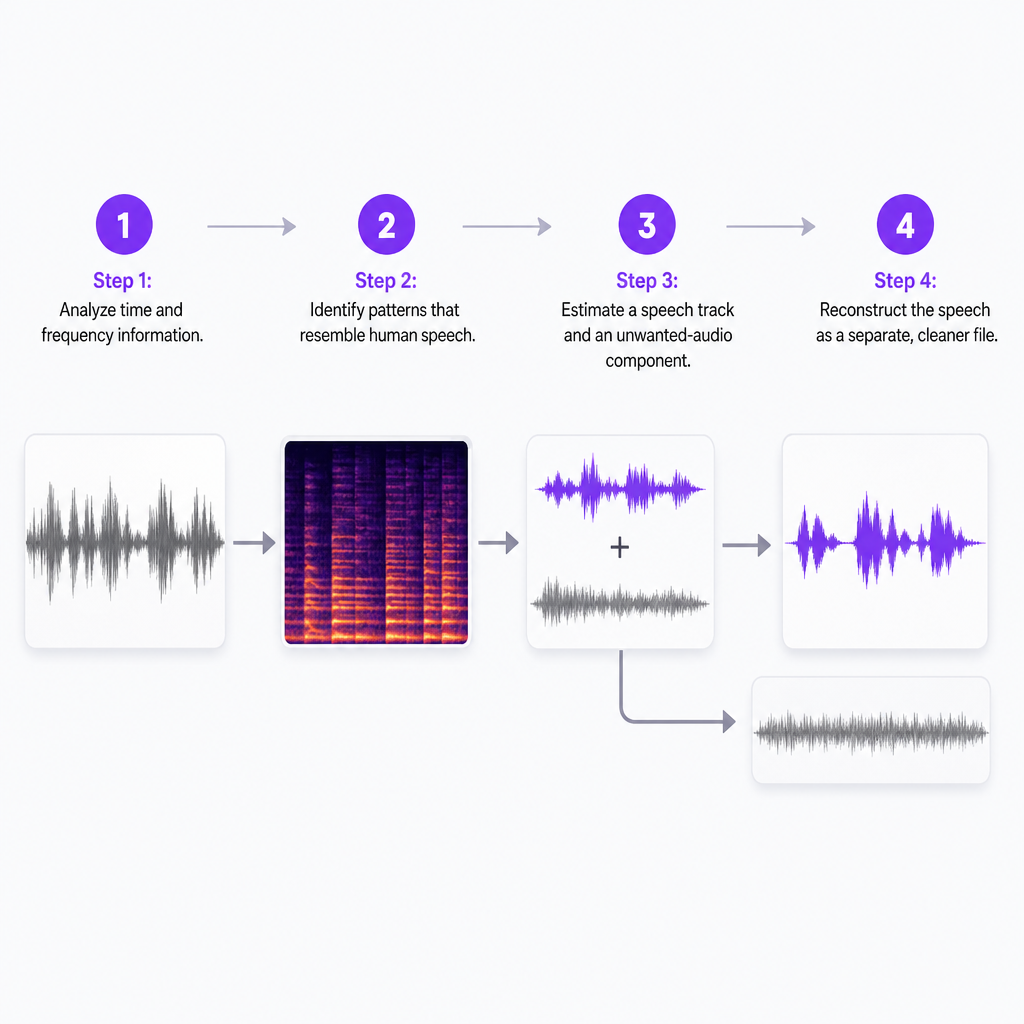
Underneath the button is an AI model trained to recognize the patterns that mark human speech and distinguish them from everything else in the mix. It reads the recording's time and frequency information, estimates which parts of the signal are voice and which are unwanted sound, then reconstructs the speech as a separate, cleaner file. Many systems use a mask-based approach: speech-related portions of the signal are allowed to pass while other elements are reduced. More advanced pipelines stack noise suppression, speaker separation, and dereverberation together. Microsoft research describes real-time single-channel systems that combine these stages to pull multiple speakers out of noise and reverberation.
The important caveat lives in the word reconstruct. The output is not the original clean recording you wish you had captured. It is an AI estimate of what the speech should sound like with the interference gone, so complex mixtures can produce artifacts—metallic tones, dropped consonants, warbling, or unnatural transitions. Performance also drops in realistic far-field and reverberant conditions, as speech-separation research on real-world recordings documents. The farther the microphone sat from the speaker and the more the room echoed, the harder the model's job becomes.
Separation versus noise removal: why the label matters
These terms get used interchangeably, but the task you actually need changes which tool fits. Noise removal lowers unwanted background sound. Speech enhancement makes an existing voice easier to understand. Speech separation pulls the voice out of a genuinely mixed signal. Speaker separation goes a step further and tries to produce distinct tracks when two people talk at once. And vocal separation splits musical stems, which is a different discipline aimed at songs rather than dialogue.
| Task | Main purpose | Example |
|---|---|---|
| Noise removal | Reduce unwanted background sound | Lowering traffic or air-conditioner hum |
| Speech enhancement | Improve speech intelligibility | Making a quiet interview easier to hear |
| Speech separation | Extract speech from a mixed signal | Isolating dialogue from music or ambience |
| Speaker separation | Give each speaker a distinct track | Splitting two people talking over each other |
| Vocal separation | Split musical elements into stems | Extracting vocals from an instrumental |
Our Speech Separator sits on the speech-isolation and background-noise-removal side of that table. Its job is to hand you a cleaner voice track, and the product page lists film, podcasts, interviews, voiceovers, and voice-cloning prep as the workflows it is built around. It accepts common audio formats such as MP3, WAV, and AAC, plus video files. Knowing which column you're in saves you from expecting per-speaker stems from a tool tuned for voice-from-noise cleanup.
The eight jobs people hire a speech separator for
The use cases overlap, but each solves a slightly different problem. Reading them as distinct jobs helps you decide whether separation is the right first move or whether a different tool belongs earlier in the chain.
Cleaning interview recordings. Interviews rarely happen in treated rooms. Offices, streets, events, and homes all leak sound into the take. Separation reduces that distraction and makes the subject easier to hear before you edit, caption, or dub. What it cannot do is invent speech that was never captured—if the mic sat too far away or a loud band buried the voice, there may be nothing clean to recover.
Improving podcast audio. Keyboard clatter, fans, hiss, and room echo all crowd a conversation. A cleaner track makes later work easier: trimming pauses, balancing speakers, cutting clips, and writing show notes. When several people talk simultaneously, results depend heavily on the amount of overlap, and models tuned for overlapping speakers can introduce processing artifacts of their own.
Preparing audio for speech-to-text. Transcription engines do their best work when words are clear and interference is low. Running separation first often improves a transcript, subtitle, or caption pass. Our Speech to Text tool transcribes audio and video and generates subtitles across languages, and its accuracy still shifts with audio quality, accents, and recording conditions. Treat separation as a preparation step, not a guarantee: in some cases enhancement artifacts can actually reduce recognition accuracy, so comparing the cleaned and original tracks is worthwhile for anything important.
Cleaning dialogue for video post-production. Editors regularly fight wind, traffic, hum, mic handling, and bleed from background music. A usable dialogue track can then be remixed with effects or a replacement voiceover, and the result often tells you whether a scene is salvageable in post or needs a fresh recording. Aggressive processing can strip natural room tone, so professional releases still deserve an editor's ear.
Improving voice-cloning input. A cloning model learns a speaker's characteristics from a sample, and noise, music, and echo make that harder. Cleaner input tends to produce a better result, which is why we present separation as a prep step for cloning on the Speech Separator page. This matters most when your only sample comes from a music-backed video, a phone recording, or a livestream. The sample must be legally and ethically usable: upload only audio you own or have permission to process, and get the speaker's consent before creating or deploying a clone.
Creating clearer voiceovers. When rerecording is inconvenient but a narration take carries moderate noise, separation can clean it enough to drop over video, pair with music, or cut into short form. It will not generate new narration—if the take is truly unusable, a text-to-speech or voice-cloning route fits better.
Supporting localization and dubbing. Before translating a video, you often want a clean dialogue track so you can transcribe, caption, and dub while preserving or remixing the background. We also offer AI Dubbing for localizing content, but separation and dubbing do different jobs: separation cleans the source audio, while dubbing generates speech in another language.
Recovering speech from noisy archives. Old footage, webinars, recorded meetings, and user-generated clips sometimes become intelligible enough for understanding or a rough transcript. For legal, medical, financial, or compliance-sensitive material, check the output against the original, because AI processing can alter or drop words.
When to use one and when to rerecord
Separation earns its place when the voice is present but masked by moderate interference, when you need a cleaner dialogue track to edit, when you're improving input before transcription or cloning, or when rerecording simply isn't practical. The common thread is that recoverable speech exists in the file.
It struggles when the voice is extremely quiet or unintelligible, when several people talk over each other continuously, when music completely masks the voice, or when the recording carries severe echo or distortion. It is also the wrong tool when you need forensic-grade or broadcast-grade restoration, or when exact word-for-word accuracy is essential and no one will review the result. The more severe the interference, the greater the chance of audible artifacts—and real-world factors like mic distance, reverberation, and multiple speakers all reduce separation performance. If the original take is distorted or buried, a fresh recording usually sounds more natural than anything you can rescue.
How to evaluate a speech separator before you commit
Pick the tool against the specific recording you need to fix, not a clean demo clip. A few criteria separate a good fit from a frustrating one.
- Type of separation. Decide whether you need speech from noise, dialogue from music, one speaker from another, or vocals from an instrumental. A tool built for speech isolation may not produce a separate track for every voice in a conversation.
- Input formats and limits. Confirm the tool accepts your source file. Our Speech Separator supports MP3, WAV, AAC, and video files; still check maximum file size and export formats before a large project.
- Audio quality under real conditions. Test a sample that includes the worst background in your project, so you judge the tool on your hardest case rather than your easiest.
- Output artifacts. Listen for metallic tones, missing consonants, choppy syllables, music bleed, and warbling during overlapping speech. For important content, compare the processed output with the original and review the transcript by hand.
- Workflow compatibility. Check what the next step needs. If transcription follows, make sure the output downloads in a usable format; if cloning or dubbing follows, confirm the files move across without pointless conversion.
- Privacy and consent. Audio may contain personal data or identifiable voices. Confirm you have permission to upload and process it, and treat cloning samples with extra care, since a cleaned sample makes a voice easier to reproduce.
How separation fits a DubSmart localization workflow
Separation rarely works alone. It's the cleanup layer at the front of a longer chain, and the surrounding tools decide how much value it adds. For a creator localizing an interview, a sensible sequence looks like this:
- Run Speech Separator to isolate and clean the dialogue.
- Send the cleaned audio to speech-to-text for an editable transcript.
- Review names, technical terms, numbers, and any unclear sections.
- Translate or adapt the approved text.
- Generate the dubbed or narrated audio through the right voice workflow.
- Compare the final audio with the original for meaning, tone, and timing.
That pattern suits YouTube channels, podcasts, online courses, marketing videos, and independent films alike. The separator handles the one job it's good at; it doesn't replace transcription, translation, editing, or consent management. When you keep those roles distinct, each tool gets a fair input and the finished result holds up.
Frequently asked questions
Can a speech separator remove background music?
It can reduce or isolate speech from background music, but the result depends on how loud, complex, and voice-like the music is. Always listen for music bleed and speech artifacts before you rely on the output.
Can speech separation improve transcription?
Usually yes—cleaning interference makes speech easier for a transcription engine to read. But enhancement can occasionally introduce artifacts that hurt accuracy, so important transcripts still need a human review pass.
Can I use a speech separator before voice cloning?
Yes. A cleaner sample gives a cloning model better input. Use only audio you own or have permission to process, and get the speaker's consent before creating or deploying a clone.
Does it separate two people speaking at once?
Some speech-separation systems attempt this, but overlapping speakers are far harder than ordinary noise removal. Results vary with microphone quality, speaker similarity, room echo, and how much the voices overlap.
Is a speech separator the same as a voice changer?
No. A separator cleans or isolates speech that already exists. A voice changer transforms a speaker's vocal identity. Separation also differs from speech-to-text, text-to-speech, voice cloning, and AI dubbing—related tools that solve different problems.