That flat, matter-of-fact narrator reading your captions aloud has become one of TikTok's signature sounds, and creators lean on it for a reason: it adds personality, improves accessibility, and keeps viewers watching even when the sound is the only thing carrying the joke. But the moment you try to build a real content strategy on it, the tiktok voice text to speech feature starts to feel limiting. You get a short list of preset voices, one narration language, and a feature that sometimes isn't even available in your region yet. DubSmart AI approaches the same effect from a different direction: instead of tapping a button inside TikTok and accepting whatever voices are offered, you generate your voiceover with full control over voice identity, language, and consistency, then drop the finished clip straight into your upload.
That shift matters most when you post more than once a week, run several channels, sell something, or want to reach audiences who don't speak your language. This guide walks through how the native TikTok effect works, where creators hit its ceiling, and how DubSmart's Text to Speech, Voice Cloning, and AI Dubbing tools recreate the effect while removing those limits.
Table of contents
- What the TikTok voice text to speech effect actually is
- Where TikTok's built-in voices stop being enough
- How DubSmart AI recreates the effect with more control
- Step by step: a TikTok clip with a DubSmart narrator voice
- Turn one TikTok into localized versions for new audiences
- Automating voiceovers for agencies and developers
- Frequently asked questions
What the TikTok voice text to speech effect actually is
TikTok's native text-to-speech turns text you type on screen into spoken narration read by an automated voice. The workflow is deliberately simple. You create or upload a clip, tap the Text option on the editing screen, type what you want narrated, then tap or long-press the text box to open a small menu. From there you choose the Text-to-speech option, and TikTok generates the audio. Depending on your version of the app, you can preview a few different voices, pick a favorite, adjust the volume, and publish.
It's worth separating two things TikTok offers that people sometimes confuse. One is a set of voice effects, which are filters applied to your own recorded voice. The other is text-to-speech, which reads typed text with a synthetic narrator. This article is about the second one, because that narrator sound is what most creators mean when they talk about "the TikTok voice."
A couple of practical notes come up repeatedly in step-by-step guides. First, you generally need TikTok updated to its latest version for the text-to-speech option to appear. Second, if the option doesn't show up at all, the usual advice is to check your app version, sign out and back in, or reinstall, and to consider that the feature may not have rolled out in your country yet. You can see the standard native workflow laid out in detail in Filmora's guide to text-to-speech in TikTok.
For a single caption on a single clip in your own language, that's often all you need. The tool is fast, free, and lives right inside the editor. The friction shows up when your ambitions grow past one clip.
Where TikTok's built-in voices stop being enough
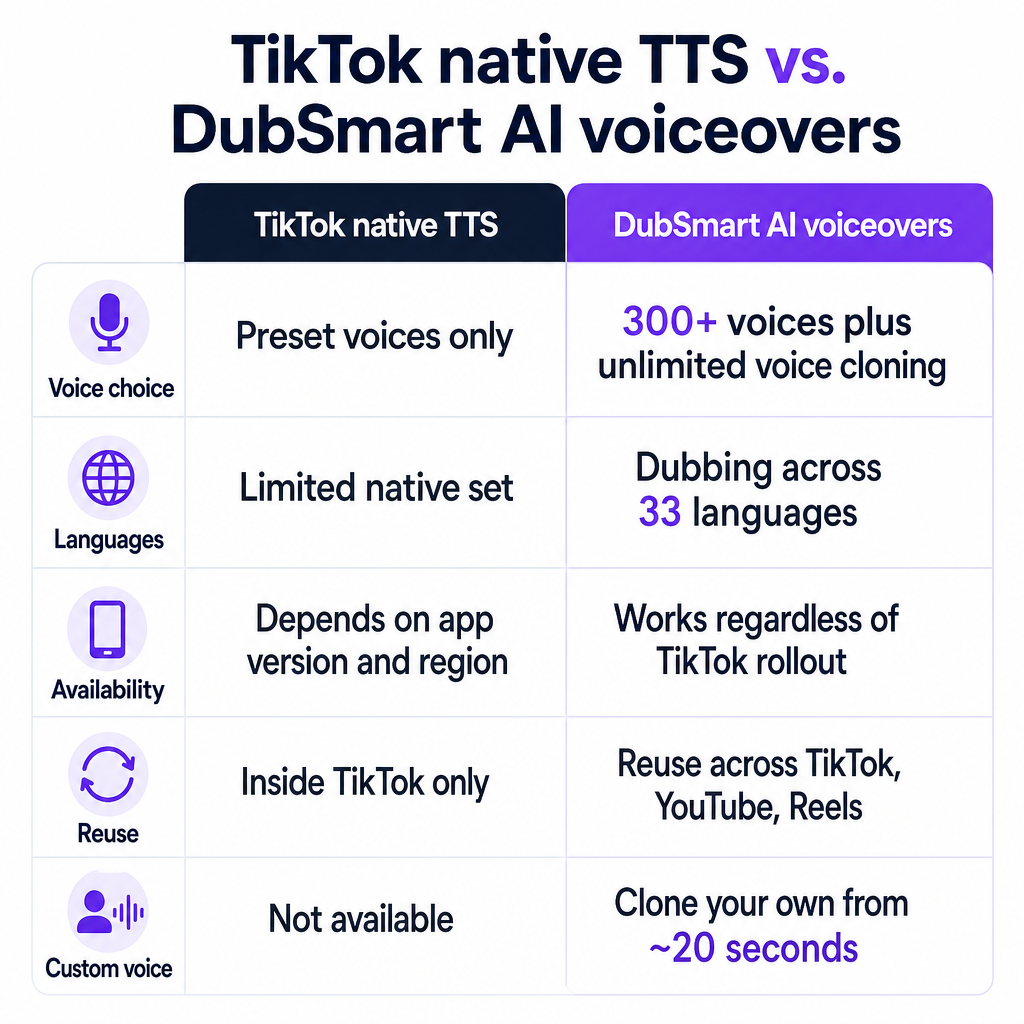
The native feature is built around selection, not creation. You pick from the preset voices TikTok provides, and that's the extent of your control. None of the mainstream tutorials describe custom voice training, cloning, or importing your own narrator. That's fine for casual posting, but it creates three concrete problems for anyone treating short-form video as a channel rather than a hobby.
The first is sameness. Because everyone draws from the same short list, your videos sound like everyone else's. There's no way to build a recognizable audio identity, which is exactly what a brand or a growing personal channel wants. A distinctive narrator voice is one of the few audio cues that lets a viewer recognize your content before they even read the handle, and the preset list takes that lever away entirely.
The second is language. TikTok's text-to-speech is oriented around reading on-screen text in a limited set of voices and languages. If you want to speak to a Spanish, Portuguese, or French audience with a full spoken voiceover rather than subtitles, the native tool isn't designed for that job. Subtitles ask viewers to read; a native-language voiceover lets them listen, which is a meaningfully lower-effort experience for the audience you're trying to win.
The third is availability and consistency. Since the feature depends on app version and regional rollout, some creators simply can't access it, and even those who can are locked into whatever TikTok decides to offer at any moment. UI and voice lists change frequently, so a workflow that works today isn't guaranteed to look the same next quarter. When your production calendar depends on a button that may move, disappear, or arrive late in your market, planning ahead becomes guesswork.
The native effect is great at reading one caption. It was never built to carry a brand voice across many videos, many languages, and many platforms.
That's the gap. Creators don't outgrow the effect; they outgrow the constraints around it. What they actually want is that same narrated feel, plus a voice they choose or own, plus the ability to reuse it everywhere. Think of it as a simple decision test: if you only ever post a single caption in one language, the native button is enough. The moment two or more of frequency, branding, selling, or multilingual reach apply to you, an external voice layer starts paying for itself.
How DubSmart AI recreates the effect with more control
DubSmart AI is an all-in-one media creation and localization platform that folds several tools into one workflow, so you don't stitch together separate apps for narration, dubbing, images, and video. Headquartered in Boca Raton, Florida, and used by more than 500,000 people, it's built for exactly the creators who hit TikTok's ceiling: YouTubers expanding across languages, small marketing teams, e-learning producers, filmmakers, podcasters, and developers.
The piece that maps directly to the TikTok effect is DubSmart's Text to Speech tool. It converts your typed script into human-like AI speech, with a library of more than 300 natural-sounding voices to choose from. Instead of the handful of presets inside TikTok, you audition and select a voice that fits the tone you want, then generate and download the audio. The decision here is qualitative: you match the voice to the mood of the content — energetic for a product tease, calm and even for a tutorial — rather than settling for whichever preset is nearest.
Where it goes further is Voice Cloning. You can create a custom narrator voice from roughly 20 seconds of recorded audio, then reuse that voice across every clip you make. That's how you build an actual audio brand: your channel sounds like you (or a talent who has given permission), not like a stock preset shared by millions of other accounts. The cloning capability is unlimited, so a team can maintain several distinct brand voices if it needs to — one per product line, per show format, or per client.
The last layer is the surrounding workflow. Because Text to Speech lives alongside AI Dubbing, an AI image generator, and image-to-video generation inside the same platform, you can produce a complete short-form package without leaving DubSmart. Pricing is credit-based with rollover credits, a free tier to start, and enterprise plans for higher volume, which is designed to keep ongoing production predictable rather than paying per minute across several unrelated tools. Rollover credits matter for creators whose output is uneven month to month, because unused capacity carries forward instead of expiring.
The trade-off is honest and worth stating plainly: with DubSmart you generate the voiceover first and then bring the finished clip into TikTok, rather than tapping one button inside the app. For casual one-off captions that extra step may not be worth it. For anyone producing regularly or across languages, it's a small step that unlocks a much larger amount of control.
Step by step: a TikTok clip with a DubSmart narrator voice
The pattern below mirrors how creators already work with external editors like CapCut or Filmora: make the voiceover outside TikTok, assemble the video, then upload it as a single finished clip. DubSmart simply handles the voice, and optionally the visuals, at a higher quality bar.
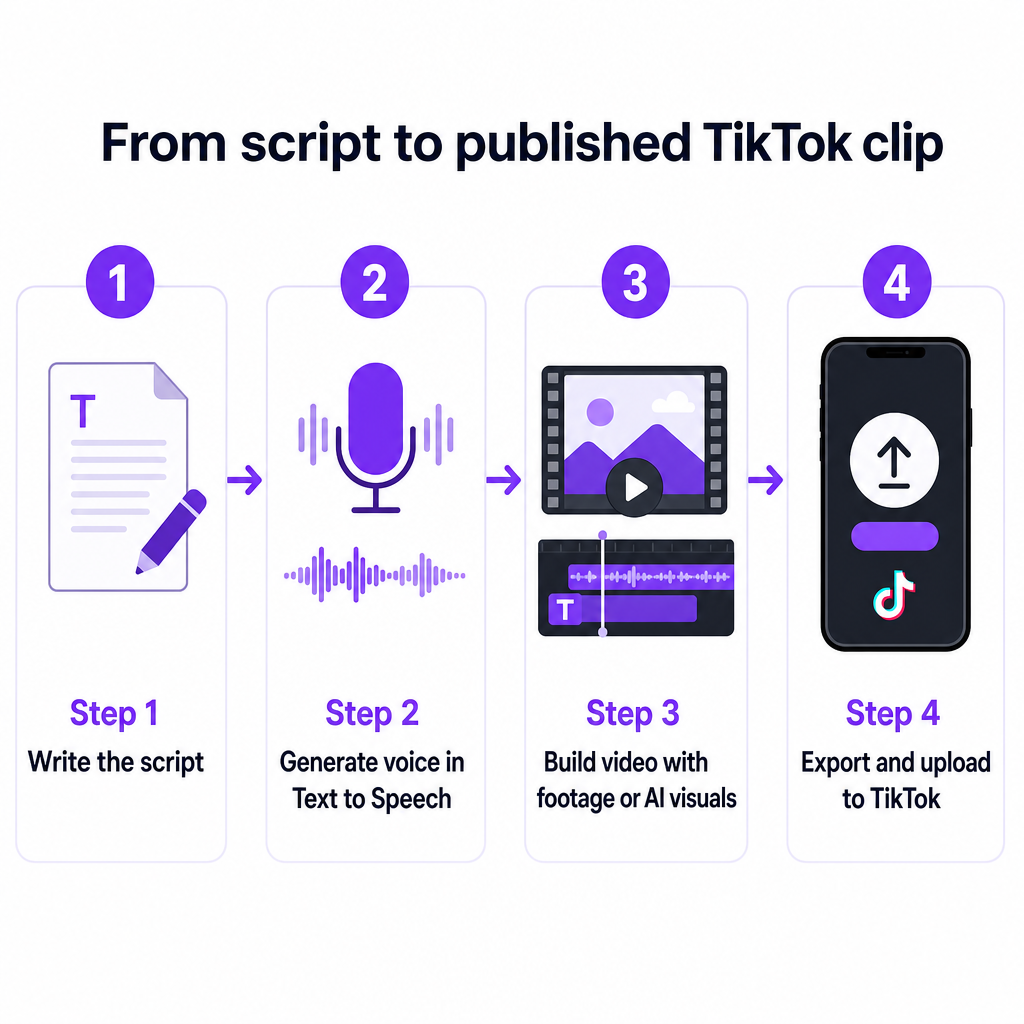
Step 1 — Write the script. Draft the on-screen narration exactly as you want it read. Short, punchy lines tend to work best for short-form, and reading them aloud once helps you catch anything the AI might stumble over. Marking natural pauses with punctuation also helps the generated voice land its beats where you want them.
Step 2 — Generate the voice in Text to Speech. Paste your script into DubSmart's Text to Speech tool and pick your voice. You have two routes here. Choose one of the 300+ AI voices that matches the narrator style you're after, or select a cloned voice you built earlier from about 20 seconds of recorded audio. Preview a couple of options before committing, generate the narration, and download the audio file.
Step 3 — Build the video. You have two options. If you have footage, drop the DubSmart audio into your editor and sync it to your clip the same way you'd use any voiceover track. If you're starting from scratch, use DubSmart's built-in AI image generator to create background scenes from text prompts, animate them with the image-to-video tool, then pair that sequence with your generated narration and export a finished video. This second path lets you assemble a whole TikTok post from text and images alone, without filming anything.
Step 4 — Upload to TikTok. Export the completed video as one clip with the DubSmart audio already embedded, then upload it through TikTok's "+" button and publish as normal. There's no need to touch TikTok's own text-to-speech button, because the narration is already part of the video.
The result on screen is the familiar narrated effect viewers expect, but the voice itself is one you chose or own, at a consistency you can carry across TikTok, YouTube Shorts, and Instagram Reels without re-recording anything.
One caution as you work: because TikTok updates its interface and voice options frequently, treat any in-app step as a current typical workflow rather than something permanent, and confirm the latest version before you rely on native features.
Turn one TikTok into localized versions for new audiences
This is where leaving TikTok's native tool behind pays off most clearly. Subtitles let people read your video; a native-language voiceover lets them hear it, which is a far stronger experience for e-learning, training, and marketing content where comprehension and trust matter more than a quick scroll.
With DubSmart's AI Dubbing you can localize a video across 33 languages. The tool transcribes the original speech, translates it into your target languages, and generates dubbed audio using either a selected AI voice or your own cloned voice. That last part is the quiet advantage: because dubbing can use your cloned narrator, your Spanish, Portuguese, and French versions can carry the same recognizable voice character as your original, instead of sounding like three unrelated accounts.
A realistic workflow looks like this. You take one English TikTok that performed well. You run it through AI Dubbing to produce several localized versions. You upload each one to TikTok or YouTube as separate language-targeted content. Suddenly a single idea reaches audiences you couldn't previously speak to, without reshooting anything or hiring separate voice talent for each market. DubSmart supports dubbing from more than 60 source languages into those 33 target languages, so the starting point doesn't have to be English.
For a marketing team or an e-learning producer, this reframes what a video is worth. One asset becomes a small library of localized assets, and the cost per market drops sharply compared with commissioning native recordings for each one. A practical way to prioritize is to dub only your proven winners first — the clips that already earned engagement in their original language — so localization spend follows demonstrated demand rather than guesses.
Automating voiceovers for agencies and developers
If you're producing at real scale, clicking through an interface for every clip stops making sense. DubSmart exposes its core tools through APIs so agencies and developers can build voiceover generation directly into their own pipelines.
The Text to Speech API converts text to natural speech using the 300+ voices and supports unlimited voice cloning, which is well suited to batch-generating narrator audio for many short videos from a set of scripts. The Voice Cloning API lets you upload audio samples, clone voices programmatically, and then use those voices inside Text to Speech or AI Dubbing, so a brand voice can be centralized and reused across an entire content operation. The AI Dubbing API automatically translates and dubs videos into 33+ languages and can apply cloned voices, which is how you keep one consistent narrator across a localized library.
In practice, an agency running campaigns for several clients can maintain a distinct cloned voice per brand, generate voiceovers in bulk from approved scripts, dub the winners into priority markets, and hand the exported audio and video into whatever distribution or scheduling tools it already uses for TikTok and other platforms. The point is independence: your production doesn't wait on TikTok's built-in text-to-speech being available or consistent, because you control the voice layer end to end. A sensible integration order is to wire up Text to Speech first for the highest-volume task, add cloning once brand voices are approved, then layer in dubbing as markets expand.
A responsible note on cloning applies at every scale. Clone only voices you own or have explicit permission to use, respect likeness and IP rights, and check TikTok's current terms of service and community guidelines before publishing branded or commercial content. These are general best practices rather than a specific legal ruling, and sensitive uses are worth confirming with your own legal advice.
Frequently asked questions
Can I get the exact TikTok narrator voice with DubSmart?
DubSmart doesn't advertise a replica of TikTok's specific default narrator, and copying a platform's proprietary voice would raise rights questions in any case. What you get instead is a much larger choice: more than 300 natural-sounding voices plus the ability to clone a custom voice from about 20 seconds of audio, so you can craft a narrated style that fits your brand rather than borrowing TikTok's. In practice most creators find a preset that reads very close to the flat, even narrator tone they were after, then refine from there.
Do I still need TikTok's built-in text-to-speech feature?
No. When you generate narration in DubSmart, you export a finished video with the audio already embedded and upload it to TikTok as a single clip. You never touch TikTok's own text-to-speech button, which also means you're not affected if that feature is missing or delayed in your region. This is the same pattern creators already use with external editors like CapCut or Filmora, so it fits established habits rather than replacing them.
How do I add DubSmart audio to my TikTok video?
Generate and download the voiceover from Text to Speech, then combine it with your footage in an editor, or build the visuals inside DubSmart using its AI image generator and image-to-video tool. Export the completed video and upload it through TikTok's "+" button, just as you would any pre-edited clip. Because the audio is baked into the exported file, nothing extra needs to happen inside TikTok itself.
How many languages can I dub my videos into?
AI Dubbing localizes content across 33 target languages and can take source material from more than 60 languages. Because dubbing can use a cloned voice, your localized versions can keep a consistent narrator character across every language you publish, which is what lets a multilingual channel still feel like one coherent brand rather than a set of unrelated uploads.
Is there a free way to try it first?
DubSmart offers a free tier, and its credit-based pricing includes rollover credits with enterprise plans for higher volume. Rollover means unused credits carry forward rather than expiring, which suits creators whose output varies month to month. Exact per-credit pricing and tier details change, so check the current pricing on DubSmart's site before committing to a plan.
What about voice cloning rights and consent?
Only clone voices you own or have explicit permission to use, and respect likeness and intellectual property rights. Before publishing commercial or branded content, review TikTok's latest terms and community guidelines, and seek legal advice for any sensitive application. Treating these as standing best practices rather than one-time checks keeps you on safe ground as both the platform's rules and your own catalog of cloned voices grow.
The fastest way to feel the difference is to make one clip. Write a short script, generate it with a voice you like or one you've cloned, assemble the video, and post it. From there, take a video that already worked and dub it into a second language to see how far one idea can travel.