That flat, slightly robotic narrator reading captions over a clip has become one of the most recognizable sounds on short-form video. The moment people hear it, they know exactly what kind of content they're watching. If you've been searching for a reliable way to bring that tiktok voice text to speech effect into videos you post everywhere else, the good news is that you don't have to stay locked inside a single app's editor to get it. With our Text to Speech tool, you write the script, pick a voice that matches the tone you want, generate the audio, and sync it to your footage for TikTok, YouTube Shorts, Reels, or anywhere else you publish.
The reason this matters goes beyond copying a trend. A distinctive narrator voice is a piece of your channel's identity. Once it's recognizable, viewers connect it to you across every platform. The problem with relying only on an app's built-in narrator is that you're limited to that app, its short voice list, and its rules. We built our workflow so the same voice you love can follow your content everywhere and, when you're ready, into other languages too.
Table of contents
- Why the TikTok narrator voice became a storytelling tool
- Recreating the effect with our Text to Speech tool
- Going beyond stock voices with voice cloning
- Carrying one voice across languages and formats
- Automating TikTok-style narration with our APIs
- Choosing your path: stock voice, cloned voice, or API
- Frequently asked questions
Why the TikTok narrator voice became a storytelling tool
The built-in narrator started as a convenience feature. You add text to a clip, tap to convert it to speech, choose from a handful of voices, and the app reads your captions aloud. Tutorials across the web walk beginners through exactly that: add text, long-press it or tap the voice icon, then pick a narrator. Because the process is so simple, creators adopted it for comedic bits, step-by-step explainers, storytime posts, and product breakdowns.
What turned a utility into a trend is repetition. When millions of clips use the same neutral, evenly paced narration, that sound becomes shorthand for a certain style of content. Viewers stop hearing it as a machine and start hearing it as the voice of short-form storytelling. That familiarity is why so many creators now want the same effect across every platform they publish to, and want more control than a fixed voice list allows.
The practical limitation is easy to hit. An app's built-in narrator gives you a short menu of voices and keeps everything inside that one app. If you repurpose a video for another platform, you either lose the narration or re-record it. If you want a voice that isn't on the list, you're stuck. And if you plan to publish the same idea in another language, the built-in tool won't carry your narrator across for you. Those gaps are exactly where a dedicated Text to Speech workflow earns its place, letting you generate narration once and reuse it wherever you post.
Recreating the effect with our Text to Speech tool
Our Text to Speech tool is the piece that directly recreates the on-screen-narrator effect. Instead of typing captions into one app and hoping its narrator fits, you paste your script, choose from a library of more than 300 natural-sounding voices, and generate clean audio you can drop into any video. The output is a downloadable file, so it belongs to your project rather than to a single platform's editor.
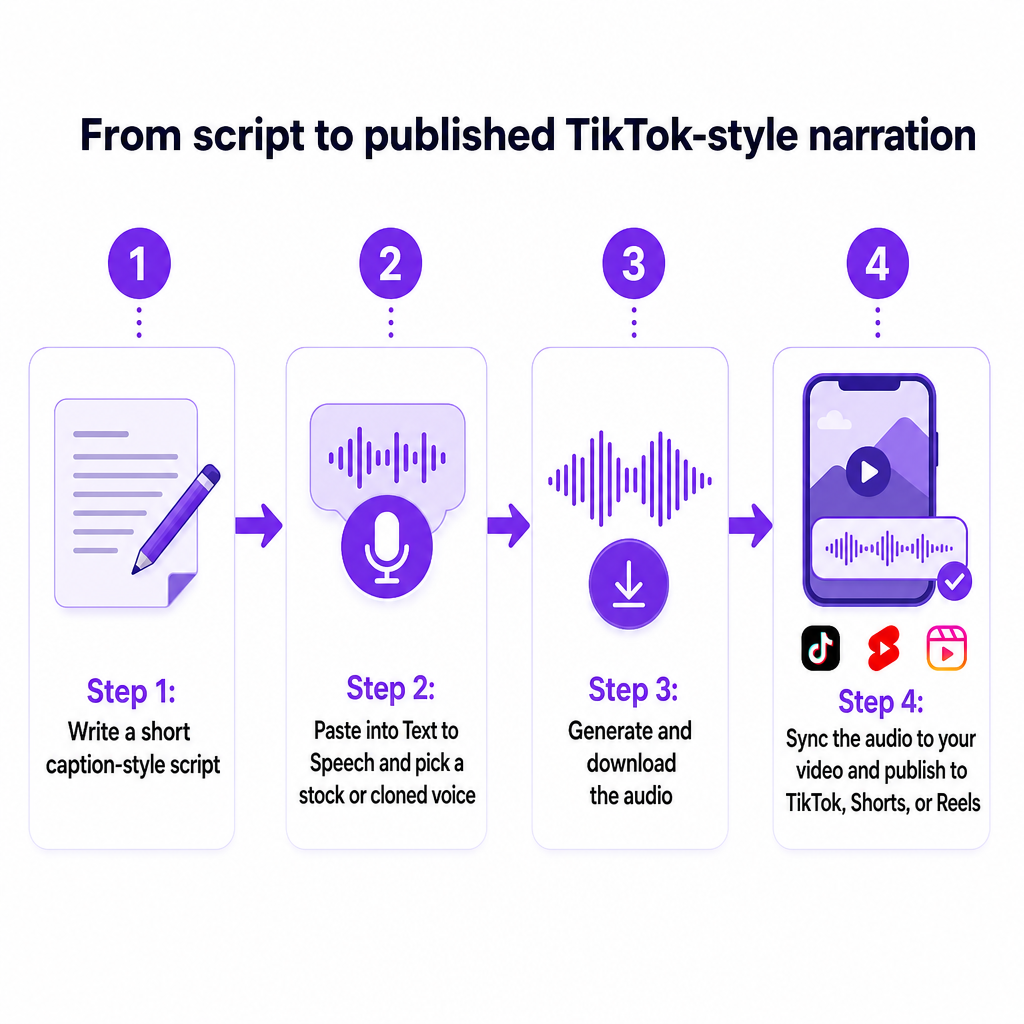
The web app follows four straightforward steps. First, choose Text to Speech. Second, create speech by entering your text and selecting a speaker. Third, edit the project, where you can add more speakers or adjust the text. Fourth, download the finished project in the format you need. There's nothing technical about it, which is the point: you should spend your energy on the script and the edit, not on wrestling with software.
Applied to short-form video, the flow becomes even more concrete. Start by writing a short, caption-style script, exactly the words you want read over your clip. Keep it punchy; the narrator effect works best with tight, rhythmic lines. Paste that script into Text to Speech and pick a voice whose tone matches the mood you're after, whether that's deadpan, upbeat, or matter-of-fact. Generate the audio, then bring it into your editor of choice and align it with the visuals before you publish to TikTok, Shorts, or Reels.
Because you're generating the narration outside any single app, the same audio file works on every platform in your posting rotation. Record once, reuse everywhere. That alone solves the biggest frustration with an app's built-in narrator: you're no longer rebuilding the same voiceover three times for three destinations.
Writing scripts that suit the narrator style
The voice does a lot of the work, but the script sets the pace. Short declarative sentences read cleanly and land with the crisp cadence viewers associate with the trend. Numbers, lists, and clear turns like "first," "then," and "finally" translate well into synthesized speech because they give the voice natural pausing points. If a line sounds awkward when you read it aloud, it will sound awkward when the voice reads it too, so a quick spoken pass before you generate saves a lot of regeneration later.
Going beyond stock voices with voice cloning
Picking from a library is the fast path, and for many creators a well-chosen stock voice is all they need. But there's a ceiling to sounding like everyone else. If your goal is a narrator that's unmistakably yours, our Voice cloning turns your own voice, or a consented brand voice, into a reusable model you can drive from text.
The distinction matters. Generic text to speech means selecting from preset narrators. Voice cloning builds a synthetic model of one specific speaker, so new speech in that voice can be generated from any text you type. In the web app, you upload an audio file of at least 20 seconds of clean speech, with minimal background noise, to the voice clone section. From that short, quiet sample we create a custom voice you can use like any other in your Text to Speech projects.
Twenty seconds of clean audio is a low bar for production effort. A quiet room, a phone or basic mic, and a short read is enough to generate a signature narrator you can reuse indefinitely. Once it exists, you're no longer choosing between anonymous stock voices; you have a voice that carries your identity into every clip, and it stays consistent whether you publish today or six months from now.
This is where a recognizable narrator becomes a brand asset rather than a one-off effect. A cloned voice reads scripts you never actually recorded, keeps its character across an entire content calendar, and never needs a re-recording session because you changed your setup. For creators building a long-term channel identity, that consistency is the real upgrade over a rotating menu of app voices.
Carrying one voice across languages and formats
A narrator voice that only works in one language limits your reach the moment you want to grow internationally. Our platform supports multilingual dubbing across 33 target languages and can generate speech from text in the language you choose, so the same trend that works in English can be replicated for audiences elsewhere.
Here's how the pieces fit together. Text to Speech gives you the narration. Voice cloning lets that narration stay in a single recognizable voice. Our AI Dubbing extends the same content into other languages by handling video and audio through text to speech, speech to text, and voice cloning inside one workflow. Instead of hiring separate narrators for each market, you keep one voice identity and let the platform carry it across versions.
The workflow scales past short clips as well. For longer content, you can upload full videos or audio files, adjust speaker settings, choose languages, and select preferred voices inside a project before exporting. So the same approach you use to add a viral-style narrator to a fifteen-second clip also applies to an explainer, a lesson, or a full episode. Short-form is where the trend lives, but the underlying tools don't stop at short-form.
For creators planning global growth, this changes the economics of localization. A single script becomes an English short, a Spanish version, and additional language versions, all narrated in a consistent voice, without rebuilding your audio from scratch each time. The recognizable-narrator effect becomes something you can operate as a repeatable system rather than a lucky one-off.
Automating TikTok-style narration with our APIs
Individual creators can do everything above in the browser. Agencies, larger channels, and teams with back catalogs usually need the same result at volume, and that's where our APIs come in. The Text to Speech API is a RESTful service that converts text into natural-sounding speech: you send a POST request with your text and voice preferences and receive a ready-to-use audio file in return. It supports the same 300+ voices and voice cloning available in the app.
To make a custom narrator programmatic, our Voice Cloning API follows a compact three-step pattern. First, upload an audio file and receive a file key. Second, create a custom voice by supplying a name and that file key. Third, use the resulting cloned voice inside Text to Speech projects through the platform's TTS project endpoints. Once a voice exists, it becomes a reusable asset your applications can call, not a single-use export.
Put together, this lets a team industrialize the effect. Imagine an agency managing several client channels: it can maintain one cloned brand voice per client, feed scripts through the API, and generate narrated audio for dozens of videos without a person manually pasting text into a tool each time. The same pattern supports learning systems and localization pipelines, where cloned voices are called on demand as content is produced.
For teams that also generate visuals or want to build short videos around still assets, our image-to-video tooling sits in the same ecosystem, so audio and visual production live in one place rather than scattered across disconnected apps. The goal is a single workflow: one platform to write, voice, localize, and assemble.
A note on expectations: we describe these APIs in functional terms because that's what the workflow depends on. If you'd like details on rate limits, throughput, or plan-specific setups, tell us your expected volume and use case so we can prepare a recommendation that matches your workload.
Choosing your path: stock voice, cloned voice, or API
Most readers arrive with one of three needs, and the right starting point depends on which one describes you. The table below maps each situation to the fastest useful first move.
| Your situation | Best starting point | Why it fits |
|---|---|---|
| Testing the effect quickly | Stock voice in Text to Speech | Pick from 300+ voices, generate audio in minutes, no recording needed |
| Building a signature channel voice | Voice cloning | Turn a 20-second clean sample into a reusable custom narrator |
| Producing at scale or across clients | TTS and Voice Cloning APIs | Automate narration across many videos and multilingual versions |
If you're not sure, start simple. Draft a short caption-style script for your next post, open Text to Speech in the browser, and generate it with a stock voice that matches your tone. If you like the effect but want it to sound like you, upload a clean 20-second sample and clone your voice, then compare the two on the same clip. That single comparison usually settles the question of whether you want a viral-style stock narrator or a unique brand voice going forward.
Teams and developers running multiple channels or a large back catalog will get more value from API access, since the manual browser flow doesn't scale to hundreds of assets. Whichever fits your volume, the underlying capability is the same: a recognizable narrator, on your terms, on every platform you publish to. If you'd like help mapping your channel plan, catalog size, and language targets to the right approach, share those details with us and we'll suggest a suitable setup.
One practical caution worth keeping in mind: when you clone a voice, use your own or one you have clear permission to use, and follow the posting rules of whatever platform you publish on. That keeps your recognizable-narrator strategy sustainable rather than risky.
Frequently asked questions
Does DubSmart AI have a preset labeled "TikTok voice"?
Our focus is on recreating the effect rather than mimicking a specific proprietary preset. You get that familiar on-screen-narrator feel by generating audio in Text to Speech from a library of 300+ voices, then choosing one whose tone matches the style you want. You can also clone a custom voice for a narrator that's uniquely yours. If you have a particular tone or brand voice in mind, tell us and we'll suggest a fitting approach.
How do I add the narrator effect to videos outside of TikTok?
Write a short caption-style script, paste it into our Text to Speech tool, select a speaker, and generate the audio. Download the file and align it with your footage in any editor, then publish to Shorts, Reels, or anywhere else. Because the audio is a standalone file, one narration works across every platform you post to.
What do I need to clone my own voice?
Upload an audio file of at least 20 seconds of clean speech with minimal background noise to the voice clone section. From that short, quiet sample we create a custom voice model you can then use inside your Text to Speech projects like any other voice.
Can I use the same voice in different languages?
Yes. Our platform supports multilingual dubbing across 33 target languages, and by combining Text to Speech, voice cloning, and AI Dubbing you can keep one recognizable voice across versions of the same content, so an English short and its other-language versions share a consistent narrator.
Is there a way to automate this for many videos at once?
Developers and agencies can use our Text to Speech API to convert text to audio programmatically, and the Voice Cloning API to upload a sample, create a named custom voice, and call it within TTS projects. That lets you generate narration across large catalogs and multiple channels without manual work per video.
Should I choose a stock voice or clone my own?
A stock voice is the fastest way to test the effect and works well for many creators. Cloning is the better choice when you want a narrator that's unmistakably tied to your brand and stays consistent over time. Trying both on the same clip is the quickest way to decide which you prefer.