The robotic narrator that reads your on-screen captions has quietly become one of the most recognizable sounds on the For You Page. That automated cadence turned into a creative shorthand for storytime videos, tutorials, and comedy skits, and the trend has only hardened heading into 2026. If you want to build a channel around that style, mastering tiktok voice text to speech is the fastest way to produce more videos without ever touching a microphone. The catch is that the built-in voices are limited, shared by millions of creators, and impossible to make your own. That is exactly the gap DubSmart AI is built to close, giving you a full studio of AI voices, custom voice cloning, and multilingual dubbing in one place.
Below, we cover what the native TikTok feature actually does, why serious creators outgrow it, and how to design a signature narrator voice inside DubSmart that you can reuse across every short-form platform you post to.
Table of contents
- Why the TikTok narrator voice still rules short-form
- What TikTok text to speech does and where it stops
- Designing a signature TikTok voice in DubSmart
- A repeatable script-to-post workflow
- Scaling one idea into multilingual TikToks
- Automating voice pipelines for agencies and developers
- Frequently asked questions
Why the TikTok narrator voice still rules short-form
The AI voice-over is no longer just an accessibility helper. It has become a format in its own right. Shopify's 2026 look at TikTok AI voice points to the popularity of the peppy narrator known as "Jessie," and notes that when the human voice actor behind it was revealed, the related video pulled in more than 50 million views. That is the kind of cultural gravity a single narrator voice can generate.
There is a production argument as well. Shopify cites earlier research suggesting creators who adopt AI voice tend to produce more novel, creative videos, with AI voice adoption linked to roughly a 21.8% increase in video output. AnySpeech reaches a similar conclusion from the usage side, describing TikTok text to speech as one of the platform's most popular features, relied on by millions of creators across storytelling, comedy, tutorials, and viral formats.
The takeaway for anyone planning a 2026 content calendar is simple. A consistent narrator voice removes the biggest bottleneck in short-form production, which is recording. You write, you generate, you post. The question is not whether to use an AI voice, but which voice, and how much control you have over it.
What TikTok text to speech does and where it stops
TikTok's native feature is genuinely easy to use, which is part of why it spread so fast. Influencer Marketing Hub lays out the in-app steps: record or upload a clip, tap the Text tool, type your caption, tap Done, then tap the text and choose Text-to-speech before picking a voice. You can apply the same voice across all text in the video. Adobe Express describes the same path through the "Aa" text tool and notes the interface offers a handful of named characters such as "Granny" and "Jessie."
That convenience comes with real limits. The in-app library is a small, fixed set of characters shared by every creator on the platform. You cannot design a voice that belongs to your channel, you cannot fine-tune it to match a brand persona, and you certainly cannot carry it into other languages while keeping the same identity. For a one-off skit, none of that matters. For a channel you intend to grow, a recognizable and exclusive voice is an asset the native tool cannot give you.
This is where an external generator becomes the standard move. AnySpeech spells out the accepted pattern: write your script, choose from a large voice library, generate the audio, download an MP3, and add it as a sound track inside TikTok. That workflow parallels DubSmart exactly. Since DubSmart does not publish a TikTok-specific button or preset, the honest framing is this: you produce your audio and visuals in DubSmart, then upload the finished files to TikTok as your destination platform. You get studio-grade voices; TikTok gets a polished upload.
Designing a signature TikTok voice in DubSmart
DubSmart's Text to Speech tool is the engine that replaces the in-app voice list. It converts text into realistic speech in seconds and gives you a library of 300+ AI voices, described on the product page as human-like and natural sounding in any language and any voice. Instead of choosing between a small set of shared characters, you audition dozens of options and lock in the one that fits your niche, whether that is a calm explainer tone, a high-energy storyteller, or something deliberately quirky for comedy.
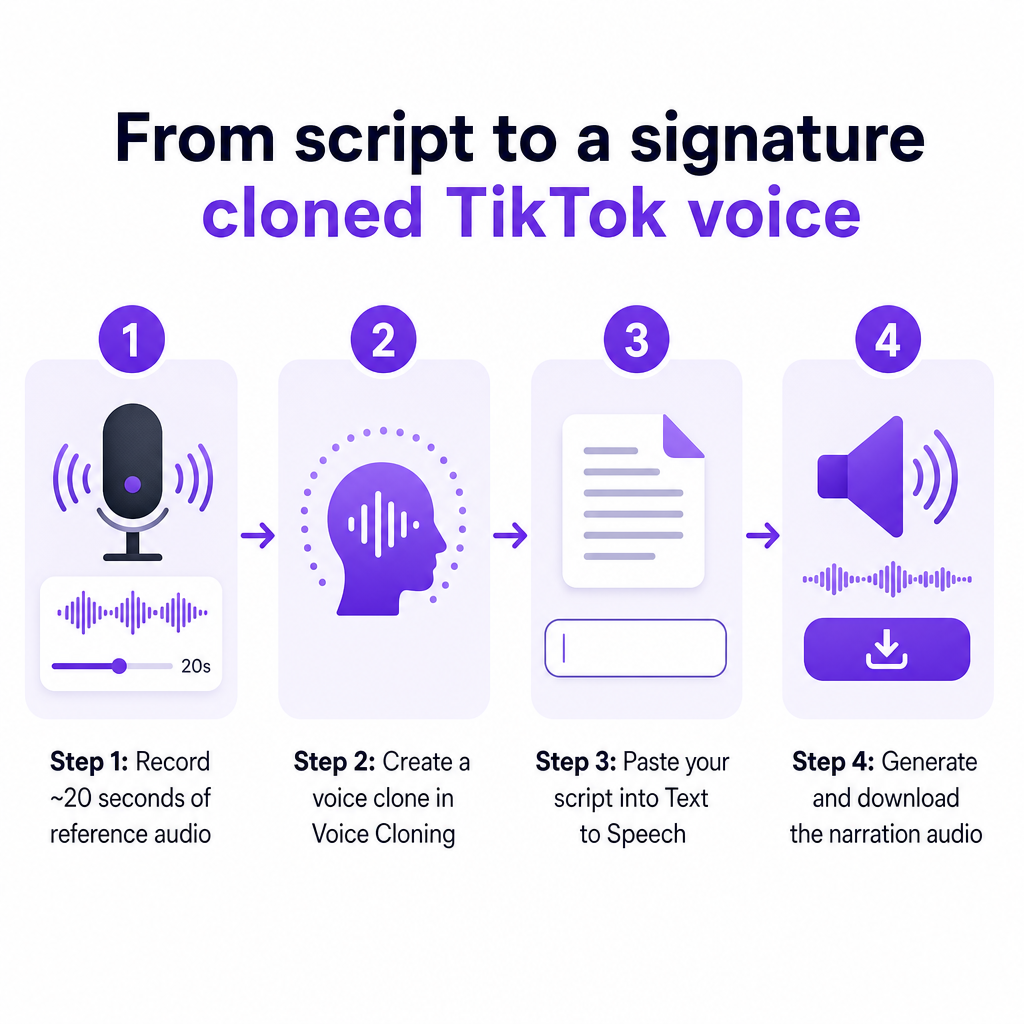
The bigger differentiator is ownership. With DubSmart's Voice Cloning, you can create a voice that is genuinely yours. The product page headlines AI voice cloning in 33 languages with unlimited voices, and states that users can clone any number of voices without restrictions or extra costs. A DubSmart guide notes the technology can build a clone from as little as 20 seconds of reference audio, and the cloning is designed to capture the nuances, emotion, and characteristics of the original voice.
That matters for TikTok specifically because a cloned voice becomes your channel's fingerprint. Record 20 seconds of yourself, a team member, or a brand persona, and you have a narrator that no competitor can copy from the app. Crucially, DubSmart states that cloned voices can be reused inside both Text to Speech and AI Dubbing, so the same identity follows you from a quick TikTok to a YouTube Short to an Instagram Reel. Instead of a robotic voice everyone recognizes as generic, you get a distinct sound your audience learns to associate with you.
A repeatable script-to-post workflow
The reason AI voice boosts output is that it turns production into a repeatable loop. DubSmart's overall platform flow is designed for exactly this: choose a tool, upload or paste your input, edit the project, then download the finished file in the format you want. Applied to a TikTok, the loop looks like this.
Start with the script. Short-form narration lives or dies on structure, so write a sharp hook, a tight story or explanation, and a clear call to action. Keep sentences short; TTS reads punctuation, so line breaks and commas help control pacing.
Generate the audio. Paste the script into DubSmart's Text to Speech tool, select your language, and pick either a stock voice or your cloned voice. DubSmart describes converting text to speech in seconds, which means you can iterate on wording and re-generate quickly until the delivery feels right. When you are happy, download the audio.
Build the visuals and sync. Record or edit your clip in TikTok or your preferred editor, then import the downloaded audio and align cuts to the narration beats. AnySpeech confirms this import-and-sync step is the normal path when using an external TTS, so you are following an established pattern rather than fighting the platform.
Add B-roll if you run a faceless channel. You do not need a separate stock library. DubSmart's AI image generator creates unique images from text in seconds, supporting photorealistic scenes and character designs up to 2K resolution, and the Image to Video tool turns a still image plus a motion prompt into a short 4 to 8 second clip with sound. That is enough to assemble faceless, trend-driven videos entirely inside one platform before you ever open the TikTok app.
Keeping the whole loop in one workspace is the practical advantage. You are not exporting from a TTS site, jumping to a stock image service, and stitching results together. Script, voice, and visuals come from the same place, which is what makes daily posting realistic.
Scaling one idea into multilingual TikToks
One strong TikTok concept is worth far more if it can travel. This is where DubSmart's AI Dubbing turns a single video into a multi-market asset. The product localizes content across 33 target languages and can dub from 60+ source languages, using AI to convert text into natural, customizable voice-over in each language.
For a US creator eyeing global growth, the workflow is straightforward. Take the script or transcript from your original TikTok and generate localized voice-overs for the languages you want to reach. Because DubSmart aims for consistent voice clones across 33 different languages, you can keep the same recognizable voice persona in Spanish, French, German, or Japanese rather than sounding like a different creator in every market. A DubSmart article on multilingual voice cloning describes exactly this pattern, cloning a voice and reusing it across languages for podcasts, videos, and audiobooks.
Download each localized version and upload it to the TikTok account targeting that region. The same discipline extends to YouTube Shorts and Reels, so one production session can feed several platforms in several languages. For an e-learning brand or a small marketing team, that is the difference between publishing in one language and quietly building an international audience from the same source material.
Note that DubSmart's own pages describe language and source counts slightly differently in places, so treat figures like "33+ target languages" and "60+ source languages" as broad, evolving capabilities rather than fixed guarantees, and confirm the current lists inside the product when a specific language is critical to your plan.
Automating voice pipelines for agencies and developers
Agencies running many TikTok channels do not want to click through a UI hundreds of times, and they do not need to. DubSmart exposes Text to Speech, Voice Cloning, and AI Dubbing as APIs so you can build short-form voice production directly into your own publishing stack. The framing here is not "build a TTS engine from scratch," but "use DubSmart as the backbone and automate around it."
The documented flow follows a clean sequence. You request an upload URL, PUT your media file to the presigned URL, then create a project by specifying the input file key, your target languages, and the voice option. The docs show setting voice: "voiceCloning" and passing target languages such as Spanish, French, and German in a single request. From there you poll the project status and download the finished output from the returned storage URL.
That structure supports real volume. With the AI Dubbing API, a team can translate and dub videos into 33+ languages with voice cloning programmatically, while the Text to Speech and Voice Cloning APIs handle narration generation and custom voice creation for the raw shorts. Ingest the resulting files into your internal editor or scheduler, and you have an assembly line: script in, branded multilingual narration out, ready for the next batch of uploads.
For developers, the value is consolidation. Rather than integrating one for voices, another for cloning, and a third for dubbing, the same platform covers all three under one account and one billing relationship.
Frequently asked questions
Can DubSmart post directly to TikTok?
No. DubSmart does not advertise a TikTok-specific export, plugin, or preset. The intended pattern is to generate your narration and visuals in DubSmart, download the finished audio or video, and then upload it to TikTok yourself. External guides confirm that importing an MP3 from a separate voice generator and adding it as a sound track is a standard, accepted way to use AI voices on TikTok.
How is DubSmart's TikTok voice better than the in-app one?
TikTok's built-in text to speech offers a small, fixed set of shared characters like "Jessie" and "Granny." DubSmart's Text to Speech provides 300+ AI voices plus unlimited voice cloning, so you can design a voice that is unique to your channel. You can also clone your own or a brand voice and reuse it across languages, which the native feature cannot do.
How much reference audio do I need to clone a voice?
A DubSmart guide notes that its voice cloning can work from as little as 20 seconds of audio. That short sample is enough to create a clone intended to capture the nuances and emotion of the original voice, and DubSmart states you can clone any number of voices without restrictions or extra costs.
Can I use one voice across multiple languages?
Yes. DubSmart's Voice Cloning is built to keep consistent voice clones across 33 different languages, and cloned voices can be used in both Text to Speech and AI Dubbing. That lets you maintain a recognizable voice persona when you localize a TikTok idea into other languages for different regional audiences.
Is there a free way to try it first?
DubSmart's pricing page lists a free plan alongside paid options, with annual billing offering a stated 17% saving and subscriptions cancellable at any time. Some plan amounts and minute allocations have appeared in DubSmart blog content and may not match the live page, so check the current pricing page for exact figures before committing.
Are there rules about using AI voices on TikTok?
Current, primary TikTok policy on synthetic voices was not available in our research, so we cannot state universal disclosure or labeling rules. The sensible approach is to avoid deceptive impersonation, use voices you have the right to clone, and review TikTok's own community guidelines and advertising policies directly, since platform rules can change.
With your script, your voice, and your visuals living in one place, the next move is simply to build the voice you want the For You Page to recognize. Start on the free plan, clone a voice or pick from the 300+ library, and publish your first TikTok narration in a single session, then scale into more languages and higher posting frequency as your channel grows.