TikTok scrolls fast, and the sound is often what stops the thumb. A distinct, well-paced voice can carry a 20-second clip further than any visual trick, which is exactly why a reliable tiktok voice generator has become part of the standard creator toolkit. TikTok's built-in text-to-speech is handy for captions and quick jokes, but it hands every creator the same short list of voices, limited language options, and no way to build a recognizable audio identity. If your channel sounds like everyone else's, you lose one of the few levers that separates a memorable brand from background noise.
That is the gap DubSmart AI fills. It gives you an external voice engine with 300+ natural-sounding voices, voice cloning from a short sample, and support for dozens of languages, so the narration you layer onto TikTok is yours and only yours. The rest of this guide walks through what an external voice generator actually does for short-form video, how to script and produce a voiceover with DubSmart, how to get that audio into TikTok, and how to reuse a single script across multiple languages to reach new audiences.
Table of contents
- What a TikTok voice generator really does
- Why external voices beat the built-in options
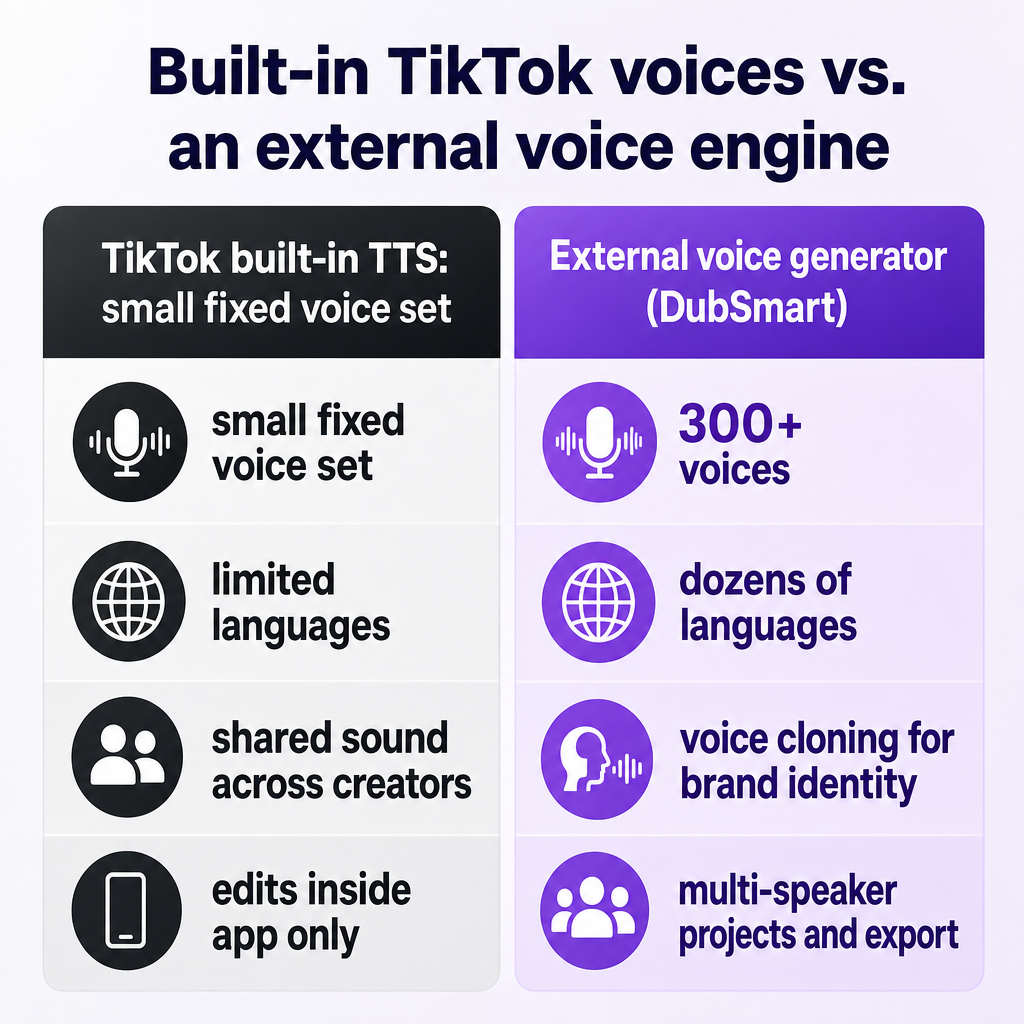
- Writing a script built for the first three seconds
- Producing the voiceover in DubSmart
- Getting DubSmart audio onto TikTok
- Cloning a signature voice and going multilingual
- Scaling with the API for agencies and teams
- Frequently asked questions
What a TikTok voice generator really does
When creators talk about a "TikTok voice generator," they usually mean two different things stitched together. The first is TikTok's own text-to-speech tool, which lets you type a caption, tap the text, and choose a synthetic voice that reads it aloud over your clip. The second is an external AI voice tool that produces a finished narration file you bring into the app. Both end up as audio on a TikTok video, but the control you have over tone, language, and consistency is completely different.
DubSmart sits firmly in the second category. It is an all-in-one media creation and localization platform that bundles Text to Speech, Voice Cloning, AI Dubbing, Speech to Text, a Speech Separator, Text to Image, and Image to Video into one workflow. For TikTok specifically, the tools that matter most are Text to Speech and Voice Cloning: you write a script, generate lifelike speech in seconds, and export an audio file ready to drop onto your video. There is no named "TikTok mode" — instead, TikTok voiceovers are a use case the platform handles well because the underlying voice engine is strong and flexible.
The practical value is straightforward. Instead of re-recording narration on your phone every time, or settling for a robotic default, you get a repeatable process that produces clean, well-timed audio. That matters because short-form video rewards clarity and pacing. A muddy phone recording or a flat synthetic voice makes viewers scroll; a crisp, characterful voice invites them to stay.
Why external voices beat the built-in options
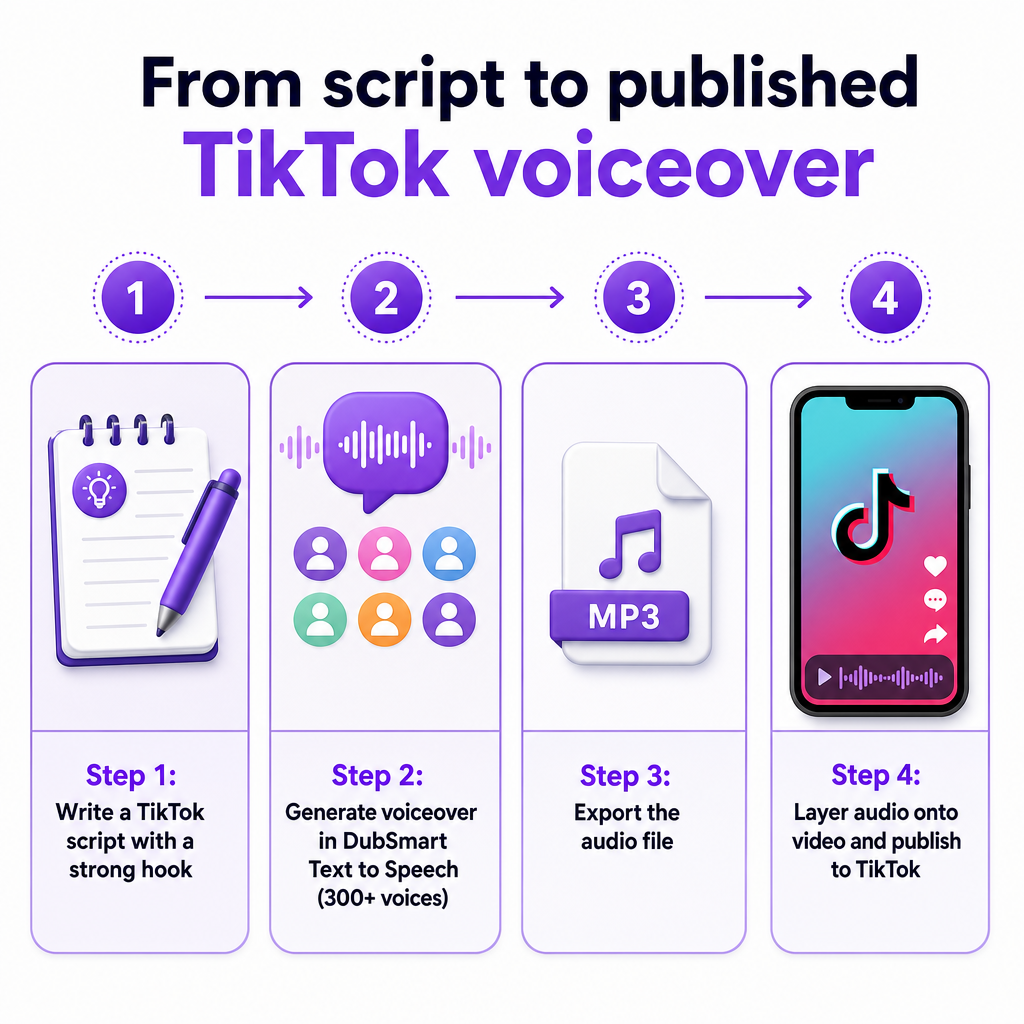
TikTok's native text-to-speech is genuinely useful for a caption gag or a quick narration, and it lives right inside the editor. But tutorials that walk through it show the same limitation every time: a small, fixed set of named voices and narrow language choices. If your niche is crowded, that shared sound works against you. The moment a viewer hears the standard TikTok narrator, they know it is a template, not a brand.
DubSmart's Text to Speech takes a different approach. The page describes turning text into natural-sounding speech in seconds, in any language, with any voice, drawing on a library of 300+ voices. That range lets you match a voice to the mood of each video — energetic for a product tease, calm and measured for an explainer, warm for storytelling — instead of forcing every clip through one narrator. You can also add multiple speakers within a single project, which is handy for skits, dialogue, or a host-and-guest format.
There is a second advantage that is easy to overlook: consistency across posts. When you generate narration externally, you can reuse the same voice settings on every video, so your channel develops a recognizable sonic signature. Combine that with DubSmart's Text to Speech workflow and you can standardize how your content sounds without recording a single new take. The homepage frames this plainly — it is a way to create professional voiceovers without hiring voice actors, using either DubSmart's own voices or a unique cloned voice.
Writing a script built for the first three seconds
Even the best voice cannot rescue a weak script, and short-form video is unforgiving about structure. The first one to three seconds decide whether someone keeps watching, so your opening line has to do real work. Lead with a claim, a question, a surprising number, or a promise of payoff. Vague warm-ups like "Hey guys, so today I wanted to talk about" waste the exact window where you either earn attention or lose it.
After the hook, keep the body tight. A single clear idea per clip performs better than a rushed list of five. Write for the ear, not the page: short sentences, concrete words, and natural pauses where a human would breathe. Read your draft aloud before you generate anything — if you stumble, the AI voice will feel awkward in the same spot. Finish with one specific call to action rather than a generic sign-off, whether that is a follow, a comment prompt, or a link cue.
Length discipline matters too. Match your word count to the runtime you have in mind, because a 30-second clip only holds roughly 70 to 85 spoken words at a comfortable pace. If your script runs long, cut adjectives and filler before you cut ideas. This planning stage costs almost nothing and pays off twice: it produces a cleaner voiceover, and it forces you to clarify the point of the video before you spend any credits generating audio.
Producing the voiceover in DubSmart
Once the script is ready, generating the audio is fast. Open Text to Speech and start a new TTS project — this is the quick path for straightforward speech generation. Paste your script, choose a speaker from the 300+ voice library or select a voice you have previously cloned, and generate the speech. The workflow is designed to be immediate, which suits the volume most TikTok creators work at.
The editing controls are where a good voiceover becomes a great one. You can adjust the text and phrasing directly in the project, which lets you fix pacing without leaving the tool. If a line lands flat, tweak the wording or add punctuation to shape the rhythm, then regenerate. For dialogue-style videos, you can add more than one speaker inside the same project so a conversation flows naturally instead of being spliced together from separate exports. Preview each take for tone, emphasis, and clarity before you commit.
When the audio sounds right, download the project in the format you need. That exported file is your voiceover asset — you can pull it into a video editor, play it back during recording, or store it for reuse. Because the whole cycle from script to export takes minutes, you can produce several variations of a hook or test two different voices on the same clip and see which one your audience responds to. Treat the first generation as a draft; the fast turnaround makes iteration cheap.
Getting DubSmart audio onto TikTok
With your voiceover exported, you have a few ways to combine it with video, and the right one depends on how much editing control you want. The cleanest route is to edit externally: bring your DubSmart audio and your footage into a video editor, sync them precisely, then upload the finished video to TikTok. This gives you frame-level control over timing and is the best option when narration needs to line up with specific cuts or on-screen action.
If you prefer to stay inside the app, TikTok's own audio editing tools accept external narration. After you record or upload your video, open TikTok's voiceover and audio editing function, where you can record a voiceover track and replace or blend it with the original sound before saving. Creators commonly play their prepared audio through speakers or a second device while recording the voiceover track, then adjust levels and publish. It is less precise than an external editor, but it keeps everything in one place.
There is also a hybrid approach that plays to each tool's strengths. Use your DubSmart-generated narration as the main voice — the consistent, high-quality track that carries the video — while letting TikTok's built-in text-to-speech handle short captions or a punchy emphasis line. Guides on TikTok voiceover workflows note that creators can adjust caption duration to time synthetic voiceovers precisely, and some even drag the text overlay off-screen so the AI audio plays without visible captions. Mixing your branded main voice with quick native captions gives you polish where it counts and speed where it does not.
Cloning a signature voice and going multilingual
The strongest way to make your channel instantly recognizable is a cloned voice that belongs to you. DubSmart's Voice Cloning packages the whole pipeline into one workflow, so you do not have to assemble separate model-training, transcription, and dubbing tools. In the app, you upload an audio file of at least 20 seconds to the Voice Clone section — clean audio with no background noise gives the best result — and the platform creates a custom voice you can reuse.
Once that voice exists, it plugs directly into your Text to Speech projects. Every future TikTok script can be narrated in the same clone, whether that is your own voice, a consented brand voice, or a recurring character or mascot. That continuity is hard to achieve any other way: viewers start to associate a specific sound with your content, and you never have to be in front of a microphone to publish. When you are ready to build a permanent brand voice, the Voice cloning tool is where that identity lives.
Multilingual reach is the other lever an external engine unlocks. DubSmart converts text into human-like speech across 33+ languages, and its AI Dubbing workflow can localize existing content across those languages. For a creator, that means one script can become several TikToks aimed at different language markets — a Spanish version, a Portuguese version, a German version — without hiring separate voice talent for each. Short-form video travels well across borders, and testing multiple languages is a low-cost way to find out where your content resonates before you invest heavily in any single market.
Scaling with the API for agencies and teams
Individual creators can do everything above by hand, but agencies and teams producing dozens of clips a week need automation. DubSmart exposes its voice tools through APIs so voiceover generation can be built directly into a production pipeline. Instead of opening the app for each video, a team can send scripts programmatically and receive finished audio in return, which keeps output consistent and removes a manual bottleneck. This matters most when a single campaign spans many short clips: a repeatable API call produces uniform pacing and tone across an entire batch, so no video drifts from the brand's established sound.
Cloning at scale follows a clear three-step pattern. First, upload an audio file to the Voice Cloning API and receive a file key. Second, create a custom voice by providing a name along with that file key. Third, use the resulting cloned voice inside Text to Speech projects through the platform's TTS endpoints, generating narration for any script on demand. That output can then feed video automation tools to assemble TikTok-ready assets with minimal hands-on work. A well-designed pipeline lets a producer queue a week of scripts on a Monday and receive finished, on-brand narration files without touching a microphone or an editing timeline.
The Voice Cloning API and the Text to Speech API are the entry points for developers who want this level of control. For an agency managing several client channels, the payoff is repeatability: each brand keeps its own cloned voice and language set, and new videos inherit those settings automatically. Decide between manual and API workflows using a simple threshold — if you publish only a handful of clips a week, the in-app tools are faster to learn and adjust; once volume climbs into the dozens or you juggle multiple brand voices, automation earns back its setup cost quickly. The credit-based model, with rollover credits, a free tier, and enterprise plans, lets small teams experiment cheaply while giving larger operations a way to forecast the cost of high-volume voiceover production.
Frequently asked questions
Can I use DubSmart voiceovers directly on TikTok?
Yes. DubSmart is not a TikTok plugin, so the process is to generate and export your voiceover audio, then combine it with your video. You can either edit the audio and footage together in a video editor and upload the finished clip, or bring the exported audio into TikTok and use the app's built-in voiceover and audio editing tools to lay it over your video before publishing. Many creators simply play the exported file through a second device while recording TikTok's voiceover track, then fine-tune the levels before saving.
How is DubSmart different from TikTok's built-in text-to-speech?
TikTok's native text-to-speech offers a small, fixed set of voices and limited languages, and every creator draws from the same pool. DubSmart provides 300+ natural-sounding voices, support for many languages, multi-speaker projects, and voice cloning, so you can build a distinct, consistent brand voice rather than sounding like a template. The practical difference is control: you choose the tone, pace, and language for each clip and can reuse the exact same voice on every post to build recognition over time.
Do I need editing skills to make a TikTok voiceover?
No advanced skills are required. In DubSmart you start a Text to Speech project, paste your script, pick a voice, and generate the audio, then edit the text and pacing right in the project. Getting it onto TikTok can be as simple as playing the exported audio while recording a voiceover track inside the app, or using a basic video editor to sync the two. If you want frame-accurate timing, an external editor helps, but it is not a requirement for a clean, publishable result.
How much audio do I need to clone my own voice?
DubSmart's Voice Cloning works from an audio sample of at least 20 seconds. Clean recordings with no background noise produce the best results, so record in a quiet room and avoid music or ambient hum. Once the voice is created, you can reuse it across all your future Text to Speech scripts, which keeps your channel sounding consistent without recording new takes each time — the clone becomes a reusable asset rather than a one-off recording.
Can I make the same TikTok in multiple languages?
Yes. DubSmart's Text to Speech and AI Dubbing tools support dozens of languages, so one script can be turned into several localized versions of the same video. This lets creators test which language markets respond best and expand reach beyond a single audience without hiring separate voice actors. A low-risk approach is to localize your best-performing clip into two or three languages first, then double down on whichever version gains traction.
Is voice cloning something I need permission to use?
As a general best practice, you should only clone a voice you own or one you have explicit consent to use, and you should follow TikTok's own rules on acceptable audio and synthetic voices. This is standard ethical guidance rather than specific legal advice, so confirm consent and platform policies for your situation before publishing cloned-voice content. When in doubt, keep a written record of consent for any voice that is not your own.