TikTok's built-in text-to-speech voices got a lot of creators through their first viral clip, but the moment you post daily, run a brand account, or want to reach viewers who don't speak your language, that small stock voice list starts to feel like a cage. If you're searching for better tiktok text to speech voices, the real question isn't where the button lives inside the app — it's how to get narration that sounds like you, matches your brand, and works across multiple languages without hiring voice actors or bouncing between five different apps. That's exactly the gap DubSmart AI fills: paste a script, pick from 300+ natural-sounding voices or your own cloned voice, generate the audio in seconds, and bring it into TikTok ready to publish.
The workflow stays fast because everything lives in one place. DubSmart AI is an all-in-one AI media creation and localization platform based in Boca Raton, Florida, and it folds Text to Speech, Voice Cloning, AI Dubbing, Text to Image, and Image to Video into a single pipeline. For a TikTok creator, that means you can go from a written hook to a finished, voiced clip without leaving the tool — and then reuse that same voice on YouTube, Reels, or a podcast so your channel sounds consistent everywhere.
Table of contents
- Why TikTok's native voices stop being enough
- Generating better TikTok voices with DubSmart in minutes
- Cloning your own voice for a consistent channel
- Reaching new audiences with multilingual dubbing
- Real creator and business scenarios
- Automating voiceovers with the DubSmart APIs
- Frequently asked questions
Why TikTok's native voices stop being enough
Inside TikTok, adding a spoken voiceover is quick: record or upload a clip, tap the text tool ("Aa"), type your script, then tap or long-press the text box to reveal the text-to-speech option and pick a voice. Filmora's walkthrough notes that tapping the text box surfaces three choices — Text to speech, Set duration, and Edit — and choosing text to speech lets TikTok's built-in AI read your words over the video. If you want the narration without visible captions, creators commonly pinch the text down small and drag it off the visible canvas, keeping the voice while hiding the text.
That's genuinely handy for a one-off post. The friction shows up when you scale. CapCut's TikTok resource describes the native set as a small handful of avatars — on the order of a couple of female and a few male voices — and Shopify's guide notes the voices are labeled by character or tone, such as "Grandma," "Prankster," "Narrator," or "Calm," but still inside a constrained list. Everyone on the platform has access to the same voices, so your account sounds like thousands of others. There's no way to make a stock TikTok voice yours.
Language is the second wall. TikTok's voice coverage and quality vary by region, and there's no straightforward path to take one script and release it cleanly in Spanish, Portuguese, French, and Hindi. For a channel with international ambitions, that limitation quietly caps your reach. TikTok's own Ads Manager already leans into script-driven AI voiceovers — its Video Editor has a Narration tab where you add a script, click Generate voice and subtitles, and even use Correct pronunciation to fix specific words phonetically. The platform clearly embraces synthetic narration; the built-in organic tools just weren't designed for brand-owned, multilingual production.
There's also a subtler cost: consistency. Because the native voices are shared and fixed, a creator who posts a series can't guarantee the same recognizable sound clip to clip if TikTok tweaks its voice set, and there's no saved voice profile you carry across platforms. A voice that lives only inside one app can't follow you to YouTube Shorts, Reels, or a podcast feed — so every channel you run ends up sounding slightly different.
One note on longevity: TikTok updates its interface often, so rather than memorizing an exact button position, look for the text tool and the text-to-speech option in your current version of the app. The underlying pattern — type text, convert to speech, or import external audio — has been stable across the guides above. If you're deciding whether to outgrow native TTS, the honest test is simple: are you posting often enough that a distinctive, owned, multilingual voice would compound over time? If yes, an in-app-only tool becomes the bottleneck.
Generating better TikTok voices with DubSmart in minutes
The faster route is to write your script once and generate the voice in DubSmart's Text to Speech tool. Paste your narration — a punchy hook, a numbered list, a short story beat — and choose a voice from the library of 300+ natural-sounding options, from an energetic female read to a calm narrator or a playful male tone. Set the language, adjust speed and delivery where available, and generate. In seconds you have a clean voiceover file ready to drop into a video.
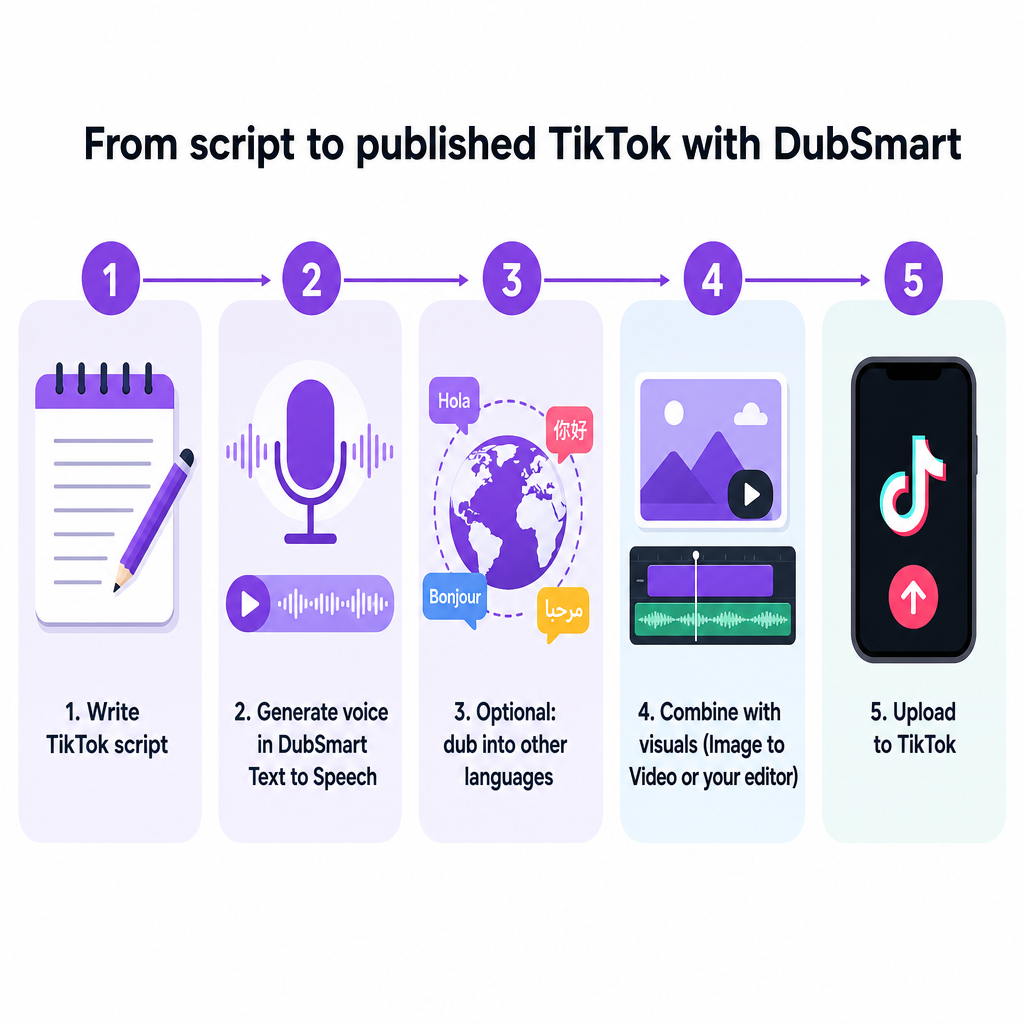
From there you have two clean ways to get that audio onto TikTok. You can build the full clip inside DubSmart — pair the voiceover with visuals and export a finished MP4 — or you can upload your video and use TikTok's audio editor to import the DubSmart voiceover, replacing the original sound. That import-and-replace pattern is exactly the method AnySpeech and Speechify document for bringing external TTS into TikTok: generate the audio elsewhere, download it, and swap it in. The difference is the quality and range of the voice you're importing. TikTok's text overlays then become purely a visual choice for emphasis or subtitles, not something you depend on for the voice itself.
Because DubSmart consolidates the whole flow, you stop juggling a separate TTS generator, an editing app, and TikTok's native tools. Script goes in, a polished voice comes out, and the "in minutes" promise holds up because there's no long setup. The credit-based model reinforces that — there's a free tier to trial the workflow, credits that roll over so nothing you buy goes to waste, and enterprise plans when a team needs more volume. For short, script-based TikTok content, that pay-for-what-you-use structure fits naturally: you spend credits only on the audio you actually generate, and light weeks don't burn a fixed subscription.
A few practical delivery choices help the output land well on TikTok. Keep scripts tight — vertical clips reward front-loaded hooks, so put the strongest line first and let the voice carry momentum. Where the tool exposes speed control, a marginally faster read often suits fast-paced tip content, while a calmer pace fits storytelling. And because you can regenerate instantly, it's cheap to try two voices on the same script and keep whichever reads more naturally against your visuals.
For faceless channels, you can generate the picture side too: use DubSmart's AI image generator to create background visuals from a prompt, or turn stills into motion with the Image to Video tool so your narration has a simple visual canvas. Combine those with your DubSmart voiceover and you have a complete vertical clip without ever filming anything — useful for listicles, quote videos, or explainer content where the voice does the heavy lifting.
Cloning your own voice for a consistent channel
Stock voices can only take a personal brand so far. DubSmart's Voice Cloning tool builds a reusable voice model from a short audio sample — the platform advertises cloning from just 20 seconds of audio — and that model plugs directly into the Text to Speech and AI Dubbing modules. Once your voice exists in DubSmart, you can narrate any script in it without recording again.
This is where a channel starts to sound like a channel. A creator can clone their own voice and use it to read every daily tip video, so the account has one recognizable sound even on days they don't feel like recording. A small business can clone a chosen brand voice and apply it across every explainer, keeping tone consistent whether the video runs on TikTok, YouTube Shorts, or Reels. Because the clone is a saved model rather than a one-time recording, you own and reuse it — something a shared TikTok stock voice can never offer.
The practical payoff is speed plus identity. You write a fresh script for tomorrow's post, select your cloned voice, and generate — no microphone, no retakes, no matching your own energy from yesterday. For series content especially — tips, facts, daily posts — batch-generating narration in a single consistent voice removes the biggest recording bottleneck creators run into. It also decouples publishing from your recording setup: you can draft and voice a week of scripts from a laptop, anywhere, without a quiet room or a microphone.
When deciding whether to clone, a simple rule helps: use a library voice when the content is generic or one-off, and clone when the sound itself is part of the brand. A personal creator whose face and voice are the channel benefits immediately; a business building a recognizable spokesperson tone benefits over dozens of posts. You can also keep more than one cloned voice on hand — one for you, one for a co-host — and switch between them per script.
One responsible reminder: when you use AI-generated or cloned voices on TikTok, follow the platform's current Community Guidelines and ad policies. The sources here don't detail TikTok's specific stance on cloned voices or on disclosing AI narration, so treat those as case-by-case decisions and check TikTok's latest policies rather than assuming a blanket rule either way. As a matter of good practice, only clone a voice you have the right to use — your own, or one you've been clearly authorized to reproduce.
Reaching new audiences with multilingual dubbing
The biggest ceiling on a stock-voice workflow is language, and it's where DubSmart changes the math most. The AI Dubbing tool supports dubbing from 60+ source languages into 33 target languages, applying either a library voice or your cloned voice in the new language. Instead of re-shooting or hiring separate voice actors per market, you take one video and release localized versions of it.
The flow is straightforward. You already have a TikTok or short-form clip in one language; run it through AI Dubbing, choose your target languages, and export each localized version for the account or region it belongs to. An English tip video becomes a Spanish, Portuguese, French, or Hindi version, each with natural-sounding narration. For creators managing multiple regional accounts, this turns one piece of production work into several posts.
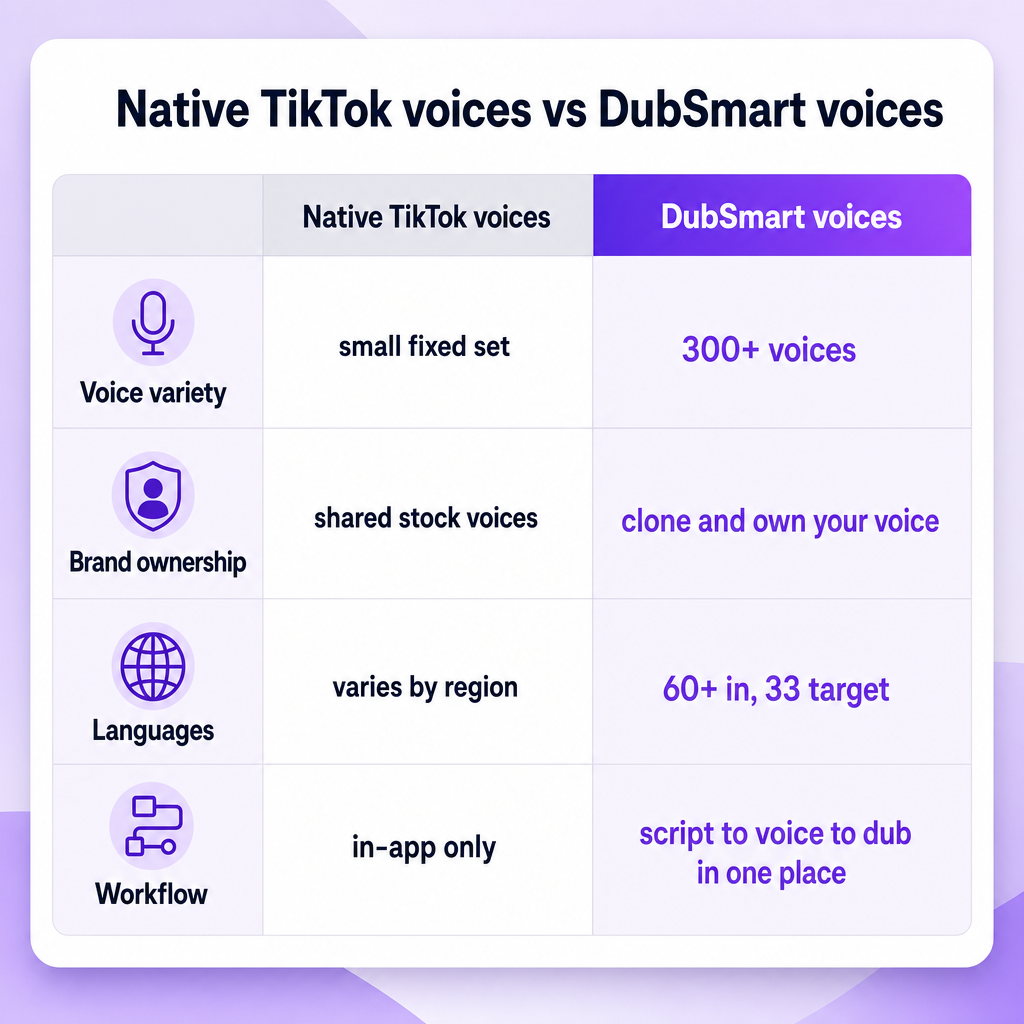
The combination matters more than any single feature. A cloned brand voice plus AI Dubbing means the same voice can speak multiple languages, so a global channel keeps one identity across borders. That's the kind of consistency stock TikTok voices can't provide, and it's why creators serious about international reach outgrow the native tools quickly. Because DubSmart supports 60+ input languages, you're not limited to starting in English either — you can produce in your first language and expand outward.
When choosing which markets to target, let performance guide you rather than dubbing everything at once. A practical approach is to dub only the clips that already performed well in your home language into one or two priority languages, watch how those localized versions land, and expand to more of the 33 target languages once a market shows traction. That keeps localization proportional to demand instead of a blanket cost.
Real creator and business scenarios
The features connect most clearly through concrete use. Consider a solo creator running a daily tips channel. They clone their voice once, then narrate each new script in that cloned voice through Text to Speech, publishing English clips every day without recording. When one tip performs well, they run it through AI Dubbing to release Spanish and French versions on their regional accounts — the same recognizable voice, three markets, one afternoon of work.
Now picture a small business making TikTok explainers. Their marketing team writes short scripts, generates them in a friendly, on-brand voice through Text to Speech, and pairs the audio with visuals built from Text to Image and Image to Video for a faceless, fully produced look. When they want to reach customers in another region, AI Dubbing localizes each explainer without new production, so the brand voice stays intact across languages. The credit model keeps this affordable at the volume a small team actually posts.
A YouTube channel repurposing long tutorials into vertical shorts is a third pattern. They pull a segment, use Image to Video and generated visuals to reframe it for TikTok, layer in a DubSmart voiceover, and then dub the short into additional languages to seed new audiences. One YouTube upload becomes a fan of localized TikTok clips. An e-learning producer follows the same shape for micro-lessons: a single scripted concept becomes a consistent-voiced short in several languages, extending one lesson to learners who'd otherwise never find it.
These scenarios share a shape: write once, voice once, then localize and repurpose without starting over. That's the difference between treating text-to-speech as an in-app afterthought and treating it as a production system your channel can grow on. The 500,000+ users on the platform span exactly these segments — individual creators, marketing teams, e-learning producers, and independent filmmakers — because the same consolidated workflow serves all of them.
Automating voiceovers with the DubSmart APIs
Agencies and developers can push this further by wiring DubSmart into their own pipelines instead of clicking through the web tools. The Text to Speech API exposes the same natural speech generation, 300+ voices, and unlimited voice cloning programmatically, so you can auto-generate a voiceover the moment a new script lands in a content calendar or CMS. That's a practical way to produce a full week of TikTok narrations from a spreadsheet of scripts.
For teams managing many clients or brands, the Voice Cloning API lets you upload audio, clone voices, and reuse those custom voices in Text to Speech or dubbing across campaigns — building a distinct brand voice per client and calling it on demand. Pair that with the AI Dubbing API to mass-localize an entire short-form series into 33+ languages and feed the outputs straight into a publishing workflow. A common pattern is "auto-dub every new video and push localized clips to each regional account," which turns multilingual TikTok production into an automated step rather than a manual chore.
The point of the API layer is scale without repetition. Where a solo creator benefits from the fast web workflow, an agency running dozens of accounts benefits from generating, cloning, and dubbing programmatically, keeping human effort on strategy and creative instead of on rendering voice files one at a time. A sensible way to adopt it is to prove the manual workflow first on the web tools, confirm the voices and languages you want, then move only the repetitive steps — generation and dubbing — into the API once volume justifies the engineering.
Frequently asked questions
Can I use DubSmart voices directly inside TikTok?
Yes. Generate your voiceover in DubSmart's Text to Speech tool, then either build the full clip inside DubSmart and upload the finished video, or upload your video to TikTok and use its audio editor to import the DubSmart voiceover in place of the original sound. Guides on TikTok audio replacement from AnySpeech and Speechify confirm this import-and-replace method works for external audio, so the higher-quality voice you generated slots in exactly where TikTok's native TTS would have gone.
How is this different from TikTok's built-in text-to-speech?
TikTok's native feature offers a small, fixed set of stock voices that everyone shares, with region-dependent language coverage. DubSmart gives you 300+ natural-sounding voices, the ability to clone and own a specific voice, and dubbing from 60+ source languages into 33 target languages — so your narration is brandable, consistent, and multilingual rather than generic. The other practical gap is ownership: a DubSmart cloned voice is a saved model you reuse across TikTok, YouTube, Reels, and podcasts, whereas a native TikTok voice never leaves the app.
Do I need to record my own voice to get started?
No. You can start immediately with any of the 300+ library voices by pasting a script into Text to Speech — no microphone required. Voice cloning is optional: it's there when you want a channel or brand to sound like a specific person, and it needs only about 20 seconds of sample audio to build a reusable voice. A good sequence is to launch with a library voice you like, then add a clone later once you know the sound you want your channel to own.
Can I make one TikTok video work in several languages?
Yes. Use AI Dubbing to take a clip you already have and produce localized versions in additional target languages, applying a library voice or your cloned voice in each language. That lets one piece of content serve multiple regional accounts without re-recording. Because the tool supports 60+ input languages and 33 target languages, you can also start in your first language rather than English and expand outward, and pairing dubbing with a cloned voice keeps the same identity speaking across every market.
Is there a way to hide on-screen text but keep the narration?
Within TikTok, creators commonly shrink the text box very small and drag it off the visible canvas to keep the voice while hiding captions. When you bring in DubSmart audio instead, you don't rely on TikTok's text tool for the voice at all — you import the generated voiceover as the clip's audio, so any on-screen text becomes an optional visual choice for emphasis or subtitles rather than the source of the narration.
How much does it cost to try?
DubSmart uses a credit-based model with a free tier for trial and light use, rollover credits so unused balance carries forward, and enterprise plans for higher-volume teams. That structure suits short, script-based TikTok workflows where you generate audio as you need it: you spend credits only on the clips you actually produce, quiet weeks don't waste a fixed subscription, and a team can scale up to an enterprise plan when posting volume grows.
The practical next move is to open the Text to Speech tool, paste the script for your next TikTok, and generate it in a voice you actually like — then try one cloned voice and one multilingual dub to see how far a single script can travel. Developers ready to automate can start from the TTS, Voice Cloning, and AI Dubbing APIs and build TikTok voiceovers straight into their pipeline.