
Every line in a video script gets one chance to land. Your viewer hears it once, at speaking pace, with no way to rewind unless they choose to. That single-pass constraint is exactly why a passive to active voice converter—or the manual habit it automates—belongs in your scripting routine. Passive sentences bury the doer, stack up extra helper verbs, and stretch a line past the point where a listener can hold it comfortably in mind. Active sentences do the opposite: they name who acts, put that actor first, and move straight to what happened.
This matters more for spoken scripts than for text on a page. A reader can slow down or reread a wordy passive clause. A listener cannot. And once you add localization into the picture—turning one English script into five or ten language versions—clarity compounds. Clearer source lines give translation and dubbing systems less to guess about. Below, I walk through what active and passive voice actually are, how to convert one to the other by hand or with a tool, and how a cleaned-up script flows into a production pipeline like DubSmart AI for voiceover and multilingual dubbing.
Table of contents
- What passive and active voice really mean for a spoken line
- Why active voice earns its place in video scripts
- Converting passive to active, one sentence at a time
- What a passive to active voice converter does and where it fits
- When passive voice is the right call
- From a cleaner script to finished multilingual video
- Frequently asked questions
What passive and active voice really mean for a spoken line
Grammatical voice describes the relationship between the subject of a sentence and the action of its verb. In active voice, the subject performs the action: the subject comes first, the verb follows, and the object receives the action. That structure creates a direct, dynamic tone, and writing authorities generally prefer it for conciseness and clarity, as Grammarly's guide to active versus passive voice lays out.
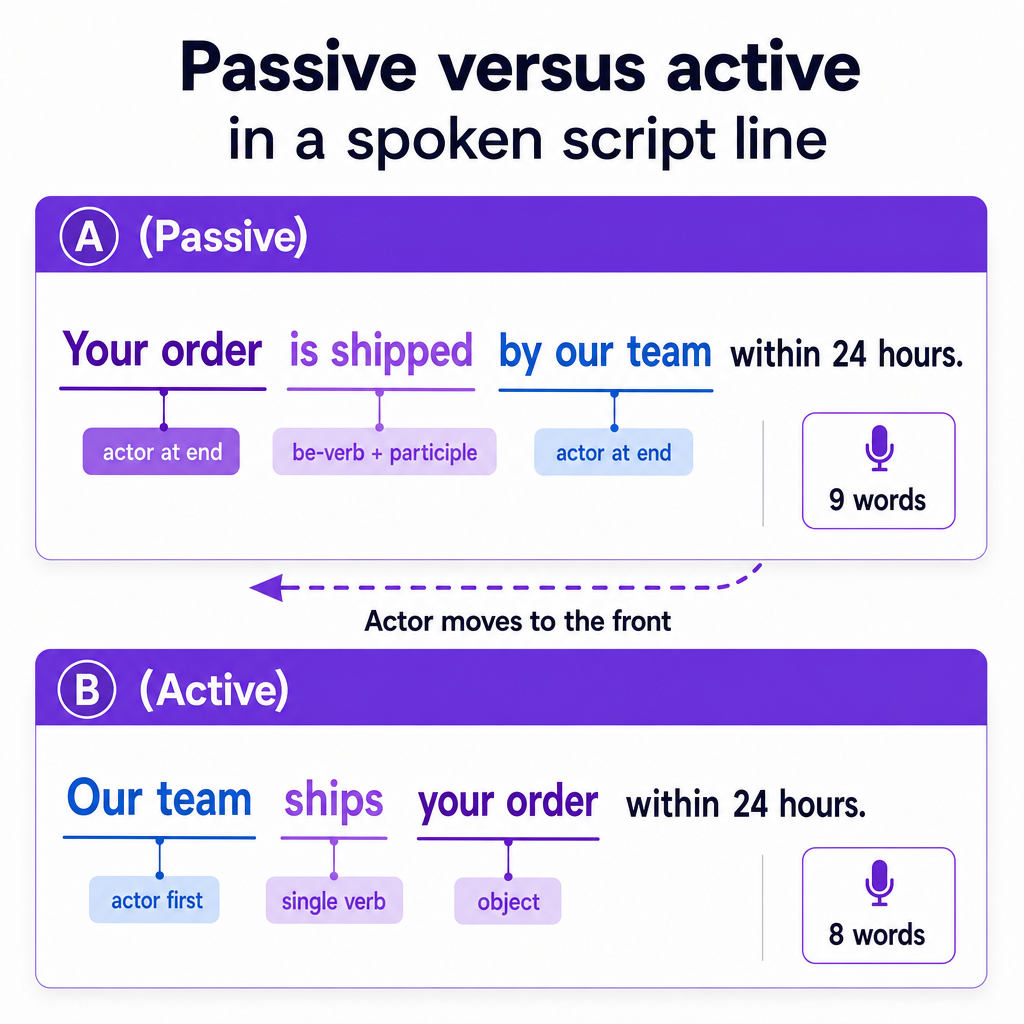
Passive voice flips that order. The subject receives the action instead of performing it, and the sentence typically uses a form of the verb "to be" plus a past participle. The actor either moves to the end in a "by" phrase or disappears entirely. Compare these two lines you might hear in an explainer video:
- Active: "Our team ships your order within 24 hours."
- Passive: "Your order is shipped by our team within 24 hours."
Both are grammatical. But the passive version adds the auxiliary "is," turns "ship" into "is shipped," and pushes the actor to the tail of the sentence. A university writing guide notes that passive sentences tend to be longer, wordier, and vaguer about who is responsible for the action, which is precisely the friction a spoken script cannot afford.
A quick recognition test helps. If you can add the phrase "by zombies" after the verb and the sentence still reads sensibly—"Your order is shipped by zombies"—you are probably looking at passive voice. It is a silly trick, but it reliably flags the be-verb-plus-participle pattern that signals a passive construction.
Why active voice earns its place in video scripts
The case for active voice is not stylistic snobbery. It comes down to how quickly a listener can process meaning. A university writing resource points out that if a draft feels awkward, overused passive voice is often the culprit, because passive constructions obscure the subject, produce longer and more syntactically complicated sentences, and require more verbs—all of which chip away at clarity.
In a video, that clarity cost is paid in real time. Your viewer hears "Our team ships your order" and instantly knows the actor, the action, and the object. A passive equivalent forces them to wait for the actor, hold the incomplete idea, and reassemble it. Over a two-minute script full of passive lines, that low-grade cognitive tax adds up to a viewer who tunes out or rewinds—if they bother at all.
The engagement angle is real too. A test-prep breakdown of the ACT English exam observes that when both forms are on the table, active voice is nearly always the better choice because it is shorter, clearer, and more engaging, and that passive voice reads as wrong when the agent is known and important. Video scripts almost always have a known, important agent: you, your brand, your product, your host. That is exactly the situation where active phrasing wins.
Active voice also tightens your runtime. Shorter sentences mean fewer words, and fewer words mean less time on screen for the same idea. When you are trying to hook a viewer in the first five seconds or land a call to action before they scroll away, trimming three or four auxiliary verbs per paragraph is not cosmetic—it changes pacing. A hook like "Discover how we cut editing time in half" beats "Learn how editing time was cut in half by our workflow" on both clarity and momentum.
One more benefit surfaces only when you localize. Translation and dubbing systems have to infer who did what in order to carry meaning into another language. Passive lines that drop the actor entirely—"Mistakes were made," "The feature was launched"—hand the system an ambiguity it must resolve on its own. Active lines with a named subject give it a clean answer. While this benefit is a matter of logic rather than a quantified figure, it aligns with how any translation pipeline relies on unambiguous input.
Converting passive to active, one sentence at a time
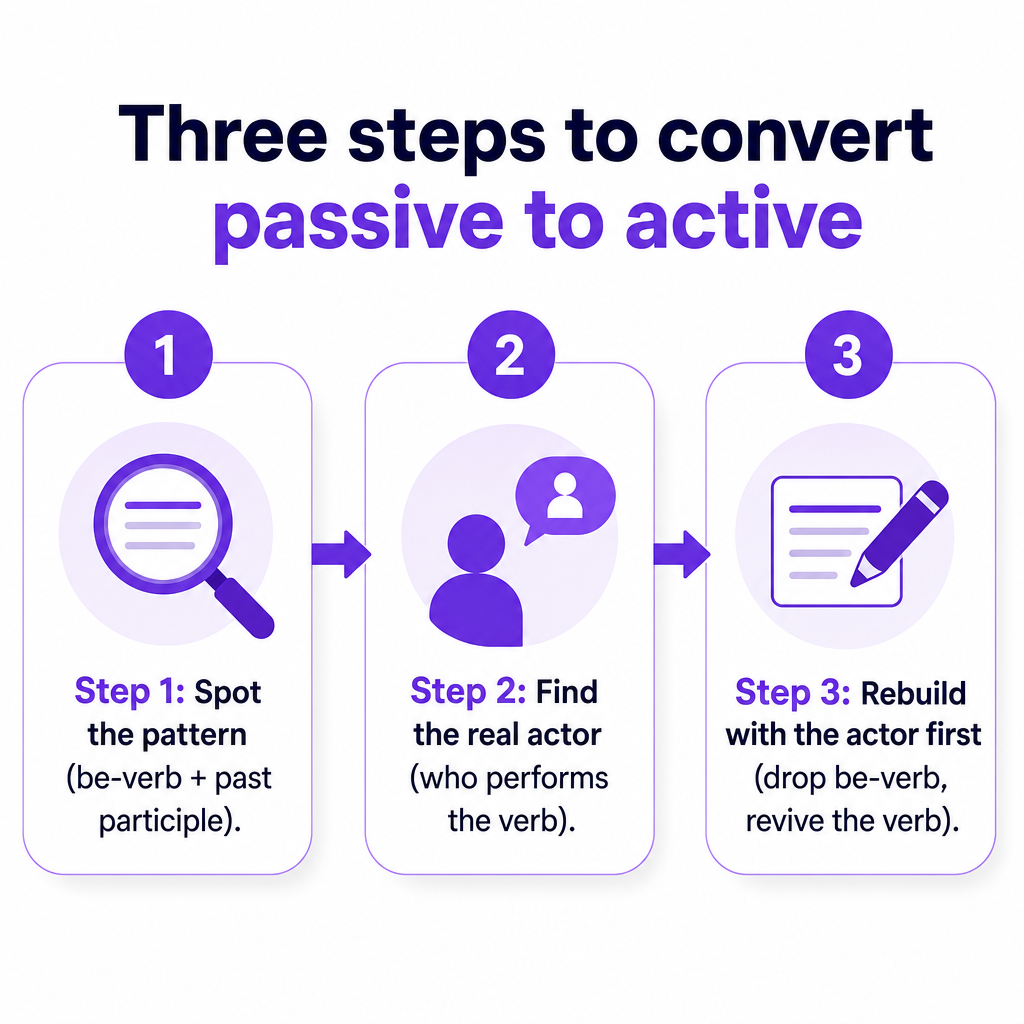
Manual conversion is a repeatable, three-move process. Once you internalize it, you can fix most passive lines in seconds without any tool at all.
Step one: spot the passive pattern. Scan for a form of "to be" (is, are, was, were, been, being) followed by a past participle (shipped, created, reviewed, launched, made). That pairing is the fingerprint of passive voice. The zombie test from earlier is a fast confirmation.
Step two: find the real actor. Ask who or what is actually performing the verb. Sometimes the actor sits in a "by" phrase: "The report was written by the marketing team"—the actor is the marketing team. Sometimes the actor is missing and you have to supply it from context: "The video was uploaded yesterday"—uploaded by whom? Your editor? You? If the actor genuinely does not matter, you may have a legitimate case for keeping the passive, which I cover below.
Step three: rebuild with the actor in front. Move the actor to the subject position, drop the be-verb, and turn the participle back into a working verb. "The report was written by the marketing team" becomes "The marketing team wrote the report." The sentence loses a word, gains a clear subject, and reads faster aloud.
Here is the process applied to lines you might actually script:
- Passive: "The settings can be adjusted in the menu." Active: "You can adjust the settings in the menu."
- Passive: "Millions of videos are watched on this channel each month." Active: "Viewers watch millions of videos on this channel each month."
- Passive: "Your feedback is valued by our team." Active: "Our team values your feedback."
Notice a pattern in the fixes: several of them introduce "you" as the subject. Direct address is a natural companion to active voice in video, because it names the viewer as the actor and pulls them into the action. "You can adjust the settings" invites the viewer to do something; "the settings can be adjusted" leaves them as a bystander.
Read every converted line out loud. Voice is ultimately about sound, and a sentence that scans well on the page can still stumble when spoken. If a rewrite feels clipped or robotic, adjust rhythm rather than reverting to passive. The goal is a line that a narrator—or an AI voice—can deliver in one clean breath.
What a passive to active voice converter does and where it fits
A passive to active voice converter automates the three moves above. As one converter's own description explains, the tool finds passive constructions—typically a "be" verb plus a past participle—and rewrites them by moving the actor into the subject position, producing cleaner, more direct sentences. Another tool, described at Textora's passive-to-active converter, reiterates that active voice is more direct and easier to read, and that most style guides and professional standards recommend it—the reasoning that justifies these tools existing at all.
What these converters are genuinely good at is speed on volume. When you are staring at a 1,500-word e-learning script or a long product walkthrough, scanning every sentence by hand is tedious. A converter flags passive constructions in bulk and proposes rewrites, so you can approve, tweak, or reject each one. That is a real time saving on long-form scripts where passive voice has crept in unnoticed.
A word of caution on the claims some of these tools make. One asserts that active-voice sentences are processed roughly 30% faster than passive equivalents, but that figure comes from a tool's own marketing without a link to the underlying research, so treat it as a claim rather than settled science. You do not need a precise percentage to justify active voice. The well-supported qualitative case—shorter, clearer, less ambiguous—is enough.
Use a converter as an assistant, not an authority. These tools detect patterns; they do not understand your intent. A converter cannot tell whether a passive line is passive on purpose (see the next section) or by accident. It also cannot always supply a missing actor, and it may guess wrong when it tries. Run the tool, then read every suggestion against your own judgment and your ear for how the line will sound spoken. Because such converters operate on arbitrary text, they slot neatly into a scripting workflow as a pre-processing step—clean the draft first, then move it into production.
When passive voice is the right call
Active voice is the default, not a rule you can never break. Passive voice is a legitimate tool, and forcing every sentence into active can produce writing as stiff as writing that overuses passive. Keep passive when it serves the line.
When the actor is unknown. "The channel was hacked last night" is fine if you genuinely do not know who did it. Inventing an actor just to satisfy active voice would be dishonest.
When the actor is unimportant. "The video was recorded in 4K" keeps focus on the video's quality rather than on the person holding the camera. If your viewer does not care who performed the action, foregrounding a vague actor adds noise.
When you want to emphasize the recipient. Sometimes the object is the star. "Your data is encrypted end to end" deliberately leads with the viewer's data—the thing they care about—rather than with the system doing the encrypting. Rewriting it as "We encrypt your data end to end" is also valid; choose based on where you want the emphasis.
When passive smooths a transition. Occasionally a passive construction connects two ideas more gracefully by keeping the topic of the previous sentence in the subject slot. Good writing sometimes trades a small clarity cost for better flow.
The practical test: convert to active by default, and keep passive only when you can name a reason. If you cannot articulate why a sentence should stay passive, it probably should not. This is where automated converters fall short—they cannot weigh emphasis or intent—and where your judgment as the writer earns its keep.
From a cleaner script to finished multilingual video
A tightened, active-voice script is not the finish line; it is the raw material for production. This is where a unified platform like DubSmart AI turns clean text into finished audio and video without scattering the job across half a dozen disconnected tools. DubSmart is worth noting here for a specific reason: it does not sell a passive-to-active converter, and this article is not pretending it does. What it offers is the environment your cleaned-up script flows into next—text to voice, voice to dubbed voice, and script to visuals in one place.
The first stop is voiceover. Once your lines are active and read well aloud, you can generate narration with DubSmart's Text to Speech engine, which draws on a library of more than 300 natural-sounding AI voices. The tighter your lines, the easier it is to match a voice and speed to your pacing, because you are not fighting long passive clauses that force a narrator to rush. Developers who want to build this into their own pipeline can send text and voice preferences straight to the Text to Speech API, which returns high-quality audio from a single request and organizes work into projects, where each project holds multiple segments with their own text and settings.
If you want one consistent host voice across every video and every language, voice cloning is the tool. DubSmart's Voice cloning supports creating a custom AI voice that preserves the original speaker's characteristics, and per the brief you can build one from a short audio sample. The documented API workflow is compact: upload an audio file to receive a file key, create a named custom voice from that key, then select the cloned voice inside a Text to Speech project exactly like any stock voice. That means your brand's active-voice lines can be delivered in a signature voice viewers recognize.
Localization is where clean scripts pay off most visibly. DubSmart's AI Dubbing localizes content across dozens of languages—company materials describe support in the range of roughly 31 to 33 target languages depending on the source and current product version, so it is worth checking the live product page for the exact count. The documented process is straightforward: select AI Dubbing, upload your original media, then in an editing phase choose target languages, speakers, and preferred voices before exporting. The dubbing engine uses advanced speech recognition and translation to detect each spoken language, decide which parts need translation, and generate natural voices that handle transitions while preserving intonation, pacing, and emotional tone. Feeding that engine active, unambiguous lines gives it less to infer about who did what—which is exactly the input translation systems handle best.
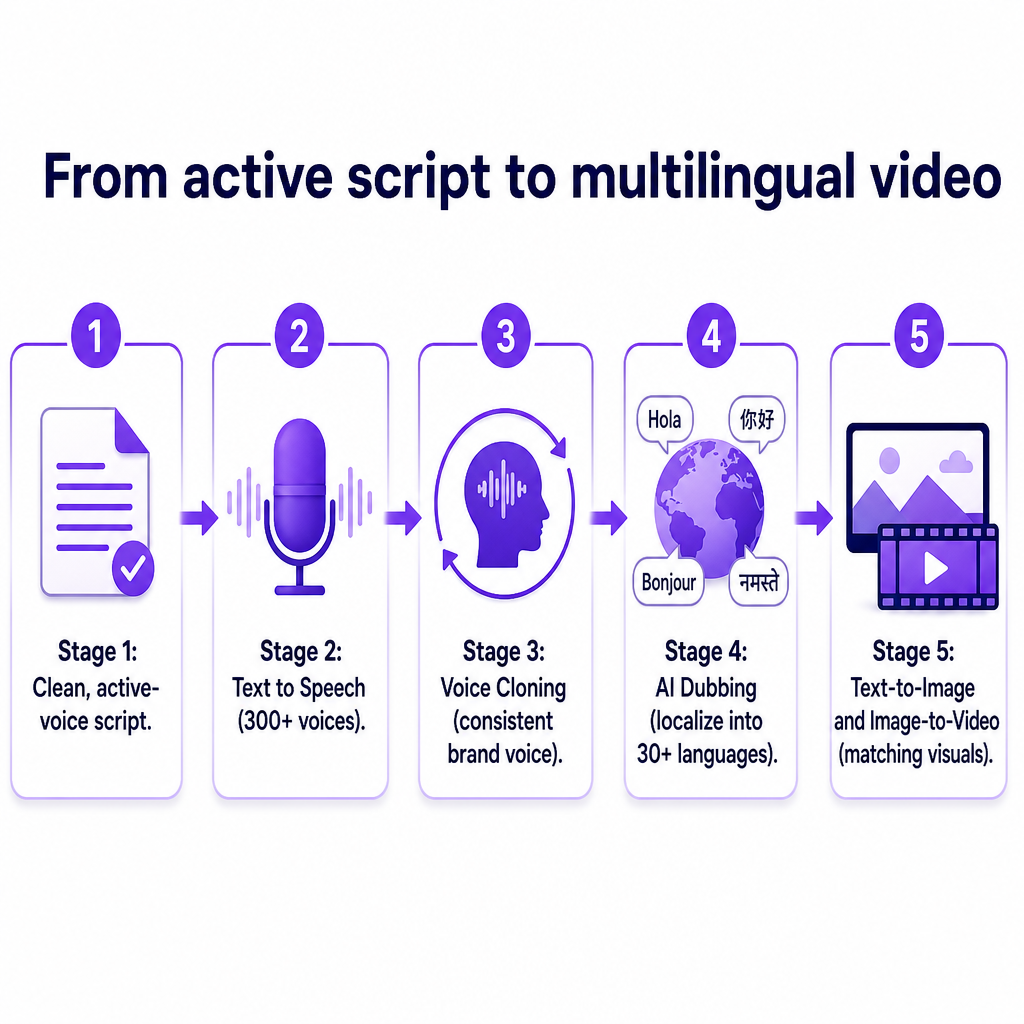
Visuals can stay inside the same workflow too. When your improved script needs matching imagery, the AI image generator turns scene descriptions into images you can use for thumbnails, storyboards, or backgrounds, and the Image to Video tool animates a static image into a short 4-to-8-second clip based on a prompt describing motion, camera angles, and scene dynamics. Combining these with your narration keeps the entire assembly—text, voice, dubbing, and visuals—in one environment rather than exported back and forth between tools.
A concrete micro-workflow ties it together. Take your cleaned, active-voice script, drop it into Text to Speech, select your cloned brand voice, then send the same project through AI Dubbing to generate several language versions for your channel. According to DubSmart's own marketing, the platform bundles these tools into a single credit-based workflow with a free tier, though pricing details are current as of their materials and subject to change, so confirm specifics on the site before committing.
Frequently asked questions
Does DubSmart have a built-in passive to active voice converter?
No. Based on the available materials, DubSmart does not advertise a passive-to-active voice conversion feature. A passive to active voice converter is a category of writing tool that rewrites sentences before you produce audio. DubSmart is the production environment your cleaned-up script moves into next—for Text to Speech, Voice Cloning, AI Dubbing, and visuals—rather than the tool that rewrites the grammar itself. Clean the script with a dedicated writing tool or by hand, then bring the polished text into DubSmart.
Should every sentence in my video script be active?
No, and aiming for 100% active voice can make a script sound stiff. Use active voice as your default because it is shorter, clearer, and names who acts. Keep passive voice when the actor is genuinely unknown, when the actor does not matter, or when you deliberately want to emphasize the recipient of the action. The working rule: convert to active unless you can state a specific reason to keep a sentence passive.
How does active voice help when dubbing into other languages?
Active lines name the actor and state who did what without ambiguity. Translation and dubbing systems have to work out that relationship to carry meaning into another language, so clear active phrasing gives them a definite answer instead of a gap to fill. Passive lines that drop the actor—"the update was released"—force the system to guess. This is a logical benefit rather than a measured figure, but it matches how any translation pipeline depends on unambiguous input.
Are automated passive to active converters accurate?
They are useful for speed on long scripts but imperfect. Converters detect the be-verb-plus-participle pattern and propose rewrites, which saves time when you are cleaning a lengthy draft. They cannot judge whether a passive line is intentional, they may fail to supply a missing actor, and they sometimes guess wrong. Treat every suggestion as a draft, read it aloud, and apply your own judgment—especially for lines meant to be spoken.
Is there a quick way to spot passive voice while writing?
Yes. Look for a form of "to be" (is, are, was, were, been, being) followed by a past participle such as shipped, created, or launched. A fast confirmation is the "by zombies" test: if you can add "by zombies" after the verb and the sentence still makes grammatical sense—"the report was written by zombies"—the sentence is almost certainly passive.
How many languages can DubSmart dub into?
DubSmart's materials describe support in the range of roughly 31 to 33 target languages, and the exact number depends on the current product version and plan. Because the sources are not fully consistent, the safest approach is to check the live AI Dubbing product page for the current supported-language list before planning a multilingual release.