You just heard it again — that bright, crisp, synthetic-yet-emotive vocal slicing through a song, a VTuber stream, or a game remix, and something clicked. You want to make that sound yourself. Not next month after you buy software and watch forty tutorials. Now. The trouble is, the traditional path runs through licensed Vocaloid or Synthesizer V engines that cost money, demand a steep learning curve, and lock that iconic vocal character behind hours of hand-drawn pitch curves. A modern miku voice generator flips that script, taking you from a typed line or a short audio clip to an exportable vocal track in minutes.
Here is the reassuring part: wanting an easier route is not cheating. Vocaloid culture grew through hobbyists learning step-by-step from community tutorials, not trained audio engineers — media scholar Hans Coppens frames the whole phenomenon as a participatory, user-generated ecosystem. And the friction keeps dropping. The open-source Real-Time-Voice-Cloning project advertises that it can clone a recognizable voice from about 5 seconds of clean audio. So the real question is which tool matches what you want to make — and that is exactly what the rest of this walkthrough sorts out.
Table of Contents
- What a "Miku Voice Generator" Actually Does (and What It Can't)
- Choosing Your Method: Text-to-Speech vs. Voice Cloning vs. Cover Models
- Step-by-Step — Generating Miku-Style Vocals with an AI Voice Tool
- Cloning a Custom Miku-Style Voice from a Short Audio Sample
- Tuning for Authenticity — Pitch, Tone, and the "Vocaloid" Character
- Licensing, Usage Rights, and Staying Legal with Miku-Style Content
- Your Miku Vocal Creation Toolkit — Ready-to-Run Action Checklist
- Miku Voice Generator — Common Questions
What a "Miku Voice Generator" Actually Does (and What It Can't)
Before you pick a tool, get clear on what "Miku voice generator" actually refers to — because the term covers three different technologies that produce three different outputs. Choosing wrong wastes hours. Here is how the approaches break down.
Vocaloid / Synthesizer V engines. These are licensed software products that generate singing directly from symbolic input — MIDI notes plus typed lyrics — giving you note-level control over pitch, timing, and expression. This is the official Crypton Future Media Hatsune Miku voicebank path, where you draw the melody and the engine sings it (Hans Coppens). Crypton explicitly defines Hatsune Miku as a "Piapro Character" — one of a line of singing voice synthesizer products, a software-based vocal tool rather than a human performer (piapro.net). Maximum control, highest skill ceiling.
AI voice cloning and Text-to-Speech tools. These generate Miku-style speech and spoken vocals from typed text or a short reference clip. Once a voice is cloned, systems like Real-Time-Voice-Cloning produce natural-sounding spoken phrases from text, but they are not optimized for note-by-note singing control the way Vocaloid engines are (Kaggle voice cloning discussion). Use a Text to Speech engine for spoken Miku-style lines, or Voice cloning to build a custom timbre you own.
Cover / voice-conversion models (RVC, so-vits-svc). These take an existing vocal performance and transform its timbre into a Miku-like voice while preserving the original pitch and timing (so-vits-svc tutorial). That makes them ideal for "Miku-style covers" of already-sung material — you supply the melody by singing it yourself, and the model swaps the voice. They do not invent new melodies from scratch.
The fastest route to a Miku-style vocal isn't always the official voicebank — it's choosing the tool that matches your output: speech, song, or transformation.
Set your expectations honestly: TTS and cloning produce spoken or speech-like output, Vocaloid engines produce true singing, and cover models transform an existing take. The line between official licensed Miku and generic "Miku-style" output also matters legally — something we'll settle later in this walkthrough.
Choosing Your Method: Text-to-Speech vs. Voice Cloning vs. Cover Models
Now match the method to your goal. The matrix below lays out the four approaches across the criteria that actually affect your decision — what comes out, what you have to feed in, how hard it is, and what the licensing picture looks like.
| Method | Output Type | Input Needed | Best Use Case | Licensing Note |
|---|---|---|---|---|
| Text-to-Speech | Spoken / speech-like | Typed text | VTuber intros, narration, spoken lines | Use generic "style," check platform terms |
| Voice Cloning | Custom spoken timbre | ~5–20 sec clean reference | Ownable custom Miku-style voice | Clone your own/licensed source |
| Cover / Voice Conversion | Transformed singing | Sung vocal + model | Miku-style covers of your own takes | Source vocal rights + character IP apply |
| Vocaloid / Synth V engine | True singing | MIDI + lyrics | Original Miku songs, full note control | Official voicebank; Piapro/PCL applies |
Read it by your end goal. If you need a spoken VTuber intro or narration in a bright synthetic voice, Text-to-Speech is the lowest-friction path — type the line, generate, done. If you want a unique, ownable timbre that nobody else has, voice cloning from a short reference clip is the move. And if you've already sung a demo and want it to come out sounding Miku-like, a cover / voice-conversion model is built precisely for that: so-vits-svc and RVC preserve the pitch and timing of your performance and replace only the voice (so-vits-svc).
The skill curve climbs as you move down the table. Text-to-speech and cloning sit at the low end — modern cloning systems adapt to a new speaker from seconds of audio (Real-Time-Voice-Cloning). Cover models land in the medium range because you have to prepare and clean a source vocal first. Vocaloid engines generate singing from MIDI plus lyrics (Hans Coppens), which means you're effectively composing and editing at the note level — powerful, but the steepest climb of the four.
This is where an all-in-one platform pays off, because the first three methods can live in one workflow. A Text to Speech engine covers spoken Miku-style lines. Voice cloning from a short reference clip gets you a fast custom timbre without touching a DAW. And a Speech Separator handles the unglamorous-but-necessary step of isolating vocals from an existing track before you run a conversion — so your Miku text to speech experiments and your cover experiments share the same toolkit instead of scattering across five apps.
One column the matrix deliberately omits: a "best overall" rating. There isn't one. The right method is whichever output type you're after, and the licensing column is the one to read twice before you publish anything commercially — the Piapro license terms are not optional reading.
Step-by-Step — Generating Miku-Style Vocals with an AI Voice Tool
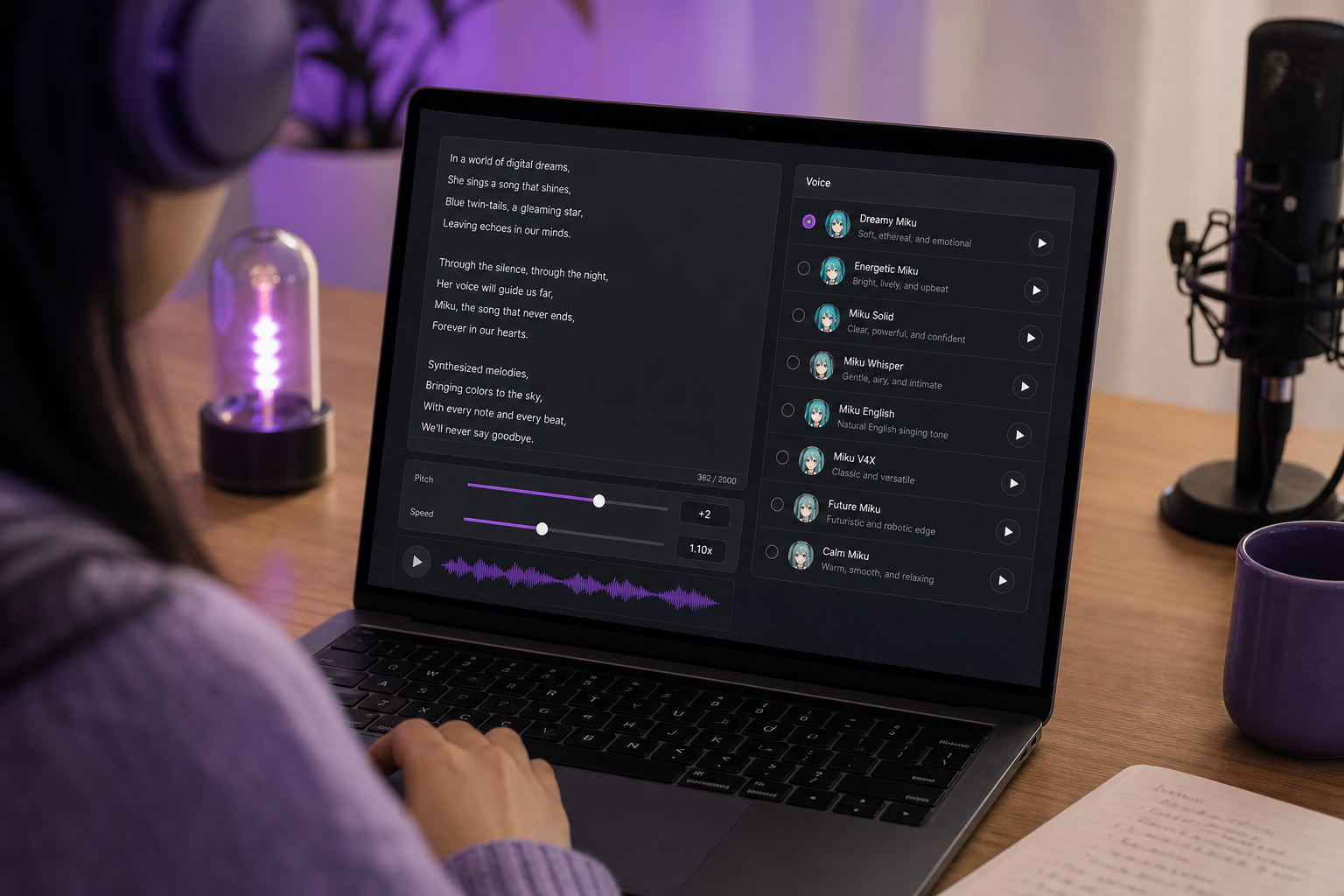
This is the part you came for. Here is the complete generate-and-export workflow with a miku voice generator, from blank screen to a clean vocal stem you can drop into your project. Five steps, no DAW gymnastics required.

- Pick your input. For spoken lines, type your lyrics or script directly into the text field. For a cloned voice, prepare a clean reference vocal clip. Either way, clean input is non-negotiable — garbage in, garbage out. Developers automating large batches of lines can push text through a Text to Speech API instead of pasting by hand.
- Select or clone a voice profile. Choose a bright, high-register voice from a stock library, or clone your own to get Miku-style vocals with a custom character. Modern systems can clone from around 5 seconds of clean audio, though longer clips — tens of seconds — yield more stable timbre (Real-Time-Voice-Cloning, Kaggle). Full cloning detail comes in the next section.
- Adjust pitch, speed, and tone. Push the pitch up toward the high, synthetic-clarity register that defines the Miku character, then tune speed and tone until the output reads crisp rather than warm. These three sliders are your main expressive levers — we go deep on dialing them in shortly.
- Generate and preview. Render the vocal and listen critically. If the timbre wobbles or the phrasing feels off, change one setting and re-run. Iteration is cheap here, so treat the first render as a draft, not a final.
- Export the clean vocal stem. Download the stem and drop it into your DAW or video editor. If you're building a finished video around it, Image to Video lets you pair the vocal with generated visuals without leaving the workflow.
The whole point is accessibility. This workflow strips out the DAW complexity that stops most beginners cold, which mirrors how Vocaloid hobbyists actually learn — step-by-step through accessible tools rather than formal engineering training (Hans Coppens).
Cloning a Custom Miku-Style Voice from a Short Audio Sample
A stock voice gets you moving fast, but if you want a timbre nobody else has — one you can call yours — Miku voice cloning from a short sample is the play. Work through this checklist in order; skipping the prep steps is where most people's results fall apart.
- Capture enough audio. Few-shot cloning works from roughly 5 seconds, but tens of seconds to a couple of minutes yields noticeably more stable timbre and prosody — and that stability matters even more for singing-like output (Real-Time-Voice-Cloning, Kaggle). Aim for the longer end if you can; the extra clean data buys you fidelity. Agencies cloning at scale can wire this into a Voice Cloning API.
- Strip background music first. A clean, isolated voice is essential. Run your sample through a Speech Separator or source-separation tool to remove music and noise before feeding it to the cloning model — successful workflows stress this step specifically to avoid artifacts and unstable pronunciation in the output (so-vits-svc).
- Source a high-register, clear reference. Record or pick a sample that is bright, clear, and consonant-crisp, sitting in a high vocal range. The closer your reference already leans toward those qualities, the less work the pitch and tone controls have to do later to reach the AI Miku voice character.
- Verify output quality and iterate. Listen for naturalness and timbral stability. Cloning quality improves with more and cleaner data (Kaggle), so if the voice wobbles or smears on certain syllables, the fix is usually a better sample — not more slider tweaking. Re-clone and compare.
- Use your own or licensed voice. Clone a voice you actually own or have permission to use. The Real-Time-Voice-Cloning project lead explicitly warns about the ethics and potential misuse of cloning voices without consent (Real-Time-Voice-Cloning). Building an original timbre from your own voice sidesteps that entire category of risk — and we'll cover the licensing implications fully in the next section.
Tuning for Authenticity — Pitch, Tone, and the "Vocaloid" Character
Anyone can generate a flat line of synthetic speech. Turning that into a convincing Miku-style vocal is craft, and it lives in a handful of specific decisions. Here is what actually moves the needle.
Pitch register and bright timbre. Miku's signature is a high register paired with bright, clear timbre — clarity favored over warmth. Push your pitch setting up and resist the urge to add body. This is also where the AI-tool approach diverges from the official engine: Vocaloid gives you note-level pitch control, letting you bend and shape each individual note (Hans Coppens). With an AI generator you approximate that character through global pitch and tone settings rather than per-note editing. You trade granular control for speed — a fair trade for most projects, but know what you're trading.
Articulation and consonant clarity. That "synthetic clarity" feeling comes largely from crisp consonants and clean enunciation. Keep your input phrasing simple and direct so the model articulates each word cleanly. Long, comma-heavy sentences with tricky consonant clusters tend to muddy the output. Short, declarative lines render sharper — and sharper is what reads as authentic here. For developers generating these lines programmatically, an AI image generator can pair matching cover art with each rendered phrase when you build out a release.
Naturalness gaps to manage. Be honest with yourself about the current ceiling. Commenters dissecting the 5-second cloning research point out that generated speech still sounds noticeably less natural and expressive than real recordings, especially under noisy conditions or for emotional content (Reddit media-synthesis discussion). The Voice Cloning: Comprehensive Survey on arXiv reinforces this, noting that systems trade data efficiency against quality and that few-shot models adapt from seconds of audio while higher-fidelity results require minutes or hours of fine-tuning data. You manage the gap, not eliminate it: feed cleaner and longer input, keep emotional demands modest, and apply light processing rather than heavy correction.
Layering and sitting in the mix. A bare vocal stem rarely sounds finished. Light reverb, subtle doubling, and targeted EQ help the vocal sit in a track without drowning it. The discipline here is restraint — over-processing pushes a borderline-natural vocal straight into uncanny territory. A touch of each effect goes a long way; piling them on does not.
Authenticity in synthetic vocals lives in the details — the consonant snap, the pitch register, and the restraint to not over-process.
Tie it back to your controls. Speed, pitch, and tone are your levers, and the workflow rewards iteration over perfectionism. Generate, listen, adjust one variable, regenerate. Tools like Text to Speech make this loop fast enough that you can audition a dozen variations in the time it would take to hand-edit a single Vocaloid phrase. Don't expect one-shot perfection — expect to converge on it.
There's a bigger frame worth holding onto as you tune. Miku has always thrived inside a participatory ecosystem of remixes, covers, and reinterpretations (Hans Coppens). Your tuning choices aren't chasing a single fixed "correct" sound — they're another entry in a creative canvas that thousands of people have already painted on. The character is a starting point, not a finish line, and that's exactly what makes it worth experimenting with. There's no single official Vocaloid character target you're failing to hit; there's a range, and you get to find your spot in it with the AI vocal generator of your choice.
Licensing, Usage Rights, and Staying Legal with Miku-Style Content
If you plan to publish — and especially if you plan to monetize — this section is the one that keeps you out of trouble. The rules around Hatsune Miku are more specific than most creators assume, so read carefully before you hit upload.
Official character vs. "style." Hatsune Miku is a licensed Piapro Character owned by Crypton Future Media, governed by the Piapro Character License (PCL) and the Character Usage Guidelines. Those terms distinguish use of the character's image and name from use of the voicebank, and they set conditions for derivative works, distribution, and display (piapro.net). A generic "Miku-style" AI vocal you generate from your own cloned voice is a categorically different thing from using the official voicebank or invoking the licensed character by name and likeness. The further you sit from the official assets, the lower your exposure.
Commercial use and clearance. For commercial releases that use the official voicebank or character, distributors must request permission through the "Piapro Link" system, while non-commercial use is generally permitted within the published guidelines (according to Tokyo Otaku Mode's Otapedia, summarizing Piapro's rules). Treat Piapro Link clearance as the professional benchmark for legally shipping an official Miku song into a paid context — it's not a formality you can skip and apologize for later.
No blanket Creative Commons freedom. This trips people up constantly: unless explicitly stated otherwise, music associated with Hatsune Miku is not licensed under Creative Commons BY-NC. Piapro is clear that creators must treat such tracks as standard copyrighted works and cannot assume blanket non-commercial CC freedoms (Piapro license FAQ). Finding a Miku track online does not mean you can reuse it.
Why "inspired-by" cloning is safer. Generating an original timbre from your own — or properly licensed — voice avoids the consent and identity pitfalls that cloning researchers flag directly. The Real-Time-Voice-Cloning documentation warns about misuse of voices cloned without consent (Real-Time-Voice-Cloning), and the Voice Cloning: Comprehensive Survey (arXiv) stresses risks like identity theft, fraud, and non-consensual impersonation that complicate deploying character-like voices without robust consent frameworks. "Inspired-by" keeps you on the safe side of all of it.
Check platform terms before monetizing. Whatever AI tool you use, confirm its commercial-use terms before you publish or run ads against your content. If you plan multilingual or commercial distribution — for example, releasing localized versions of a track — pair that planning with the same licensing diligence, whether or not you route the audio through an AI Dubbing workflow.
Miku-style is a sound; Hatsune Miku is a licensed character — knowing the difference is the difference between safe publishing and a takedown.
Your Miku Vocal Creation Toolkit — Ready-to-Run Action Checklist
You have the full picture now. Here's the run-it-today checklist — tick each box in order and you'll move from idea to a published-safe vocal without backtracking.
- Decide your output type — speech, song, or transformation. This single choice determines every tool decision that follows.
- Choose your method — Text-to-Speech for spoken lines, voice cloning for a custom timbre, or a cover model for converting your own sung take. Match it to the matrix.
- Prep clean input — type your lyrics for TTS, or capture a clean 20-second-plus reference with the music stripped out via a Speech Separator before cloning.
- Generate, then tune pitch, tone, and speed, then preview and iterate — treat the first render as a draft and change one variable at a time.
- Export your vocal stem — drop it into your DAW to mix, or pair it with visuals in a video editor for a finished piece.
- Confirm licensing — stick to generic style or your own clone for safety, and clear official voicebank use through Piapro Link before you monetize anything.
That's the whole loop, and none of it requires audio-engineering credentials. The lowest-friction way in is to start on a free tier, generate one short line, and hear it for yourself before committing to a full track. Try a miku voice generator today using Text to Speech for spoken lines or Voice cloning to build your own timbre from a sample as short as a few seconds — generate your first Miku-style vocal in minutes, then iterate from there.
Miku Voice Generator — Common Questions
Is it legal to make money from Miku-style AI vocals?
It depends on what you use. The official Hatsune Miku character and voicebank require Piapro Link clearance for commercial use (Otapedia). A generic "style" vocal made from your own cloned voice carries lower risk. Either way, don't assume Creative Commons freedom — Miku tracks aren't blanket CC (Piapro license).
Can I make Miku-style vocals sing, or only speak?
TTS and cloning tools mainly produce spoken or speech-like output. True singing comes from Vocaloid or Synthesizer V engines, which build the melody from MIDI plus lyrics (Hans Coppens), or from cover/conversion models that transform an existing sung take (so-vits-svc).
What's the best free way to try a Miku voice generator?
Start on a platform with a free tier using a stock voice or a quick clone. Generate one short spoken line first using Text to Speech, then iterate on pitch and tone before you invest time in building out a full track. Cheap drafts, then commit.
Do I need a DAW to use an AI Miku voice generator?
No. You can generate and export a clean stem directly, ready to use as-is. A DAW only helps if you want to layer, EQ, or add reverb afterward. Many Vocaloid hobbyists learn step-by-step without any engineering background (Hans Coppens).
How is this different from official Vocaloid software?
Official Vocaloid generates singing from MIDI and lyrics with note-level control and a licensed voicebank (piapro.net). AI generators clone or synthesize a style from text or audio — faster, with a far lower learning curve, but with different and looser licensing implications you still need to verify.