An AI voiceover for YouTube is built in a simple arc: you turn a written script into spoken audio with text-to-speech, review the result, then drop that audio into a video editor and export a YouTube-ready file. Learning how to make an ai voiceover for youtube is less about finding a magic voice and more about matching the right method to your channel, then controlling pronunciation, pacing, and the final mix. We built DubSmart AI to handle that whole arc in one place, combining Text to Speech, Voice Cloning, audio cleanup, and multilingual dubbing so you are not stitching four disconnected tools together.
The decision that shapes everything downstream is which voice method you use: a ready-made AI voice, a clone of your own voice, or a translated voiceover for another audience. Each one changes your production speed, your channel identity, and the rights you need to secure. Below we define the methods, show how the mechanics work, and give you clear criteria so you can commit to one path with confidence.
Table of contents
What an AI voiceover actually is
An AI voiceover is synthetic narration generated from written text. Instead of recording every line yourself or booking a voice actor, you hand a script to a text-to-speech system, choose a voice, and generate an audio track you can edit and reuse.
For YouTube, that flexibility fits a surprising range of formats: explainer videos, tutorials and screen recordings, faceless channels, educational series, product demonstrations, Shorts, the video version of a podcast, and multilingual editions of content you have already published. It is especially useful for anything that needs frequent script updates, because you regenerate a line instead of rebooking a session.
What separates a professional result from an obviously robotic one is rarely the voice model alone. Script structure, pronunciation handling, pacing, emotional direction, music levels, and synchronization with the visuals all pull on the final impression. A strong voice read over a sloppy mix still sounds amateur, so the craft lives in how you prepare and assemble, not just in which voice you pick.
Three methods, and when each one wins
There are three practical ways to produce the narration, and choosing deliberately saves hours later.
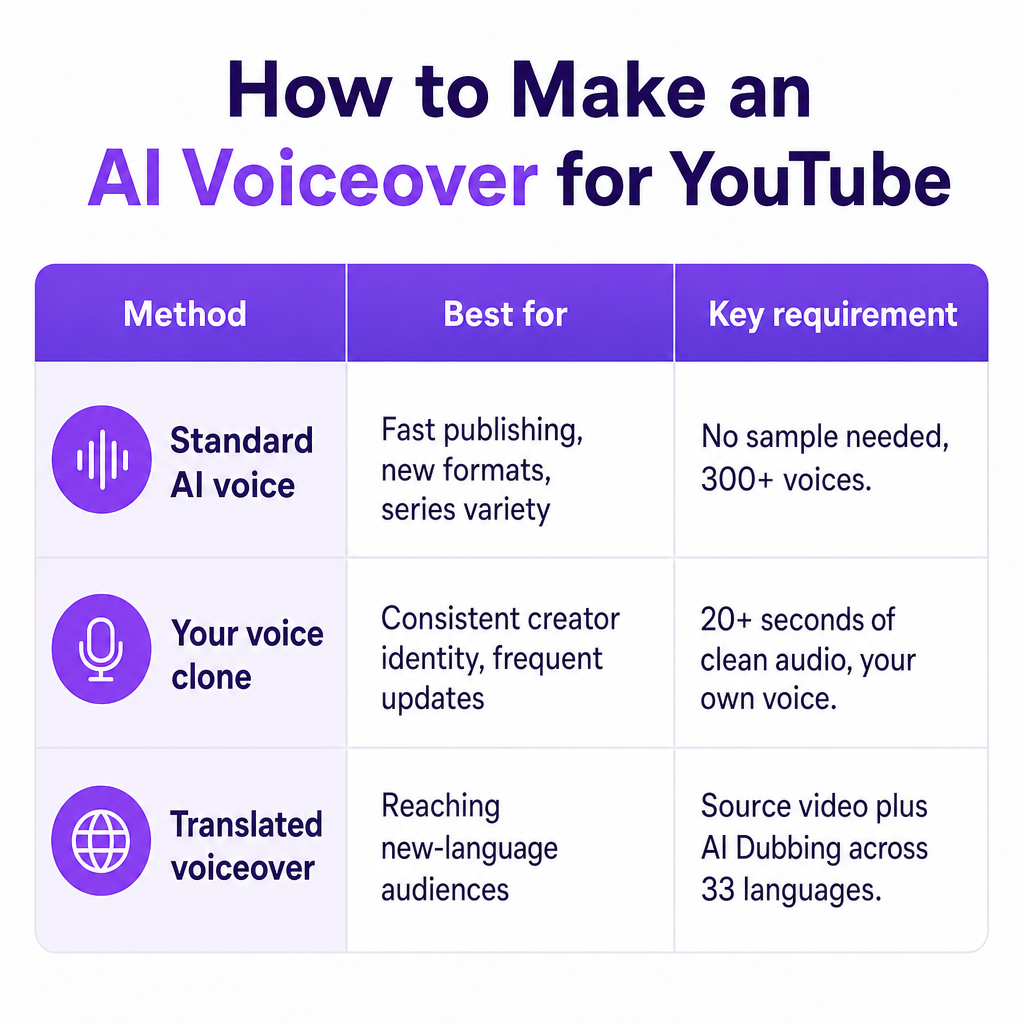
A standard AI voice is the fastest route. You pick a voice to match the subject, audience, and tone: clear and calm for a tutorial, confident and energetic for a tech review, measured and authoritative for a finance explainer, expressive and conversational for gaming, brighter and more emphatic for short-form, warm and animated for children's content within appropriate safety limits. Our Text to Speech tool offers more than 300 voices across male, female, and neutral options, built for narration, ads, courses, and podcasts.
Cloning your own voice gives you AI convenience without surrendering your vocal identity, which matters when you want consistent narration across a large library. A DubSmart clone can be created from an audio sample of at least 20 seconds, and the recording should be clean and free of background noise. Once created, that voice works across Text to Speech and AI Dubbing, including multilingual output. The non-negotiable rule: clone only your own voice or one you have clear permission to use. Imitating another person without consent creates legal, reputational, and trust problems that a natural-sounding clip will not excuse.
A translated voiceover is the better move when your goal is a new market rather than a fresh English read. That workflow runs through transcription, translation, voice generation, timing, and mixing, which is exactly what our AI Dubbing for multilingual video is built to handle across 33 languages. If you prefer to compare the available narration voices first, our roundup of the best Text to Speech voices for YouTube breaks down the trade-offs by channel type.
What to prepare before you generate a single line
Rushing into a voice generator with a half-finished script is the most common way to waste credits and regenerate the same audio three times. Five pieces of prep remove almost all of that friction.
Start with a narration-ready script that matches the video's structure, stripped of notes, stage directions, duplicate sentences, and text that will only appear on screen. Pair it with a pronunciation list that flags names, technical terms, acronyms, product names, URLs, abbreviations, and foreign words that models commonly mangle. Add a visual timeline marking where each section starts and ends, so narration lines up with screen recordings, demonstrations, B-roll, or animation.
Then write a short voice direction brief defining pace, tone, audience, and energy. "Friendly and clear" directs a read far better than the vague instinct to just pick something "natural." Finally, confirm your rights and permissions for the script, music, footage, images, and voice, which becomes critical the moment voice cloning or third-party material enters the project.
How we turn a script into finished narration
The core sequence is short: prepare the script, generate the narration, review the audio, and place it into the video. The quality comes from how you run each step.
Write for speech, not for reading. Short sentences, natural transitions, and explicit punctuation beat dense paragraphs every time. Rather than a clause-heavy sentence like "Our platform, which includes several AI tools and supports multilingual production, enables creators to work more efficiently," split it into two spoken lines: "DubSmart brings several AI media tools into one workflow. That helps creators produce and localize videos faster." Add commas and periods where you want pauses, spell out numbers the system mispronounces, and test any brand name with an unusual pronunciation before committing the full script.
When you select a voice, listen past the demo polish. Check clarity at normal playback speed, natural pauses, appropriate vocal age and tone, correct pronunciation of your industry terms, expressiveness that stops short of theatrical, and consistency across several paragraphs. The only reliable test is your own sentence style, not a vendor sample sentence.
Generate a short test before producing anything long. A good sample packs in a sentence with a number, a product or person's name, a question, a comma-heavy sentence, a technical term, a section transition, and the emotional tone you expect throughout. That one clip surfaces pronunciation, pacing, and tone problems while they are still cheap to fix.
Tune pacing and delivery with restraint. Our Text to Speech controls include speech rate, and descriptive wording such as "he said happily" or "she shouted angrily" can steer emotion, while numbers written as words fix stubborn mispronunciations. Overdone speed hurts comprehension and overdone emotion makes an explainer sound artificial, so a calm, slightly slower read usually serves tutorials best.
Once the sample is right, generate the full script in sections rather than one giant block, split by chapter, scene, or major transition. That structure lets you replace a single flawed paragraph, re-time a section after an edit, fix one pronunciation, or compare alternate deliveries without regenerating everything. The documented DubSmart path is to open Text to Speech, enter your text, choose a speaker, generate the speech, edit the project, and download the result.
Finally, edit the voiceover alongside the video. Align narration to the visual timeline and keep speech intelligible over music and effects: lower background music when narration begins, keep sound effects off important words, leave short gaps between major ideas, trim dead silence without cutting natural breathing room, and check the mix on headphones, laptop speakers, and a phone. Clean AI audio can still feel robotic if every line is jammed against the next cut, so let key ideas breathe.
One hard rule at export: YouTube will not accept an audio-only upload. Your track needs a visual layer, whether footage, a screen recording, animation, a still image, or a waveform. Export the finished project as a video file; YouTube's encoding guidance points to an MP4 container, H.264 video, AAC-LC or Opus audio, and a 48 kHz audio sample rate.
Making AI narration sound genuinely human
The voice model does only half the work. The script and edit carry the rest, and a few habits reliably lift the result.
Write conversationally. Contractions and light transitions such as "here's how it works," "now let's look at an example," and "that matters because" read far more naturally than formal prose. Resist filling every second with words; a deliberate pause helps viewers absorb a complex point and makes the narration feel considered rather than rushed.
Keep one voice consistent across a channel so viewers learn to recognize it. Swapping voices every video fragments your identity unless the format intentionally uses multiple hosts. A clone suits a recurring creator identity; a standard voice fits one-off campaigns or experimental formats.
Match the voice to what viewers see. Narration should explain or add context rather than read on-screen text word for word, unless accessibility or instructional clarity calls for it. For screen recordings, leave time to locate buttons and follow along; for Shorts, favor tight lines over dense explanation.
Review pronunciation by ear, deliberately. Listen for acronyms read as words, mispronounced names, decimals and percentages, dates and currency, specialist vocabulary, URLs and email addresses, words with multiple pronunciations, and foreign phrases. When something breaks, rewrite the term phonetically and regenerate only that section.
Rights, disclosure, and the risks worth managing
The technical steps are the easy part. The risks that actually threaten a channel are about rights, transparency, and value.
Start with voice rights and consent. Never clone a celebrity, customer, employee, voice actor, or anyone else without permission, and make that consent cover both creating the clone and how you will use it, including commercial publishing, ads, localization, and future reuse. We treat consent and responsible use as part of our voice-cloning approach, but our public pages are not a legal clearance service, so keep your own permission records and check the laws and contracts that apply to your project.
On disclosure, YouTube requires it when AI-generated or altered content looks realistic and could mislead viewers, such as making a real person appear to say something they did not. YouTube specifically lists cloning your own voice for voiceovers or dubs as an example that does not require disclosure, while a realistic synthetic voice impersonating someone else may. During upload, you set this in YouTube Studio under the Attributes section by choosing Yes or No for AI use. When you are genuinely unsure, disclosing is the safer call: YouTube states that disclosure itself does not limit reach or earning eligibility, while repeated failure to disclose can trigger labels or penalties, including removal or suspension from the Partner Program.
AI also does not exempt you from the originality bar. Using an AI voice will not block monetization, but the finished video still needs real value through research, commentary, education, storytelling, editing, or analysis. A channel assembled from auto-generated scripts, generic narration, reused footage, and minimal editing can read as low-value even when the voice sounds flawless. The voice should amplify your concept, not substitute for having one.
Last, guard audio and factual quality. An AI voice will confidently mispronounce a term or read an inaccurate script without flinching, so review every final file for factual errors, missing words, wrong emphasis, awkward pauses, clipping, timing drift, and translation mistakes in dubbed versions.
For a side-by-side view of where each method fits, this framework maps priorities to a starting point.
| Your priority | Best starting option |
|---|---|
| Fast narration for a new channel | Standard AI voice |
| Consistent creator identity | Your own voice clone |
| Multiple language versions | AI Dubbing or multilingual TTS |
| Maximum human nuance | Human voice actor |
| Frequent script changes | AI voice or approved voice clone |
| Technical tutorials | Clear, moderate-paced voice |
| Short-form entertainment | Expressive voice tested at faster pacing |
| Enterprise or client work | Voice with documented rights and approval records |
If your real objective is translating an existing video rather than writing a new English read, start with DubSmart AI Dubbing instead of generating narration from scratch.
Frequently asked questions
Can I use an AI voiceover on a monetized YouTube channel?
Yes. AI use alone does not prevent monetization. The video still has to meet YouTube's monetization, Community Guidelines, and originality requirements.
Does every AI voiceover require an AI disclosure?
No. YouTube requires disclosure for realistic AI-generated or altered content that could mislead viewers, and it specifically lists cloning your own voice for voiceovers or dubs as an example that does not require disclosure.
Can I upload an AI voiceover as an MP3 to YouTube?
No. YouTube needs a video upload, so combine the voiceover with footage, an image, animation, or another visual track before publishing.
How long does a voice-cloning sample need to be in DubSmart?
Our Voice Cloning tool creates a clone from an audio sample of at least 20 seconds, and the recording should be clean and free of background noise.
Can I use my cloned voice for multilingual YouTube videos?
Yes. A cloned voice works with our Text to Speech and AI Dubbing across 33 languages. Review each translated version for pronunciation, timing, and cultural fit before publishing.