
An AI voiceover for training videos comes together when you pair a written script with an AI voice engine, optionally clone your trainer's voice, and generate narration in one or more languages from a single platform. That is the short answer to how to make an AI voiceover for training videos, and it holds whether you are producing a two-minute onboarding clip or localizing a full compliance library. The larger question is which workflow fits your content, your audience, and how often you expect to update the material.
With DubSmart AI, training teams generally take one of two starting points. You either generate fresh narration from text, or you upload existing videos and let the platform dub them end to end by handling transcription, translation, and voice generation. Both paths live inside one credit-based workflow, so you rarely need a separate transcription app, translation service, or voice tool to finish a course.
Table of contents
What decision are you actually making?
The real choice is not just which button to press. It is what kind of voiceover workflow matches your training content and the people watching it. With DubSmart AI, that decision usually falls into three buckets, and each one shapes how consistent your learner experience feels and how fast you can revise courses later.
- Use standard AI narrators from a library of 300+ natural-sounding voices across more than 33 languages when you simply need fast, professional training narration.
- Clone a specific trainer or brand voice so learners hear a familiar speaker, even when courses are localized into several languages.
- Automate voiceover production through our APIs when you need to pipe course text from an LMS or app directly into audio generation at scale.
Each route affects three things at once: how uniform the learner experience sounds, how quickly you can push updates, and how easily you expand into multilingual training without re-recording everything. A team producing five polished courses a year will weigh these differently than one maintaining a few hundred role-based modules, so it helps to name your volume and update rhythm before picking a tool.
How DubSmart AI creates voiceovers for training videos
DubSmart is an all-in-one AI media creation and localization platform that consolidates Text to Speech, Voice Cloning, AI Dubbing, Speech to Text, Speech Separator, Text to Image, and Image to Video into a single credit-based workflow. For training teams, that consolidation is the point: you can move from raw script to a finished, localized training video without switching vendors midway.
Text-to-speech narration from your script
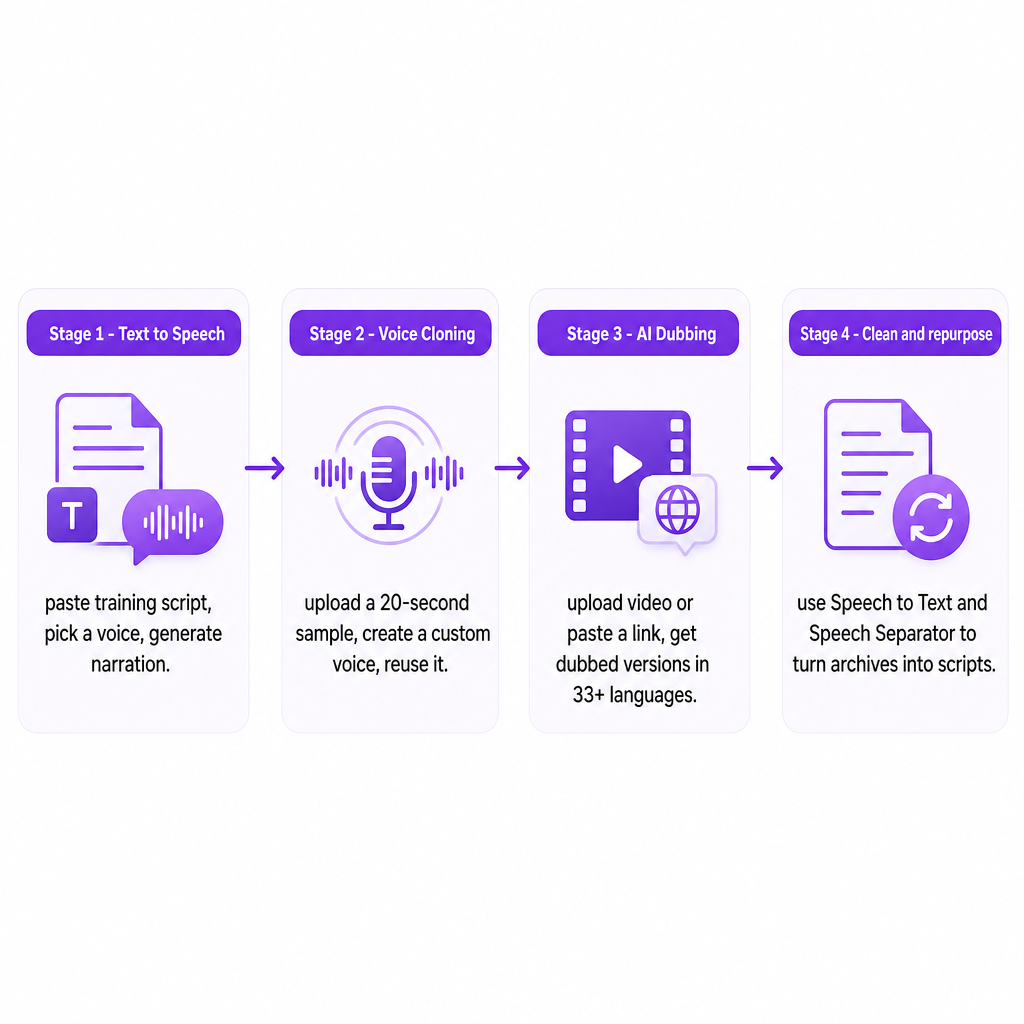
For most courses the starting point is a script: onboarding modules, safety procedures, compliance explanations, or software walkthroughs. Our Text to Speech tool converts that text into natural, human-like speech in any supported language. Inside the web app the flow stays approachable for non-technical creators. You open the tool, paste or type your script, pick a speaker from the voice library, and generate the audio. Once it sounds right, you can add or change speakers, revise individual segments, and download the finished file in your preferred format to drop into your video editor.
Teams with a learning platform or custom app can reach the same capability through our Text to Speech API. You send a request with the course text and voice preferences, and the API returns high-quality audio you can programmatically attach to lessons or dynamically generated content.
Voice cloning your trainer or brand voice
When you want training to sound like a specific person, Voice Cloning builds a synthetic model of that voice so new speech can be generated from text in the same tone. This differs from generic text-to-speech, where you pick from stock narrators rather than supplying your own speaker. In the creator-friendly path, you collect a short clean sample, typically at least 20 seconds, and upload it to the Voice Clone section. The system turns it into a named custom voice that then appears inside both Text to Speech and AI Dubbing projects. From there you paste scripts and have them read in the cloned voice for intros, detailed explanations, or compliance segments, without pulling the trainer back in for every update. If you want the underlying mechanics, our explainer on how AI recreates any voice walks through the model in plain terms.
Developers and agencies can formalize this through the Voice Cloning API as a three-step pattern. First, request a presigned URL and upload an audio file in a supported format such as MP3, WAV, AAC, M4A, or FLAC. Second, create a custom voice by sending a name and the file key from that upload. Third, reference the cloned voice identifier inside Text to Speech or AI Dubbing projects so any training text or video uses that voice automatically.
Multilingual dubbing for global audiences
When you already have recorded walkthroughs, instructor-led sessions, or live presentations, dubbing them directly often beats rebuilding from scratch. Our AI Dubbing API and web tool are built for speech-to-speech workflows: you upload a source video or audio file, or paste a link, and receive dubbed versions in your target languages while the platform handles transcription, translation, and voice generation. You can add speakers, adjust timings, and edit the generated text segments so terminology and pacing match your training standards before downloading. Because dubbing works across more than 33 languages and integrates voice cloning, you can keep the same trainer voice for every region or switch narrators where it makes sense, all from one account. For large catalogs, the API mirrors this flow programmatically and returns dubbed tracks you can insert into an existing publishing pipeline.
Cleaning and repurposing existing audio
Many organizations already own libraries of recorded webinars and workshops that could become structured modules. Because DubSmart includes Speech to Text and a Speech Separator alongside cloning and dubbing, those archives can be turned into reusable assets. Speech to Text converts spoken content into transcripts you can edit into clean scripts, and a Speech Separator helps isolate voices from mixed audio so you get cleaner samples for cloning or better input for transcription. That combination cuts down on re-recording and lets you modernize legacy content with consistent narration.
Key decision criteria for training and e-learning teams
Once you understand the mechanisms, the choice comes down to a handful of practical factors. The table below maps common priorities to the path that tends to fit, and the notes after it add the nuance a table cannot hold.
| Priority | Best-fit path | Why it fits |
|---|---|---|
| Recognizable instructor voice | Voice cloning | Reuse one cloned voice across TTS, dubbing, and API workflows |
| Speed over identity | Stock TTS voices | 300+ styles ready without setup |
| Large or frequently updated catalogs | TTS or Dubbing APIs | Automate generation in publishing flows |
| Global workforce | AI Dubbing + cloning | Dub into 33+ languages, keep original feel |
| Technical or regulated content | Editable dubbing projects | Review terminology before finalizing |
Consistency of learner experience is often the deciding factor. If your strategy leans on a recognizable instructor or corporate voice, cloning keeps that identity intact across modules and languages, and the same cloned voice can appear in courses generated months apart. If speed matters more than a single identity, the 300+ stock voices let you match tone to content type, for example a steadier voice for compliance and a lighter one for onboarding.
Volume and update frequency push the calculation toward automation. A team producing a handful of courses can work comfortably in the web app, generating voiceovers and dubbing as needed. Organizations maintaining large catalogs or role-based variations benefit from the APIs, which convert text or video to audio automatically inside scheduled publishing workflows. If you expect frequent policy changes or software updates, text-based TTS and dubbing let you regenerate narration quickly without booking studio time.
Language coverage matters most for US-based companies training global teams. DubSmart supports dubbing from more than 60 source languages into at least 33 target languages, paired with cloning and TTS, so each region can receive content in its primary language while retaining the look and feel of the original. For lighter needs, such as US English with occasional Spanish modules, stock TTS voices may be enough and reduce setup work.
Technical and regulatory content deserves extra care. Jargon, product names, and legal phrasing must be pronounced and translated correctly, so the ability to review and edit transcripts and generated segments in dubbing projects gives subject matter experts real control. When using APIs, you can encode preferred terminology into your scripts or pre-processing logic so what TTS or dubbing receives is already vetted.
Data, consent, and governance close the list. Cloning requires speech samples from the target speaker, so secure consent and document how the cloned voice will be used. Because our cloning process accepts short, clean recordings, you collect less data while still producing a usable model. Centralizing cloning, TTS, and dubbing in one platform also simplifies audit trails compared with juggling separate tools, and a credit-based model with APIs lets training leaders control usage from a single account structure.
Risks and safeguards when using AI voiceovers in training
AI narration is fast, but a few failure modes deserve attention before you scale.
Misalignment with brand or instructional style is the most common. AI voices, cloned ones included, can be generated at different speeds and intensities that may not match your house style. Listen to sample outputs, adjust delivery parameters where available, and standardize voice choices per course type before rolling out widely.
Pronunciation and translation nuances come next. Automated narration can stumble over names or specialized terms, and machine translation can produce phrasing that is accurate but pedagogically clumsy. The ability to edit text segments in dubbing projects and regenerate audio helps, but it does not replace human review for critical compliance or safety modules.
Overreliance on automation is a subtler risk. For sensitive topics such as workplace conduct, mental health, or legal obligations, tone missteps can slip in even when the facts are correct. Pairing AI voiceovers with human review, and occasionally a human-recorded segment for the most crucial messaging, tends to strike a better balance.
Managing cloned voices responsibly rounds this out. A cloned voice is a reusable asset, which raises questions of scope and lifecycle. Set internal policies for who can trigger generation with a given voice, how long samples are retained, and how access is revoked if a trainer leaves. Those guardrails keep the technology ethical and predictable.
If you are weighing where AI narration fits and where a human should stay in the loop, start by naming your course volume, languages, and how often the content changes. Tell us those details and we can help you map the right mix of Text to Speech, voice cloning, and dubbing for your program.
Frequently Asked Questions
Can I keep my trainer's voice and still localize courses into multiple languages?
Yes. You can clone your trainer's voice and then use that cloned voice in both Text to Speech and AI Dubbing projects, including dubbed versions in other languages.
How much audio do I need to clone a voice for training narration?
Cloning works from short, clean samples, typically at least 20 seconds of speech. Many creators use 20 to 60 seconds for a more robust model.
Which audio formats can I use when uploading samples for voice cloning?
The Voice Cloning API accepts common formats such as MP3, WAV, AAC, M4A, and FLAC, uploaded via a presigned URL before the sample becomes a custom AI voice.
Can developers automate voiceovers from LMS or app content?
Yes. The Text to Speech API and AI Dubbing API let backend systems send training text or video and receive ready-to-use audio or dubbed tracks for automated publishing flows.
Is DubSmart suitable for compliance and regulatory training?
Our combination of TTS, voice cloning, AI Dubbing, and editing controls supports structured, repeatable workflows, but teams should still apply human review and governance for sensitive or regulated topics.