
The quickest way to integrate a text to speech API is to treat it as a REST service: authenticate with an API key, send your text plus voice settings as JSON, let the service render speech in the background, then fetch and store the resulting audio files for playback wherever your users need them. Our Text to Speech API follows exactly this pattern while exposing 300+ natural voices and unlimited voice cloning, so you can drop lifelike speech into websites, apps, video pipelines, and learning platforms. This guide walks through what you are actually wiring in, how our engine works, and the decisions that determine whether the integration fits your product.
Table of contents
What a text to speech API does in DubSmart
A text to speech API turns structured text into spoken audio on demand, so your code can request narration or dialogue the moment a script is ready instead of waiting on manual recording. Our Text to Speech engine powers both the browser-based Text to Speech tool and the API, giving access to more than 300 AI voices across languages, genders, and styles, with prosody tuned for narration, explainers, and dialogue.
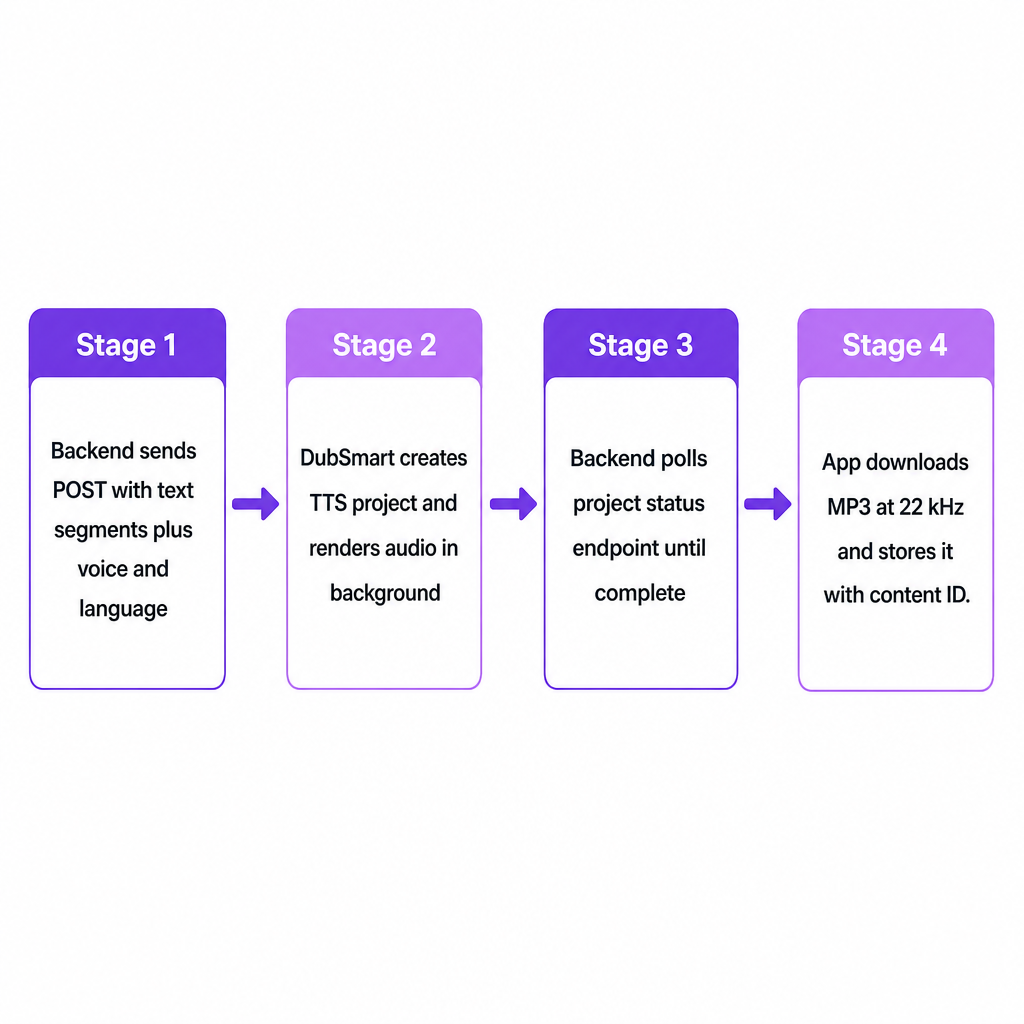
At the API layer we expose this engine as a RESTful service: your backend sends a POST request containing text segments and voice parameters, and the service returns a project object whose status you can poll until audio is ready to download. Output is delivered as high-quality audio files, typically MP3 at 22 kHz, suitable for direct use in video editors, podcast workflows, or web players without extra conversion.
For the creators and teams we serve—YouTubers, small businesses, e-learning producers, filmmakers, and developer agencies—the API bridges content planning and publishing. As soon as a script hits a CMS or learning platform, the backend can generate voiceovers automatically, which removes the bottleneck of repeated manual recording.
The integration decision: what are you actually wiring in?
"Integrate a text to speech API" sounds generic, but in practice you are deciding three things: where in your workflow speech should be generated, which voices and languages will represent your brand, and how tightly you automate generation and retrieval of audio.
For a YouTube creator expanding into multilingual content, integration often means tying our API into a video planning tool or script database so each finalized script becomes a voiceover in the right language and style. For small businesses and marketing teams, the API typically sits behind a CMS or marketing automation platform, turning blog posts, product explainers, and social copy into reusable audio assets. E-learning and corporate training providers tend to wire the API into authoring tools so lesson modules can request narration per slide or per topic and regenerate it instantly when material updates.
Developers and agencies integrating voice AI more deeply usually choose between two patterns. A batch model collects scripts and processes them via scheduled jobs. A transactional model triggers an immediate request every time new content or a user action arrives. Our project-based API works cleanly for either, because each TTS project encapsulates text, voice choice, language, and resulting audio in a way that maps to your own content units—videos, lessons, or podcast episodes. If you are still weighing the concept itself, our companion explainer on what a text to speech API is and how it works covers the fundamentals before you commit to a design.
How our Text to Speech API works under the hood
Our Text to Speech API is built around projects and segments, which makes it more flexible than a single "text in, audio out" endpoint. A TTS project groups one or more text segments under a title and shared configuration such as language and default voice. Each segment carries its own text, voice identifier, and language tag, which lets you mix narration styles or languages inside a single output.
A typical JSON payload to the TTS project endpoint includes a human-readable project title for your dashboards and logs, plus an array of segments. Each segment sets text (the script or sentence to speak), voice (either a built-in voice ID or a custom voice ID created via the Voice Cloning API), and language (a code indicating the segment's language).
When your backend sends this payload to the TTS endpoint with a valid API key in the Authorization header, we create the project and begin rendering audio in the background. The API exposes a project status endpoint that reports whether processing is still in progress or complete, along with references to the generated audio files once ready. This asynchronous design keeps your own requests fast: log the project ID, return control to the user, and let a background worker check for completion and pull down the audio when available.
Generated speech arrives as downloadable files in standard formats, notably MP3 at 22 kHz, which slots easily into web players, mobile apps, and video editing timelines. Because the same engine powers our browser-based tool, developers can prototype voices and scripts interactively and then migrate the winning combinations into automated API calls. The full endpoint reference lives on the Text to Speech API page.
Connecting voice cloning and AI dubbing to text to speech
Our defining feature is that Text to Speech, Voice Cloning, and AI Dubbing share a single underlying voice engine and workflow. That means the TTS API is not isolated—it is the core of a broader localization pipeline.
The Voice Cloning API lets you upload audio samples of a speaker, create a custom AI voice, and reference that voice in TTS projects. Once a custom voice exists, its identifier becomes the voice field in your Text to Speech segments, so narration plays in the cloned voice instead of a generic stock voice. That continuity matters for hosts, podcasters, and brand spokespeople who want a consistent sonic identity across languages and formats. If you plan to add cloning, our guide on integrating a voice cloning API in your app covers the specifics.
The AI Dubbing API extends this further by combining transcription, translation, and text to speech in a single pipeline that dubs videos into more than 33 target languages. Here the TTS engine converts translated scripts into speech using the same 300+ voice library or your cloned voice, so dubbed versions preserve tone and timing. For multilingual creators and businesses, the Text to Speech API becomes the building block for both monolingual voiceovers and fully localized dubbed content. Our overview of how AI localization works shows how these pieces fit together end to end.
Key decision criteria when integrating our TTS API
Integrating "any" TTS API is not enough; the choices around implementation determine how well it fits your production, brand, and technical stack.
Scale and automation needs. If content volume is low and sporadic, the browser-based tool may suffice. Once scripts are generated regularly or tied to content calendars, learning management systems, or marketing automation, the API becomes the right layer because it can be triggered programmatically and scaled with your backend.
Voice and language strategy. Our platform supports dubbing from over 60 source languages into 33 target languages, powered by the same voice engine the TTS API uses. If your brand needs a distinctive spokesperson voice, pairing the Voice Cloning API with TTS keeps that voice consistent across languages and channels. If you prioritize speed over personalization, built-in voices keep implementation simpler.
Integration point in your stack. For YouTube channels, a natural spot is the video pipeline: scripts stored in a planning tool, dispatched to the TTS API when finalized, and returned as audio ready for editors. E-learning platforms may integrate at the lesson or slide level, where each content block maps to a segment and projects represent entire courses. Marketing teams often integrate at the CMS level so each article or product page can request an audio version for accessibility.
Governance, compliance, and risk. Because voice cloning can replicate recognizable voices, consent, licensing, and usage policies matter. Cloned voices are identified by IDs and can be tagged with metadata, which makes it easier to enforce internal rules on where specific voices may be used. Decide up front which environments may trigger cloned voices versus generic voices, and add logging in your own systems.
Latency and user experience expectations. Asynchronous processing offers flexibility but adds a timing consideration. For workflows where users expect immediate playback—such as a script editor with instant preview—create smaller projects or segments and show progress indicators while audio renders. For batch localization across whole libraries, latency matters less, and jobs can run on schedules with completed audio attached to content records afterward.
| Decision area | Batch model | Transactional model |
|---|---|---|
| Trigger | Scheduled jobs | Per content item or user action |
| Latency tolerance | High | Low |
| Best fit | Course catalogs, video libraries | Script editors, live previews |
| Voice strategy | Approved voice per language | Approved voice per language |
Risks and practical safeguards
Integrating a text to speech API brings a few predictable risks that thoughtful design can mitigate.
Choosing voices without testing can produce speech that feels out of character for a brand or host. Trial voices in the interactive interface first, and keep an approved voice catalog inside your own systems, organized per language and content type, before codifying voice IDs in API calls.
Over-automation of sensitive content is another trap. Generating speech automatically for compliance, medical, or legal material may not be appropriate. Because our API operates on discrete projects and segments, you can maintain routing rules that send only approved categories into TTS while keeping sensitive content in human-recorded workflows.
Operational errors—failed projects or missing downloads—happen when network issues or invalid payloads interrupt processing. The project status endpoints and structured responses let you confirm a project completed and its outputs are available before publishing. Pair each TTS project ID with your own content ID, and implement retries or fallbacks when status checks report errors.
Misuse of cloned voices deserves explicit controls. Custom voices must be created via dedicated endpoints and then referenced by ID in TTS projects, which gives you a clear technical boundary to monitor. Restrict who can create or assign cloned voice IDs, and log where they are used.
A practical starting path is to integrate TTS for standard voiceovers first, validate voices and error handling in production, then layer in Voice Cloning and AI Dubbing once the core integration is stable. Tell us your content volume, target languages, and where the API should sit in your stack, and we can point you to the right endpoints and plan for your workflow.
Frequently asked questions
How is the Text to Speech API different from the browser tool?
The browser tool is a visual interface where you paste text, choose a voice, and manually download audio. The API exposes the same engine through REST endpoints so your backend can generate and retrieve audio automatically in response to scripts, schedules, or user actions.
Can the API speak in my own voice, not just stock voices?
Yes. By integrating the Voice Cloning API, you upload audio samples of a speaker, create a custom AI voice, and then reference that voice's ID in your Text to Speech segments so all generated speech plays in the cloned voice.
How does this help with multilingual YouTube channels or podcasts?
Our platform turns speech or scripts from over 60 source languages into dubbed output across 33 target languages, with TTS generating the final audio using 300+ voices or your cloned voice. Wiring the TTS and AI Dubbing APIs into your publishing pipeline lets new videos or episodes receive voiceovers or full dubs once scripts or source audio are ready.
What audio formats will my app or editor receive?
The TTS API delivers high-quality audio files, including MP3 at 22 kHz, suitable for most web, mobile, and video editing environments without extra conversion.
Can I integrate Text to Speech now and add AI Dubbing later?
Yes. Text to Speech, Voice Cloning, and AI Dubbing share a common API ecosystem, so you can start with TTS for voiceovers and later add Voice Cloning and AI Dubbing to automate multilingual dubbing without rebuilding your core integration.