
If you have ever watched a tutorial dubbed so smoothly that you forgot it was recorded in another language, you have seen the answer to how does ai localization work in action. At its core, AI localization uses machine learning to transcribe, translate, and re-voice your audio or video into other languages while keeping the timing, tone, and intent of the original. With DubSmart AI, that entire chain runs inside one integrated workflow instead of a patchwork of separate transcription, translation, and voice tools.
The short version: your media is analyzed, its speech becomes editable text, that text is translated, and new speech is generated and synced back to the original timeline. The longer version is where the interesting decisions live, because localization is not just translation, and the choices you make about voice, language variants, and human review shape how native your content actually feels.
Table of contents
What AI localization actually means
Localization goes further than swapping words from one language to another. It adapts content so it feels native to viewers in another language and region, matching pacing, tone, and context rather than only vocabulary. A literal translation can be technically correct and still sound foreign, which is why the word choice, rhythm, and voice all matter.
For media specifically, localization usually touches three layers: the spoken content such as dialogue, narration, and voiceover; on-screen text like titles, captions, and interface elements; and the audio mix that balances voices against music and effects. Different projects need different combinations of these.
Our focus at DubSmart is voice and audio-first localization. We turn spoken content from more than 60 source languages into dubbed versions across 33 target languages, combining text-to-speech and voice cloning in one platform. If you want the broader concept before the mechanics, our explainer on what media localization means sets the wider context this guide builds on.
The core decision: what are you localizing?
Before choosing tools or languages, the real question is what exactly needs to change for your audience to fully understand the content. For most YouTube channels, courses, films, and podcasts, that answer falls into one of three shapes.
Voice-only localization keeps your visuals untouched and replaces or overlays the original speech with localized dubbing. It fits talking-head videos, tutorials, explainers, and podcasts, where the picture already works everywhere and only the audio needs a new language.
Full narrative localization goes further. You dub the voices and also adjust terminology, examples, and sometimes script segments to match regional expectations, such as choosing US versus Latin American Spanish for a marketing video. This is slower but avoids phrasing that reads as imported.
Workflow localization is for teams and developers who want localization to become part of publishing rather than a manual afterthought. Here you integrate voice and dubbing directly into a pipeline through our AI Dubbing API and Text to Speech API, so new content is localized automatically instead of one file at a time. Naming which of these three you need makes every later choice about tools, languages, and review steps far simpler.
How AI localization works inside DubSmart
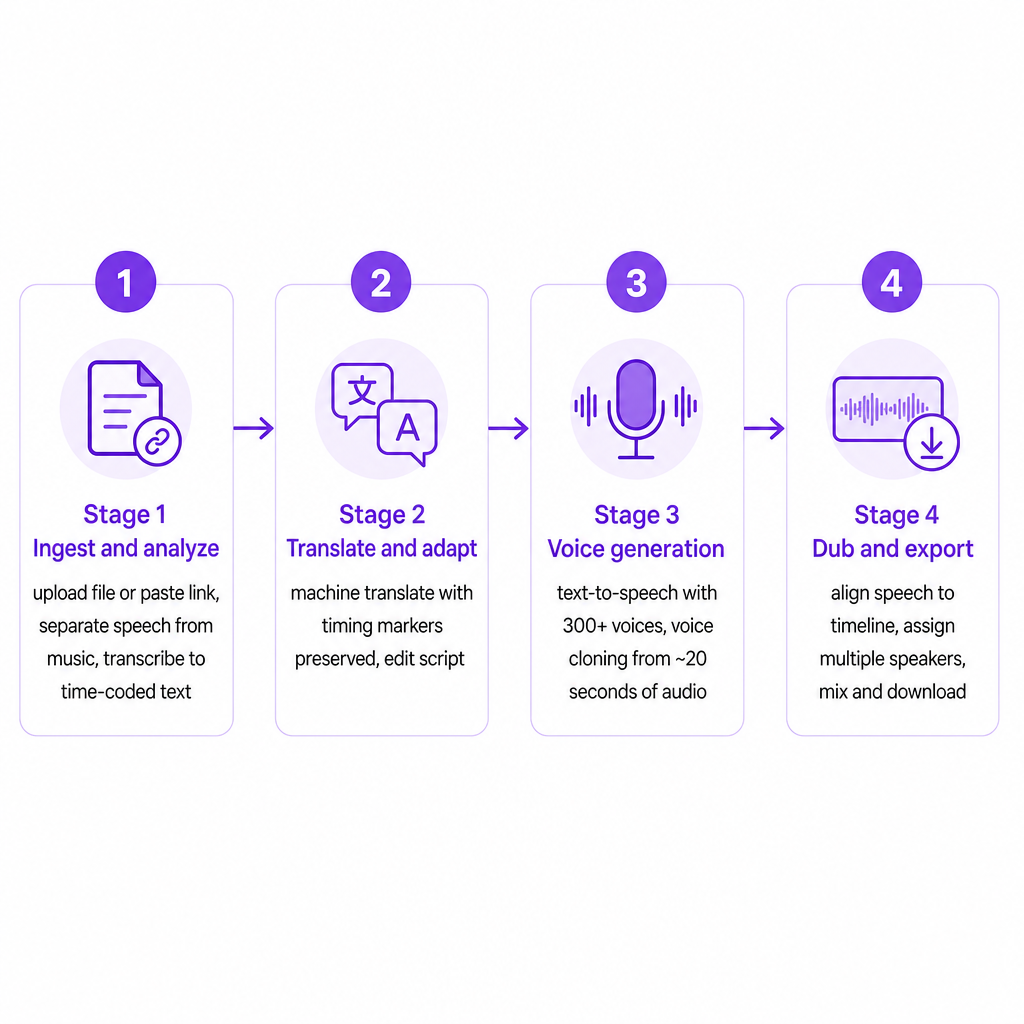
At a high level, AI localization runs through four connected stages, and each one maps to a specific set of DubSmart tools designed to hand off cleanly to the next.
The first stage is ingesting and analyzing your media. You upload a video or audio file from your device or paste a YouTube link so our AI Dubbing tool can fetch the source directly. A speech separator isolates dialogue from background music and effects, which lets the system read the spoken content cleanly and reduces artifacts in the final dub. Then speech-to-text converts the original audio into time-coded text, giving you a precise script aligned to the original timeline that you can see and edit inside the project editor.
The second stage is translating and adapting that script. The transcribed text is machine-translated into your target language with timing markers preserved, so the new lines stay aligned to the video. Inside the project editor you can review and edit both the transcription and the translation before any audio is generated, which is where you fix terminology, brand phrasing, and culturally sensitive wording. Because we support 60+ source languages into 33 targets, one source project can spawn multiple language variants while scripts and timings stay in sync.
The third stage generates localized speech. Our Text to Speech engine turns the translated script into lifelike audio using a library of 300+ voices across different genders, styles, and languages. If you would rather sound like yourself, voice cloning recreates your or your actor's voice from a clean sample of roughly 20 seconds, and that cloned voice can be reused across Text to Speech and AI Dubbing so viewers hear you speaking a new language rather than a generic narrator. The same voice can carry across projects, keeping a brand consistent everywhere.
The fourth stage assembles everything back into publishable media. Our AI Dubbing tool uses the time-coded script to place localized speech along the original timeline so it matches the visual pacing. You can assign different speakers to different parts of the script, which makes interviews, panels, and multi-character content manageable. Finally the platform mixes the localized voices with the original or adjusted music and effects and lets you export in standard formats. Developers reach the same pipeline through RESTful APIs: send text or media plus configuration over HTTP and receive generated speech or dubbed output without touching the interface.
Matching the workflow to your creator type
Because these mechanisms are modular, the same underlying pipeline adapts to very different goals.
For YouTube creators expanding into new markets, the pattern is usually import a video by link, generate translated audio, review the script, then publish localized versions. Clone your voice once and reuse it so subscribers hear the same personality in Spanish, Portuguese, or Hindi. You can also refresh thumbnails and descriptions with our AI image generator so the whole channel presentation feels local, not just the audio.
Small businesses and marketing teams tend to convert English explainer and product videos into localized versions using brand-appropriate cloned voices for campaign consistency. Training clips and onboarding videos localize the same way, replacing narration while leaving every visual asset untouched.
E-learning and corporate training producers generate multi-language voiceovers for slide decks and screen recordings with text-to-speech and voice cloning, then route them through AI Dubbing for synchronized modules. A single standardized instructor voice can then carry compliance, safety, and skills training worldwide.
Independent filmmakers and podcast creators apply dubbing to narrative content and interviews, assigning different cloned voices to different characters or speakers, and lean on speech separation to keep the original sound design intact while producing international audio versions.
Developers and agencies wire the whole thing into their own products. The Voice Cloning API creates, stores, and deploys custom voices; the Text to Speech API converts text into natural speech across 300+ voices; and the AI Dubbing API sends video files, creates projects, and returns dubbed versions in 33+ languages inside automated localization pipelines.
Decision criteria before you commit
Deciding how far to rely on AI, and where humans stay in the loop, comes down to a handful of practical criteria.
Scale and frequency come first. If you publish weekly or daily, manual human dubbing becomes slow and costly. AI localization scales with volume because you can reuse cloned voices, presets, and scripts to localize dozens or hundreds of assets efficiently.
Language strategy is the next fork. Decide which languages matter most for growth, whether you will ship one neutral variant such as international Spanish or several region-specific versions, and which markets demand stricter review, such as regulated, medical, or financial content. Our support across 60+ input and 33 output languages gives room to move, but the choices should follow audience and compliance needs rather than sheer availability.
Voice and brand identity deserve an early decision too. You can keep your original voice through cloning, use region-native voices for a more local feel, or mix the two, for example a cloned founder voice for brand videos and local voices for ads. Since cloned voices are reusable across text-to-speech and dubbing, maintaining a single brand voice or a consistent cast across languages is straightforward.
Workflow integration depends on where your bottleneck sits. Individual creators often prefer the web studio, editing scripts and timelines visually. Teams and SaaS platforms often prefer APIs so localization triggers automatically when new content ships. The split between creative review and engineering automation usually decides between the interface, the API, or a blend.
Quality and risk close the list. AI provides speed and scale; people provide nuance and accountability. For important educational, corporate, or branded content, plan for human review of translated scripts, spot-checks of synchronized dubbing, and legal sign-off wherever voice cloning and synthetic media are involved. Our editing tools and cloning controls are built to keep humans in the loop rather than treating localization as an automatic black box.
| Criterion | Lean AI-first | Add human review |
|---|---|---|
| Content volume | High, recurring output | Low, high-stakes pieces |
| Language variants | One neutral variant | Region-specific, regulated |
| Voice identity | Reusable cloned voice | Sensitive brand messaging |
| Delivery | API-triggered pipeline | Manual studio editing |
Risks worth planning around
No localization system, human or AI, is risk-free, and naming the failure modes lets you design safeguards.
Mistranslation and contextual errors are the most common. Machine translation can misread idioms, technical terms, or culturally sensitive phrases. Editing translated scripts before generating audio, with reviewers who know the target market, keeps these from reaching your audience.
Tone mismatch can quietly damage a brand. A generic voice or a literal translation may sound off. Voice cloning and deliberate voice selection help hold a consistent tone, and script adaptation can soften or adjust phrasing for local audiences.
Synchronization problems appear when translated lines run much longer or shorter than the original, making a dub feel rushed or delayed. The editor lets you adjust text and timing so the speech tracks the visual pacing.
Voice cloning misuse is a governance issue, not a technical one. Cloned voices are powerful and must be used with consent and clear agreements. Secure explicit permission from the voice owner and never clone without authorization; our reliance on clean, user-provided samples reflects that you control and are responsible for the voices you create.
Regulatory and platform policies keep shifting as synthetic media becomes common. You may need to label AI-generated or dubbed content, so watch the policies of the platforms you publish on and your industry regulators, and update descriptions and disclosures as they change. A well-designed workflow pairs AI speed with human oversight, documented consent, and honest communication to your audience.
Frequently asked questions
What is AI localization in simple terms?
It is using artificial intelligence to automatically transcribe, translate, and re-voice your audio or video so it sounds natural to audiences in other languages, while keeping timing and intent intact.
How accurate is AI dubbing compared to human dubbing?
AI dubbing can produce highly natural speech and strong synchronization, especially when you review and edit scripts before generating audio. For high-stakes content, keeping human review in the loop remains important.
Which languages does DubSmart support for localization?
We can dub videos from more than 60 source languages into 33 target languages, drawing on a library of 300+ AI voices plus voice cloning.
Can I keep my own voice when localizing into other languages?
Yes. You can clone your voice from a short, clean audio sample and reuse it in Text to Speech and AI Dubbing, so localized versions still sound like you.
How do developers integrate DubSmart into their apps or pipelines?
Developers use our RESTful Text to Speech, Voice Cloning, and AI Dubbing APIs to send text or media, configure voices and languages, and receive generated or dubbed audio files programmatically.