
Ask how AI voiceovers are made and you're really asking how a written script becomes speech without anyone stepping into a booth. The short answer: a neural text-to-speech model converts your script into synthetic audio, an optional cloned voice makes that audio sound like a specific person, and a dubbing layer aligns everything with your video across languages. At DubSmart AI, we run that entire chain inside one workspace, so you can go from a paragraph of text to a finished, multilingual voiceover without switching tools or booking studio time.
What that process looks like for you depends on one decision, and the rest of this guide walks through the mechanisms, the options, and how to choose.
Table of contents
The decision behind how AI voiceovers are made
Before any audio gets generated, you make two choices that shape everything downstream. The first is whether you want a prebuilt voice from a library or a clone of your own. The second is whether you need a voiceover in a single language or a fully localized version across many.
For a YouTube creator or a small business, that usually settles quickly: pick a stock voice for speed, clone a voice when brand consistency matters, and reach for dubbing only when you're going multilingual. For developers and agencies, the same fork becomes an architecture question — do you call a text-to-speech endpoint for one-off audio, or wire voice cloning and dubbing together into a pipeline that runs on its own?
We built DubSmart around exactly these forks. Text to Speech, Voice Cloning, Speech to Text, Speech Separator, Text to Image, Image to Video, and AI Dubbing all live in one platform, so you can dial the level of automation and personalization up or down without stitching together separate vendors.
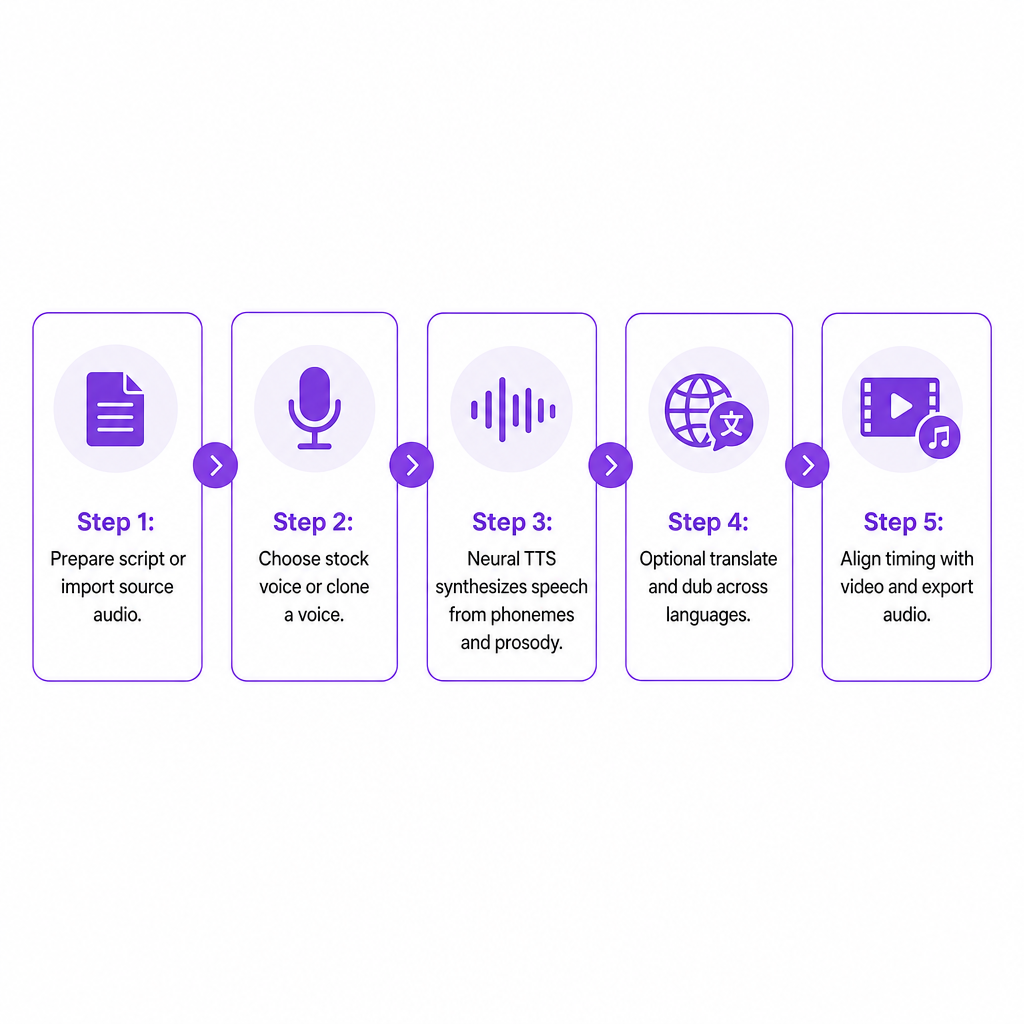
The mechanisms: how AI voiceovers are actually made
Text to speech: turning script into sound
Text-to-speech (TTS) sits at the center of every AI voiceover. The engine first analyzes your script — breaking text into phonemes, reading punctuation and structure, and inferring prosody, which is the rhythm, emphasis, and intonation that keeps speech from sounding flat. Neural models then synthesize those phonemes into audio and apply the prosody patterns that make delivery sound fluent rather than robotic.
Our Text to Speech engine lets you paste text in any language, pick a voice from a library of more than 300, and generate realistic speech in seconds. The voices are natural-sounding and human-like, and they're categorized by language, gender, and style so you can match the tone of what you're producing. For developers, the same engine is exposed through a RESTful Text to Speech API: send a POST request with your text and voice parameters, receive ready-to-use audio files back. Structured text in, lifelike audio out, with no manual recording.
Voice models and voice libraries
AI voiceovers rely on trained voice models — neural networks that learn how a particular voice should sound across different words, languages, and emotions. A voice library is simply a catalog of those models. We maintain a library of 300+ natural-sounding voices covering multiple genders, accents, and speaking styles across many languages, and it's available both in the web app and through the API so internal tools can generate speech on demand.
Voice cloning: making the AI sound like you
Cloning is the mechanism that makes a voiceover sound like a specific person instead of a generic narrator. The system analyzes a sample recording, learns the speaker's timbre, pitch range, and pronunciation patterns, then applies those characteristics to new synthetic speech.
In practice, you upload an audio file of at least 20 seconds to Voice Cloning — ideally clean and free from background noise. We process that sample into a custom voice profile you can name and reuse, with cloning typically taking only a few seconds. Once created, the cloned voice becomes available inside Text to Speech and AI Dubbing, so you can generate scripts or dubbed versions in your own voice. Programmatically, the Voice Cloning API mirrors this: obtain an upload URL, send your audio in a supported format, create a custom voice from the resulting file key, then use it in TTS or dubbing projects.
Dubbing and multilingual voiceovers
Moving from a single-language voiceover to multilingual content adds localization on top of basic TTS. The general pattern is consistent:
- Capture or import the original speech.
- Transcribe it to text.
- Translate that text.
- Generate new speech in the target language.
- Align the timing with the original video or audio.
Our AI Dubbing workflow follows exactly this pattern, combining speech-to-text, machine translation, and text-to-speech, optionally reusing a cloned voice so the dubbed track matches the original speaker. It turns spoken content from more than 60 source languages into dubbed versions across 33 target languages. Speech-to-speech dubbing aims to keep tone and timing close to the original performance, which matters most for e-learning, training, and film content where lip-sync and pacing carry the experience.
APIs and automated workflows
For teams producing voiceovers at scale, APIs are what fold voice creation into existing systems. The TTS API handles text-in, audio-out; the Voice Cloning API adds programmatic creation and management of custom voices; and the AI Dubbing API extends both to automatic translation and dubbing across 33+ languages with access to cloned voices. Together they let you build pipelines where scripts, subtitles, or transcripts pulled from a content system become voiceovers or dubbed tracks automatically, with no manual file handling.
Your three ways to make AI voiceovers in DubSmart
Inside our platform, the question resolves into three practical starting points.
Start from a script with Text to Speech. Paste your text, choose a stock or cloned voice, set the language and basic controls, and generate speech you can download in standard formats. This fits training videos, explainer content, marketing spots, and podcast intros where you own the script from the start.
Start from existing media with AI Dubbing. Upload a source video or audio file, let the system transcribe and translate, then generate dubbed tracks in your chosen languages — reusing cloned voices to keep the sound consistent. This is the route for channels expanding into multilingual audiences and for businesses repurposing webinars or product demos.
Start from your own systems with API-based generation. Your app sends text and voice parameters to the TTS API, optionally ties content to a specific voice through the Voice Cloning API, and retrieves audio ready to attach to videos or e-learning voiceovers for training modules. This suits developers, agencies, and LMS providers who need consistent, programmatic output.
Decision criteria: choosing your AI voiceover setup
Naturalness and audio quality
Naturalness is non-negotiable. Strong engines model prosody and articulation so speech flows with appropriate pauses and emphasis. Because generation is fast, you can iterate on a script and regenerate audio until the delivery feels right rather than settling for the first take.
Language coverage and localization depth
If multilingual channels or international training are on your roadmap, coverage decides how far you can reach. Turning content from 60+ source languages into 33 target languages from one workflow defines the markets you can serve, and speech-to-speech dubbing helps keep tone and timing consistent across every version.
Voice branding and cloning capability
A recognizable voice matters for companies, creators, and podcasts. Cloning lets you carry the same voice across languages and channels. Being able to clone from roughly 20 seconds of clean audio and reuse that profile inside Text to Speech and AI Dubbing makes a signature sound practical to establish and maintain.
Workflow simplicity versus technical integration
Creators often want upload, editing, and download handled in one place. Technical teams often need APIs. We offer both: user-facing tools in a unified app and developer APIs that expose the same engines. The choice comes down to whether your team works mostly in a browser or builds on internal systems.
Speed, scalability, and consistency
A voiceover tool should shorten production and scale without quality slipping. Near-instant TTS generation and cloning that completes in seconds allow quick iteration and bulk output, while APIs let thousands of scripts or segments process automatically with consistent voices and settings.
Budget structure and control
Instead of per-session studio fees, AI voiceover tools generally use usage-based pricing. Our credit-based model gives you access to AI Dubbing, Text to Speech, Voice Cloning, Speech to Text, Speech Separator, Text to Image, and Image to Video under one account, with a free tier and enterprise plans. Credits provide predictable usage caps while rollover and scaling stay available when volume climbs. If you want to size credits against runtime, our breakdown of AI dubbing cost per minute walks through the math.
Compliance, consent, and data handling
Cloning and synthetic speech carry ethical and legal weight. We require that you upload audio you have the rights to and recommend clean recordings for best results, which keeps consent and control at the center. Our API documentation uses secure, presigned upload URLs and standard audio formats, giving developers a clear pattern for compliant use inside applications.
Risks worth planning around
Even with capable tools, a few failure modes are worth anticipating.
Unnatural or robotic audio usually traces back to poorly punctuated scripts or a voice mismatched to the content. Choosing from a library of natural voices and regenerating until the delivery fits is the practical fix, and fast generation makes that experimentation cheap.
Mispronunciation tends to surface with names, technical terms, and localized content. A pipeline that runs transcription, translation, and review — rather than a blind audio-to-audio conversion — catches more of these errors before they ship.
Timing mismatches between synthesized speech and on-screen visuals hurt viewer experience. Speech-to-speech dubbing that stays close to the original tone and timing, paired with editing inside the project environment, gives you better control over alignment.
Ethically, cloning a voice without proper rights invites serious problems. Requiring a clean sample under your control, and framing cloning as a tool for creators and businesses rather than anonymous impersonation, is what keeps the practice responsible. When you're localizing existing footage, our guide on how to change voice language in a video shows the review-friendly path.
How different creators put this into practice
A YouTube creator expanding abroad can turn one English video into Spanish, Portuguese, and German versions with AI Dubbing and a cloned voice, so the host stays recognizable across every market — all inside the 60+ source and 33 target language pipeline.
A small business or marketing team can draft a product explainer or ad script in a document, convert it to audio with Text to Speech, and pick a voice that matches brand tone — energetic, formal, or conversational. Those same scripts can be localized later through AI Dubbing using a cloned brand voice.
An e-learning or corporate training producer can automate narration for slide decks and SCORM packages by sending lesson text through the TTS API and attaching returned audio to each module, with cloning keeping the instructor's voice consistent even across regional versions.
An independent filmmaker or podcast creator can produce trailers, promos, or translated dialogue without booking a studio in every language, combining Speech to Text, AI Dubbing, and cloned voices to hold character identity steady.
Developers and agencies can embed the TTS, Voice Cloning, and AI Dubbing APIs into internal tools or client platforms, automating everything from short-form social voiceovers to interactive voice agents.
Frequently asked questions
How are AI voiceovers different from traditional recorded voiceovers?
Traditional voiceovers need a human voice actor, studio time, and multiple sessions. AI voiceovers are generated by text-to-speech and voice cloning engines that turn scripts directly into audio using trained neural models instead of a live performance.
Can an AI voiceover sound like a specific person?
Yes. Voice cloning analyzes a short sample of someone's voice and builds a custom model that can speak any script in that voice, available in our Voice Cloning tool and API.
How much audio is needed to clone a voice?
We ask for at least 20 seconds of clean audio, free of background noise, to create a reliable cloned voice profile, with cloning typically finishing in seconds.
Can I make voiceovers in multiple languages from one source video?
Yes. We combine speech-to-text, translation, and text-to-speech to turn content from 60+ source languages into dubbed output across 33 target languages, so one original video can produce many localized voiceovers.
Is there a way to automate voiceover creation instead of using the interface?
Our TTS API and Voice Cloning API let apps and internal tools send text and audio samples, create custom voices, and receive synthetic speech programmatically, so voiceovers can be generated automatically at scale.