If you grew up making "grounded" videos or trading meme narrations, you already know the sound: that slightly robotic, mid-range, cartoonish delivery that voices like Brian, Eric, Julie, and Ivy gave to a whole generation of GoAnimate creators. Recreating goanimate voices text to speech used to mean hunting down aging TTS sites and hoping the right voice was still online. Today you can rebuild that classic sound—and take it much further—inside a single platform.
DubSmart AI consolidates Text to Speech, Voice Cloning, and AI Dubbing into one workflow, so the nostalgic tone you want and the modern reach you need live in the same place. Instead of stitching together random generators, you clone or select a voice, tune its delivery, and export audio you can drop straight into your animation editor. This guide walks through what those legacy voices actually were, why the DubSmart stack is a practical way to emulate them, and how creators, marketing teams, and developers can produce that signature cartoon-TTS feel at scale.
Table of contents
- What "GoAnimate voices" actually means
- Why DubSmart is a practical way to get GoAnimate-style TTS
- Recreating the classic GoAnimate sound in DubSmart
- Multilingual GoAnimate-style channels with AI Dubbing
- API workflows for developers and agencies
- Frequently asked questions
What "GoAnimate voices" actually means
When people search for GoAnimate voices, they are usually thinking about a specific catalogue of text-to-speech voices rather than a single tool. GoAnimate (later Vyond) let users assign synthetic voices to characters, and over the years it drew on several TTS engines—VoiceForge, Vocalware, and Acapela among them—which produced named voices like Brian, Eric, Julie, David, and Ivy. Those names became recognizable characters in their own right inside the community, as documented on the GoAnimate Wiki text-to-speech page.
What made these voices iconic was their tone: synthetic yet cartoonish, often slightly monotone, and paced in a way that lent itself perfectly to comedic "grounded" scripts and reaction narration. The delivery was a byproduct of early TTS technology, but the community embraced it as a stylistic signature rather than a limitation.
Mechanically, the sound came from a predictable pattern: pick a character, open a dialogue panel, choose a language and voice, type your line, and generate the clip. Vyond's current documentation describes essentially the same flow, where you open the Dialog panel, select ADD DIALOG → Text-to-Speech, choose the voice, type the text, and trigger generation with a robot symbol, then optionally adjust tone, speed, or pitch through a VOICE STYLE section, as outlined in the Vyond help article on text-to-speech clips. That combination of a fixed voice menu plus pitch and speed controls is the technical heart of the GoAnimate sound.
Editorial guides covering the topic describe the same habits creators developed: logging in, opening a text-to-speech converter, choosing a character, finding an "Add Dialogue" box, and adjusting parameters before generating. The persistence of demand for these workflows tells you something useful—people are not just chasing a specific 's voice, they are chasing a feel. Some want faithful nostalgia; others simply want a cartoon-robotic timbre they can control. That distinction matters, because it changes how you should approach recreating the sound.
Why DubSmart is a practical way to get GoAnimate-style TTS
The reason the old workflow felt fragile is that it was tied to a single animation environment and a rotating set of third-party engines. DubSmart takes a different approach by making voice generation a standalone capability you can point at any project. Three tools do the heavy lifting: Text to Speech, Voice Cloning, and AI Dubbing.
The DubSmart Text to Speech tool offers 300+ natural-sounding AI voices with realistic speech generation and unlimited voice cloning. For a GoAnimate-style project, that library gives you a starting point when you simply want a cartoonish synthetic base you can bend toward the classic tone. You are not locked into a small menu of aging voices; you pick a timbre that reads as slightly mechanical and shape it from there.
When you want more than a generic cartoon voice—when you want to approximate a specific legacy character—cloning becomes the tool of choice. The DubSmart Voice Cloning feature is built to clone voices from as little as 20 seconds of audio, with unlimited cloning available. That means you can take short, lawfully sourced reference clips of the voice you want to emulate and turn them into a reusable voice profile, rather than being stuck with whatever a fixed menu offers.
The practical advantages stack up quickly:
- A large voice starting point. With 300+ voices, you can often find a base that already leans synthetic and monotone before you touch any settings.
- Fast cloning. Twenty seconds of clean reference audio is a low bar for building a custom character voice you can reuse across scripts, memes, and commentary.
- One export, many uses. Generated audio is downloadable, so it drops into your animation editor of choice without forcing you to live inside one tool.
- A credit-based model with a free tier. Because DubSmart uses credits with rollover and offers a free tier, you can test many short GoAnimate-style lines and comedic beats before committing to a larger plan.
That last point matters more than it sounds. GoAnimate-style content thrives on quantity—short reprimands, quick reaction lines, running gags. A model that lets you experiment cheaply is a better fit than one that penalizes iteration. DubSmart is described as an all-in-one media creation and localization platform trusted by over 500,000 users, and its design goal of keeping voice, dubbing, and even visuals in a single workflow is exactly what a high-volume meme or channel creator needs.
One honest caveat: the exact names and locations of pitch and speed controls in the DubSmart studio are best confirmed inside the product itself. Modern TTS tools typically expose speed and pitch adjustment, and the sections below assume that pattern, but you should check the interface for the precise control names when you sit down to build.
Recreating the classic GoAnimate sound in DubSmart
There are two realistic paths depending on your goal: faithful nostalgia or a fresh cartoon voice inspired by the era. Both stay entirely inside DubSmart.
Path one: approximating a specific legacy voice
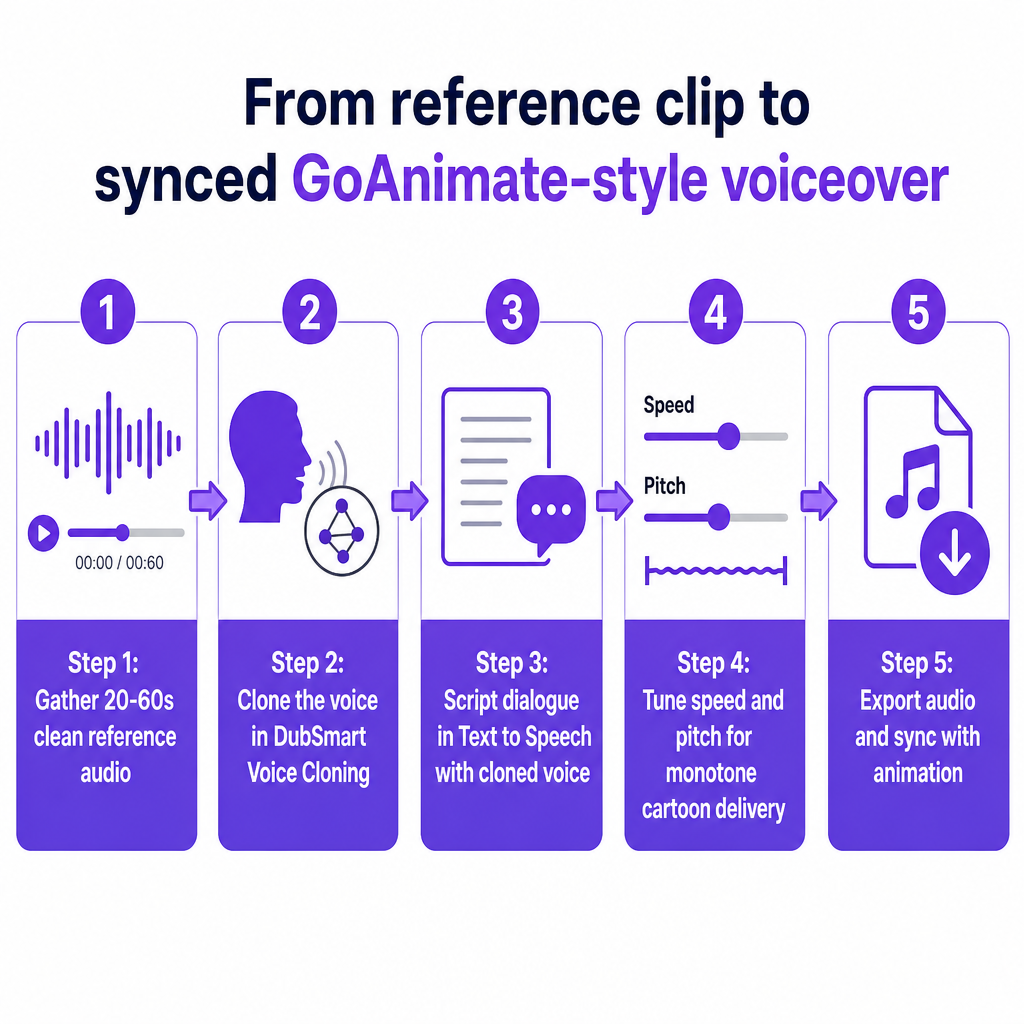
Start with reference audio. Collect roughly 20 to 60 seconds of clean audio of the voice you want to emulate, drawn from your own old projects or from sources you have the right to use. Clarity matters more than length here—background music, overlapping dialogue, and heavy compression all weaken the clone.
Feed that clip into DubSmart Voice Cloning to build a custom voice profile. Once the profile exists, open Text to Speech, select your cloned voice, and script your dialogue. This is where the GoAnimate character comes through: write the way those videos wrote, with short declarative lines, quick reprimands, and deadpan narration.
Then tune delivery. Aim for a slightly monotone, mid-range read—the hallmark of the classic sound. GoAnimate and Vyond both let creators adjust pitch and speed to shape their TTS, and the same principle applies here: nudge the pace toward the brisk, even cadence you remember, and adjust pitch so the voice sits in that recognizable mechanical register rather than sounding fully human. Finally, export the audio and sync it with your animation.
Path two: building a new cartoon voice from scratch
If nostalgia is not the point and you just want a controllable robotic-cartoon voice, you do not need any legacy source material at all. Record yourself or a voice actor performing in an exaggerated, slightly robotic style for 20 to 40 seconds. Clone that recording in DubSmart, and you now own a reusable character voice that is entirely yours.
Generate your scripts through Text to Speech in that voice, tuning pitch and speed for comedic timing—short pauses before a punchline, faster delivery for a rapid-fire scolding, a flatter read for the straight-man character. Niche GoAnimate voice guides show that creators have always leaned on pitch, speed, and volume tuning to dial in a preset's personality, and the same instinct serves you well with a cloned voice.
A short list keeps the process honest:
- Keep reference audio clean and free of music or overlapping speech.
- Write in short, punchy lines that match GoAnimate pacing rather than long paragraphs.
- Adjust speed first, then pitch, listening back after each change.
- Save the cloned voice profile so every future script uses the same character.
- Export audio and finish sync inside your animation editor.
Because cloning is unlimited, you can build a small cast—one voice per character—and keep them consistent across an entire series. That consistency is often what separates a convincing homage from something that just sounds like generic TTS.
Multilingual GoAnimate-style channels with AI Dubbing
Here is where a modern platform pulls ahead of the original workflow. Vyond's text-to-speech lives inside its own animation environment, which is fine for single-language projects but limiting if you want to grow an audience beyond English speakers. Many creators who grew up on GoAnimate comedy now want their channels to travel.
The DubSmart AI Dubbing tool is built to translate and dub video across languages while integrating voice cloning, so the same character voice can carry from one language to the next. DubSmart supports dubbing from 60+ source languages into 33 target languages, which means the "grounded" tone or meme narration you built in English can be reproduced in dozens of other languages without losing the recognizable voice.
That capability changes the creative calculation. A running gag character does not become a stranger the moment you localize; the cloned voice profile travels with the script. For YouTube creators chasing international reach, small businesses producing localized explainers, or e-learning teams delivering the same lesson to multiple markets, keeping one consistent character voice across languages is a meaningful advantage over re-recording from scratch in each market.
The workflow is straightforward in concept: build your cloned or synthetic voice, generate the original-language dialogue, then run the source video through AI Dubbing to produce translated versions that preserve the same timbre. You keep the comedic identity intact and only swap the words. For creators who treat their channel as a brand, that continuity is worth as much as the nostalgia itself.
API workflows for developers and agencies
High-volume creators, agencies, and product teams often need more than a studio interface—they need to generate GoAnimate-style audio programmatically. DubSmart exposes the same capabilities through developer APIs, which lets you fold voice generation into an existing pipeline rather than producing clips by hand.
The building blocks map cleanly to the manual workflow:
- Use the DubSmart Voice Cloning API to upload audio samples, create voice profiles, and manage custom voice IDs that correspond to your GoAnimate-style characters. Those voices then become available in Text to Speech or AI Dubbing.
- Use the Text to Speech API to convert large volumes of text—scripts, commentary tracks, subtitle files—into audio using those cloned voices, at scale and on demand.
- Use the AI Dubbing API to automatically translate and dub input videos into 33+ languages while preserving the cloned voice across each one.
This mirrors the logic of the classic tools, where a single "generate" action turned a typed script into a spoken clip—only now that action is an API call you can trigger thousands of times. An agency running a network of meme channels can batch-generate dialogue for a whole content calendar; a product team can let end users type a line and hear it back in a consistent character voice; a localization team can pipe subtitle files straight into dubbed audio.
The credit-based model with rollover credits keeps this accessible to smaller teams. You are not forced into a heavyweight enterprise commitment just to test an integration, and unused credits carry forward rather than evaporating. Enterprise plans exist for teams that outgrow the standard tiers, but the on-ramp is deliberately gentle.
If your production also needs visuals, the same account gives you a path there. You can spin up simple characters and backgrounds with the DubSmart AI image generator and turn static art into short clips with the DubSmart Image to Video tool, then layer your GoAnimate-style voiceovers on top. That keeps the entire pipeline—image, motion, voice, and localization—inside one ecosystem.
Frequently asked questions
What exactly are GoAnimate voices, and can DubSmart copy them?
GoAnimate voices are the named text-to-speech voices—Brian, Eric, Julie, Ivy, and others—that GoAnimate and Vyond exposed through various TTS engines over the years, as documented on the GoAnimate Wiki. DubSmart does not ship official presets named after those legacy voices. Instead, it lets you approximate the sound by cloning lawfully sourced reference clips or your own performances and then tuning pitch and speed. Before cloning any third-party voice, review the applicable platform terms and any rights that apply; the safest approach is to clone voices you own or are permitted to imitate.
Do I need original GoAnimate projects to recreate the voice?
No. If you have your own old clips, they can serve as reference audio for cloning. But you can also build a fresh cartoon voice from scratch by recording yourself or a voice actor in an exaggerated, slightly robotic style and cloning that. Many creators prefer this route because the resulting voice is entirely their own and avoids any question about the source material.
How much audio do I need to clone a GoAnimate-style voice in DubSmart?
DubSmart Voice Cloning is designed to work from as little as 20 seconds of audio. Cleaner samples produce better results, so aim for a clip free of background music, overlapping speech, and heavy compression. Once cloned, the voice becomes reusable across as many scripts as you like.
Can I use DubSmart's GoAnimate-style voices in other languages?
Yes. DubSmart supports dubbing from 60+ source languages into 33 target languages, and voice cloning is integrated into AI Dubbing. That means you can keep the same character voice while translating your dialogue, so a series can run in English plus many other languages without losing its recognizable tone.
Is there a free way to try GoAnimate-style TTS in DubSmart?
DubSmart offers a free tier alongside its credit-based pricing model, and credits roll over rather than expiring. This makes it practical to experiment with short lines, test different base voices, and refine pitch and speed settings before committing to a larger plan.
How do developers integrate GoAnimate-style voices into their apps?
Developers can use the Voice Cloning API to create and manage custom voice IDs, the Text to Speech API to generate audio from text at scale in those voices, and the AI Dubbing API to translate and dub videos while preserving the cloned voice. Together they let agencies and product teams produce GoAnimate-style content programmatically instead of clip by clip.
The classic sound is not gone—it just needs a better home. If you want to rebuild that cartoon-TTS feel and give it a modern reach, the fastest starting move is to clone a voice and generate your first lines, then decide whether you want to keep it in one language or send it around the world.