
Picking the best ai dubbing software for creators usually comes down to one question: do you want a single studio that handles transcription, translation, voice generation, timing, and export, or do you want to stitch together a handful of disconnected apps and hope the timing survives? We built DubSmart AI around the first answer. Our AI dubbing, text-to-speech, speech-to-text, and voice cloning tools run inside one workflow, so spoken content moves from upload to a finished multilingual export without leaving the platform.
This is not a roundup that ranks rival brands. It is a working breakdown of the DubSmart capabilities that matter to serious creators, who each one fits, and where the honest limits sit—so you can match the right tools to your channel instead of guessing.
Table of contents
What this list actually selects for
Before any tool earns a place here, it has to answer real creator demands rather than sound impressive on a feature sheet. We judged each capability against six criteria that decide whether multilingual content actually ships.
- End-to-end, voice-first localization. The chain from upload to export should live in one place instead of a patchwork of separate apps.
- Broad language coverage. We support dubbing from more than 60 source languages into 33 target languages, so one platform can reach global audiences.
- Natural, reusable voices. Text-to-speech plus voice cloning lets you keep the same voice assets across projects instead of rebuilding them each time.
- Editing control. Segment, timing, and speaker adjustments keep dubs in sync and on-brand.
- A path for both non-technical creators and developers. A web studio for hands-on editing, plus APIs for teams that want to automate.
- Pricing and scalability that suit YouTube channels, small businesses, e-learning catalogs, and production teams.
Everything below maps to these criteria: what the capability does differently, who it fits, and the practical limits worth knowing before you commit a whole catalog to it.
Integrated AI Dubbing studio for multilingual workflows
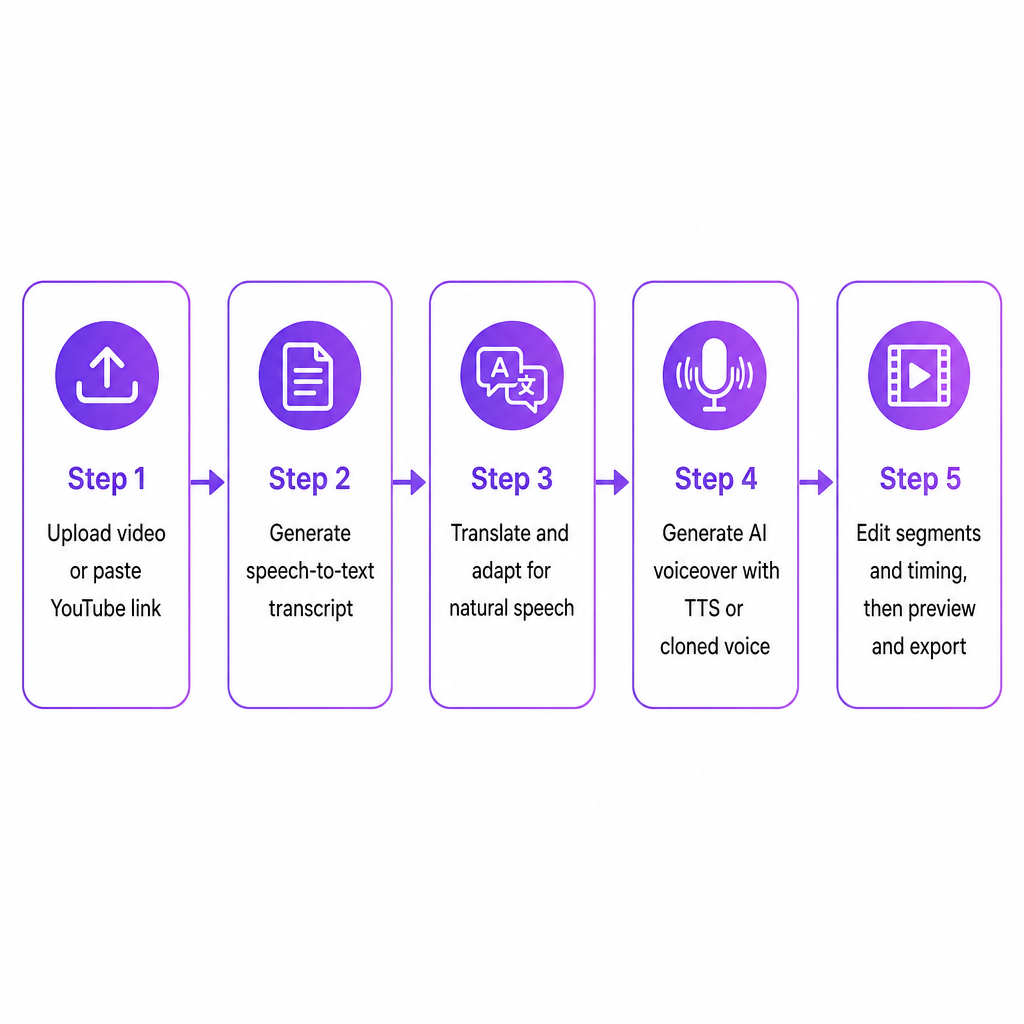
Why juggle a transcription app, a translation doc, a TTS tool, and a video editor when they never quite agree on timing? Our AI Dubbing studio runs online and lets you upload video or audio from your device or paste a YouTube link so we fetch the source automatically. From there, transcription, translation, voice generation, segment editing, and export flow as a single chain. You can add speakers, edit timings and text, adjust segments, and preview the localized video before downloading it.
Distinction. We focus on voice and audio-first localization, turning spoken content from 60+ source languages into dubbed versions across 33 target languages, backed by a large AI voice library and voice cloning in one place. The one-studio approach is designed to keep timing, tone, and intent aligned as content crosses languages—which is exactly where stitched-together toolchains tend to break.
Best fit. YouTube creators expanding a proven channel into new language markets without building a full post-production pipeline; small businesses and marketing teams repurposing video campaigns for new regions; e-learning and corporate training producers converting English-first modules into multilingual voiceover without hiring separate language studios.
Limitations. Automation speeds the work, but it does not remove the need to review and lightly edit transcripts and translations for nuance, especially in specialized or technical content. Output quality tracks your source audio, so heavy background noise or overlapping speech still benefits from cleanup first. And while coverage is broad, it is bounded by the documented 60+ source and 33 target languages—niche dialects or low-resource languages may call for a hybrid workflow with human talent.
Fast voice cloning for branded creator and character voices
Generic narration is the fastest way to make a dubbed video feel like it belongs to someone else. Our voice cloning creates custom AI voices from audio samples, needing at least 20 seconds of clean speech and finishing the clone in seconds. That cloned voice then works across both text-to-speech and dubbing projects, so your voice—or any voice you are legally licensed to use—becomes a reusable asset for multilingual content.
Distinction. Cloning here is not a disconnected lab experiment. It plugs directly into your dubbing and TTS flows, which makes it practical to hold a single host voice across videos and languages while only the spoken language changes.
Best fit. Solo creators who want their dubbed videos to sound like them; podcasters and filmmakers who need consistent character voices reused and localized across episodes or cuts; brands and enterprises with signature voice talent who want that voice scaled across campaigns in multiple languages.
Limitations. Cloning needs clean, background-noise-free recordings; weak source audio lowers quality and may force a re-record. You are responsible for having rights and consent for any voice you clone—the ease of the technology does not change the ethics or the law. And for high-stakes narrative or cinematic work, extremely stylized or theatrical performances may still be better delivered by a human take.
Text-to-speech built for training, explainers, and voiceover at scale
When you need dozens of narrated lessons or explainers, re-recording each one is a non-starter. Our Text to Speech tools convert scripts into natural-sounding speech using built-in AI voices or your own cloned voice. Inside the localization workflow, you generate a transcript, translate and adapt it for natural speech, then produce the AI voiceover before refining segments and timing—a sequence that suits training videos, explainers, and voice-led formats.
Distinction. This is more than a read-aloud utility. The TTS engine sits inside the dubbing studio, where you can regenerate specific segments, merge or split segments, and adjust emotional tone and timing. Paired with voice cloning, that gives you granular control over how a translated script actually sounds in each language.
Best fit. E-learning producers and instructional designers building large catalogs of narrated lessons or microlearning modules; corporate training teams updating compliance or onboarding content across regions without re-recording every module; marketing and product teams producing explainer and demo voiceovers that must stay consistent across language versions.
Limitations. AI speech can be highly natural, yet emotionally intense storytelling or cinematic spots may still want a bespoke human performance. Scripts translated for literal accuracy often need adaptation for spoken flow; the workflow supports this, but it still asks for your involvement. Skip the phrasing review and some target languages can come out stiff or overly formal.
Developer APIs for dubbing, TTS, and voice cloning
If you are shipping localization as a feature inside your own product, manual exports do not scale. We expose our core capabilities through APIs so you can ingest media, create custom voices, and run dubbing programmatically. The AI Dubbing API issues a presigned URL so you upload video files with standard HTTP PUT requests, and the Voice Cloning API accepts common audio formats including MP3, WAV, AAC, M4A, and FLAC for sample upload. Voices you create via the API then flow into text-to-speech and dubbing.
Distinction. The APIs turn our creator studio into an engine you can embed inside platforms, SaaS products, and agency workflows. Instead of exporting files by hand, you automate upload, voice creation, dubbing, and retrieval, wiring localization straight into your own applications or pipelines.
Best fit. Video platforms and creator tools adding a "dub this video" button; agencies and localization providers standardizing on an AI dubbing backend while keeping their own front end; internal engineering teams embedding multilingual voice into training portals, support centers, or content management systems.
Limitations. API use assumes developer resources and comfort with HTTP and JSON—non-technical teams will often prefer the studio. Rate limiting, error handling, and file-storage infrastructure sit on the integrator's side even though we provide the dubbing logic. Governance around who may create and use cloned voices has to be enforced at the application level.
Speech-to-text backbone for accurate timing
A dub that drifts a beat off the visuals feels wrong even when the words are perfect. Our Speech to Text layer converts spoken content into an editable transcript before anything gets re-voiced. The end-to-end chain we document runs like this: generate a transcript of the original video, edit it for accuracy and clarity, translate and adapt phrasing for natural speech, generate the AI voiceover, adjust audio in the dubbing studio, then preview and export.
Distinction. We build speech-to-text into the dubbing pipeline rather than treating it as a separate product. That means you fix transcript errors, rewrite lines, and adjust pacing before voices and timings are generated—which matters most when syncing dubbed speech to existing visuals, where small misalignments feel jarring. If you also work with noisy multi-speaker recordings, our Speech Separator explained guide covers the cleanup step that protects transcript accuracy.
Best fit. Talking-head and tutorial channels where precise speech timing is crucial; training and corporate communications teams needing verbatim accuracy for compliance while still adapting phrasing for natural delivery; localized product walkthroughs or UI demos where the voice must hit specific visual beats.
Limitations. Transcript accuracy still depends on audio quality, speaker accent, and domain vocabulary, so technical or noisy recordings need more review. Complex multi-speaker or heavily overlapped audio is harder to transcribe and align without prior cleanup. The workflow cuts manual labor but does not remove final quality checks—particularly for regulated industries.
How to choose the right setup for your channel
Once the building blocks are clear, matching them to your profile is straightforward. Use this mapping to decide where to start.
| Your profile | Start with | Why it fits |
|---|---|---|
| YouTube creator or filmmaker | Dubbing studio + voice cloning + timing controls | Dubbed versions feel like your originals, not re-narrations |
| Small business marketing/training | TTS + dubbing workflow | Scale explainers and training across languages with editable, reusable scripts |
| E-learning / corporate training | Transcript editing + segment control + cloned voices | Courses stay consistent and are easy to update over time |
| Developer or agency | AI Dubbing + Voice Cloning APIs | Presigned uploads and custom voices become backend services you orchestrate |
If you are planning a full multilingual channel rather than one-off videos, our guide on how to build a multilingual YouTube channel walks through the strategy end to end, and how to change the voice language in a video covers the practical single-video path. A useful pattern for US-based creators: start with a single-language channel or catalog, then add multilingual voice tracks as you validate demand, instead of committing to full human-dubbed production upfront.
Frequently asked questions
What is AI dubbing, and how is it different from subtitles?
AI dubbing transcribes, translates, and re-voices your audio or video into other languages while preserving the original timing, tone, and intent. Subtitles overlay text on screen; dubbing replaces or adds an audio track so viewers can listen in their own language.
How many languages can DubSmart work with?
Our workflow turns spoken content from more than 60 source languages into dubbed versions across 33 target languages, combining text-to-speech and voice cloning in a single platform.
What types of creators does DubSmart focus on?
We are built for global content creators, agencies, and businesses, with AI dubbing, voice cloning, text-to-speech, and speech-to-text aimed at video creators in media, marketing, e-learning, and training.
Can I automate dubbing across a large video catalog?
Yes. Our AI Dubbing API and Voice Cloning API let you upload files via presigned URLs, create custom voices, and run dubbing programmatically, so localizing a large catalog inside your own applications or content pipelines is practical.
Do I still need human review if I use AI dubbing?
For professional or high-stakes content, review the transcript, translation, and final audio for accuracy and nuance. Our workflow makes these checks easier by exposing each stage—transcript, translation, voiceover, and timing—in one integrated studio.