A still image freezes a moment, but it can't show how that moment moved. That's the gap image-to-video AI fills. If you're asking what is image to video ai, the short answer is this: it's a generative media technology that takes a single static visual—a photo, illustration, product shot, or AI-generated artwork—and animates it into a short video clip by inventing new frames that create apparent movement, camera motion, and sometimes sound. You supply an image, describe what should happen, and the model predicts and renders the in-between frames.
That sounds simple, but the decision behind it isn't just "can this tool make a cool clip." It's whether the generated motion stays faithful to your source, fits your platform, and survives a brand or accuracy review. This guide explains the mechanism, what you can control, where it fits in a real production, and how we handle Image to Video inside DubSmart AI as one stage of a larger media workflow.
Table of contents
How image-to-video AI differs from its lookalikes
The confusion usually starts here, because several tools sound alike but do different jobs. Image-to-video AI generates a sequence of new frames so a static visual appears to move over time. That single distinction separates it from everything it gets mistaken for.
- Text-to-video builds a clip from a written description alone, with no starting image.
- Image animation applies simpler effects—zoom, pan, parallax—without synthesizing genuinely new subject movement.
- Slideshow creation cycles through multiple stills but never generates continuous motion inside a frame.
- Video-to-video restyles or edits footage that already exists rather than beginning from one image.
So a slideshow changing from photo A to photo B is not image-to-video. Neither is a Ken Burns-style pan across a single picture. The defining trait is frame synthesis: the model creates movement that was never captured, anchored to the one frame you gave it.
If dubbing, transcription, and localization sit elsewhere in your stack, our explainer on all-in-one AI video tools by use case maps where image-to-video fits alongside those tasks.
How the generation actually works
Providers use different models, but the pipeline reduces to four connected capabilities. Understanding them tells you why some clips look seamless and others warp.
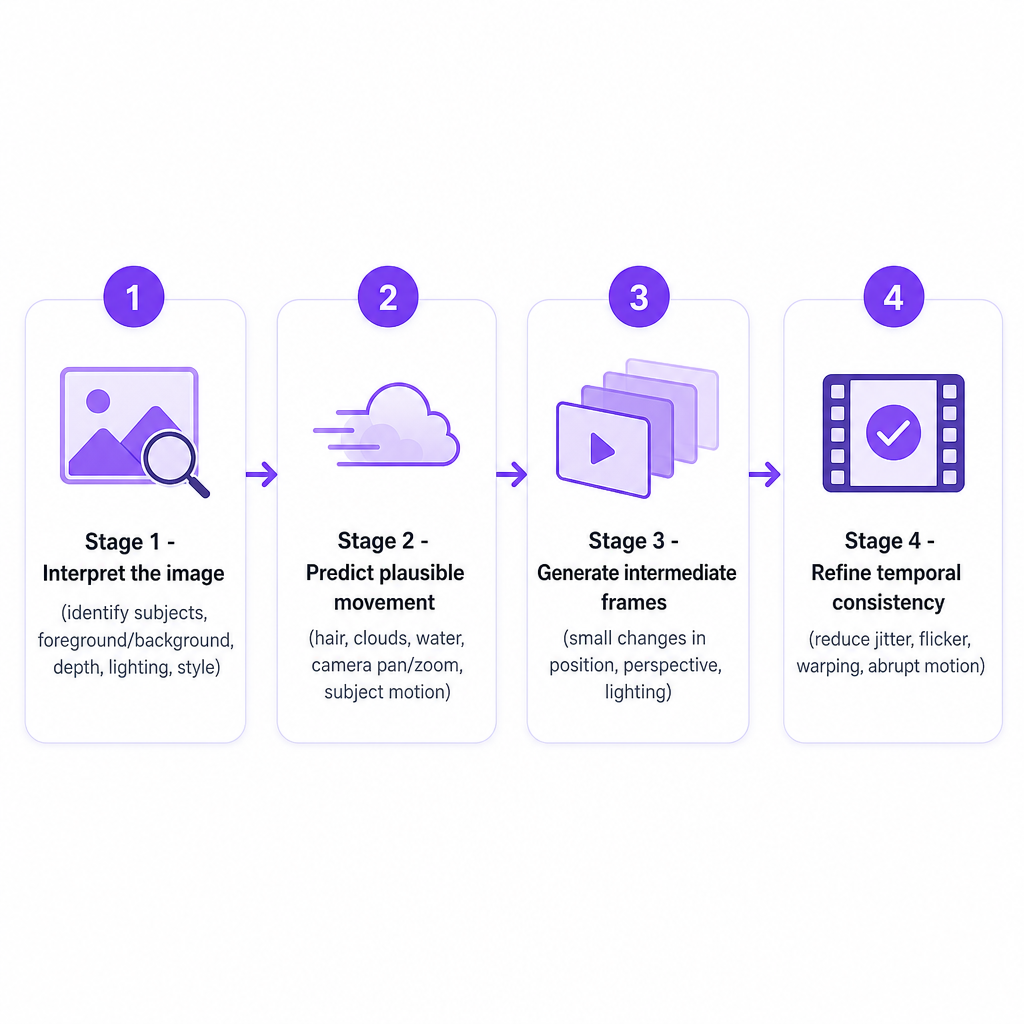
It interprets the image first. The model examines the upload to identify people, animals, products, and objects, then separates foreground from background and estimates relative position, depth, lighting, and visual style. The picture becomes a working representation of a scene rather than a flat surface.
It predicts plausible movement next. From that representation, the model estimates how the scene could change: how hair or fabric might shift, how clouds, smoke, water, or leaves might move, how light could travel across an object, and how a camera might pan, tilt, zoom, or push in. These predictions are not a recording of something that happened. They are generated possibilities drawn from the image, your prompt, and patterns learned in training.
It generates the frames between. The system renders a series of frames with small changes in position, perspective, lighting, or shape. Played consecutively, those frames read as continuous motion. This is the crux: the tool isn't revealing hidden footage, it is synthesizing what could appear between moments that were never filmed.
It refines temporal consistency last. Finally the model smooths transitions to suppress jitter, flickering, sudden lighting shifts, warped objects, inconsistent faces, and abrupt camera moves. How well it succeeds depends on the model, the source image, the prompt, and how complex the requested action is. The more you ask the model to invent, the harder this stage works.
What you can control, and what the source image decides
The strongest results come from directing motion, not from rewriting the whole image in prose. A reliable prompt names four things: subject, action, camera movement, and visual style.
A ceramic coffee mug on a wooden table, steam gently rising, slow camera push-in, warm morning light, realistic product video.
From there you can usually specify subject movement (walks, turns, rotates, rises), environmental movement (wind, rain, smoke, falling leaves), camera movement (pan, tilt, dolly in or out, handheld, static), pacing (gentle to rapid), mood (cinematic, documentary, calming), and output format (landscape, square, vertical). We recommend keeping the first prompt simple and focusing on the motion you actually want.
The catch is that your prompt has to match what the image can support. A portrait tends to look natural with subtle facial or camera movement and unnatural if you ask the subject to sprint. A landscape often reads better with a slow pan or environmental motion than with rapid subject action. A product shot usually favors controlled rotation, a light sweep, or a gradual reveal. Every degree of dramatic movement forces the model to invent more visual information—and invention is where artifacts appear.
That's why the source image carries so much weight. It sets the subject, composition, lighting, and style the model has to work from. For stronger output, start with a clear, recognizable subject, good lighting, sharp detail, minimal artifacts, a deliberate composition, enough empty space for the movement you want, and distinct foreground and background layers. A crowded, blurry, or heavily cropped image gives the model less to reason with—an image framed tightly on a face rarely leaves room for a wide camera move. A strong source doesn't guarantee a perfect clip, but it hands the model a far better starting point. If you're generating those stills from scratch, our AI image generator can produce them before you animate.
Where creators and teams actually use it
Image-to-video earns its place when the motion serves the message, not when it's decoration for its own sake.
- Social media. Turn photos, thumbnails, illustrations, or generated artwork into short clips for Shorts, Reels, and TikTok. Vertical output matters most when the original visual was built for mobile.
- Product marketing. Animate a product image with a subtle zoom, rotation, lighting shift, or background movement to make a static asset stand out in an ad.
- YouTube and video production. Use clips as intros, outros, B-roll, establishing shots, transitions, or background sequences behind narration—then layer voiceover, music, captions, or dubbing on top.
- E-learning and training. Add movement to diagrams, historical images, and presentation visuals, but only where the motion clarifies an idea.
- Storyboarding and concept work. Animate stills to explore mood, framing, and camera direction before committing to a full shoot.
- Real-estate and travel. Transform a well-chosen property or destination image into a short atmospheric clip—without implying features the real location doesn't have.
In every case the clip is a component. A YouTube creator might animate several illustrations, assemble them in an editor, generate narration, and localize the finished video for other markets.
Our Image to Video options at DubSmart AI
Our Image to Video generator uses the uploaded image as the first frame, which fixes the opening composition and visual style. You add a text prompt describing subject movement, camera angles, or scene dynamics, choose duration and quality, and download the clip.
| Option | Our offering |
|---|---|
| Clip duration | 4, 6, or 8 seconds |
| Quality levels | Standard, High, Ultra High |
| Audio | High and Ultra High include sound |
| Landscape formats | 1280×720 and 1920×1080 |
| Square format | 1024×1024 |
| Vertical format | 720×1280 |
| Input | A high-quality image plus a motion prompt |
We built the tool for social media, advertising, artistic projects, and larger video productions. For specific pricing or credit consumption, confirm the current figures in your DubSmart account or plan information before you scope a production, since those details live with your plan rather than on the public tool page.
How to choose a tool for the job
The right tool depends on the content you need to ship, not on whether it can produce one impressive demo. A few criteria separate a novelty from something you can use in a repeatable workflow.
Source-image control. Check whether the tool treats your image as a strict first frame, a loose reference, or only a style guide. A first-frame approach keeps the opening composition tied to your source—useful when the starting shot matters.
Motion control. Look for clear support for subject movement, camera movement, environmental effects, speed, and style. Attractive but unpredictable motion is hard to reproduce when you need consistency across several clips.
Duration and formats. Match available durations and aspect ratios to your destination. Short clips suit social posts, ads, transitions, and inserts; confirm the vertical, square, and landscape options line up with where the clip will run.
Audio. Decide whether you need a silent visual for later editing, ambient sound, music, effects, or a fully generated track. Generated audio should still be reviewed for timing and relevance before it ships.
Consistency. If a face, product, logo, or character must stay identical throughout, test several generations first. Models can quietly alter small details—hands, text inside an image, logos, architectural lines—as they synthesize frames.
Editing compatibility. Confirm you can download a practical format at the right resolution, combine it with live-action footage, and add captions, narration, or dubbing without losing the framing your editor needs. For teams already producing voice and localized media with us, Image to Video slots into one workflow instead of adding yet another standalone tool.
Limitations, risks, and rights you can't skip
Image-to-video AI does not reconstruct real footage from a still. It generates a plausible interpretation of motion, and that distinction drives every limitation worth planning around.
Faces, fingers, text, logos, and product details can shift between frames, so review the whole clip rather than judging the first preview. The model can also misread depth, object boundaries, or cause and effect—producing unnatural movement, bending objects, or a camera move that reveals invented detail. Vague prompts like "make it move" give almost no direction; specific descriptions of subject, movement, camera, and mood guide the model far better. And because the technology is strongest on short clips, a generated sequence works well as an insert or social asset but won't replace a complete filmed scene.
The risks that matter most are ethical and legal. A generated clip should never imply that a person performed an action, that a product has a feature, or that a real place changed when none of that happened—a line that matters especially in advertising, news, education, and customer communications. On rights, only use images you have permission to process and publish, and be cautious with photos of identifiable people, brand assets, copyrighted artwork, client-owned materials, private information, celebrity likenesses, and AI-generated images with uncertain usage terms. Transforming an input does not grant you rights to the input or the resulting video.
Frequently asked questions
What is image to video AI in simple terms?
It's AI software that turns a still image into a short moving video by generating new frames based on the image and a movement instruction you provide.
Can image-to-video AI add sound?
Some tools generate sound while others produce silent video for later editing. Our High and Ultra High quality options include sound; review generated audio for timing and relevance before publishing.
What images work best?
Clear, well-lit images with a recognizable subject, distinct foreground and background areas, sharp detail, and minimal artifacts give the model a stronger starting point than crowded or blurry sources.
How long are DubSmart AI image-to-video clips?
We offer 4-, 6-, and 8-second durations, in landscape, square, and vertical formats.
Can I create vertical videos for TikTok or YouTube Shorts?
Yes. We list a 720×1280 vertical format alongside square and landscape resolutions, so clips fit mobile-first platforms.
Is image-to-video AI suitable for business content?
It can work for ads, product visuals, training, social content, and concept development, provided you review the output for accuracy, brand consistency, rights, consent, and any misleading visual claims before it goes live.