
If you have landed on comfyui text to speech expecting a single button that turns a script into audio, the first thing worth knowing is that ComfyUI is not a voice engine at all. It is a node-based workspace where you wire text, a voice, a model, language, and an audio output together into a reusable graph. The speech itself comes from whatever TTS node you connect: a hosted provider, an official partner integration, or a local model you install yourself. The question that actually matters, then, is not whether ComfyUI can speak your script, because it can, but whether a visual graph is the right place for the work you need to repeat.
That distinction shapes every other decision on this page. ComfyUI rewards experimentation and multimodal pipelines where narration sits next to image, video, and audio generation. A dedicated speech tool rewards repeatable production where you simply need clean voiceovers again and again. Below, we break down how the workflow works, which option types exist, how to judge them, and where a graph stops being worth the maintenance.
Table of contents
What ComfyUI text to speech actually is
ComfyUI text to speech is the practice of using a ComfyUI graph to convert written text into an AUDIO output. The official documentation describes ComfyUI as an open-source, node-based application for building workflows across image, video, audio, and 3D generation, and its audio nodes connect external speech services or models into that same visual canvas.
A working speech graph is small. It needs a text or prompt input, a TTS node, a voice or reference-audio input, optional language and delivery settings, and an audio preview or save node. The TTS node pushes your script through a speech model and hands back generated audio that later nodes can use.
The practical consequence is that ComfyUI is the workflow layer, not the model. The actual voice may be produced by a hosted provider, a partner audio model, a third-party custom node, or a locally installed system. Understanding that split is what keeps your expectations accurate: you are assembling a pipeline, and you still choose the engine inside it.
How the four-stage workflow works
Strip away the node names and every ComfyUI speech graph does the same four things in sequence.
First, the script arrives as text. The TTS node may take plain text directly, or the text may flow in from another node that loads, translates, or segments a longer script. Breaking a long narration into logical sections lets you regenerate one paragraph without rebuilding the whole voiceover, and it helps you stay under a provider's input ceiling.
Second, the workflow selects a voice and a model. Depending on the provider, that could be a preset speaker, a cloned voice, a voice ID, or a reference recording. The model choice also governs speed, quality, expressive range, and cost. ComfyUI's HeyGen node, for example, exposes both heygen-voice-1 and a faster, lower-cost heygen-voice-1-turbo, while the ElevenLabs node surfaces controls such as stability, speed, and style.
Third, the speech model synthesizes audio. Modern neural systems estimate pronunciation, rhythm, pauses, and pitch movement rather than stitching together prerecorded words, and they return a waveform you can route onward: saved to a file, mixed with music, dropped into a video graph, or paired with an avatar.
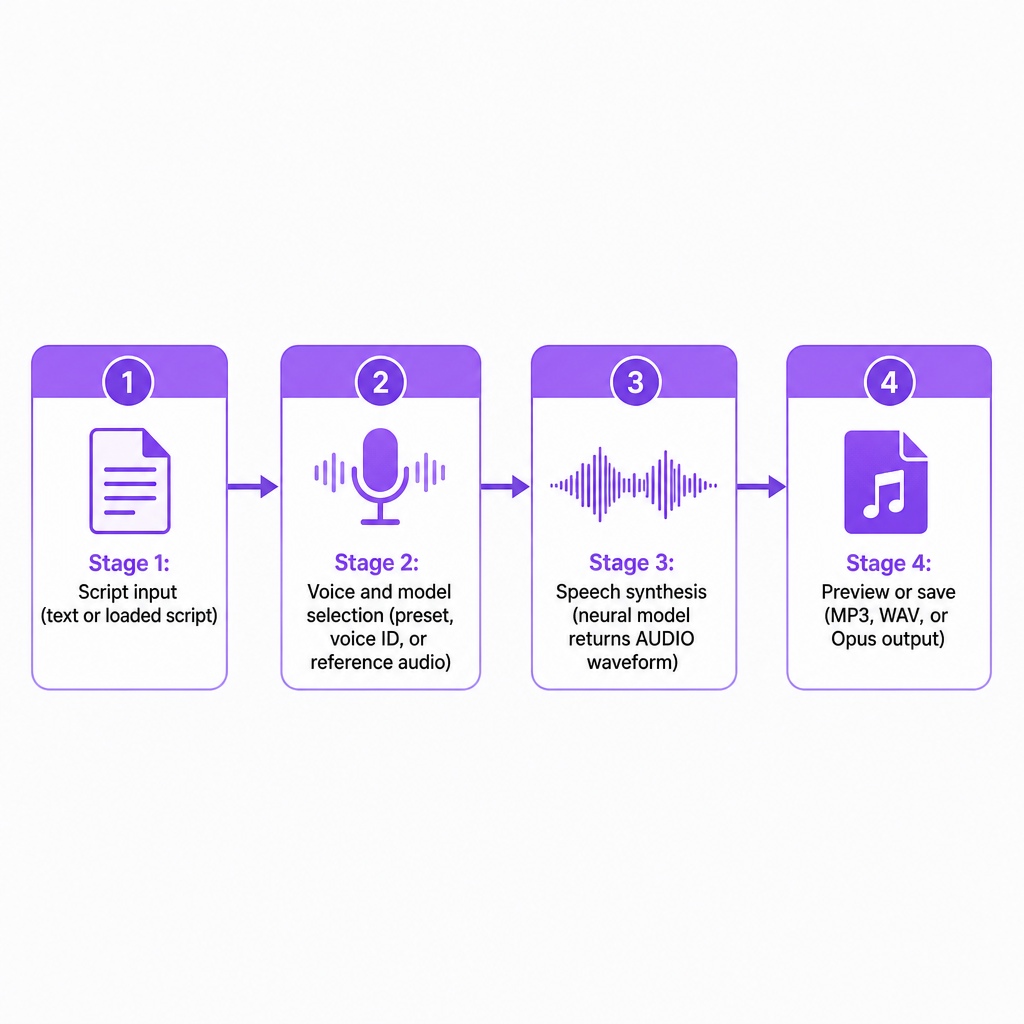
Fourth, the audio is previewed or saved. TTS nodes typically emit an AUDIO object that connects to a preview or save node, with the file format set by the node and provider; the ElevenLabs node documentation, for instance, lists selectable formats including MP3 and Opus variants. Because the graph is visual, the loop is easy to rerun: change the script, voice, language, or model, then queue it again.
The three ways to run TTS in ComfyUI
There is no single ComfyUI speech method, and the differences come down to setup, control, privacy, and how much maintenance you are willing to own.
Hosted provider nodes send your text and voice settings to an external service and return finished audio. This is usually the quickest path to high-quality speech because the model runs on the provider's infrastructure. The HeyGen Voice 1.0 node illustrates the pattern: it requires a valid cloned voice ID, sends the text and ID to HeyGen, and returns the speech. The trade-offs are predictable too, as an account or API connection may be required, usage can consume provider credits, your text and audio are processed by a third party, and provider limits or pricing can change.
Official partner audio nodes extend the same idea across more of the audio space. ComfyUI's audio documentation separates text-to-audio generation from voice-and-speech use cases, including speech from text and from reference audio. These integrations shine when your graph already relies on other hosted media models, because they cut down on shuffling files between separate applications.
Community and local TTS nodes connect ComfyUI to systems such as Edge TTS, Kokoro, Index-TTS, and other models that can run locally. Local workflows can give you more control over your data and model choice, but they ask more in return: installation, compatible hardware, model downloads, and troubleshooting. A local node is not automatically better than a hosted one. Its real advantage depends on whether your machine can run the model efficiently, whether the voice quality holds up, whether your language is supported, whether the license permits commercial use, and whether you can keep the workflow alive over time.
Voice cloning and the controls you can expect
Voice cloning adds a reference identity to the graph instead of a stock speaker. The structure is usually two connected parts: a cloning node that creates or returns a voice identity, and a TTS node that uses that identity to speak new text. The HeyGen documentation describes this directly, where an Instant Clone node produces a voice_id that feeds the Voice 1.0 Text to Speech node; that clone workflow asks for at least 10 seconds of clear speech, and the TTS node accepts up to 5,000 characters per request.
Clone only with authorization. Do not replicate a real person's voice simply because you can reach a recording. Get permission, keep proof of it, and disclose synthetic or cloned speech wherever the context could mislead an audience.
Beyond the voice itself, the controls you will meet vary by node and model, but a familiar set recurs across most of them.
- Voice: the speaker identity or preset
- Language: the language used to interpret the script
- Speed: how quickly the narration is delivered
- Pitch: the perceived highness or lowness of the voice
- Style and expressiveness: the delivery character and how strongly emotion is applied
- Stability: how consistently the voice holds its characteristics
- Output format: such as MP3, WAV, or Opus
- Reference audio: a recording used for cloning or speech transformation
Some models go further with inline cues. The Fish Audio node documentation supports emotion cues and multi-speaker dialogue tags in supported models. One caution carries across all of them: these controls are not interchangeable between providers, and a setting called style in one node may behave nothing like style in another.
ComfyUI versus a dedicated TTS platform
ComfyUI earns its place when speech is one part of a larger media pipeline. A dedicated platform tends to win when the only real job is turning scripts into polished narration without assembling a graph.
| Decision factor | ComfyUI | Dedicated TTS platform |
|---|---|---|
| Workflow flexibility | High; connect TTS to other media nodes | Usually focused on speech production |
| Setup | May need nodes, provider links, or model installs | Often faster for first generation |
| Voice options | Depends on installed or connected nodes | Usually one organized voice library |
| Automation | Strong for reusable visual graphs | Often via API or batch tools |
| Local processing | Possible with local nodes and models | Usually cloud-based |
| Best use case | Experimental or multimodal pipelines | Repeatable narration and production |
For creators building a visual pipeline that blends speech with images, video, or audio processing, the graph pays for itself. For YouTube narration, e-learning voiceovers, podcasts, or localization teams that need a predictable interface, a specialized service usually removes technical overhead. Our Text to Speech workflow is built around direct script-to-audio generation, with 300+ AI voices, voice cloning across 33 languages, adjustable speech rate, emotional dialogue cues, and downloadable projects. When generation has to live inside an application or an automated content pipeline, our Text to Speech API handles the integration side, and our AI Dubbing API extends the same idea to translated, voice-matched video.
How to choose and troubleshoot your setup
Before committing to a node or model, run a few deliberate checks rather than trusting a short demo.
Judge voice quality on a hard sample, not a soft one. Generate a passage that includes names, numbers, acronyms, long sentences, questions, brand terms, and at least one emotional line in your target language and accent. A voice that charms you in a one-liner can mangle a product name or lose rhythm across a paragraph.
Check language and accent support per language, not in the aggregate. Some systems detect language automatically while others need you to set it, and the HeyGen node documentation recommends setting the language manually for closely related languages where automatic detection can be unreliable. Remember that a fluent voice cannot rescue an inaccurate translation; voice quality and translation quality are separate problems.
Measure pronunciation control for the words that actually trip engines up: product names, proper nouns, abbreviations, dates, currency, and technical vocabulary. If a node offers no pronunciation dictionary or SSML-style controls, plan to rewrite text phonetically or spell numbers out. For a series or branded channel, also test consistency by running the same voice across multiple generations, tones, and regenerated sections, since separate ComfyUI runs for different scenes can drift.
Weigh latency, cost, privacy, and rights together. Hosted nodes start fast but depend on network speed, provider availability, account limits, and per-use pricing, while local models avoid per-request charges but demand hardware and upkeep; compare total production cost, not the advertised rate. On privacy, confirm how input is stored, whether content trains the model, whether voice data can be deleted, whether commercial use is allowed, who owns the output, and what consent cloned voices require.
When a graph misbehaves, the failures cluster into a short list. A cloned-voice node that returns an error often has an empty or invalid voice_id; the HeyGen node stops for exactly that reason. Overlong scripts hit limits, and the documented HeyGen Voice 1.0 node accepts up to 5,000 characters while warning that very long speech can fail, particularly for extended Chinese or Japanese text, so split narration into logical sections. Wrong pronunciation usually responds to rewriting numbers in words, adding punctuation, or spelling out acronyms. Overexpressive output calls for lower expressiveness, style, or pitch variation. And when audio will not connect downstream, check the type, since an AUDIO output cannot feed a node expecting an image, video, or text without a conversion step. Finally, save a clean graph with named nodes and recorded settings, because the provider, voice ID, language, and output format you used are the details future-you will need.
Frequently asked questions
Is ComfyUI a text-to-speech tool?
ComfyUI is a node-based workflow application rather than one single TTS engine. It can generate speech through built-in nodes, partner integrations, and community or local TTS nodes.
Can ComfyUI clone a voice?
Yes, if the selected integration or custom node supports cloning. The exact recording requirements, voice-ID process, limits, and commercial terms depend on the provider.
Does ComfyUI text to speech work offline?
It can when you use a compatible local TTS model and local nodes. Hosted provider nodes require an internet connection and may send text or voice data to the provider.
What is the best ComfyUI TTS node?
There is no universal best node. Choose based on language support, voice quality, cloning needs, privacy, cost, latency, and compatibility with the rest of your workflow.
Can I use ComfyUI TTS for YouTube videos?
Yes. Generate the narration, review pronunciation and rights, export the audio, and sync it with your video. If you use a cloned or synthetic voice, follow the applicable consent, disclosure, and platform requirements.