
If your goal is to reach viewers who speak another language, the AI dubbing vs manual subtitling choice usually comes down to one question: do you need a translated voice track or a translated text layer? AI dubbing replaces or supplements the original speech with a generated voice in another language, which makes it the stronger fit for scalable video localization. Manual subtitling keeps the original audio intact and displays translated dialogue as timed text, which suits the lowest production overhead, tight editorial control, and accessibility support. Many teams eventually use both, because the real decision is about what your audience needs from the content.
Table of contents
What actually separates dubbing from subtitling
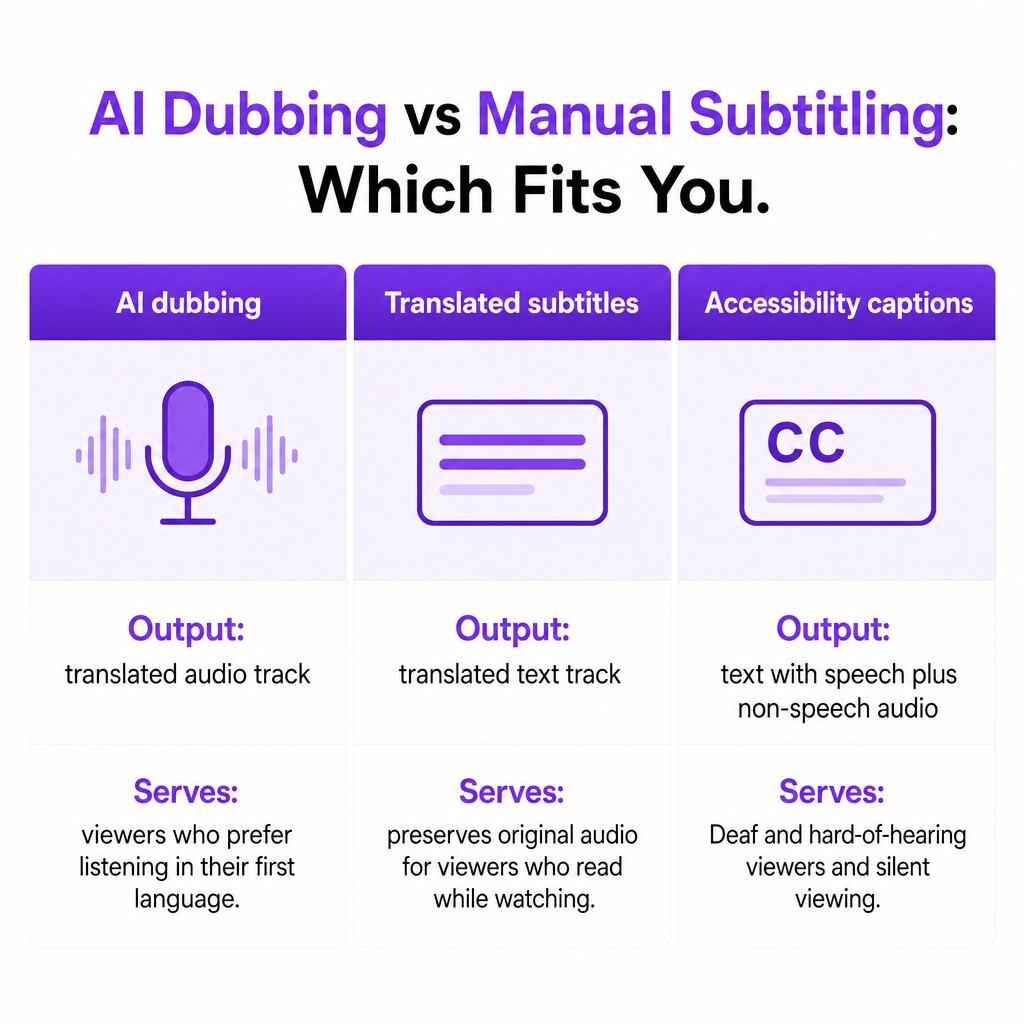
The two formats solve different problems, and conflating them leads to the wrong budget and the wrong deliverable. Dubbing makes content feel natural to viewers who prefer listening in their first language. Subtitling preserves the original performance while adding a translated text layer that viewers read while watching.
There is also a third category that often gets folded in by mistake: captions. The W3C distinguishes captions from translated subtitles because captions support viewers who are Deaf or hard of hearing by including speech plus relevant non-speech audio such as music cues, alarms, or speaker identification. Terminology varies by region, but the functional difference is real: a translated subtitle file is not automatically an accessibility caption file.
This is why AI dubbing vs manual subtitling is rarely a clean either-or. A dubbed soundtrack localizes the listening experience; a reviewed caption track handles accessibility and silent viewing. If your project needs translated audio and an accessible text alternative, you may need both.
How each workflow is built
An AI dubbing workflow chains several technologies. Speech recognition converts the source audio into text. Translation adapts the dialogue into the target language. Speaker identification separates or labels different voices. Voice generation or voice cloning creates the translated speech. Timing and audio mixing align the new dialogue with the video, music, and sound effects. Human review then checks pronunciation, meaning, timing, and cultural fit.
In our AI Dubbing workflow, you upload a video or paste a YouTube link, edit speakers, adjust text and timings, regenerate segments, and download the finished project. We dub content from more than 60 source languages into 33 target languages, with speaker voice cloning available inside the same workflow. If you want to preserve the identity of the original presenter, cloning helps; if voice identity matters less, a stock voice is often faster to approve and easier to govern.
Manual subtitling has a narrower job: produce an accurate, readable timed-text file. That work means reviewing or transcribing the dialogue, translating meaning rather than words, condensing lines so viewers can read comfortably, adding timestamps, splitting text into logical lines, labeling speakers where needed, and including important sound information for captions. Common web formats include WebVTT, SRT, and TTML.
One commercial detail matters here. The W3C notes that automatically generated captions normally require editing before they can be considered accurate, because a raw transcript can mishear names, numbers, product terms, accents, or negations in ways that change the meaning of the video. "Automatic subtitles" and fully reviewed subtitles are not the same deliverable.
A direct comparison you can decide from
| Decision factor | AI dubbing | Manual subtitling |
|---|---|---|
| Main output | Translated audio track | Translated text track |
| Original performance | Replaced or supplemented | Preserved |
| Viewer experience | Feels closer to localized programming | Requires reading while watching |
| Production speed | Fast across many languages and large libraries | Slower when each file is timed and reviewed by hand |
| Up-front cost | Often efficient at scale | Usually lower for one language or a short clip |
| Editorial control | Review generated translation, voice, and timing | High control over wording, line breaks, timing |
| Accessibility | Does not replace captions | Can provide captions when properly prepared |
| Main risk | Translation, pronunciation, consent, or timing errors | Labor cost, reading burden, inconsistency between subtitlers |
When AI dubbing is the better choice
If you are expanding a YouTube channel internationally, a dubbed version lets viewers listen in their preferred language instead of reading every line. That pays off most for tutorials, explainers, reviews, educational videos, and long-form content. The deeper advantage is repeatability: one localization workflow applies to a growing library instead of a fresh voice production for every upload.
Long or dialogue-heavy content strengthens the case. Subtitles grow more demanding as runtime and speaking speed increase, because viewers keep splitting attention between visuals and text. Dubbing makes interviews, courses, webinars, and video podcasts easier to consume. It does not remove the need for captions, though, and a dubbed video should generally retain an accessible text option in the target language.
Multiple languages tip the balance further. Manual subtitling works well for one or two priority markets, but translation, timing, review, and file management multiply as languages grow. Our AI Dubbing API exists for exactly this: teams that need to fold localization into their own systems and run it across many languages without rebuilding the pipeline each time.
Frequent updates also favor generated audio. Product demos, onboarding material, sales videos, and training content change often, and AI-generated speech can be regenerated when a sentence, price, feature, or compliance statement changes. Keep human review in the loop whenever an update touches legal claims, product instructions, medical information, or brand terminology.
Finally, when you want to preserve the presenter's voice, voice cloning can keep translated content consistent with the original speaker. Use it only with documented permission. A recognizable voice is part of a person's identity and a company's brand, so approval should cover the source recording, the generated voice, the target languages, and the intended distribution.
When manual subtitling is the better choice
Accessibility is the clearest case. Translated subtitles and accessibility captions are related but not identical, because captions typically include relevant non-speech audio such as music cues, laughter, or speaker identification. The W3C states that captions are required at WCAG Level A for prerecorded video with meaningful audio content. A dubbed soundtrack alone does not provide that text alternative, so when accessibility is the requirement, create and review captions even if you also dub.
Subtitling also wins when the original performance is central. Interviews, live events, dramatic scenes, and creator-led commentary often depend on the speaker's delivery, timing, humor, and emotion. Subtitles let viewers hear the original voice while reading the translated dialogue.
Short content that rarely changes is another fit. For a single announcement, social clip, or one-market campaign video, standing up an AI voice workflow may be more overhead than the project warrants. The same goes for tightly controlled wording: legal, financial, healthcare, public-sector, and technical content frequently requires approved terminology, and manual subtitling gives an editor direct control over every visible word. AI can still assist with a first transcription or translation, but the final file should be checked by someone who knows the subject and the target market.
There is also a behavioral reason. When your audience is likely to watch without sound, in social feeds, offices, or public spaces, subtitles carry comprehension that a dubbed track cannot. Dubbing improves understanding when sound is on; it does not solve silent viewing on its own.
Cost and scale: what to actually compare
Comparing only the per-minute production price hides the real workload. Weigh the full localization effort instead: number of source videos, average runtime, number of target languages, update frequency, whether voice cloning is needed, human translation and review, caption or subtitle-file requirements, audio mixing, platform delivery rules, rights and approvals, and revision costs.
For a single short video, manual subtitling often has the lower total cost. For a recurring library in multiple languages, dubbing tends to reduce turnaround time and make localization repeatable. We use a credit-based model with rollover credits, a free tier, and enterprise options; confirm current credit usage and plan terms before you build a production budget, since those variables drive the real number more than any headline rate.
Quality risks to check before publishing
Translation can be accurate at the word level yet miss intent, humor, idioms, cultural references, or industry terminology. Review the translated script before you approve any audio. Pronunciation is a separate check: test people's names, places, product names, acronyms, and technical terms, because a natural-sounding voice can still deliver a wrong pronunciation.
Timing deserves attention because translated speech may run longer or shorter than the original. Our Dubbing Studio provides controls for editing timestamps and changing speech rate, but do not fix every mismatch by speeding the voice unnaturally; rewrite or condense the line instead. On consent, never clone a voice without authorization, and document who owns the source recording, who approved the clone, where it may be used, and whether permission covers commercial distribution.
Watch for cultural mismatch as well. A literal translation may not suit a specific market or customer segment, so review jokes, measurements, currency, references, calls to action, and claims for local relevance. And treat machine captions as draft: the W3C cautions that generated captions may contain errors that change meaning, so check them against the finished video before publishing. If transcription is part of your pipeline, our Speech to Text output is a starting point for editing, not a finished caption file.
Where we fit your localization workflow
We built DubSmart for creators, small businesses, e-learning teams, filmmakers, podcasters, and developers who want more than a single subtitle file. Our AI Dubbing product combines multilingual voice generation, speaker handling, timing edits, and downloadable localized output in one place, with dubbing from 60+ languages into 33 target languages and an API route for automated integrations.
The practical advantage is consolidation. Instead of shuffling each project between separate transcription, voice, cleanup, and localization tools, you can pair dubbing with transcription, speech separation, text-to-speech, or voice cloning in one media-creation platform. If you are still weighing the text-first route, our explainer on dubbing versus subtitles for video digs into engagement and platform fit in more detail.
Start with a representative sample rather than your whole catalog. Test one short video that contains multiple speakers, music, technical terminology, and natural conversational speech. Review translation accuracy, voice quality, timing, pronunciation, and how much human editing it needed, then compare that against the time and cost of manually subtitling the same sample. That single test usually settles the decision faster than any spreadsheet.
Frequently asked questions
Is AI dubbing better than manual subtitling?
Neither is universally better. AI dubbing is generally better for scalable multilingual audio localization, while manual subtitling is better for precise text control, accessibility captions, and preserving the original performance.
Is AI dubbing cheaper than manual subtitling?
It can be, especially across many languages or frequent updates. For a short, single-language project, manual subtitling may cost less overall. Compare review, revision, captioning, and delivery work rather than only the initial generation fee.
Do dubbed videos still need subtitles?
Often, yes. Subtitles or captions support viewers who watch without sound, need accessibility features, or prefer reading. A dubbed soundtrack and an accessible text track serve different needs.
Is manual review still needed when AI creates the text?
Yes. AI transcription and translation should be reviewed for accuracy, timing, names, terminology, and cultural meaning. The W3C notes that automatic captions generally require editing before publication.
What fits e-learning and corporate training best?
A hybrid is often strongest: use AI dubbing for spoken instruction in priority languages, then add reviewed captions or subtitles for accessibility, silent viewing, searchability, and learner preference.