
An ai voice clone turns a short recording into a reusable digital voice that can read any script, in your own voice, across multiple languages in seconds. With DubSmart AI, the path is deliberately short: upload roughly 20 seconds of clean audio, wait a few seconds while our system builds the voice model, then apply that voice inside our Text to Speech and AI Dubbing tools. The result is a consistent voice identity you can scale across hundreds of videos and dozens of languages without re-recording every time.
That speed changes the real question. It is no longer whether cloning is possible, but whether a custom clone is the right choice for your channel or business, how the pipeline actually works, and where the legal lines sit before you press publish.
Table of contents
What an AI voice clone actually is
An ai voice clone is a synthetic voice model trained to reproduce one speaker's tone, timbre, accent, and speaking style from a short sample. Once the model learns that voice fingerprint, it stops being a single recording and becomes a reusable instrument.
That instrument does three concrete jobs. It reads any text you type through Text to Speech. It replaces the original voice inside a video while keeping timing and emotion through AI Dubbing. And it can speak in other languages while preserving the original speaker's character. For creators, e-learning teams, filmmakers, podcasters, and developers, this means one voice identity can carry across formats and markets instead of fragmenting into different narrators every time output scales up.
Is cloning right for your channel or business?
Before uploading anything, pin down the decision you are actually making. A clone is worth the setup when you need a recognizable, repeatable voice; it is overkill when a generic narrator would do.
Creating a custom clone tends to pay off when you want a recognizable personal brand across YouTube, podcasts, or online courses; consistent narration across many training or product videos; scalable multilingual content without booking voice actors for each release; or an embeddable voice inside your own app or platform through an API. If none of those describe your work, a stock voice is usually faster and simpler.
The distinction matters because a clone commits you to a specific identity. That is exactly what you want for a branded host voice, and exactly what you do not want when you need quick variety across throwaway assets.
How AI voice cloning works in 2026
Under the hood, modern cloning follows a consistent pattern, and understanding it helps you get a better result on the first try.
First comes a clean sample: at least around 20 seconds of natural speech, free of background noise, clipping, and music. Next, an AI model analyzes that recording to capture pitch, timbre, prosody, accent, and pacing. The system then saves this as a custom voice you can select in projects. Finally, when you type a script or upload a video, the AI synthesizes new audio in that voice, aligning timing and style to the original performance in the case of dubbing.
Because the heavy computation runs on our servers, the cloning step itself takes only a few seconds once your audio is uploaded and processed. Your real bottleneck is usually recording quality, not compute time.
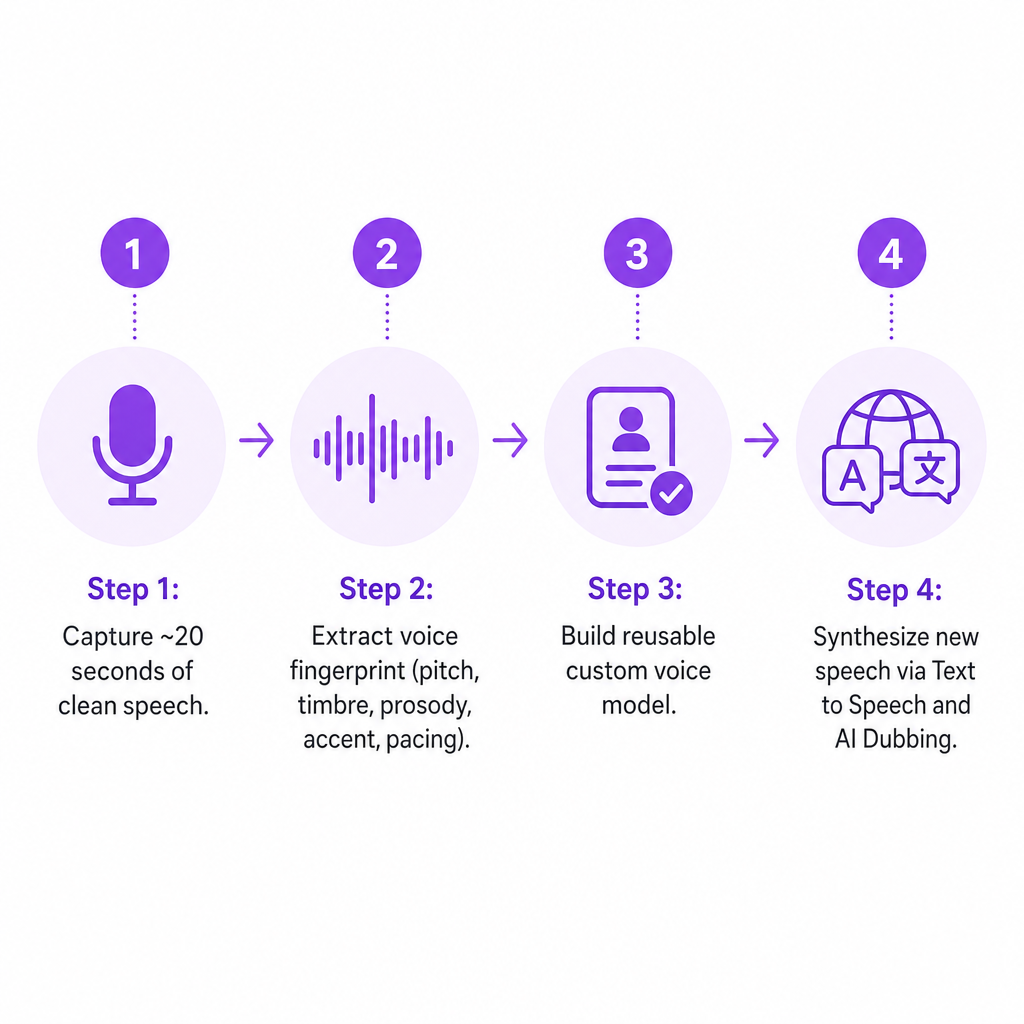
The no-code path in the web app
For most creators and teams, the simplest route runs entirely through the browser. Record at least about 20 seconds of your voice on a decent mic in a quiet room, or reuse a high-quality existing recording. Upload that file to the Voice Clone section, wait a few seconds for processing, then select your custom voice inside Text to Speech or AI Dubbing to start generating content. Clean audio, free of background noise, is the single biggest factor in cloning quality.
The developer path via API
Developers and agencies reach the same pipeline through our Voice Cloning API. You obtain a pre-signed URL and upload the audio file in a supported format such as MP3, WAV, AAC, M4A, or FLAC, then create a custom voice by referencing that uploaded file. Once created, the voice can be invoked programmatically in both Text to Speech and AI Dubbing. That gives you an end-to-end path: upload sample, create a named voice, and generate speech and dubbed audio with that voice for your own users.
Stock voices vs. a custom clone on DubSmart
DubSmart AI consolidates voice cloning, Text to Speech, AI Dubbing, Speech to Text, Speech Separator, Text to Image, and Image to Video into one credit-based workflow. Inside that ecosystem, your first real choice is usually between two kinds of voice.
A stock voice is a prebuilt, natural-sounding voice from our library. Reach for it when you do not need a unique identity, or do not have recording rights for a specific speaker. A custom ai voice clone is a reusable digital version of your own voice, or a voice you have rights and consent to use, that you can apply across Text to Speech, AI Dubbing, and API-powered experiences.
Because every tool sits on the same platform and shares one credit system, you can move from cloning a voice to dubbing a full multilingual video without exporting and re-importing assets between separate services. That single-workspace flow is the practical reason a clone stays consistent across scripts, videos, and languages.
How to choose your cloning workflow
With the mechanics clear, four criteria decide how you should actually deploy a clone.
| Criterion | What to check | Why it matters |
|---|---|---|
| Voice quality and control | Naturalness, style control over speed and tone, fit with your brand identity | Determines whether the clone truly sounds like you across different scripts and emotions |
| Languages and scalability | Your source language, needed target languages, one market or many | A unified workflow keeps one host voice across every localized version |
| Integration and automation | No-code recording-to-video for creators; API hooks for teams | The API feeds the same voice into Text to Speech and AI Dubbing endpoints |
| Governance and consent | Rights to clone, internal usage policy, tracking of which projects use which voice | Centralized voice profiles support controlled use in teams and enterprises |
For voice quality, weigh whether the clone stays consistent and expressive rather than flat, and whether you can adjust delivery within our tools. Mixing approaches is valid: use your clone when authenticity carries the message, and stock voices when speed or variety wins.
On scalability, map which source languages you create in and which target languages you need. The unified workflow earns its keep when the same cloned voice must narrate every localized version of a multilingual channel, a multi-region campaign, or a global training program.
Integration splits by audience. Non-technical users care whether they can go from recording to finished video without touching code, and whether dubbing handles time alignment. Technical teams care whether the Voice Cloning API connects cleanly to the Text to Speech and AI Dubbing APIs so a single set of voices stays the source of truth across projects.
Governance is not an afterthought. Confirm you have rights and consent for the speaker, keep internal policies for when an AI voice may represent your brand, and track which cloned voice powers which project so you can manage it later.
Consent, robocalls, and responsible use in the US
Cloning carries real legal and ethical risk when misused. This section is informational, not legal advice; consult counsel for your specific situation.
Start with automated calling. In February 2024, the Federal Communications Commission ruled that calls made with AI-generated voices count as "artificial" under the Telephone Consumer Protection Act. That effectively makes AI-voice robocalls used in scams or deceptive scenarios illegal and open to enforcement. If you use a clone for marketing, customer contact, or automated outreach, treat those calls as subject to robocall rules, obtain consent where required, and never mislead people about whether they are hearing a real person.
Ownership of a voice is murkier. There is currently no single federal right-of-publicity statute covering name, image, likeness, and voice, so courts rely on a patchwork of state laws. Many states have or are proposing name, image, and likeness protections that vary in scope and remedies, only a small number have explicitly addressed AI voice cloning and digital replicas, often around musicians and performers, and lawmakers are working on nationwide protections including proposals such as the No AI FRAUD Act. In practice, cloning a celebrity, client, or employee without permission can expose you to right-of-publicity, unfair competition, or false endorsement claims, and talent contracts may specifically allow, restrict, or prohibit AI cloning.
The guardrails follow directly. Clone only voices you own or have clear permission to use. Keep written records of consent and usage terms for any third-party voice. Disclose AI-generated audio in regulated contexts such as finance, health, or political content. And avoid impersonating officials, competitors, or family members, even as a joke. Our tooling supplies the capability; the policy and legal review belong to you.
Real scenarios our users run
The abstract options get concrete fast once you see how different audiences use them.
A YouTube creator with a strong English channel clones their own voice once, then uses AI Dubbing to release Spanish, Portuguese, and Hindi versions of each video while keeping the same host voice across every language instead of swapping narrators. A regional brand builds a branded clone for its spokesperson, generates product explainers, onboarding videos, and localized ads through Text to Speech and AI Dubbing, and reuses the same voice in web experiences via the API.
An e-learning team clones a subject-matter expert's voice with consent, narrates dozens or hundreds of modules, updates scripts without rebooking studio time, and dubs the same voice into new languages to keep training consistent. A SaaS product or agency lets each user record a short sample, creates a custom voice tied to that account through the Voice Cloning API, routes it automatically into Text to Speech and dubbing requests, and keeps a centralized catalog of voices for compliance tracking and revocation when contracts end.
What unites them is one voice model reused everywhere, rather than a scramble of tools and re-recordings each time the work scales.
Frequently asked questions
How long does it take to create an AI voice clone?
Once you upload at least around 20 seconds of clean audio to the Voice Clone section, we can build the voice in a few seconds. Your total time depends mostly on how quickly you prepare and upload a good recording.
How much audio do I need, and what formats are supported?
We recommend at least 20 seconds of speech, free of background noise, for a reliable clone. For API workflows, our Voice Cloning API supports common formats including MP3, WAV, AAC, M4A, and FLAC.
Can I legally clone any voice I want?
No. Cloning someone else's voice without proper rights and consent can violate state right-of-publicity laws, and there is no single federal statute that universally authorizes it. Using AI voices in robocalls or deceptive communications can also violate the Telephone Consumer Protection Act under the FCC's 2024 ruling. Consult legal counsel before cloning or commercially using third-party voices.
What is the difference between a stock voice and a custom clone?
A stock voice is a prebuilt synthetic voice anyone can use. A custom clone is generated from your own or a licensed speaker's recording and is unique to your account, giving you a consistent, branded sound across Text to Speech, AI Dubbing, and API workflows.
Can developers integrate voice cloning into their own apps?
Yes. Our Voice Cloning API lets you upload audio samples, create custom AI voices, and use those voices in Text to Speech and AI Dubbing from your own applications, which suits platforms offering user-specific or brand-specific voices at scale.