TikTok text to speech voices are the built-in AI narrators that read any text you drop onto a clip, and for a quick meme or trend reaction they are hard to beat. But if you are building a channel with a recognizable sound, publishing on a schedule, or expanding into more than one language, the in-app voices start to feel like a ceiling. That is the real decision behind this guide: when to stay native inside TikTok, and when to script off-platform, generate polished narration with a tool like our own DubSmart AI, and bring that audio back into the app. We build media creation and localization tools, so this walks through both paths honestly and shows where each one earns its place.
Table of contents
What TikTok text to speech voices actually are
TikTok's text to speech voices are AI narrators that read out any text you place on a video, right inside the editor. The flow is quick: record or upload a clip, tap the Text tool on the editing screen, type your caption, then tap that text and choose the text-to-speech option so an AI voice reads it aloud. From there you scroll a menu of voices, pick one that fits the mood, and you can apply it to every text box in the video at once.
Most markets get several standard options, from warmer conversational voices to deeper narration styles and more energetic, character-flavored picks. TikTok also rotates licensed character voices tied to films or games, and has experimented with "singing" text to speech that delivers your words melodically instead of as plain speech. Language support spans Spanish, French, Portuguese, German, Japanese, Korean, Indonesian, and more, though what is available shifts by region and over time.
For a lot of creators that makes tiktok text to speech voices the fast default. You go from a silent clip to a voiced post in seconds without leaving the app, and when the joke is the voice itself, that is exactly what you want.
The real choice: native voice or custom AI narration
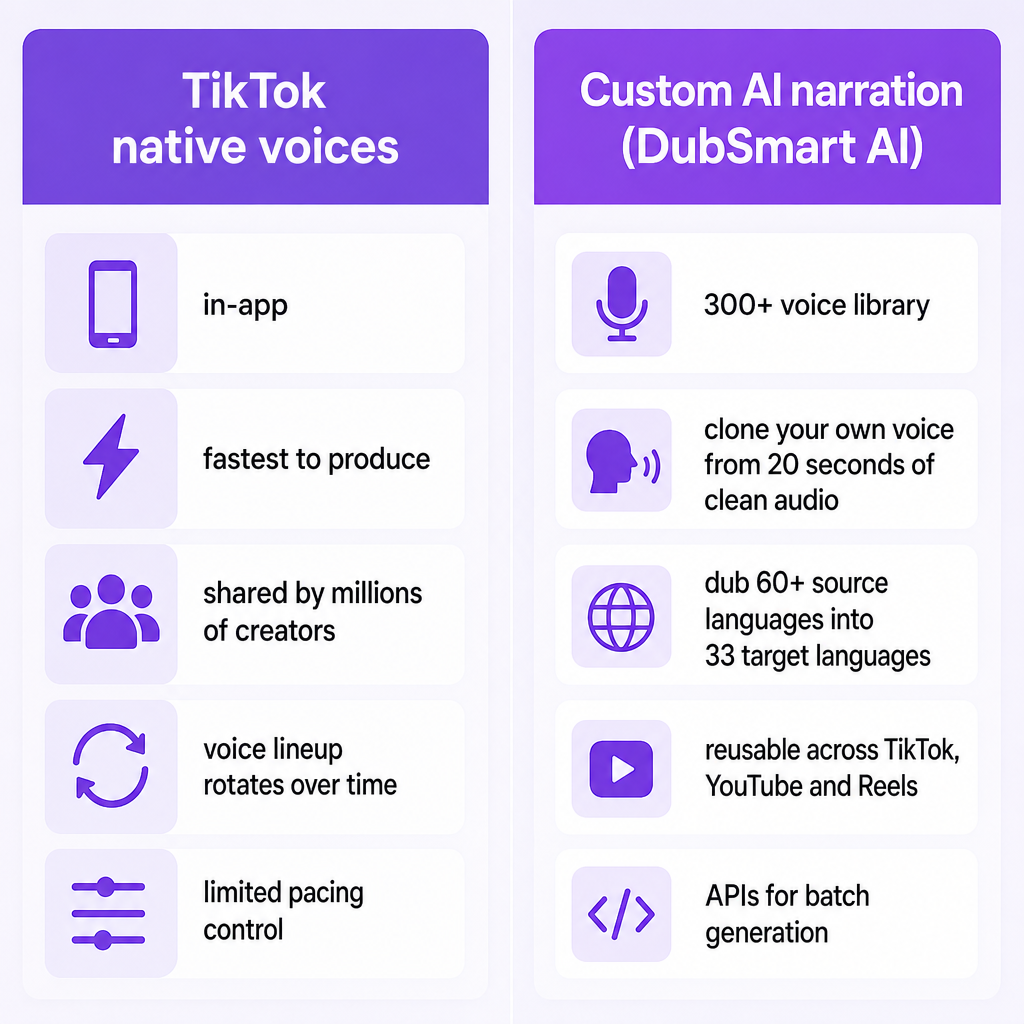
For a US-based creator or brand, the question is rarely "AI voice or no AI voice." It is which stack you commit to. You can lean entirely on TikTok's built-in voices and stay in-app. You can generate narration in an external platform like DubSmart AI and import that audio. Or you can mix both: native voices for quick memes and trends, external voices for brand content, ads, and multilingual campaigns.
TikTok's native voices win on speed and simplicity because everything lives in one app. The tradeoff is that those voices are shared by millions of creators, so your channel does not have a distinct sound, and the lineup can shift whenever TikTok updates it. External narration wins on control. You choose from a larger library, you can clone your own voice, you can shape pacing and pronunciation, and you can hold the same voice across multiple languages so branding stays consistent.
That control is the whole point of scripting off-platform. You keep TikTok's editor for what it does well, and you stop being limited to whatever voices happen to be exposed in your region this month.
Where TikTok's own voices work and where they stop
TikTok's in-app TTS is at its best when you need a voiceover directly on your phone, when you are riding a trending sound or meme where the recognizable voice is part of the humor, and when you do not need fine control over emphasis, pauses, or pronunciation. The workflow is genuinely fast: record or upload, tap Text and type your script, tap Done, then tap the text box, choose text-to-speech, pick a voice, and confirm. You can apply one voice to every text element, swap the voice afterward, and preview before posting.
The limits show up once you scale. You are constrained to the voices TikTok exposes in your region at that moment, and that set rotates. You cannot fine-tune prosody beyond rough tricks like splitting text across multiple boxes to force micro-pauses. And you cannot build a consistent branded sound, because the same voices are shared with every other creator and advertiser in your niche.
For a one-off post none of that matters. Over dozens or hundreds of uploads on a real channel, it becomes the difference between content that sounds like yours and content that sounds like everyone's.
Building a viral-ready narration pipeline with DubSmart and TikTok
DubSmart AI is our all-in-one media creation and localization platform, folding Text to Speech, AI Dubbing, Voice Cloning, Speech to Text, Speech Separator, Text to Image, and Image to Video into a single project-based workflow. For narration specifically, our text to speech engine lets you paste text in any language, pick from a library of 300+ natural-sounding voices, and generate audio in a dedicated TTS interface. We can also dub from 60+ source languages into 33 target languages, so a script produced in the US can be localized while tone and timing stay intact.
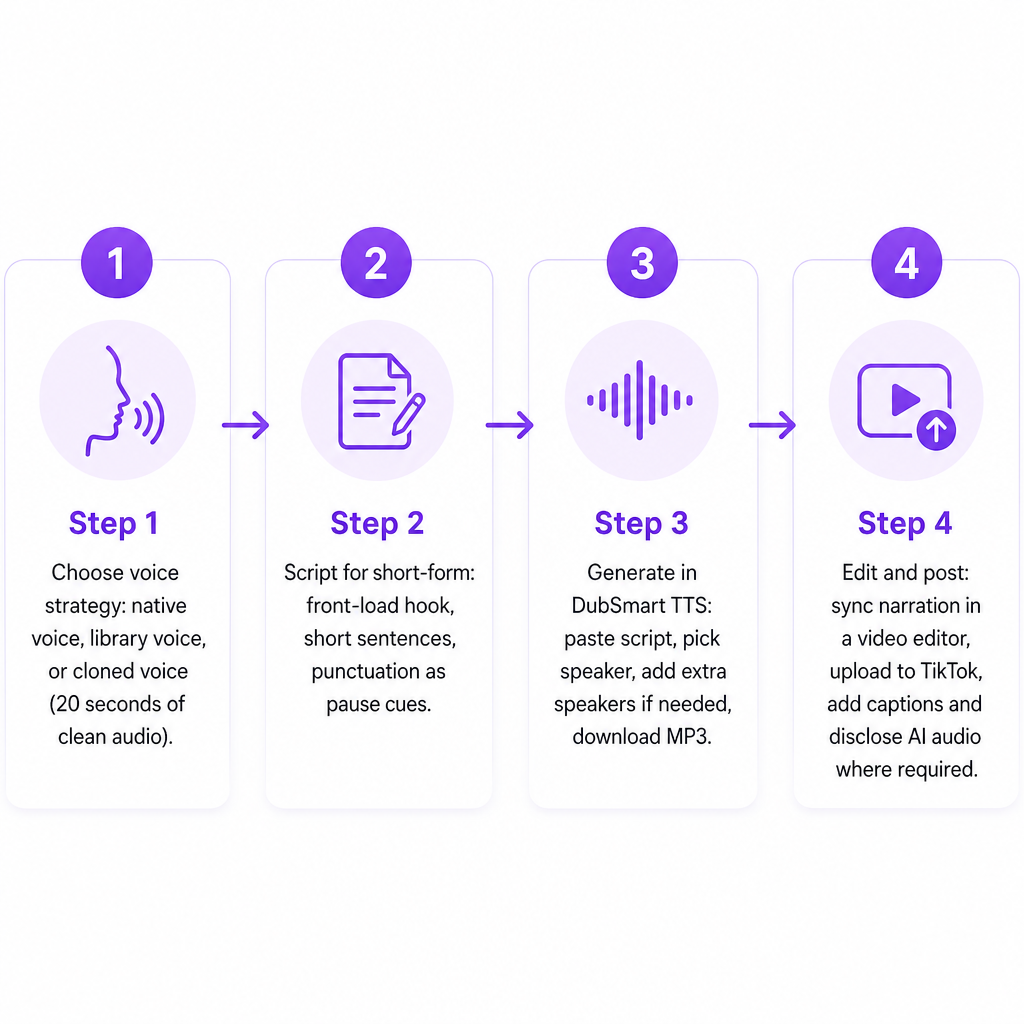
Here is a practical, repeatable flow for TikTok and Shorts creators. There are numbered steps here because this is an actual process, not a checklist for its own sake.
1. Choose your voice strategy. You have three sensible paths. Use TikTok's native character-style voices as a top-of-funnel hook for meme-friendly clips. Or pick a natural, high-quality DubSmart AI voice, warm female, deep male, youthful, or corporate, and use it consistently for tutorials, reviews, and explainers. Or clone your own voice once and let it read scripts for you indefinitely. To clone, upload a noise-free recording of at least 20 seconds; we process it into a named custom voice profile you can use immediately in TTS and dubbing. That clone becomes your channel voice even when you cannot record yourself.
2. Script for short-form pacing. Front-load the hook in the first one to three seconds, keep sentences short and conversational, and place commas, periods, and line breaks where you want micro-pauses. Our TTS interprets punctuation as timing cues, so the way you write directly shapes the delivery. Because the editor is built around pasting text, choosing a speaker, and generating, it is fast to iterate until the timing feels right.
3. Generate narration in DubSmart. Create a TTS project, paste your script, choose a library voice or your clone, and generate. If a scene needs it, add multiple speakers in the same project, for example a narrator plus a "customer" voice, and regenerate. Then download the audio in a common format like MP3 through the project download flow. Building at volume? Our TTS API lets developers and agencies send text and voice parameters and receive an audio file that plugs straight into an editing pipeline.
4. Combine narration and video, then bring it into TikTok. For the cleanest sync, edit in a video editor, drop the DubSmart narration on the timeline, and cut visuals to the beats. Export a near-final clip, upload it to TikTok, and add only light overlays, captions, or stickers in-app. Your main narration stays under your control and can be reused across platforms. If you want a native voice for a single line, such as a character voice for one joke, you can still layer TikTok's own TTS on top.
The payoff is that you script, generate, and translate a voiceover once, then cut it into many TikToks and Shorts instead of retyping text to speech in each app.
Decision criteria: stay native or upgrade
Five factors usually settle the question for a given channel.
Brand voice and distinctiveness. If you want a recognizable sound, shared TikTok voices are limiting because competitors can pick the exact same ones. Our 300+ voice library plus custom cloning gives you a sonic identity you can carry across TikTok, YouTube, podcasts, and training content.
Multilingual reach. TikTok offers some multilingual TTS, but it is bounded by region and its own roadmap. We support dubbing from 60+ source languages into 33 target languages, and those voices work in text to speech projects too, which makes US to Latin America or US to Europe campaigns far easier to run.
Scale and workflow. Posting occasionally? Native TikTok TTS may be all you need. Posting on a schedule, daily TikToks, a weekly Shorts series, monthly product explainers, benefits from our project-based interface and APIs, which let you reuse voices and scripts systematically and save real production time.
Policy and compliance. TikTok has been tightening rules around synthetic voices, including platform labeling, provenance metadata, and explicit disclosure in some commercial and seller contexts. Guidance published in July 2026 emphasizes disclosing synthetic or cloned audio in most commercial or high-risk posts and suggests on-screen labels or caption mentions for organic content as well. Running your AI audio through one platform makes it easier to keep internal records of where narration is used, which simplifies disclosure.
Budget model. We use a credit and minute-based model with a free tier and paid plans where unused minutes can roll over. For creators making several videos a month, that turns voiceover into a predictable operating expense rather than a per-project recording cost.
Risks and how to manage them
Undisclosed AI audio. Skipping platform-level synthetic voice rules, such as labeling AI audio in ads or high-risk categories, can lead to limited distribution or removal. Add a short "Voice generated with AI" note in the caption or on-screen for sponsored, political, or sensitive topics, and track which videos use cloned voices.
Over-reliance on a single trending voice. Lean only on the most recognizable TikTok voices and your content blends into the feed, plus you are exposed if TikTok changes or deprecates that voice. Use native voices for trends, but keep critical series, educational content, product walkthroughs, brand announcements, on a stable DubSmart voice or your clone.
Poor source audio. Cloning performs best with clean input; background noise, music, or heavy compression degrade the result. When you clone with us, record at least 20 seconds of speech in a quiet space without background noise, as our voice cloning guidance recommends.
Fragmented tools. Juggling separate apps for dubbing, TTS, speech to text, image generation, and video invites errors and slows you down. Keeping the pipeline inside one stack, AI Dubbing, Voice Cloning, Text to Speech, Speech to Text, Speech Separator, Text to Image, and Image to Video in one place, keeps things consistent.
A quick picture of how these pieces fit real teams: a Florida ecommerce brand writes a 20-second product script in English, generates a natural English narrator, dubs the same script into Spanish, then cuts two TikTok versions, discloses AI voice use in the caption, and runs separate US and Latin America campaigns. A Shorts creator clones their own voice from 20 seconds of clean audio, generates every episode of a weekly "60-second business idea" series, and edits around that narration for both TikTok and YouTube, so the audience assumes each episode was personally recorded. An L&D team assigns different voices to different micro-learning modules, batch-generates narration through the TTS API, and re-cuts key lessons into vertical clips for recruitment marketing.
Frequently asked questions
Can I post TikToks that use DubSmart AI voices instead of TikTok's own text to speech?
Yes. TikTok does not require its built-in voices; you can upload videos with any narration as long as you follow its content and synthetic media rules, including disclosure where required.
How do I keep my voice consistent across TikTok and YouTube?
Clone your voice once with us using at least 20 seconds of clean audio, then use that clone in text to speech projects for both vertical and horizontal edits.
Is DubSmart overkill if I only make English-language TikToks?
If you post occasionally, native TikTok TTS may be enough. If you post regularly, want more natural voices, or plan to expand into YouTube, podcasts, or multilingual content, our unified TTS, dubbing, and cloning tools scale with your channel.
How many different voices does DubSmart offer?
Our text to speech system offers over 300 natural-sounding voices across multiple languages, with further customization through voice cloning.
Does DubSmart support APIs for agencies and developers building TikTok content at scale?
Yes. We provide Text to Speech, Voice Cloning, and AI Dubbing APIs that accept text and audio inputs and return ready-to-use speech files, built for automated content pipelines.