
A text to speech API is a service that lets your software convert written text into natural-sounding audio on demand, so voices can be generated programmatically instead of recorded by hand. Instead of opening an editor and exporting files one at a time, your application sends text plus a few voice settings to an endpoint and gets audio back—usually as a file (MP3, WAV, Opus) or a live stream. For us at DubSmart AI, that means the same text to speech and voice cloning power you already see in the studio can be wired directly into your apps, courses, platforms, and production pipelines through simple API calls.
That single idea unlocks a lot: narrated e-learning that updates itself when the script changes, in-app prompts that speak in real time, and multilingual video localization that runs automatically rather than clip by clip. Below we break down what a TTS API actually is, how the synthesis pipeline works under the hood, which controls you get to set, and how to decide whether an API—or a browser-based editor—fits your workflow.
Table of contents
What a text to speech API actually does
At its core, a text to speech (TTS) API is a cloud-based interface that turns text or structured markup into spoken audio using AI models. Your application sends a request with the words you want spoken and how you want them delivered, and the service returns audio data your product can play, save, or serve. The heavy lifting—the speech models, the languages, the voices—lives on the provider's side, so you never build or train a speech model yourself.
What separates a modern TTS API from the tinny synthetic voices of the past is deep learning. These systems are trained on large datasets of human speech, which lets them reproduce realistic pacing, intonation, and emphasis instead of a flat monotone. For developers, agencies, and platforms, that quality is what makes it viable to add narration, prompts, and full voiceovers to real products at scale.
Our Text to Speech API exposes DubSmart AI's voice engine—300+ AI voices, realistic speech generation, and voice cloning—through a RESTful service designed to drop into websites, apps, and internal tools. You send text and voice preferences; you get back high-quality audio that matches the voice configuration you chose. It is the same engine behind the studio, made callable.
API or editor: which one your project needs
The real question behind "what is a text to speech api" is usually this: do you need voice generation inside your product or workflow, or just as a standalone tool you open when needed? The answer decides everything else.
If you work project by project—a YouTube creator, filmmaker, podcaster, educator, or marketer—our browser-based Text to Speech and AI Dubbing editors let you paste a script, pick a voice, and export audio or dubbed video without writing a line of code. That is the fastest path when each piece of content is a deliberate, hands-on decision.
If you are a developer, agency, LMS vendor, training platform, or internal tools team, the Text to Speech API gives you those same capabilities through REST calls. Narration can then be generated automatically from your own UI, CMS, or pipeline. Choosing an API is really choosing to make voice a native feature of your product: a button in your app triggers speech, a newly published lesson gets narrated on its own, interface microcopy is spoken in real time, and video localization becomes an automated job instead of a manual one.
How a text to speech API works under the hood
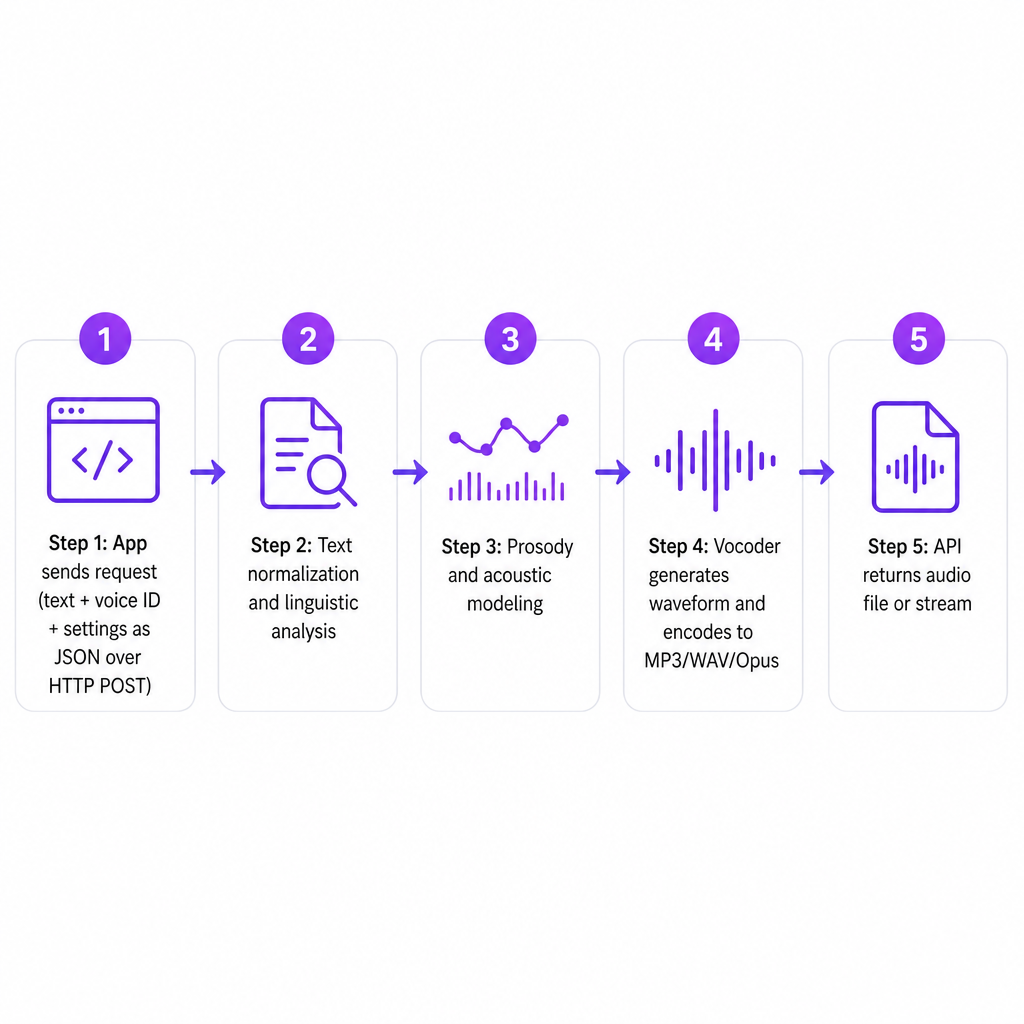
Every provider's architecture differs, but most modern TTS APIs move through a similar pipeline from text input to audio output. Understanding the stages helps you know which controls matter and where quality problems tend to appear.
Input and request construction. Your application assembles a request that carries the text to be spoken (plain text or markup such as SSML to shape pauses, emphasis, and pronunciation), a voice selection (a stock voice name or a cloned/custom voice ID), and a language plus optional parameters like speaking rate, pitch, or a style such as "conversational" or "narration." This payload is typically sent as JSON in an HTTP POST.
Text normalization and linguistic analysis. Inside the service, the raw text is pre-processed: numbers, abbreviations, and special characters are rewritten as they should be spoken—"$1.5M" becomes "one point five million dollars," "Dr." becomes "Doctor." The system then analyzes pronunciation, word boundaries, stress patterns, and sentence structure, which is what keeps the result from sounding mechanical.
Prosody and acoustic modeling. A prosody model decides timing, rhythm, and intonation—where to pause, which words to stress, how a sentence should rise and fall. An acoustic model then produces a representation of the audio: a sequence of frames that encode what the voice should sound like at each moment.
Waveform generation and encoding. A vocoder converts that acoustic representation into an actual audio waveform, constructing the sound signal itself. The system encodes it into your requested format (MP3, WAV, Opus) and applies post-processing such as loudness normalization or silence trimming before sending it back.
Response delivery. Finally, the API responds with either a binary audio file you can save, attach, or serve—to a video editor, an LMS, or a storage bucket—or a stream for low-latency, interactive uses like voice agents, real-time dubbing, or in-product prompts.
Our TTS API follows exactly this RESTful pattern: send text plus voice preferences, receive high-quality audio matching the AI voice you configured. When you use voice cloning, your cloned voice is simply another selectable voice ID inside this same pipeline, applying your unique vocal profile across every synthesis stage above.
The controls you get to set via API
A well-designed text to speech API exposes controls that matter both creatively and technically. These are the knobs your integration turns to make one voice fit a training module, a YouTube explainer, and an in-app hint without recording anything new.
- Voice and language selection. Choose from a catalog of AI voices across multiple languages and accents, or point the API at a cloned or custom voice profile.
- Style and delivery. Adjust speed, pitch, and in some cases emotional tone—neutral, excited, empathetic—to match context.
- Markup for fine control. Use markup such as SSML to specify pauses, emphasis, phonetic pronunciations, or how dates, numbers, and acronyms are read. This is where technical or multilingual content gains clarity.
- Output format and quality. Request formats and sample rates suited to the job—high-fidelity audio for production, streaming-friendly formats for web and mobile.
- Batch versus dynamic generation. Generate thousands of clips at once for a full course or onboarding flow, or synthesize speech dynamically at runtime when a user triggers an action.
For us, these options sit alongside AI Dubbing and Voice Cloning, so the voices you configure in the studio for multilingual video are the same ones available when you integrate through the TTS and AI Dubbing APIs. That shared model matters most when your content strategy spans YouTube, e-learning platforms, and internal corporate training at the same time.
How our TTS API fits a unified media workflow
DubSmart AI is built as an all-in-one media creation and localization platform that consolidates text to speech, voice cloning, AI dubbing, speech to text, and image and video tools into a single workflow. The Text to Speech API is the programmatic counterpart to the studio tool you see in your browser: same voices, same cloning, same multilingual capability, exposed over REST.
A few aspects tend to drive the decision:
- RESTful design. The API uses standard HTTP patterns—JSON in, audio out—so any language or framework that can make HTTP requests can integrate it.
- Shared voice layer. The 300+ natural-sounding AI voices in the Text to Speech tool, plus your cloned voices, are referenceable by developers through voice identifiers or configuration parameters.
- Alignment across our APIs. The Voice Cloning API follows a compact pattern—upload audio, receive a file key, create a named voice, then use that voice inside text to speech projects, including via API. The AI Dubbing API taps into the same voice infrastructure so your localization stack stays consistent.
- Credit-based model with a free tier. The credit system that powers the browser tools also underpins API usage, which makes costs easier to predict as you move from manual to automated work.
For a YouTube channel going multilingual, an e-learning catalog expanding globally, or a US-based business adding localized voiceovers at scale, the practical payoff is that you can prototype in the studio and then harden that same workflow as API calls—without switching providers or rebuilding voices.
How to choose a text to speech API
Whether to adopt a TTS API, and which one, comes down to a handful of criteria that carry different weight for creators, businesses, and developers.
Audio quality and naturalness. Listen closely for pacing, pronunciation, and emotional range. Neural TTS should hold attention across full courses, podcasts, and long-form video, not just short prompts. For branded content, the ability to clone a voice and keep it natural across different scripts and languages is what protects your identity.
Language and voice coverage. If you target multilingual audiences, confirm the API offers real voices in the languages and accents you need—not just translated text. Our library of 300+ AI voices and dedicated voice cloning makes it practical to keep a consistent brand sound while entering new markets.
Integration simplicity. Look for straightforward REST endpoints, clear authentication, concise JSON payloads, and well-documented parameters. Our TTS API is designed around a simple pattern—send text and voice configuration, receive audio—so it fits existing backends, automation scripts, or no-code platforms that support webhooks and HTTP calls.
Scalability and latency. Interactive use cases such as voice agents and in-app narration need low latency and streaming; batch workloads such as mass dubbing and e-learning libraries need reliable throughput. The underlying architecture and quotas decide how well an API absorbs usage spikes and large campaigns.
Governance and rights. For US businesses and training providers, think about consent and usage around voice cloning, alignment with internal policy, and how synthetic voices are disclosed to audiences. A controlled cloning process—named voices tied to specific accounts and projects—makes it easier to manage who can create and use each voice.
Workflow fit. If you already rely on AI dubbing, speech-to-text, and image or video generation, a unified API layer reduces integration overhead instead of forcing you to stitch multiple providers together. That is the reasoning behind offering text to speech, voice cloning, and AI dubbing APIs on shared credit and project models.
Risks and practical considerations
TTS APIs are powerful, but they carry real-world considerations worth planning for before you ship.
- Mispronunciation and domain language. Technical jargon, brand names, and multilingual content may need pronunciation overrides or SSML tuning; skip that and errors slip into production.
- Consistency across languages. Switching voices or providers can quietly shift tone and pacing. Running dubbing, narration, and cloned voices through one platform helps keep a coherent sound across a brand or course catalog.
- User trust and transparency. In training, healthcare, finance, or corporate communication, audiences may need to know when a voice is synthetic or cloned—especially when it resembles a real person. Clear internal policies and stakeholder approval matter here.
- Operational complexity. Once narration is automated, you need processes for versioning scripts, regenerating audio when content changes, and keeping captions and transcripts aligned with the audio for accessibility.
A project-based approach with shared voices and credit-based usage helps carry some of that load, because voices, scripts, and audio stay centralized across studio tools and APIs in one environment rather than scattered across separate services.
Frequently Asked Questions
What is a text to speech API in simple terms?
It is an online service that lets your app send text and receive ready-to-use audio, generated by AI voices, with no manual recording involved.
How is our Text to Speech API different from the web tool?
The web tool is for manual creation in the browser. The API exposes the same voices and engine over REST, so you can automate narration and dubbing inside your own products and workflows.
Can I use my cloned voice through the API?
Yes. You can clone a voice and then reference that named voice inside text to speech and AI dubbing projects, including through the Voice Cloning and TTS APIs.
Is a TTS API suitable for e-learning, training, and corporate content?
Text to speech APIs are widely used to narrate courses, onboarding flows, and internal training because they produce consistent, multilingual voiceovers at scale and update quickly when content changes.
Do I need to be a developer to benefit?
No. Non-developers can work entirely in the studio, while teams with developers can integrate the TTS API to trigger voice generation from an LMS, CMS, or internal app—combining the studio's creative control with automation.