You can go from raw audio to a reusable AI voice profile in about the time it takes to grab a coffee. With DubSmart AI, the recipe for how to clone your voice with AI is short: record at least 20 seconds of clean speech, upload it once, and the platform builds a custom voice you can reuse across Text to Speech and AI Dubbing. The cloning step itself finishes in a few seconds; most of your effort goes into recording a good sample and setting up your first project. Budget under 15 minutes for a first attempt. On cost, you can start free with limited minutes, or move to paid plans beginning around $19.9 per month for 50 minutes, with unused minutes rolling over.
That cloned voice isn't a one-off. Once it exists in your account, it can narrate scripts, voice sales videos and tutorials, and dub full videos into up to 33 target languages while keeping your vocal character intact. This guide walks the exact sequence, the prerequisites that prevent a bad first clone, the mistakes worth avoiding, and where a solo workflow ends and professional help begins.
Table of contents
What you get and how fast it runs
The output of a clone is a lifelike digital replica of your voice that can speak with natural prosody and tone. You can point it at three jobs: narrate scripts through Text to Speech, dub existing videos into new languages while preserving the original speaker's character, and reuse the same voice across projects for consistent branding.
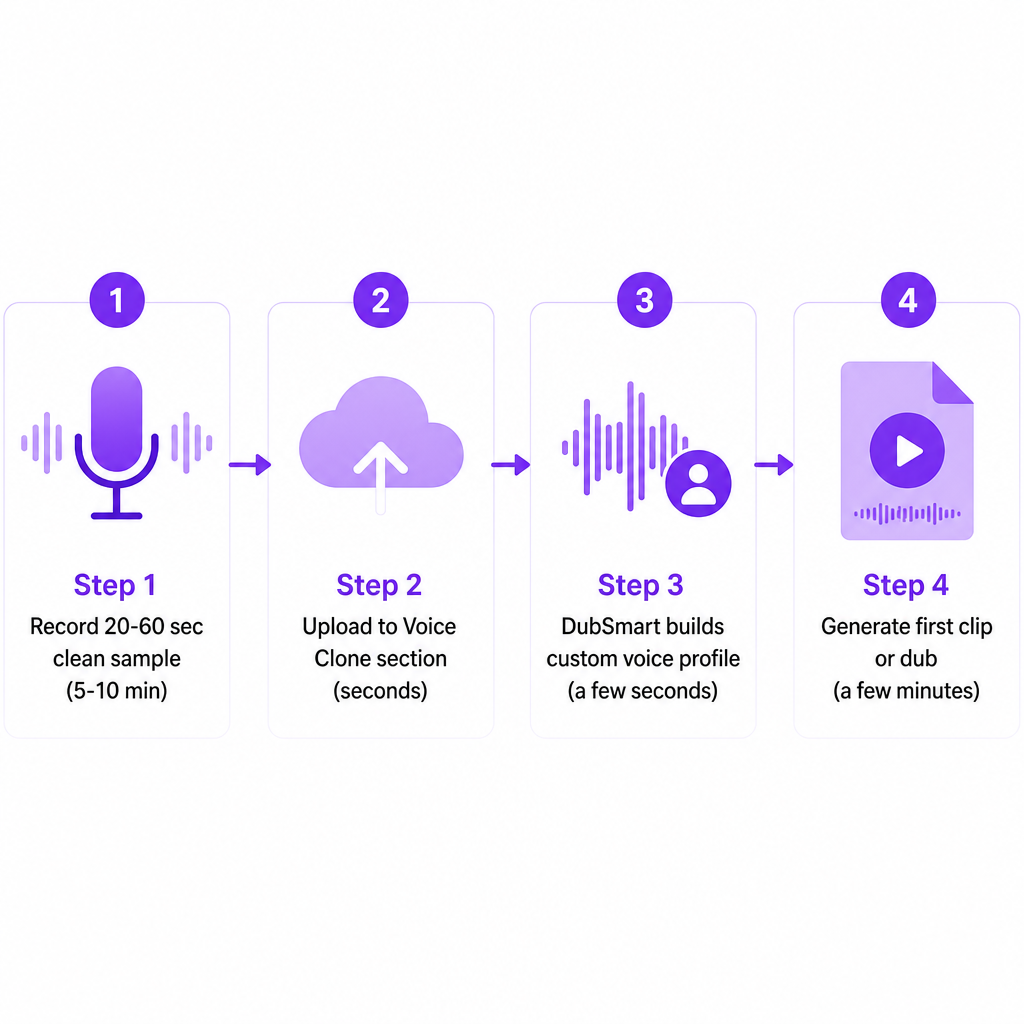
The timeline breaks down cleanly. Recording and prepping a sample takes roughly 5 to 10 minutes. The upload-and-clone step runs in a few seconds once the file lands. Generating your first clip or dubbed video adds a few more minutes, depending on length and the languages you process.
Cost follows a credit model rather than a per-clone fee. A free tier gives you a small pool of dubbing minutes to test the whole flow. Paid plans start around $19.9 per month for 50 minutes, with unused minutes carrying over to future periods. Cloning voices does not cost extra on its own; you are billed against your available minutes when you generate audio, not when you create a voice. That distinction matters: it means you can build several voice versions and compare them without watching a counter tick down for each one.
Prerequisites before you clone
Most weak clones trace back to a skipped setup step, not the AI. Run through this checklist before you record anything.
- A DubSmart AI account. Sign in so you can reach the Voice Clone section and your project dashboards.
- A quiet recording environment. We recommend audio free of background noise; noisy samples noticeably reduce clone quality.
- At least 20 seconds of speech. That is the documented minimum to build a usable voice profile. A longer sample captures more of your vocal range.
- A supported audio format. For manual uploads in the app you can use a standard audio file; for the Voice Cloning API, MP3, WAV, AAC, M4A, and FLAC are supported.
- Clear rights and consent. Only clone voices you are legally allowed to use, meaning your own or a speaker who has given explicit permission.
- A short script that sounds like you. Your usual channel intro, podcast opener, or training narration works well.
- API credentials, if you are a developer. Integrating cloning into your own app means you will need access to the Voice Cloning API endpoint.
Step by step in the DubSmart app
This is the core path for creators, marketers, and training teams working in the web app rather than through code.
Step 1: Decide the use case and languages
Pick how the clone will earn its keep first: YouTube narration, shorts, explainer videos, e-learning, product demos, or podcasts. Then choose the target languages you actually care about, since our AI Dubbing engine dubs from over 60 languages into 33 target languages. Finally, decide whether you will mostly generate voiceovers from scripts through Text to Speech or dub existing videos through AI Dubbing. Settling this early shapes how you write your sample and structure your first tests.
Step 2: Record a clean 20 to 60 second sample
Write a short script that reflects your natural tone, and include both conversational and more energetic lines if you tend to switch between them. Record in a quiet room with a decent USB or XLR microphone, speaking at a normal pace with your usual delivery. Steer clear of background music, fans, traffic, and echoey rooms, and skip whispering, shouting, or forced emotion, which distort the training sample. Twenty seconds is the floor, but a slightly longer clip captures more of your voice.
Step 3: Upload in the Voice Clone section
Open the Voice Clone section, upload your recorded file in a supported format such as MP3, WAV, or M4A, and give the voice a clear name like "Alex - Main English Voice." Once the upload finishes, the file is queued for processing, and the system analyzes tone, pitch, accent, speaking style, and timing.
Step 4: Let DubSmart build the voice
Our engine uses deep learning to build a digital replica from your sample. Within a few seconds, it turns your audio into a custom voice profile that shows up in your account's voice list. Two things make this practical at scale: you can clone any number of voices without per-voice fees, subject to your overall minutes, and each cloned voice is reusable across projects and languages for consistent branding.
Step 5: Test the clone in Text to Speech
Validate before you commit it to a full production. Create a Text to Speech project, select your cloned voice, paste in a short script such as your intro or a 30-second ad, and generate. Listen critically: does it match your natural tone, and are any words mispronounced or stressed oddly? Creators usually do a quick listening test first and refine gradually rather than judging quality from a single clip. If the rhythm feels off, adjust punctuation, line breaks, and emphasis in your text to guide intonation.
Step 6: Deploy in AI Dubbing
When you are happy, put the voice to work. Create an AI Dubbing project, upload a video or paste a YouTube link, add speakers, and assign your cloned voice to your primary narrator or on-screen presenter. Select your target languages, adjust subtitles and timings, then generate and download the localized video. The dubbing system preserves the original speaker's tone, pitch, accent, and speaking style while switching languages, so viewers still feel like they are hearing the same person.
The API path for developers
If you are building cloning into your own product, the Voice Cloning API exposes the same capability through a compact three-step pattern. First, request a presigned URL and upload your 20-plus second sample in a supported format such as MP3, WAV, AAC, M4A, or FLAC. Second, call the API to create a voice, passing a human-readable name and the file key returned from the upload. Third, reference the new voice ID when you generate speech through Text to Speech or dub content through the AI Dubbing routes.
That structure lets agencies and platforms automate voice creation for internal tools or customer-facing features while keeping all generation on our infrastructure. It is the same engine as the app, just addressable from your own code.
Checking quality before you ship
A clone is only useful when it is convincing and safe to publish. Use a layered check rather than trusting one clip.
Start with your own ear. Play several clips across different scripts and emotional tones, then compare them side by side with your original recordings. Next, test consistency across languages: generate the same script in English and in a target language such as Spanish, and confirm the personality and vocal color stay constant even as pronunciation shifts. For more formal or enterprise work, our blog references objective measures like Mean Opinion Score (MOS) and Word Error Rate (WER) for evaluating AI-generated audio. Finally, for public-facing brand material, route the output through marketing, legal, or compliance reviewers before it goes live.
Common mistakes and quick fixes
Most failed or "uncanny" clones come from a handful of repeatable errors.
Noisy or over-compressed audio. Background noise, reverb, or heavy compression can make a clone sound metallic. Record in a quiet, treated space, and if you must reuse noisy archival audio, pre-clean it with our Speech Separator before uploading.
A sample that is too short or flat. Exactly 20 seconds of monotone speech may pass technically but captures little expressiveness. Aim for 30 to 60 seconds that mix neutral and energetic lines while staying natural.
Unclear rights or consent. Cloning a voice without permission raises legal and ethical problems, especially for public figures or employees. Get written consent, define how the voice will be used, and confirm internal policy coverage for employee voices.
Expecting identical accent across very different languages. Dubbing preserves core voice characteristics across up to 33 target languages, but pronunciation and rhythm adapt to each language. Treat that adjustment as expected, not a defect.
The voice not appearing in a project. Confirm the clone finished processing, refresh the page, and check that you are in the correct workspace or account.
Burning minutes faster than planned. Long videos and many language variants drain monthly minutes quickly. Start with shorter clips, and scale to a higher plan as your pipeline stabilizes; plans reach up to about 1,000 minutes per month with rollover of unused minutes.
Doing it yourself versus calling in help
DubSmart is built so individual creators and small teams can handle voice cloning and multilingual dubbing without a studio or hired voice actors. For most solo and small-team work, that self-serve path is the right call.
Stay hands-on when you are a solo YouTuber, podcaster, or indie filmmaker who mainly needs consistent narration and basic multilingual reach; when you run a small business or marketing team localizing product videos, social ads, or explainers into a few languages; or when you manage in-house e-learning and want uniform voiceovers across modules without juggling multiple narrators. The unified workflow and unlimited cloning keep these cases cost-effective.
Bring in professional support in three situations. In highly regulated sectors such as healthcare, finance, education, or government, explicit approvals for AI-generated media are often required, so involve legal or compliance before broad deployment. For high-stakes content like feature films, national ad campaigns, or critical corporate communications, a localization agency can oversee QA, translation nuance, and cultural adaptation even while the cloning runs on DubSmart. And for platform-level or large-scale API integrations, a development team helps you deploy the Voice Cloning and AI Dubbing APIs securely and at scale.
Frequently asked questions
How long does it take to clone my voice?
The cloning step finishes in a few seconds once your audio is uploaded. Most of your time goes into recording a clean 20 to 60 second sample and setting up your first project, which is typically under 15 minutes for a first-time user.
What is the minimum audio length?
At least 20 seconds of speech, ideally free of background noise, to create a usable clone. Longer samples help capture more of your vocal nuances.
Can I use one clone for both Text to Speech and AI Dubbing?
Yes. Once created, your custom voice appears as an option inside Text to Speech projects and can also be assigned to speakers in AI Dubbing projects.
How much does cloning and using my voice cost?
Cloning itself is included, with no per-voice fee, subject to your minute usage. Plans start around $19.9 per month for 50 minutes, scale up to about 1,000 minutes with rollover of unused minutes, and there is a free tier for testing.
Is AI voice cloning legal in the United States?
It depends on consent and use. Cloning your own voice for your own content is generally acceptable, but cloning someone else's voice without permission can violate rights of publicity, contracts, or other laws. Obtain explicit consent and consult legal counsel for commercial use, especially with third-party voices.