If you build on Roblox, the fastest way to make a character talk is Roblox's own speech generator: the roblox text to speech api turns short strings of text into spoken audio directly inside your experience. It runs on a native object called AudioTextToSpeech, and the real decision isn't whether it works, but how you want speech to behave. Should a line be generated live while the game runs, reacting to what a player just did? Or should the dialogue be baked into a reusable audio asset ahead of time? That single choice shapes your character limits, your moderation responsibility, and whether Roblox's built-in tooling is the right home for the audio at all.
This guide walks through what the API actually is, how it connects to Roblox's audio graph, the two generation routes available to you, and the practical checks that tell you when to stay inside Roblox and when a dedicated voice workflow serves you better.
Table of contents
What the Roblox text to speech API actually is
The Roblox text to speech API is Roblox's native capability for generating spoken audio inside an experience. A script hands text to an AudioTextToSpeech object, which converts that text into speech. You pick a preset voice and can adjust properties such as pitch and speed, then route the result into the experience's audio system so players hear it.
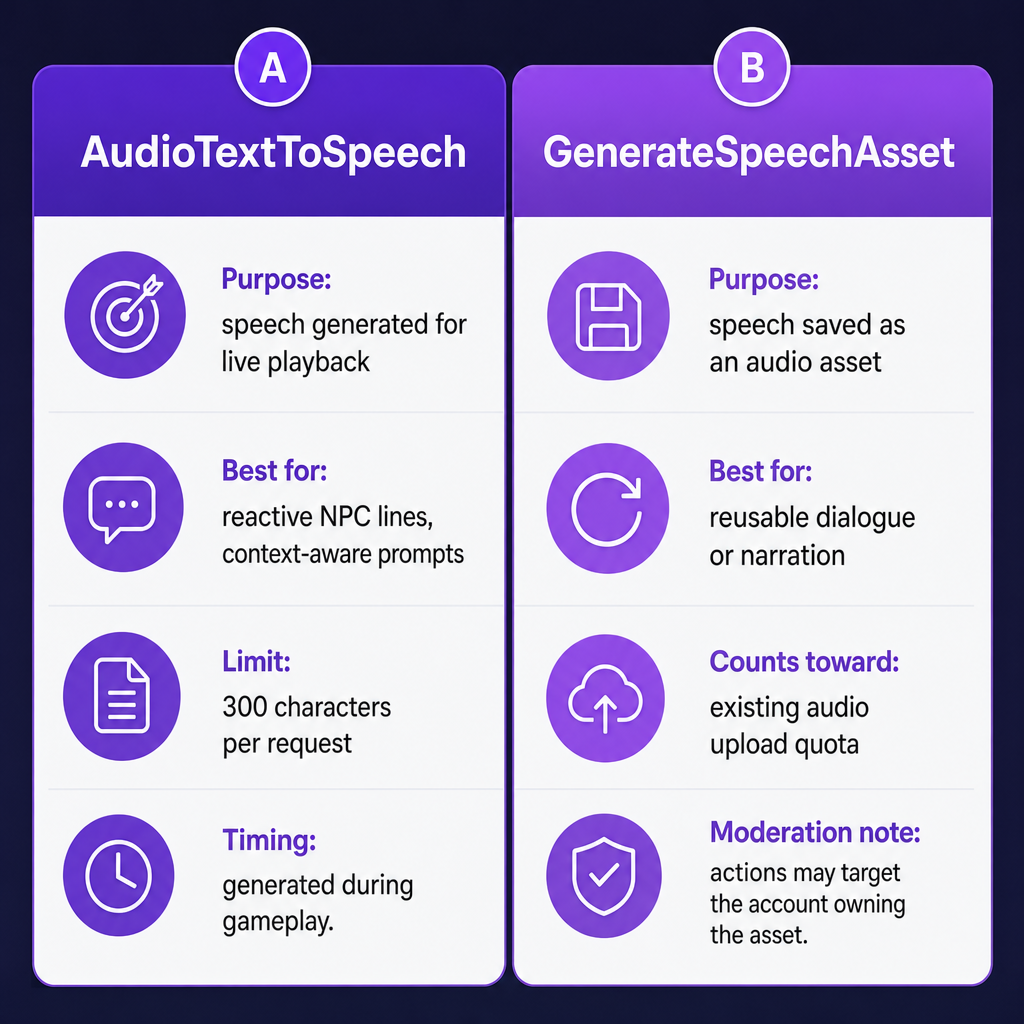
Two details matter immediately. First, each request is capped at 300 characters, which frames the whole tool as a system for short, reactive lines rather than long-form narration. Second, the voices are presets, not a custom library. Roblox lists voices across several varieties of English, including British, US, Australian, and retro styles, plus Spanish, German, Italian, French, Mandarin Chinese, Hindi, Japanese, Arabic, Korean, and Portuguese, with male and female options for many of those languages.
That positions AudioTextToSpeech as a tool for in-world dialogue: an NPC greeting, a gameplay cue, a prompt that changes with context. It was not designed as a general-purpose voiceover service, and reading it that way is where most integration frustration starts.
How speech reaches a player's ears
Generating speech is only half the job; the audio has to be wired into Roblox's audio graph before anyone can hear it. The connection route depends on whether you want flat or positional sound.
For 2D audio, you connect the AudioTextToSpeech object to an AudioDeviceOutput using a Wire. The speech plays as a general output, the same way a UI sound or background cue would.
For 3D or positional audio, the output routes through an emitter and a listener instead. That places the voice at a specific point in the game world, so a villager's line sounds like it's coming from the villager rather than from everywhere at once. For interactive experiences, positional routing is usually what makes dialogue feel like it belongs to a character.
Because speech is generated on demand, request volume becomes a design constraint, not an afterthought. Roblox scales the allowance by how busy your experience is: the published ceiling is 1 + (6 × concurrent users) maximum requests per minute per experience. A quiet lobby has very little headroom; a packed server has far more. If a line can be triggered by every player at once, you need to plan for those bursts rather than assume the request will always go through.
Real-time speech or a saved audio asset?
Roblox gives you two routes, and picking the right one is the core decision of this whole topic.
AudioTextToSpeechgenerates speech for live playback. Reach for it when the spoken line needs to react to gameplay or change with context, such as a short NPC response tied to what a player just did.GenerateSpeechAssetcreates speech as a saved audio asset. Reach for it when you want generated dialogue or narration stored for reuse. Note that asset generation counts against your experience's existing audio upload quota, so it draws from the same budget as other uploaded sounds.
The difference goes beyond timing. Roblox filters both text and audio output for compliance, and moderation responsibility shifts with the route you choose. For saved speech assets, Roblox has indicated that moderation actions may be taken against the account that owns the asset. In practice, that means a reusable asset you generate carries ongoing accountability in a way a transient live line does not, which is worth weighing before you bake dialogue into permanent assets.
A simple way to decide: if the line only makes sense in the moment, generate it live. If you'd want to hear the exact same clip again, treat it as an asset and accept the quota and moderation implications that come with it.
Checks that decide whether Roblox TTS fits
Before you commit a feature to the built-in API, run it against four practical constraints.
Match the task to the 300-character limit. Short lines fit comfortably; long narration does not. Anything substantial has to be split across multiple requests or moved into a workflow built around prepared audio. If your script reads like a monologue, the built-in object is fighting you.
Check voice coverage against your players. Roblox offers presets, not a broad custom library. The listed languages cover a lot of ground, but you still need a voice that matches your players' language and the quality bar your experience sets. If your audience expects a specific accent or a branded narrator, presets may fall short.
Plan for bursts and moderation together. A feature that generates speech often, especially one many players can trigger simultaneously, has to respect the per-experience request ceiling. Keep every generated string inside Roblox's Community Standards and Terms of Use, since both input text and output audio are filtered.
Decide where the speech truly belongs. Short, interactive, in-world lines are exactly what the native objects are for. Recorded narration, trailers, marketing clips, or media assets produced outside the game are a different job, and forcing them through AudioTextToSpeech usually means fighting the character limit and the preset voice list at the same time.
| Decision factor | Built-in Roblox TTS fits | A separate TTS workflow fits better |
|---|---|---|
| Line length | Short cues under 300 characters | Long narration or scripted monologue |
| Timing | Reacts live to gameplay | Produced ahead of time |
| Voice needs | Preset voice is acceptable | Custom or branded voice required |
| Output use | Plays inside the experience | Published across other media |
When an external TTS workflow makes more sense
The built-in API is the direct answer for interactive game lines. It starts to strain when a project needs a broader voice selection, a custom or cloned narrator, or production-ready audio that lives beyond short in-game prompts, such as a launch trailer, a tutorial video, or multilingual marketing around your experience.
That's the gap we fill at DubSmart AI. Our Text to Speech API offers 300+ voices across many languages and dialects, and if you need a signature narrator rather than a preset, our Voice Cloning API builds a reusable custom voice from a short audio sample. For full video localization, our AI Dubbing API translates and dubs footage into 33+ languages with voice cloning, which is useful when you're promoting a Roblox experience to players who don't share your language.
To be clear about scope: this is a separate production workflow for media you create around your game, not a drop-in replacement for Roblox's in-experience objects. Our public offering does not establish a direct Roblox integration, so treat it as the tool for narration, trailers, and localized promotion rather than for live NPC dialogue. If you're newer to how these services work under the hood, our explainer on what a text to speech API is covers the synthesis pipeline in plain terms.
The practical split is clean. Keep reactive, in-world speech inside Roblox where the engine, the audio graph, and the moderation model are built for it. Move trailers, tutorials, and multilingual promotion into a dedicated voice workflow where character limits and preset voices no longer box you in.
Frequently asked questions
Is Roblox TTS the same as player voice chat?
No. Roblox TTS generates artificial speech from text you supply. Voice Chat is a separate feature for real-time spoken communication between players, with its own eligibility and experience requirements.
Can Roblox TTS generate long dialogue in one request?
No. The documented limit is 300 characters per request. Longer dialogue has to be split into shorter requests or prepared through a different workflow.
Can I use a custom cloned voice with Roblox's built-in TTS?
Roblox's documented TTS voice list consists of preset voice IDs. The documentation does not describe importing a custom cloned voice into AudioTextToSpeech, so a branded or cloned narrator belongs in a separate production workflow.
How many TTS requests can my experience make?
Roblox scales the ceiling with activity: a maximum of 1 + (6 × concurrent users) requests per minute per experience. Features that many players can trigger at once need to be designed around that limit.
When should I use an external TTS API instead?
Consider one when you need a broader voice selection, custom voice workflows, or production-ready narration beyond short in-game lines. Our Text to Speech API is one such option for media created around your game, not a direct Roblox integration.